1. Event Operating System
  2. Accreditation
  3. Passes & approvals

Give Everyone Who Works Your Event the Right Pass, Approved and Ready Before the Gates Open

Accreditation usually means a spreadsheet for every department, a chase for names from every contractor and a pass printed by hand for each person. Ticket Fairy brings your crew, acts and their guests, traders' staff, volunteers and press into one pass list from the work you have already done elsewhere in your event. Each pass type carries its zones, days, hours, meals and parking. Security firms, caterers and press outlets name their own people from a page with no sign-in, within the allowance you give them. Passes that need a yes from your press office or your head of security wait for them, in the order your team works. Every pass reaches its holder as a ticket your door team already knows how to scan, and you print photo badges from the same list.

  • Everyone confirmed elsewhere in your event on one pass list
  • Outside teams naming their own people within the allowance you set
  • Press and all-areas passes approved by the right people first
Ticket Fairy Passes section for a festival, with crew, a performer's travel party and guest list, a volunteer and a photographer, their zones, meals and status, and the groups with their allowances

Bring In Everyone You Already Confirmed

Your crew list, your volunteer rota, each act's advance, your approved traders and your approved press already say who is working your event. Ask Fai to bring them in and she adds your crew, confirmed volunteers with a confirmed shift, each act's travel party and guest list, approved traders' staff and approved press to the pass list. Nobody is typed in twice, and nobody gets a pass until you issue it.

Anyone the lists do not cover, such as a visiting director or a council officer, you add by name with their email, role, organisation and pass type. Leave out the email and the pass comes to you to hand on. When an act corrects a name on their advance, a pass that is still waiting takes the new name by itself, and an issued pass offers the new name so you can send a fresh pass in one step.

Fai brings people in while you carry on with other work, and selecting it again later never adds anyone twice. On a large festival, that turns a week of copying names between spreadsheets into a list you check and issue.

  • Bring in people: crew, volunteers, acts, traders and press from the lists you keep
  • Add someone: any other name, with their role and organisation
  • Nothing sent until you say: every person waits until you issue the pass

Keep Every Guest List and Department to the Size You Agreed

Group passes by department, act, trader or team, and give each group its passes allowed, the time names close and one pass type for everyone in it. A headliner's guest list stays at the number in the deal, the bar crew stays at the number you budgeted, and a name added after the cut-off waits for your decision, marked as late.

When you issue, passes over a group's allowance are held back and the dialog says why, so a long guest list never slips through unnoticed. Raise the allowance or issue anyway when you agree to it. Guest list places on an act's advance are the same pass group, so the number the tour manager sees on their advance link and the number in Accreditation are always one number.

  • Pass groups: crew, an act and their guests, a trader's staff or the press
  • Passes allowed: the allowance each group can fill
  • Names close: late names wait for your decision
Ticket Fairy Change group dialog for a performer's guest list with four passes allowed, the pass type and the time names close

Decide Exactly What Each Pass Opens

Add your zones, such as Backstage, Production, Artist village or Press pit, each with a colour printed as a band on the badge. Then give each wristband or badge its zones, the days it works, the hours from and until, its meals per day and whether it includes parking. Your meal desk reads those meals, and your staff gates check those zones, days and hours on every scan.

Pass types come from the wristbands and badges on your event's Credentials page, so a crew wristband, an all-areas laminate and a guest list band each carry their own access. Leave every day unticked for a pass that works on every day of the event. Where one person needs more, such as a stage manager who needs the build day too, change the zones or days on that one pass, and the door sees the change on the next scan.

  • Zones: each with a colour band on the badge
  • Days and hours: when each pass type works
  • Meals and parking: meals per day and a parking space on the pass
Ticket Fairy Zones and pass types dialog with Backstage, Production and Artist village zones, and a crew wristband set to open two zones on two days with two meals a day

Send Passes Your Door Team Scans Like Tickets

Issue the passes and each person gets theirs by email as a free guest ticket of their pass type. Your door team scans it in the check-in app they already use, and every scan shows the zones, days, hours, meals and parking on the pass. There is no second system to learn and no separate list at the gate.

Issue every ready pass together, or tick a few and issue only those. Change a pass's group, role, zones, days or parking after it is issued and the door sees it on the next scan. Cancel a pass and its ticket is refused at the door; issue it again when the person is back on the team. Each pass keeps its history, so you can see who issued, changed or cancelled it and when.

  • Passes by email: each one a named guest ticket of its pass type
  • One scanning app: passes and tickets scanned the same way
  • Cancel and issue again: a cancelled pass is refused at the door
Ticket Fairy dialog to issue three passes, saying each person gets a free guest ticket by email and that the door sees the zones, days, meals and parking

Print Photo Badges People Recognise at a Glance

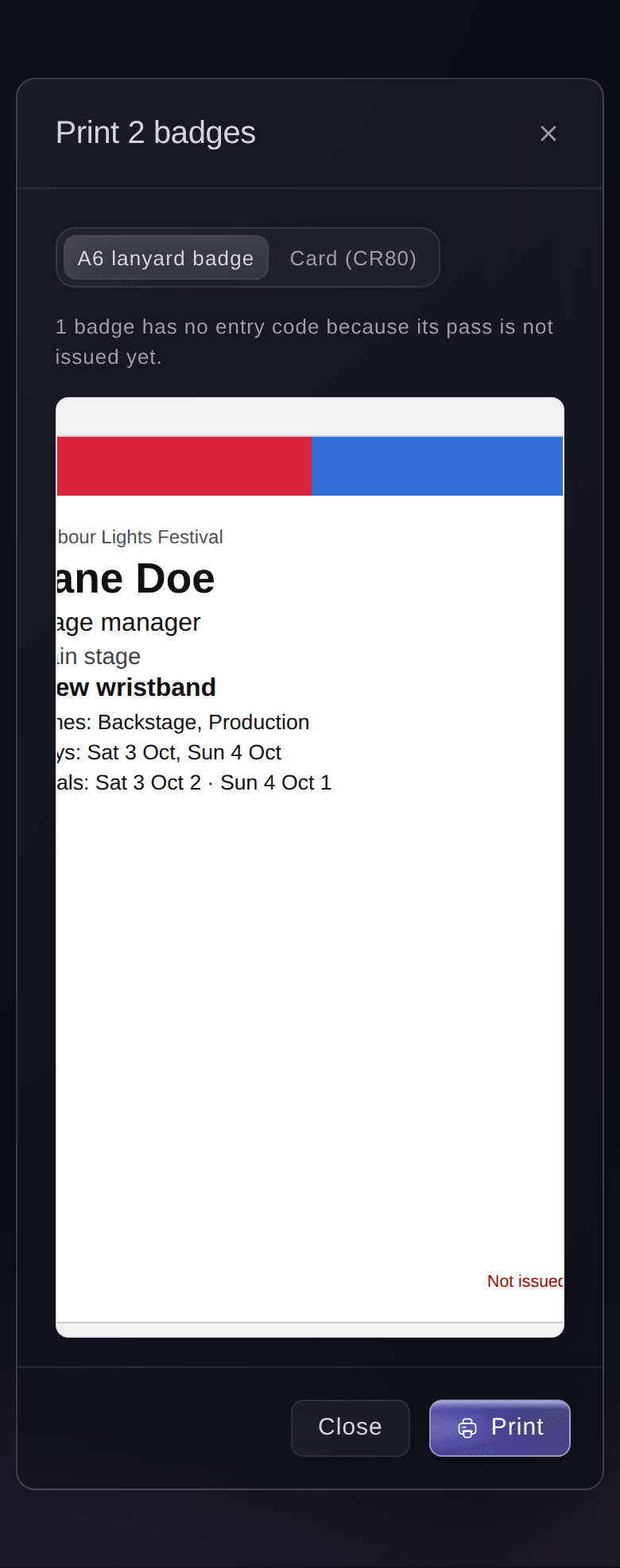
Upload a photo on the pass, or send the pass holder a photo link they open on their phone to add their own photo without making an account. Tick the passes and print A6 lanyard badges or CR80 cards. Each badge carries the name, photo, zones, days, meals and entry code, with the zone colours across the top, so a steward can tell from across a corridor where the wearer can go.

Print badges before you issue, for a pack you hand out on build day, and they print without an entry code until the pass is issued. Outside teams add their own people's badge photos on their page, and your desk team can take a missing photo with a phone camera while the person waits.

  • Photo links: pass holders add their own photo with no sign-in
  • A6 or CR80: lanyard badges or cards from the same list
  • Zone colours: the band on each badge shows where it opens
Ticket Fairy pass panel for an issued crew pass, with the group, pass type, zones and meals, the badge photo and the pass history

Let Every Outside Team Name Its Own People

Security firms, caterers, suppliers, sponsors and newspapers usually send their names late, each in their own spreadsheet. Give each organisation an allowance of passes, a pass type and a date names close, and email its contact a page of their own with no sign-in. They add people one by one, paste a list or choose a CSV or Excel file with no template, add badge photos and follow each pass from waiting to sent.

The contact opens the page on any phone or computer in their own language, and the people they brought to your brand's last event are offered back in one tap. Each row in Outside teams shows how many passes have names, what is still needed and whether the page link works, so you see in a moment who still owes you names. The people a team names wait in Accreditation like any other pass, and when their passes go out the contact gets one email listing everyone.

The same page carries the rest of the team's work with you: the insurance and certificates you ask for, delivery times at your gates and kit orders from your kit list. Name an outside team on a shift with its cost per hour, and its people's approved hours flow into your budget; the meals they eat at your meal desk are counted so you can charge the team for them.

  • Outside teams: press, contractors, suppliers, sponsors or your own kind
  • Add a list: pasted rows or a CSV or Excel file, with no template
  • Still needed: the names and badge photos each team owes
  • In their own language: the page opens in the language the contact picks
Ticket Fairy page a newspaper's contact opens from their link, with the press passes, the people named, what is still needed and a language picker

Get Every Pass Request to the Right People, in Order

Press passes need the press office, an all-areas badge needs security, and nobody wants to chase either by email. Set each rule once and it reads back as a plain sentence, such as when passes from press organisations come in, ask the press office, then security. The passes a rule covers wait for each step in turn, and everything else goes ahead as it always did.

A rule can cover organisations of a kind, the organisations you pick, certain pass groups or certain pass types. Rules are tried from the top, so a narrow rule for one contractor sits above a broad rule for every supplier, and a rule you switch off keeps its steps for next season. The same rules can also ask named people about outside teams' kit orders, delivery bookings and an act's request for more than its allowance.

Approvers who do not run the event get one email listing everything waiting for them, with a button to a page that needs no sign-in and shows only their requests. Each request carries the facts that settle it, such as how many passes the outlet has left and whether the person had a pass at your last event, and requests whose names close soon are marked urgent. A decline asks why, and the reason goes back to the person who asked. When your press officer is on leave, an owner or admin decides in their place, with their own name and reason kept with the decision.

  • Rules as sentences: read back in plain words before you save
  • Steps in order: the press office first, then security
  • Decision links: approvers decide from their email, with no sign-in
  • Decide for them: an owner or admin steps in with a reason
Ticket Fairy approval rule for press passes from press organisations, asking the press office first and security second

Give Regular Crew a Pass for the Whole Season

For the crew who work every show, make a multi-entry pass on your brand and it works at every event the brand runs. Set how many times it can be used at each event, add people one by one or from a CSV file, and send each pass by email. Your door team scans it in the same app as tickets, and every scan records when it was used and who scanned it.

Event passes suit everyone you accredit for one show, with zones, meals and approvals. A season pass suits the house crew, the in-house security team and the promoter's regular staff, who would otherwise need a new pass every week. Use both side by side: the season pass gets your regulars through the door, and event passes cover the guests, contractors and press who change from show to show.

  • Every event of your brand: one pass for the people who work them all
  • Uses per event: entries counted at each event
  • From a CSV file: a whole crew list in one upload
Ticket Fairy Create New Pass form, with the type picked and the Enter Recipient and Upload Recipients tabs beside each other

How Organisers Run Accreditation With Ticket Fairy

  • A Three-Day Festival With Hundreds of Crew

    The production office brings in crew, volunteers, acts and traders from the lists they already keep, then issues every pass the week before build. Each department stays within its allowance, and the meal desk and staff gates read the same zones, days and meals.

  • A Stadium Show With Outside Security

    The security contractor names its stewards on its own page against an allowance of passes and adds their badge photos. The head of security approves every all-areas badge before it goes out, and the promoter never retypes a name.

  • A Music Festival Press Office

    Each newspaper and photo agency names its people for press passes, and a rule sends every press pass to the press officer first. She approves from her phone between interviews, and declines carry her reason back to the outlet.

  • A Conference With Sponsors and Exhibitors

    Sponsors and exhibitors name their booth staff from their own pages, within the passes their package includes. The events team prints CR80 photo cards from the same list and hands them out at registration.

  • A Venue With a Regular House Crew

    The venue gives its house crew a multi-entry pass on the brand, which works at every show of the season. Visiting production crews and guests get event passes for each show, with the zones that night needs.

Questions About Accreditation and Passes

Passes & approvals

You need an owner, admin or producer role on the event, and you work from Accreditation on the event's Operations page. The wristband and badge types come from the event's Credentials page, where an owner or admin adds them.

Sports, conference, business, convention and food and drink events show it from the start. On any other event, open it from More sections on the Operations page.

Up to 500 passes and up to 200 badges at a time.

Yes, for the group, role, organisation, zones, days, parking and vehicle registration, and the door sees the change on the next scan. To change the name, email or pass type, cancel the pass and issue it again.

A photo link works for 14 days. An outside team's page link works for 120 days, and a new link stops the one before. Upload a JPG, PNG or WebP of the face, at least 600 pixels wide, for a sharp print.

No. They open the link from the email on any phone or computer, with no sign-in, and see only their own organisation's passes and people. They can add up to 200 people at a time, only while places are left in their allowance.

Up to 5 steps of up to 10 people each, and any one of the people on a step can decide it. Approvers must be on the event's team, with any role. An approver's email link works for 14 days, and anyone with it can decide that approver's requests, so it should not be forwarded.

Yes, while it is not issued yet. A change to the name, email, group, pass type, zones or days cancels the approval and the rules decide again. A change to parking does not.

Accreditation passes are for general admission events. For a seated event, issue guest tickets on the Guest Tickets page, where you can choose the seats.

Fai brings people in, sets up zones, pass types and allowances, adds, issues, cancels or reissues passes, adds or changes outside teams, emails their page links, sets approval rules from a sentence and decides requests. She shows you each change and waits for your yes, and she always asks before she issues anything, because issuing emails each person their pass.

Ready to Build a Stronger Event Business?

Book a live demo, and we will set up your first event on the Event Operating System with your team.

Start Selling Tickets Online

Sign up without a credit card and build a test event before you commit. Go on sale in minutes when you are ready.

No monthly subscription required for ticketing
Start selling tickets immediately
Ticketing tools included in the service fee
Get Started for Free Talk to Fai Now

Ask Fai, our AI assistant, about Ticket Fairy’s features, pricing and how it could work for your event.

No credit card required

Book a demo call

See the referral model that drives 20% more ticket sales on average, learn which campaigns sell tickets, answer buyers faster and keep queues moving.

45-Minute Video Call
Pick a Time That Works for You

The Ticket Fairy, Inc. is a fintech company and technology platform. The Ticket Fairy, Inc. is not a bank, financial institution, or regulated financial services provider. Vault banking services are provided through regulated banking partners. Ticket Fairy Capital financing is provided by third-party private credit partners. The Ticket Fairy, Inc. does not make credit decisions, and all funding terms, approvals and conditions are determined by those lending partners.