1. Event Operating System
  2. Crew meals & safety

Keep Your Crew Fed, Qualified and Briefed

Plan crew meal times from your shifts and see how many people to feed and their food needs. Give meals at a meal desk that works without a connection, and charge outside teams for the meals their people ate. Ask crew for the certificates their shifts need and run a safety induction before anyone collects their pass.

  • The kitchen knows how many to feed
  • Every meal counted and charged
  • Certificates and inductions checked before work
Ticket Fairy Event Operating System: Crew meals & safety

Tell the Kitchen How Many People to Feed

Set when crew catering serves each day, with meal times suggested from your shifts. Each meal time shows how many people are on shift and their food needs. Crew give their food needs once, and the kitchen follows the day's counts on its own link, with no names on it.

  • Meal times: suggested from who is on shift each day
  • Food needs: given once by each person, in their own words
  • Kitchen count link: the day's counts and food needs, with no names
Ticket Fairy Event Operating System: Tell the Kitchen How Many People to Feed

Give Every Meal at the Desk and Charge Teams for Theirs

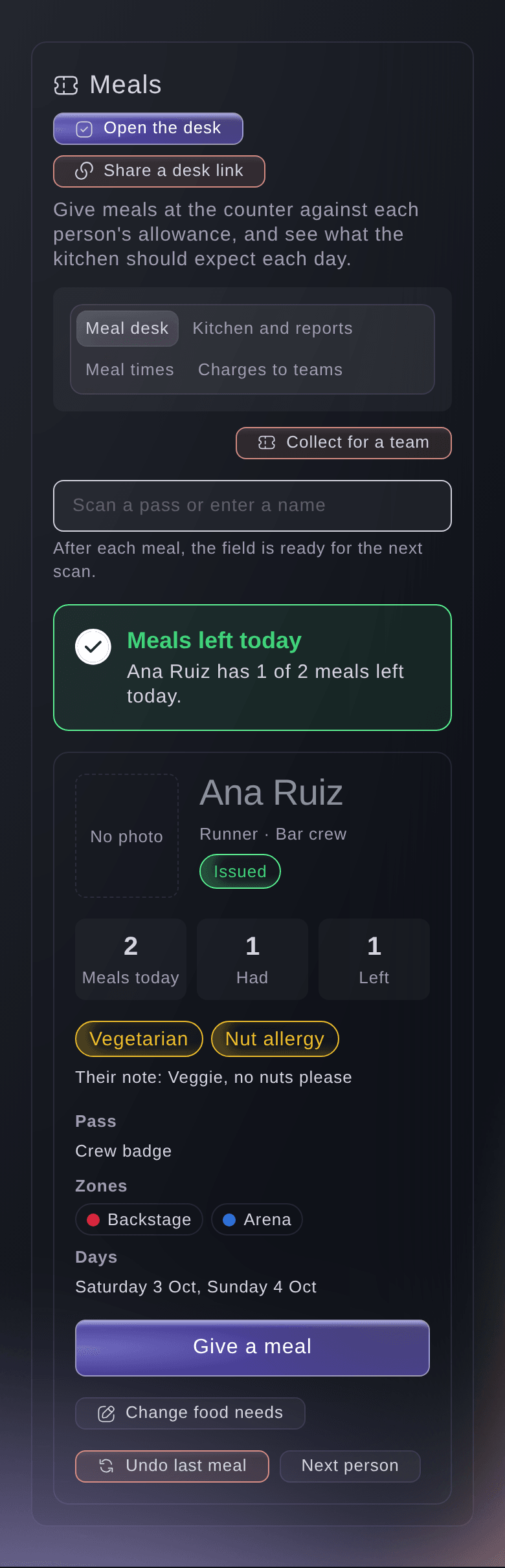
Scan a pass at the meal desk to see today's meals and the person's food needs, and give a meal. A team lead can collect meals for their team in one go. The desk works without a connection and sends each meal when it is back, with nothing recorded twice. Charge each outside team for the meals their people ate at your price per meal, and they pay from the invoice's payment page.

  • Meal desk: scan, see food needs and give a meal
  • Works without a connection: meals are sent when the connection is back
  • Meal charges: an invoice for each outside team
Ticket Fairy Event Operating System: Give Every Meal at the Desk and Charge Teams for Theirs

Make Sure Everyone Is Qualified and Briefed Before They Work

Ask for the documents each shift needs in your own words, such as a first aid certificate. Each person adds a document once from their My shifts page, it counts at every one of your events until it expires, and Fai reads the expiry date from the file. Nobody goes on a shift without it unless your team gives a reason. Set up your safety induction with a short test Fai drafts from your briefing, and the hand-out desk checks it is done before anyone collects their pass.

  • Documents for shifts: added once and used at every event
  • Expiry dates: read by Fai from each file
  • Safety induction: with a short test Fai drafts from your briefing
Ticket Fairy Event Operating System: Make Sure Everyone Is Qualified and Briefed Before They Work

Feed, Check and Brief Everyone Who Works Your Event

  • Meal times

    Breakfast, lunch, dinner and a late meal suggested from each day's shifts, with people on shift and their food needs.

  • Kitchen count link

    The kitchen sees the day's counts and food needs on its own link, with no names and no sign-in.

  • Meal desk

    Scan a pass, see today's meals and food needs, give a meal and undo the last one.

  • Team collections

    A team lead collects meals for their team, each one from that person's allowance for the day.

  • Meal desk links

    Caterers work the meal desk from their own phone with a desk link, with no dashboard login.

  • Meal charges

    Charge an outside team for its people's meals by the day, at your price and currency.

  • Documents from people

    Ask for the certificates and licences shifts need, check them and send one back with a reason.

  • Checks when you book

    Someone without a document a shift needs is left out of offers and needs a reason to be booked.

  • Safety induction

    A briefing and an optional short test for people who work or everyone with a pass.

  • Induction at the desk

    The hand-out desk shows who has not done the induction and can record it done there.

Questions About Crew Meals and Safety

Crew meals & safety

No. It shows counts and food needs only. Staff give meals at the meal desk or from a meal desk link.

No. The kitchen sees how many people to expect and their food needs for each meal time, and people do not choose dishes in advance.

No. A document belongs to the person for your whole brand, so it counts at every one of your events until it expires.

No. It checks that people read your briefing. Check every question and answer before you make it live.

The event's owners, admins and producers. Each time a file is opened, Ticket Fairy records who opened it.

Ready to Build a Stronger Event Business?

Book a live demo and we will switch the Event Operating System on for your events and set up the first one with your team.

Start Selling Tickets Online

Sign up without a credit card and build a test event before you commit. Go on sale in minutes when you are ready.

No monthly subscription required for ticketing
Start selling tickets immediately
Ticketing tools included in the service fee
Get Started for Free Talk to Fai Now

Ask Fai, our AI assistant, about Ticket Fairy’s features, pricing and how it could work for your event.

No credit card required

Book a demo call

See the referral model that drives 20% more ticket sales on average, learn which campaigns sell tickets, answer buyers faster and keep queues moving.

45-Minute Video Call
Pick a Time That Works for You

The Ticket Fairy, Inc. is a fintech company and technology platform. The Ticket Fairy, Inc. is not a bank, financial institution, or regulated financial services provider. Vault banking services are provided through regulated banking partners. Ticket Fairy Capital financing is provided by third-party private credit partners. The Ticket Fairy, Inc. does not make credit decisions, and all funding terms, approvals and conditions are determined by those lending partners.