1. Event Operating System
  2. Control & safety

Keep Every Crowd Safe and Every Team Responding Fast

Run your site from a live control log that your control room, your safety lead and every team share. See how full each zone is as people scan in, hear from Fai before a zone fills, and act on weather and crowd warnings with the steps you planned. Keep a private medical log, sign off every barrier line and follow every permit from application to inspection.

  • One live log for your whole site
  • A warning before any zone fills
  • Every barrier, inspection and permit signed off
Ticket Fairy Event Operating System: Control & safety

Run Your Whole Site From One Live Control Log

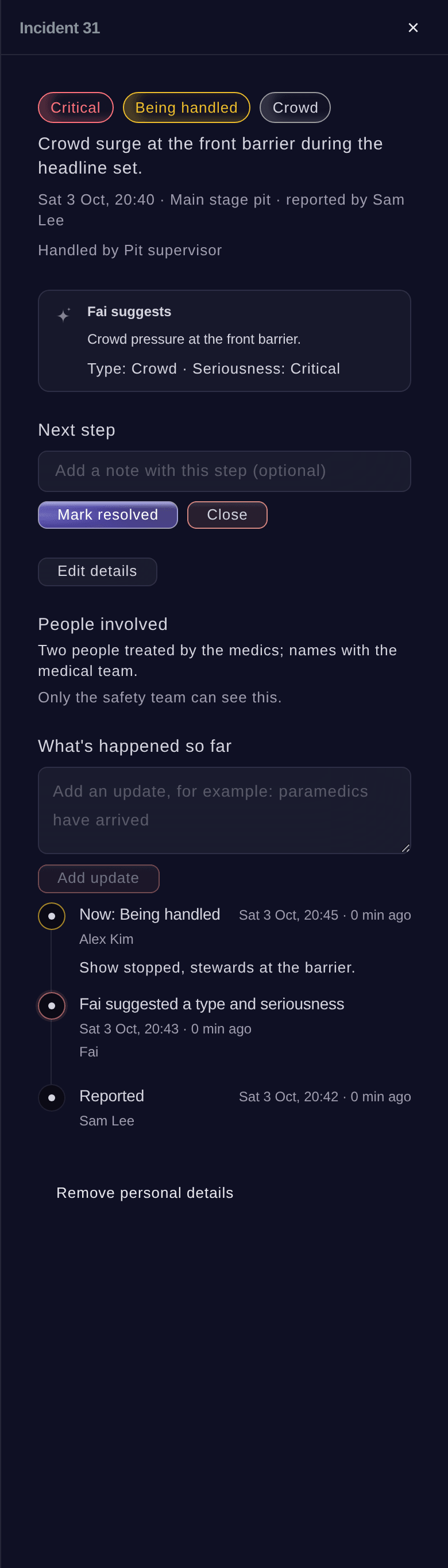
Your teams report everything into one live log. Each entry has its team, its zone, a pin on your site plan, how serious it is and everything that has happened since. Assign it, escalate it and close it, and send it to the team for that zone on its radio channel. Put the log on a TV in your control cabin from a private link, with no sign-in.

  • Control log: report, assign, escalate and close
  • Dispatch by zone: to the right team on its radio channel
  • Control room link: the live log on any TV, with no sign-in
See How Full Every Zone Is Before It Becomes a Problem

Live counts for each zone come from the scans at your gates, set against the safe capacity you enter. Fai warns you before a zone reaches it and suggests what to do, such as holding an entrance or opening the overflow. See how fast people are arriving and leaving, with a heat map of every zone on your site plan.

  • Zone counts: live, against each zone's safe capacity
  • Early warnings: from Fai, with the next step suggested
  • Heat map: every zone on your site plan

Act on Weather and Crowd Warnings With Your Plan Ready

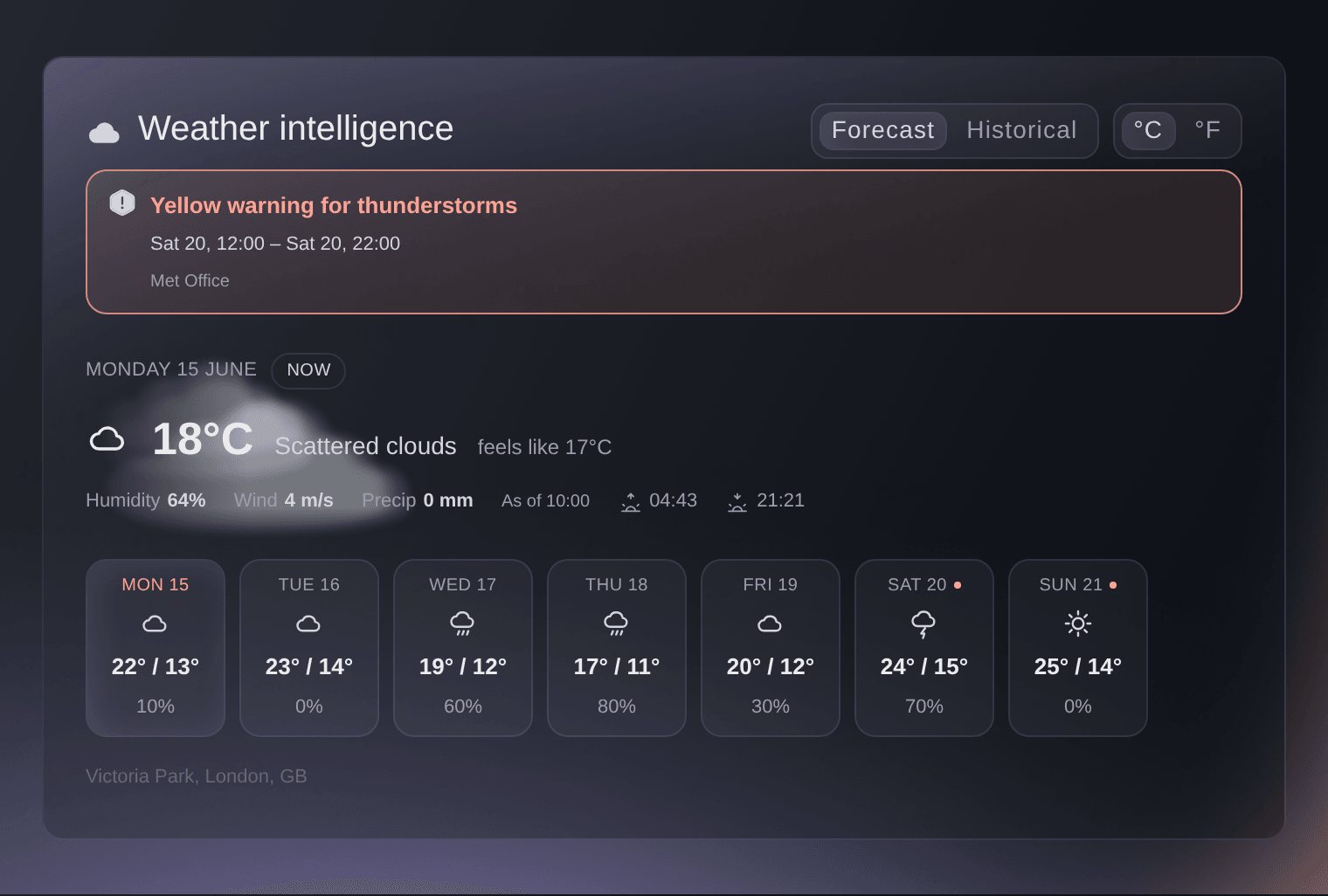
Link each warning in your emergency plan to the steps your team takes. When wind, lightning, heat or a crowd passes the level you set, your plan shows the steps to take, such as pausing a stage, opening shelters, adding water or messaging your ticket holders. On show days, the forecast for your venue updates hour by hour, with official weather alerts.

  • Triggers: wind, lightning, heat and crowd levels you choose
  • Planned steps: pause a stage, open shelters, add water or message ticket holders
  • Hourly forecast: with official weather alerts for your venue

Look After Every Patient With a Private Medical Log

Your medical and welfare teams record each patient with their triage, treatment and outcome, linked to the incident they came from. Only your medical team and the event's owners and admins see the details, and everyone else sees counts with no names. Each time someone opens a record, Ticket Fairy records who opened it.

  • Medical and welfare log: triage, treatment and outcome for each patient
  • Linked to incidents: each patient beside the incident they came from
  • Counts with no names: for reports and the rest of your team

Get Barriers, Structures and Permits Signed Off on Time

Draw your fence and barrier lines on your site plan, work through each build checklist and run timed inspections that are signed off and kept with their history. Follow each permit with its authority, such as licensing, fire, police, highways or health, with its conditions, due dates, the documents you sent and the inspections booked and passed.

  • Barrier lines: on your site plan, with build checklists
  • Timed inspections: signed off, with the full history
  • Permit tracker: conditions, due dates, documents and inspections for each authority
Get this page as a PDF Read it later or share it with your team. We email you a link to the PDF.
What to put in your PDF

We will email you this deck. We may also email you now and then about Ticket Fairy features that can help your events. You can unsubscribe at any time with one click.

Run Your Control Room, Crowds and Safety Paperwork

  • Control log

    Report, assign, escalate and close every issue on site, each with its team, zone, pin on the site plan, seriousness and full history.

  • Dispatch

    Send each entry to the team for its zone and radio channel, from the radio plan you already keep.

  • Control room link

    Show the live log on a TV or computer in your control cabin from a private link, with no sign-in.

  • Crowd and capacity by zone

    See live counts for each zone against its safe capacity, with a warning and a suggested step from Fai before it fills.

  • Arrivals, departures and heat map

    See how fast people come in and leave, and how busy each zone is on your site plan.

  • Emergency plan

    Link wind, lightning, heat and crowd warnings to the steps your team takes, from pausing a stage to messaging ticket holders.

  • Weather on show days

    Follow your venue's forecast hour by hour on show days, with official weather alerts.

  • Medical and welfare log

    Record each patient's triage, treatment and outcome, linked to their incident, with counts and no names for everyone else.

  • Barriers and inspections

    Draw fence and barrier lines on your site plan, follow build checklists and sign off timed inspections.

  • Permit tracker

    Keep each permit with its authority, conditions, due dates, documents sent and inspections booked and passed.

  • Incidents and risks

    Let anyone report an incident from their phone and keep a risk register drafted by Fai.

    Learn more

  • Private map links

    Share the live site map with the emergency services, with the fire lanes, exits and first aid they need.

    Learn more

Questions About Event Control and Safety

Control & safety

People with the Medical role on your event, and the event's owners and admins. Everyone else sees counts with no names. Ticket Fairy records every time someone opens a record.

You choose for each event, and you can keep them permanently. When a patient asks for their details to be removed, their personal details are removed and the counts stay.

From the scans in and out at your gates and zone entrances. Enter a safe capacity for each zone, and Fai warns you before the count reaches it.

No. Fai warns you and suggests a step, such as holding an entrance or opening the overflow, and a person on your team decides.

From the forecast Ticket Fairy shows for your venue, with official weather alerts. On show days it is checked hour by hour against the levels in your emergency plan.

No. Open the private link on a TV or computer in your control cabin.

Any permit from any authority, such as licensing, fire, police, highways or health. Each one keeps its conditions, due dates, the documents you sent and the inspections booked and passed.

Ready to Build a Stronger Event Business?

Book a live demo, and we will set up your first event on the Event Operating System with your team.

Start Selling Tickets Online

Sign up without a credit card and build a test event before you commit. Go on sale in minutes when you are ready.

No monthly subscription required for ticketing
Start selling tickets immediately
Ticketing tools included in the service fee
Get Started for Free Talk to Fai Now

Ask Fai, our AI assistant, about Ticket Fairy’s features, pricing and how it could work for your event.

No credit card required

Book a demo call

See the referral model that drives 20% more ticket sales on average, learn which campaigns sell tickets, answer buyers faster and keep queues moving.

45-Minute Video Call
Pick a Time That Works for You

The Ticket Fairy, Inc. is a fintech company and technology platform. The Ticket Fairy, Inc. is not a bank, financial institution, or regulated financial services provider. Vault banking services are provided through regulated banking partners. Ticket Fairy Capital financing is provided by third-party private credit partners. The Ticket Fairy, Inc. does not make credit decisions, and all funding terms, approvals and conditions are determined by those lending partners.