1. Event Operating System
  2. Control & safety
  3. Weather & risk

See the Weather and the Risks Coming, and Have Your Plan Ready

A storm that arrives while your safety team is still deciding what to do is the one that turns into an incident, and a risk register written for one meeting and never opened again protects nobody. With Ticket Fairy, you follow the forecast and any severe-weather warning for your venue beside your ticket sales, see what your date has been like in past years while the event is still months away, and link each wind, lightning, heat and crowd trigger to the steps your team takes. Your risk register starts from a draft Fai builds for your kind of event and the incidents at your earlier ones, and every risk keeps its score, owner, review date and history, so licensing officers and insurers see a register your team has kept up to date.

  • Weather warnings seen before they reach your site
  • Every trigger linked to the steps your team takes
  • A risk register that stays current, with its full history
Ticket Fairy risk register for a festival, with each risk's score, likelihood and impact, owner, review date and status

See the Week Ahead at Your Venue, With Any Warning

Once your event is a week away, the weather for your venue sits under the sales figures on its Performance page. It opens on the conditions now, with the temperature, what it feels like, humidity, wind and recent rain, and a strip of the days ahead with each of your event days marked. A severe-weather warning for the area shows above the forecast with the hours it covers and the weather service that issued it.

Reading the weather beside your sales matters on the day you decide whether to push a last-minute campaign, order more water or move the after-party indoors. The warning comes from the official alerts for the area around your venue, so your safety team reads the same warning the authorities are acting on, with its hours to check against your own dates and your wet-weather and evacuation plans.

  • Forecast at your venue: the days ahead with your event days marked
  • Official warnings: the hours they cover and who issued them
  • Conditions now: temperature, feels like, humidity and wind
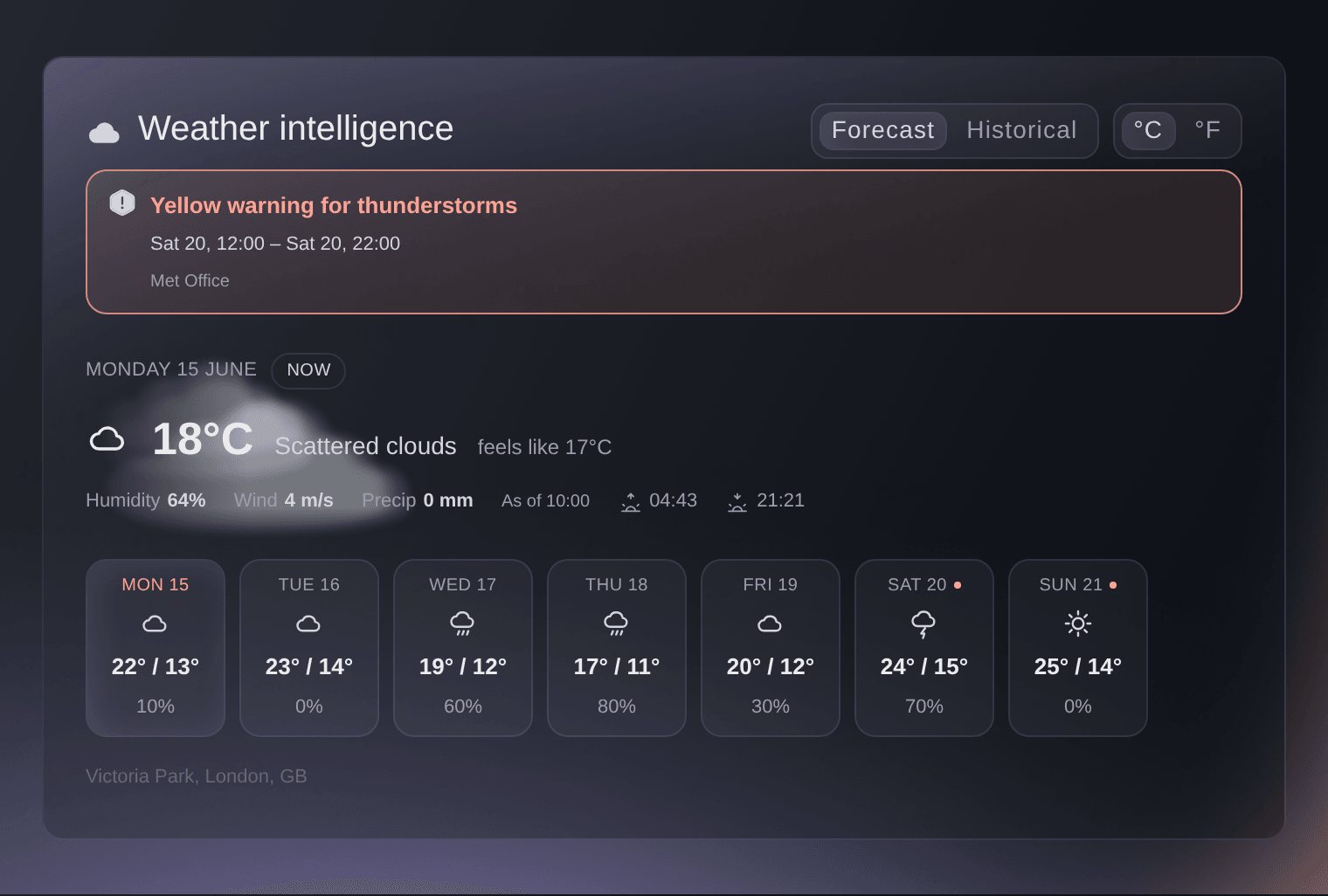
Ticket Fairy Weather intelligence card on the Performance page, with a thunderstorm warning, the conditions at the venue now and a strip of the week ahead

Read Each Show Day in Detail

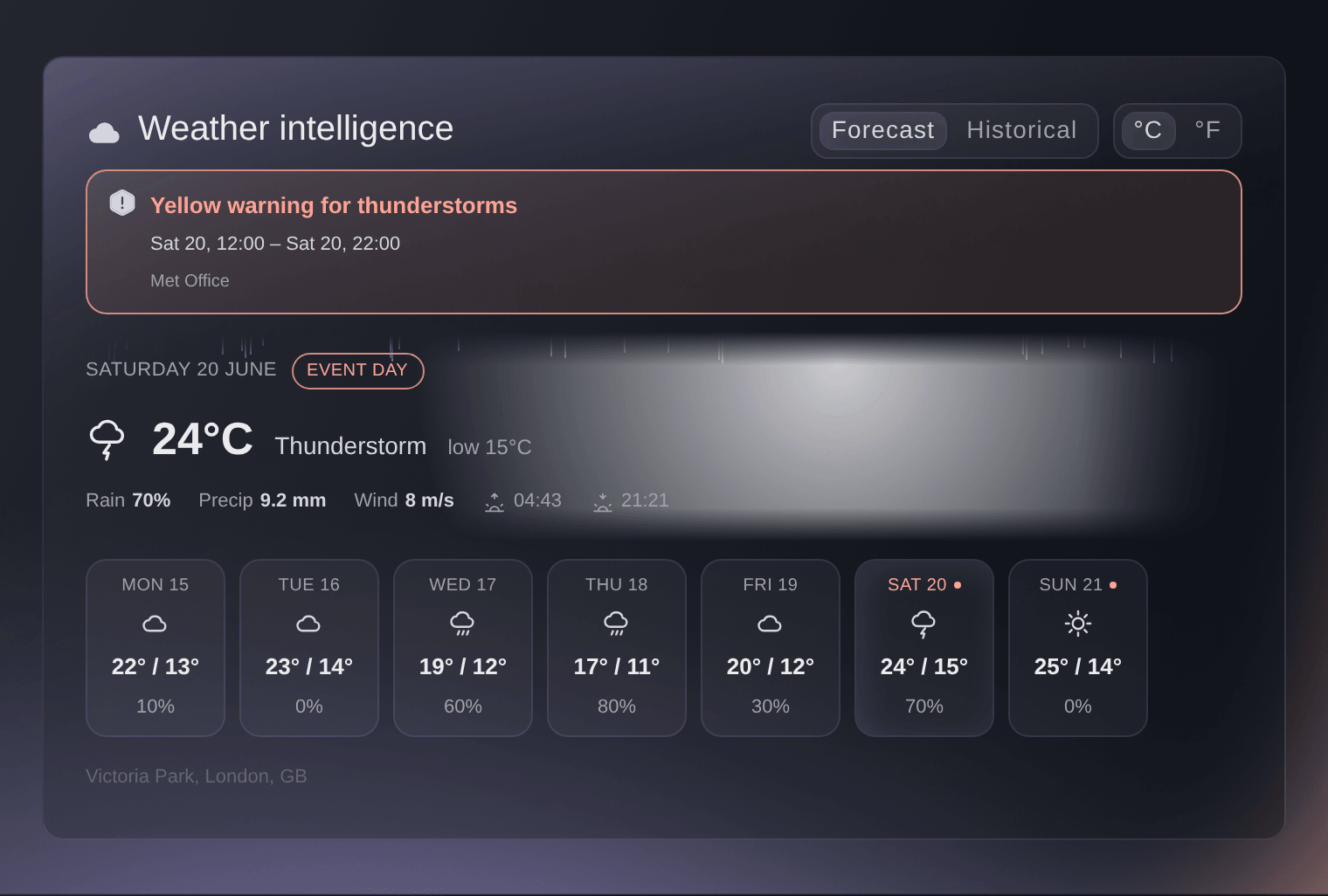
Choose any day on the strip to read its high and low, the chance of rain, the rain expected, wind, and sunrise and sunset at the venue. Your crew knows when the light goes for a de-rig, your bar manager knows whether the day calls for more water or more ponchos, and your stage manager sees the wind on the day the rigging goes up.

The later days of a long run join the strip as they come into range, each with its marker, so a festival week fills in day by day. A show that finishes in the early hours is marked on the day it starts, so the strip matches the way your team talks about the dates.

  • Event day: each of your days marked on the strip
  • Rain and wind: the chance of rain, rain expected and wind
  • Sunrise and sunset: at your venue on each day
Ticket Fairy Weather intelligence card with the first day of the event selected, showing its high and low, chance of rain, rainfall and wind

Plan for the Extremes Your Date Has Seen

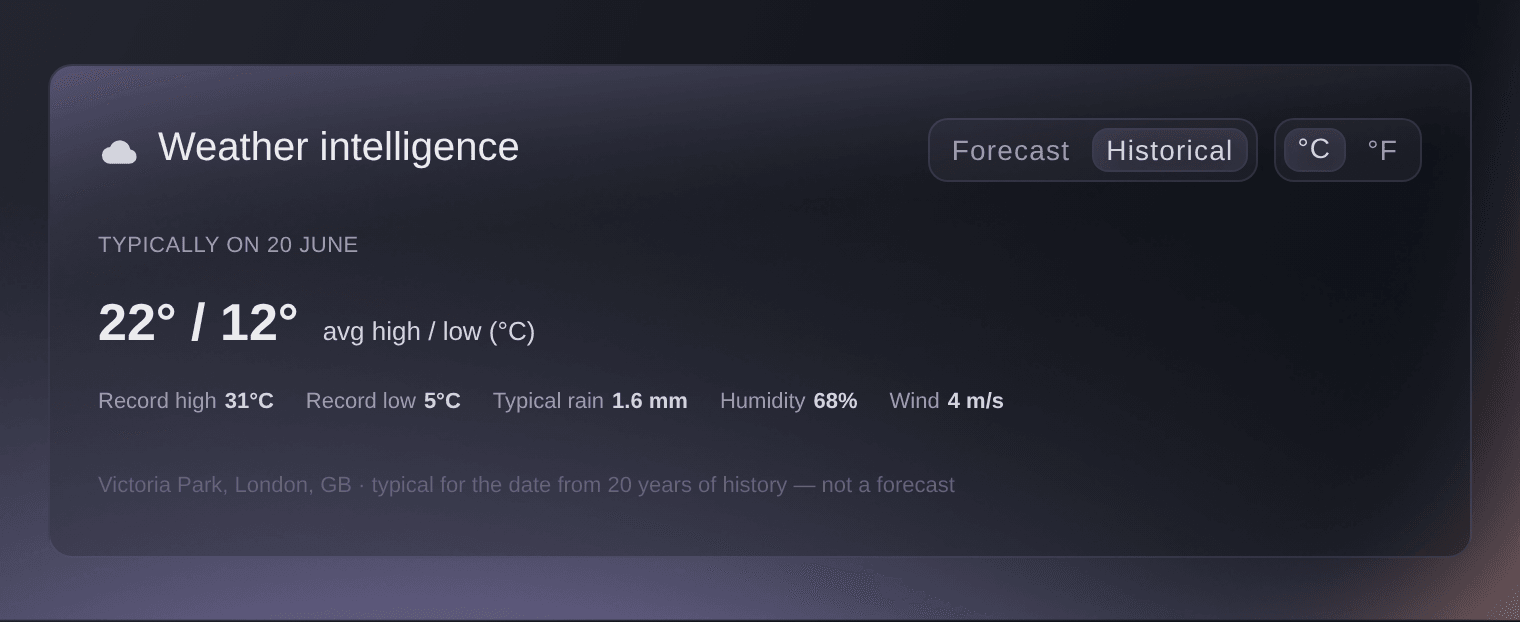
While your event is still months away, see what its first day is usually like at your venue: the average high and low, the record high and low, typical rain, humidity and wind, from years of history. Plan shade and water for a hot record, heaters and shelter for a cold one, and trackway for a date that is usually wet, long before a forecast exists.

This is the view to open when you book marquees, hire generators or brief your medical provider on heat. It turns "it is usually fine in July" into the actual record for your field, and it gives your safety advisory group the numbers behind your wet-weather plan.

  • Record high and low: the extremes your date has seen
  • Typical rain: what the date usually brings
  • Years of history: for your venue and your date
Ticket Fairy Weather intelligence card switched to Historical, with the average high and low, the record high and low and the typical rain for the event date

Link Every Trigger to the Steps Your Team Takes

Set the wind, lightning, heat and crowd triggers in your emergency plan and link each one to its steps, such as pausing a stage, opening shelters, adding water or messaging your ticket holders. On show days the forecast for your venue comes hour by hour and is checked against your levels and the official alerts, so your safety team sees which hours pass a level in good time, with the steps ready beside them.

Nobody has to remember the procedure in the middle of a storm. When a trigger fires, the plan shows the steps you agreed with your safety, security and medical providers, in order, and your team carries them out. A crowd trigger works the same way, from the live zone counts in your control room, so a zone filling too fast and a squall line arriving both open the plan you already wrote.

Messaging ticket holders is one of the steps a trigger can hold, so when a stage pauses or the gates change, the people coming to your event hear it from you, as part of the same plan your safety team follows.

  • Weather triggers: wind, lightning and heat levels you choose
  • Crowd triggers: for a zone that fills too fast
  • Hourly watch: each show day checked against your levels
  • Planned steps: pause a stage, open shelters, add water, tell ticket holders

Start Your Risk Register From a Draft Built for Your Event

Fai drafts a starting register from your event type, the crowd you expect at the busiest time, whether you are indoors or outdoors, your dates and your finish time. An outdoor festival gets crowd pressure at the barriers and severe weather, a conference gets rooms over capacity at popular sessions, and a late finish brings noise complaints and people walking to transport in the dark. Each risk says why it is on the list, and nothing is saved until you choose what to keep.

The draft scales with the event. A bigger crowd adds entry security and the crush when everyone leaves at once, an event over several days adds staff and volunteer fatigue, and an outdoor event covers heat, storms and high winds. Every drafted risk arrives with suggested actions, such as stewards at pinch points at peak times or wind limits agreed with your suppliers, so you edit a register rather than face a blank spreadsheet.

  • Drafted by Fai: the risks your kind of event usually carries
  • The reason for each risk: why Fai put it on the list
  • You choose what to keep: nothing saved until you add it
Ticket Fairy dialog with Fai's draft risk list for an outdoor festival, each risk with its score, the reason it is listed and a tick box

Learn From Every Incident at Your Earlier Events

Fai reads the incidents your team logged at your brand's earlier events. A kind of incident that keeps happening raises that risk's likelihood in the draft, or adds the risk when your register was missing it, and the draft says how many incidents sit behind it. Your register gets sharper with every event you run, from the record your team already keeps.

This closes the loop most safety teams leave open. The fainting at the bar last August and the lost child at the family field in June stop being lines in an old log and become reasons on this year's register, with the evidence beside them for your safety advisory group.

  • Past incidents: what went wrong before, counted for each risk
  • Raised likelihood: risks that keep happening scored higher

Score, Own and Review Every Risk the Same Way

Choose how likely a risk is and how bad it would be, and the score is worked out for you, so every risk on the register is scored the same way by everyone. Record what you are doing about it, one action per line, then name who owns it and when it is reviewed. The register lists the highest scores first, and the Risks tile on your event's Today page counts the risks that need a review.

As your actions take effect, lower how likely or how bad and the score follows, so the register shows where you are now. Two people can work on the register at once: a teammate's save in the meantime is never overwritten, and the form shows their version for you to check before you save again.

  • Score: how likely times how bad, never entered by hand
  • What you're doing about it: the actions for each risk
  • Who owns it: one person answerable for each risk
  • Review by: the date each risk is looked at again
Ticket Fairy Edit risk dialog with what could go wrong, how likely, how bad, the score, what you are doing about it, type, owner and review date

Show Licensing Officers and Insurers a Register Your Team Keeps Current

Mark a risk controlled when your actions are in place, accept it when you have decided to live with it, and close it when it no longer applies. A closed risk can be reopened, risks are never deleted, and every change is kept in the risk's history, so the register you show a licensing officer is the one your team worked from.

Ask Fai about the weather or the register in your own words: what the forecast says for Saturday, whether a warning is in force for the venue, what the date is usually like, or which risks are overdue a review. She can draft the register, add risks and change their status when you ask, and she shows you each change and waits for your yes first.

  • Controlled, accepted or closed: a clear status for every risk
  • Full history: every change kept, nothing deleted
  • Ask Fai: the forecast, the history and the register in your own words

How Organisers Plan Around Weather and Risk

  • A Summer Festival in an Open Field

    The record high for the date tells the team to double the water points and add shade at the main stage months ahead. On the Friday, a thunderstorm warning appears with its hours, the lightning trigger opens the plan, and the stage pauses and the shelters open in the order the safety advisory group agreed.

  • A Conference With Packed Breakout Rooms

    Fai's draft flags rooms over capacity at popular sessions. The producer gives the risk an owner and a review date before the doors open, and adds overflow seating to the actions so the score drops before the event starts.

  • A Late-Night Warehouse Party

    The finish after midnight adds noise complaints and people walking to transport in the dark to the draft. The promoter keeps both, names the security lead as owner and records the stewarded route to the night bus.

  • A Brand Running Its Fifth Edition

    Two years of heat calls at the family field lift that risk's likelihood in this year's draft, with the count beside it. The team adds misting fans and a shaded welfare tent before the licensing meeting, with the history to show why.

Questions About Weather and Risk

Weather & risk

From the forecast and the official weather alerts for the area around your event's venue. Your event needs a venue under Venue Location on its Details page, so an online event has no weather.

Owners and admins on the event, and people with a Stats or promoter login for it. It sits under the sales figures on the event's Performance page.

Up to eight days from today. While your event is more than a week away, the card shows what the first day is usually like instead, and the forecast takes over once the first day is a week out.

A new forecast is fetched when the one held is more than three hours old, more than an hour old once your event is four days away, and more than 30 minutes old from 36 hours before it starts until two days after it starts.

It is a warning for the area around your venue, whether or not its hours fall on your event days. Read the hours it covers against your own dates before you act on it.

No. When a trigger fires, the plan shows the steps your team linked to it, and your team carries them out. Follow your own risk assessment, your licence conditions and the advice of your safety, security and medical providers.

The event's owners, admins and producers, from Risks on the event's Operations page.

How likely, from 1 to 5, times how bad, from 1 to 5, so from 1 to 25. A score of 15 or more is High, 8 to 14 is Medium and 7 or less is Low.

The draft is a starting list for you to check, not a risk assessment. Fai adds or raises a risk when two or more incidents of that kind were logged at your brand's earlier events, and the draft says how many beside the risk. Risks your register already has are left out.

No. Risks are never deleted, so your register keeps its history for licensing and insurers. Close a risk that no longer applies, and reopen it if it comes back.

Ready to Build a Stronger Event Business?

Book a live demo, and we will set up your first event on the Event Operating System with your team.

Start Selling Tickets Online

Sign up without a credit card and build a test event before you commit. Go on sale in minutes when you are ready.

No monthly subscription required for ticketing
Start selling tickets immediately
Ticketing tools included in the service fee
Get Started for Free Talk to Fai Now

Ask Fai, our AI assistant, about Ticket Fairy’s features, pricing and how it could work for your event.

No credit card required

Book a demo call

See the referral model that drives 20% more ticket sales on average, learn which campaigns sell tickets, answer buyers faster and keep queues moving.

45-Minute Video Call
Pick a Time That Works for You

The Ticket Fairy, Inc. is a fintech company and technology platform. The Ticket Fairy, Inc. is not a bank, financial institution, or regulated financial services provider. Vault banking services are provided through regulated banking partners. Ticket Fairy Capital financing is provided by third-party private credit partners. The Ticket Fairy, Inc. does not make credit decisions, and all funding terms, approvals and conditions are determined by those lending partners.