1. Event Operating System
  2. Exhibitors & sponsors
  3. Leads & sponsor results

Send Every Exhibitor and Sponsor Home With Results They Can See

Exhibitors and sponsors decide whether to come back from what your event did for them, and a box of business cards or a hired scanner returned on the last day tells them very little. With Ticket Fairy, each exhibitor's booth staff scan visitors' tickets and badges from a link on their own phone or tablet, rate each visitor in the exhibitor's own words and note what they talked about. Each exhibitor gets a page of its own where its team approves the follow-up emails Fai drafts from those notes and reads its results, and each sponsor sees the deliverables you have done for it and the sales its tracking link brought in. You see every exhibitor and sponsor from the Exhibitors section of your event, so the rebooking conversation starts from figures you both trust.

  • A lead scanner on every booth phone, with no hardware to hire
  • Follow-ups Fai drafts and each exhibitor approves
  • Results each exhibitor and sponsor can read for themselves
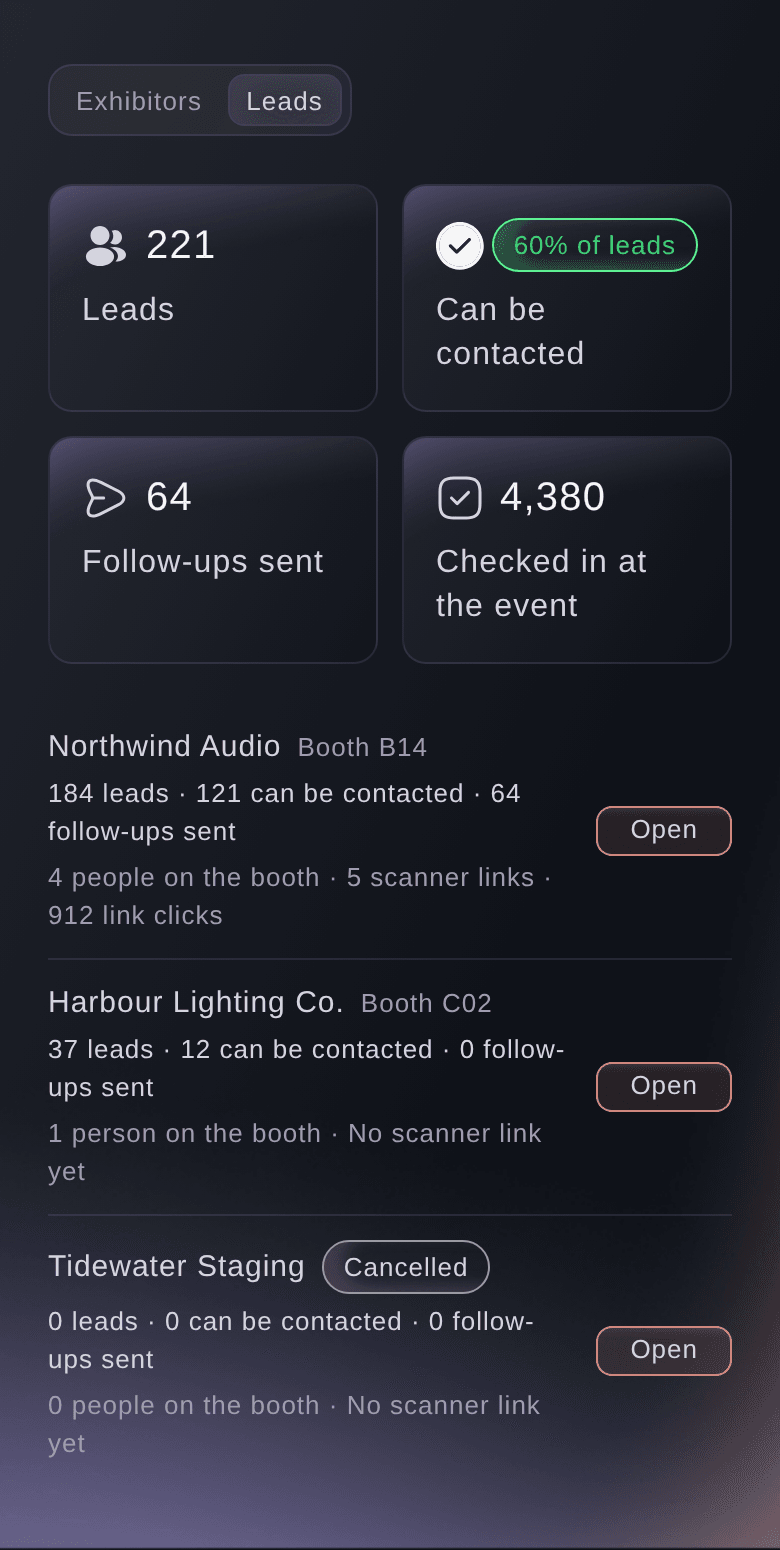
Ticket Fairy Exhibitors section on Leads, with each exhibitor's booth, its leads, how many can be contacted, the follow-ups sent and its scanner links

Put a Lead Scanner on Every Booth Phone

Lead retrieval usually means hired handsets, a deposit and a queue at the organiser's desk on build day. Here, each person on an exhibitor's booth gets a scanner link of their own, as an address to copy or a QR code to open on their phone or tablet. Nothing to install, no account to create and nothing to collect at the end of the show.

Add each member of booth staff with their name and email address, and every lead they capture carries their name. For the tablet that stays on the stand, make one shared booth link instead. When someone leaves the exhibitor's team half-way through the show, stop their link and it stops working at once, while the leads they captured stay with the exhibitor.

Exhibitors can add their own booth staff and make their own scanner links from their exhibitor page, so a large exhibitor with a rota of staff does not have to come back to you for each new person. You see every scanner link in Leads, with when it was last used.

  • A scanner link for each person: a link to copy or a QR code to open on their phone
  • Shared booth link: one link for the tablet on the stand
  • Stop link: the link stops at once and its leads stay
Ticket Fairy lead scanner link for a member of booth staff, with its QR code, the address to copy and the date it works until

Capture Every Visitor While the Conversation Is Fresh

Booth staff scan the visitor's ticket or badge with a handheld USB or Bluetooth scanner, or enter the code printed on it, and the visitor joins the exhibitor's leads with their name and contact details. A tap rates them and a note records what they asked for, while the visitor is still standing at the stand.

Exhibition halls are known for poor signal. Scans taken without a connection wait on the phone and send when the signal comes back, so booth staff keep scanning through a busy hour. A visitor scanned twice, by two people or at two moments, stays one lead with both sets of notes added together, so the exhibitor never follows up the same person twice.

Because the scanner reads the same tickets and badges your door team scans, every visitor already carries the details they gave when they bought. There is no separate badge database to import, and a refunded or cancelled ticket is not added as a lead.

  • Scan a ticket or badge: with a handheld scanner or by entering the code
  • Ratings and notes: what the visitor wants, recorded at the stand
  • Scans without signal: saved on the phone and sent when the connection is back
  • One lead per visitor: a second scan adds its notes to the first
Ticket Fairy lead scanner on a booth phone, with a visitor scanned a moment ago, the switch for a visitor who does not want to be contacted, the ratings and notes

Rate Visitors in Each Exhibitor's Own Words

A software company and a craft brewery sort their visitors differently, so each exhibitor gets its own rating words, best first, such as Ready to buy, Follow up and Just looking. Booth staff rate in the language their sales team already uses, and the exhibitor's results count leads by those same words.

Give the exhibitor a tracking link in its lead setup too, such as the link to its offer or its own event page, and the people who follow that link and the tickets they buy are counted towards the exhibitor's results. A sponsor's tracking link works the same way.

  • Rating words: the exhibitor's own scale, best first
  • Tracking link: clicks and sales counted for the exhibitor
Ticket Fairy lead setup for an exhibitor, with three rating words, the tracking link and the outside team page

Give Each Exhibitor a Page Its Team Runs Itself

Every exhibitor gets a page of its own, opened from a link with no sign-in. Its team finds the booth's leads, follow-ups, booth staff, results and rating words there, downloads its leads when it wants them, and sees what it still needs to do for you. Your team stops forwarding spreadsheets, and the exhibitor stops waiting for them.

The same page lets an exhibitor take meetings at its booth. It switches on meeting bookings, enters what it offers and chooses its own times, your meeting times or both. Ticket holders find the exhibitor on their order page and book, the exhibitor's team accepts or declines each booking, and you see every exhibitor meeting beside the other meetings at your event.

You decide who gets a page and when, and every download of an exhibitor's leads is recorded with who made it.

  • Exhibitor page: leads, follow-ups, booth staff, results and ratings
  • Download leads: recorded with who downloaded them
  • Meetings at the booth: ticket holders book and the exhibitor answers
  • Still needed from you: what the exhibitor has left to do
Ticket Fairy page for an exhibitor's booth, with its leads, ratings, notes, who met each visitor and the button to download the leads

Follow Up Every Visitor While the Lead Is Warm

Most leads go cold in the week after a show, while the business cards sit in a bag. On the exhibitor's page, Fai drafts a follow-up email for every visitor who can be contacted, from the rating and the notes booth staff took. The exhibitor reads each one, changes it if they like and approves it, and nothing is sent before they do.

The exhibitor edits the subject and the email in plain text. Your event's details, why the visitor received the email and a link to stop the exhibitor's emails are added below it. The email comes from your event, so visitors recognise it, and replies go straight to the exhibitor, so the conversation carries on with the people they met.

Each visitor gets one follow-up from each exhibitor, however many times the draft button is pressed. A follow-up that could not be sent shows as not sent, and it goes again only when the exhibitor asks.

  • Drafted by Fai: one email for each visitor, from their rating and notes
  • Approved by the exhibitor: nothing goes until they say yes
  • Replies to the exhibitor: visitors answer the people they met
  • One each: no visitor gets the same follow-up twice
Ticket Fairy follow-ups on an exhibitor's page, with a draft to check, one sent and one Fai could not draft

Show Each Exhibitor the Return From Your Event

Results show the exhibitor's leads by rating, how many visitors can be contacted, who on the booth met the most visitors, the follow-ups sent, the people its tracking link brought in and what they bought, and the share of checked-in attendees its booth met. You see the same figures in Leads, so you and the exhibitor talk about next year from the same numbers.

The share of attendees met is the figure exhibitors rarely get from an organiser. It sets the booth's scans against the people who actually came through your doors, so an exhibitor can judge its stand, its position and its staffing against the size of the crowd. Bring your exhibitors into the next edition with Copy from last event, and start the rebooking conversation with last year's results in hand.

  • Leads by rating: in the exhibitor's own rating words
  • Clicks and sales: through the exhibitor's tracking link
  • Attendees met: the share of checked-in people the booth scanned
Ticket Fairy results for an exhibitor, with leads by rating, contact choices, who met the most visitors, follow-ups and tracking link clicks and sales

Keep Every Sponsor Deal and Deliverable on Track

Track each sponsor from prospecting through committed, contracted and paid to fulfilled, with its tier, its cash value and the value of what it gives in kind. Turn its deliverables into tasks on your team's board, so the logo on the main stage and the activation in the food court each have an owner and a due date.

Sponsor values flow into your event budget as income, cash and in-kind apart, so your budget shows what sponsorship brings in without a second spreadsheet. A sponsor that declines or lapses drops out of the budget by itself.

Give a sponsor its own page and it sees how many of its deliverables are done and the sales its tracking link brought in. Your partnerships team answers "what did we get?" before the sponsor asks, and the renewal starts from proof.

  • Sponsors: tier, status, cash and in-kind value
  • Tasks from deliverables: each deliverable on your team's task board
  • In your budget: sponsor income, cash and in-kind apart
  • Sponsor page: deliverables done and tracking link results
Ticket Fairy page for a sponsor, with four of six deliverables done and the clicks and sales through its tracking link

Respect Every Visitor's Choice About Contact

Attendees trust your event with their details, and exhibitors want leads they can use. When a visitor says at the booth that they would rather not be contacted, staff mark it before they save, and the exhibitor never sees that visitor's email address or phone number. Booth staff see names, ratings and notes only.

Record a later request too, and the visitor's details disappear from the exhibitor's leads and download, and any follow-up not yet sent is stopped. A visitor who uses the link in a follow-up to stop the exhibitor's emails is treated the same way. Ticket buyers are told in their order confirmation that exhibitors can scan their ticket, once your event has a working scanner link.

  • Does not want to be contacted: set at the booth before the lead is saved
  • No longer wants contact: details hidden and unsent follow-ups stopped
  • Told at purchase: buyers learn that exhibitors can scan them

How Organisers Look After Exhibitors and Sponsors

  • A Trade Show With a Busy Hall

    Each exhibitor adds its own booth staff from its page, and the stand tablets run on shared booth links. When the hall Wi-Fi drops at lunchtime, scans wait on the phones and arrive when it returns, and every exhibitor leaves with its leads rated and noted.

  • A Technology Conference

    Sponsors at the Gold tier have six deliverables each, turned into tasks for the partnerships team. Each sponsor's page shows the deliverables done and the sales from its tracking link, and the renewal meetings open with those figures.

  • A Food and Drink Festival

    Producers rate visitors as Stockist, Trade enquiry or Tasting, in their own words. The week after, Fai drafts a follow-up for every trade enquiry, and each producer approves its own emails before they go.

  • A Fan Convention

    Merchandise exhibitors take meeting bookings at their booth from ticket holders' order pages. Visitors who ask not to be contacted keep their email address private, and exhibitors still see how many people their booth met.

  • An Annual Expo Selling Next Year's Stands

    The sales team copies last year's exhibitors into the new edition and opens each rebooking call with the share of checked-in attendees that exhibitor's booth met. Exhibitors who met the most attendees rebook first.

Questions About Exhibitor Leads and Sponsor Results

Leads & sponsor results

Events with the Exhibitors section, as a conference, convention or expo has. On any other event, open Exhibitors from More sections on the event's Operations page.

No. Booth staff scan with a USB or Bluetooth scanner connected to the phone or tablet, or enter the code printed on the ticket or badge.

A ticket or badge for this event that lets its holder in, including one already checked in. A refunded or cancelled ticket, or a code from another event, is not added.

Up to 100 on each booth, and adding someone sends nothing to their email address. A scanner link works until the day after your event ends, unless you stop it first. It is shown once, so if it is lost, make a new one and the old one stops working.

Yes, in their order confirmation once your event has a working scanner link. People who ordered before the first link was made are not told by email, so tell them another way, for example in a pre-event email.

Up to 50 at a time and 200 a day for each exhibitor, only for visitors who can be contacted. A visitor who already has a follow-up does not get another.

You see how many were sent in the exhibitor's results. The drafts and emails belong to the exhibitor, and only the exhibitor approves them. The exhibitor needs a contact email so that visitors' replies reach them.

You need an owner, admin or producer login on the event. Exhibitors can also add their own booth staff and links on their own page. To give a sponsor its page, ask Fai to link the sponsor to its outside team and tracking link, then send the page link from Outside teams.

No. Copy from last event brings your exhibitors into the next edition without their leads or booth staff. Sales from a tracking link show in each currency on its own.

Fai reads every exhibitor's leads and results, adds or removes booth staff, sets rating words and tracking links, makes scanner links, records that a visitor no longer wants contact and manages your sponsors. She shows you each change and waits for your yes first.

Ready to Build a Stronger Event Business?

Book a live demo, and we will set up your first event on the Event Operating System with your team.

Start Selling Tickets Online

Sign up without a credit card and build a test event before you commit. Go on sale in minutes when you are ready.

No monthly subscription required for ticketing
Start selling tickets immediately
Ticketing tools included in the service fee
Get Started for Free Talk to Fai Now

Ask Fai, our AI assistant, about Ticket Fairy’s features, pricing and how it could work for your event.

No credit card required

Réserver une démo

Découvrez le modèle de recommandation qui génère en moyenne 20 % de ventes de billets en plus, voyez quelles campagnes vendent des billets, répondez plus vite aux acheteurs et gardez les files en mouvement.

Appel vidéo de 45 minutes
Choisissez un créneau qui vous convient

The Ticket Fairy, Inc. is a fintech company and technology platform. The Ticket Fairy, Inc. is not a bank, financial institution, or regulated financial services provider. Vault banking services are provided through regulated banking partners. Ticket Fairy Capital financing is provided by third-party private credit partners. The Ticket Fairy, Inc. does not make credit decisions, and all funding terms, approvals and conditions are determined by those lending partners.