1. Event Operating System
  2. Planning
  3. Today & tasks

Start Every Day Knowing What Needs You and Who Is Doing What

Promoters and producers start each day with the same two questions: what needs me before the doors open, and is everyone else on top of their part? With Ticket Fairy, each event opens on its Today page, with the countdown, your own tasks and approvals, what your team changed while you were away and how every section of the event is doing. Behind it sits one task board your whole team shares, a readiness plan Fai suggests for your kind of event, and a workload view that shows who is overloaded before it becomes a problem. Each teammate starts in the part of the event their role runs, so nobody has to dig for their own work.

  • Your own work first thing every morning
  • Every job with an owner, a date and a priority
  • Work spread across the people with time
Ticket Fairy Today page for a festival 12 days out, with the section list, the countdown and figures, what changed since the last visit, Fai's suggestions and a status tile for each section

Start Each Morning With the Countdown and Your Own Work

Open the event and the countdown to doors sits at the top, with tickets sold this week against the week before, the decisions waiting for you, late tasks and what is due this week. Here's what's yours lists the tasks your team has given you, your departments and the stages you call, with a button that asks Fai what you should do next. You know where your day starts before you have opened a single email.

Since you were last here lists what your teammates changed since your previous visit, newest first, with the name of the person behind each change. Recent activity at the foot of the page keeps every approval, reminder and turned-down suggestion with the teammate who made it, so nobody has to ask who decided what. Compared with last time shows how sales stand against your last edition at the same point, and Time Fai saved shows the work Fai has already taken off your team on this event.

Fai checks the event every hour and lists what she finds under Needs your decision, from late tasks to acts with no hotel, each with the email or tasks already drafted. Nothing is sent or changed until someone on your team approves it.

  • Countdown and figures: days to doors, tickets sold, decisions, late tasks and what is due this week
  • Here's what's yours: your tasks, your departments and the stages you call
  • Since you were last here: your team's latest changes, with who made each one
  • Needs your decision: Fai's suggestions with the drafts ready for your yes

Read Every Section of the Event at a Glance

Event at a glance gives each section a tile that says in one line how it is doing, with a ring for progress and a red number when something needs you: places filled on the rota, cues locked on the run of show, advances signed off, serious incidents still open. The section list follows the order of the work, from Programme to After the show, and marks the groups for where your event is now, so the right part of the event is always nearest to hand.

Tick every kind of event this is and the sections follow, named the way that kind of event names them. A conference shows Speakers, Rooms and an Agenda, a sports event shows Athletes, Venues and a Match schedule, and a food or drink festival shows Vendors, Booths and Tastings. Choose more than one type and you get the sections of each.

Add a section for your whole team when you need it, or pin the sections you use most to the top of your own list without changing anyone else's. Your role decides where the event opens for you: a stage manager lands on Now and next and a production manager on Run of show. On your own event you still choose what Fai helps you with, from line-up and show day to staff, safety, money, sponsors and traders, and change it under More sections whenever your plans change.

  • Event at a glance: one tile for each section, with progress and what needs you
  • Event type: tick every kind of event this is, and the sections follow
  • Pin to top: the sections you use most at the top of your own list
Ticket Fairy event type dialog with a tick box for each kind of event and Festival ticked

Find Any Act, Stage, Person or Task in Seconds

Press Ctrl K, or Cmd K on a Mac, on any part of the event and enter a few letters. Results come back grouped into performers, stages, people, tasks, files and the event's own sections, and everyday words work too, such as "hotels" for Accommodation. When nothing fits, the last result sends what you entered to Fai as a question, so the answer is never more than a moment away.

Every performer, stage and day has its own page. Day at a glance lists every set by stage, the run of show, arrivals, pickups and departures, hotel check-ins and check-outs, shifts by team, tasks due and incidents for that day, and you can step to the day before or after or print it for the production office. A stage page holds its sets, run of show, teams, rota and tech notes for the day.

  • Find anything: the whole event from one search, on any page
  • Day at a glance: sets, travel, hotels, shifts, tasks and incidents for one day
  • Stage and performer pages: everything about one stage or one act together
Ticket Fairy Find anything dialog with a search entered and results grouped into sections, performers, stages, people and tasks

Give Every Job an Owner, a Date and a Priority

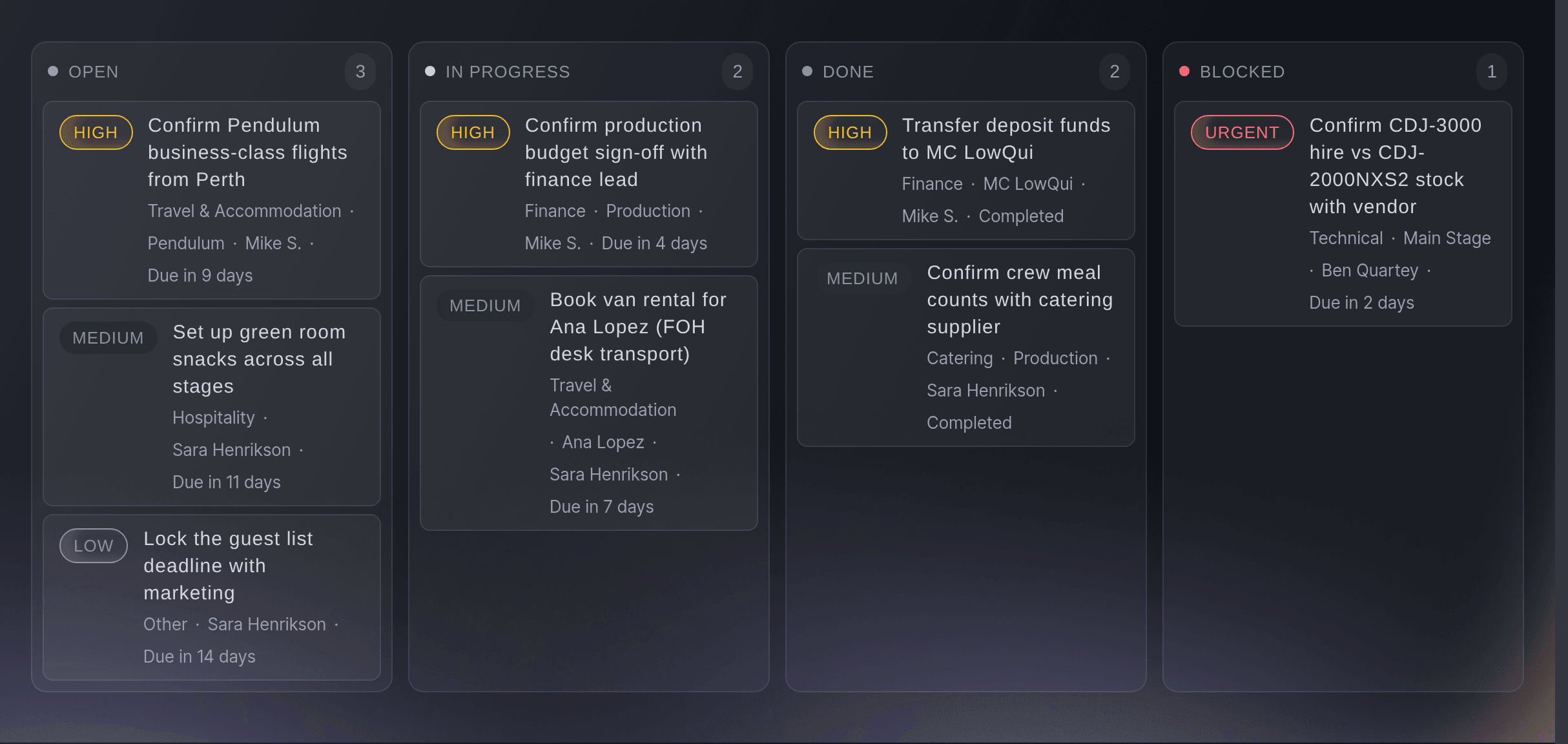
The licence, the barrier hire, the catering numbers and the day sheets all have to happen before doors. Put each job on one task board your whole team shares, with the people doing it, the day it is due and how urgent it is. Cards move from open to in progress to done, and the blocked column shows what is waiting on a permit, a supplier or a decision, so it is the first thing you read each morning.

Switch the view to suit the question. The board shows what is stuck, the list shows everything at once, the calendar shows what is due this week, and the timeline lays the dated work out in order, so you see what has to finish before the next thing starts. Each task names the tasks it is blocked by and the ones it blocks, and you can save the views your team uses most.

A job that comes round again, such as a weekly production meeting or a daily site walk, can repeat every day, week, month or year, so nobody has to remember to add it. Teammates who only want to keep an eye on a job follow it, and every task keeps the history of its status changes.

  • Owners and followers: everyone doing the job, and anyone keeping an eye on it
  • Priority: low, medium, high or urgent on every card
  • Board, list, calendar and timeline: the same work by state, all at once, by date or in order
  • Repeating tasks: the jobs that come round every day, week or month
Ticket Fairy event task board with cards spread across the open, in progress, done and blocked columns, each with its priority, owner and due date

Keep the Conversation, the Files and the History With the Job

Open a task to discuss it in comments, attach the quote or the plan it depends on, label it and run a timer while you work on it. A task added from the event's Inbox keeps the email it came from, so whoever picks it up has the whole story. My tasks gathers everything given to you or followed by you across every event of your brand, so a producer running three events this month sees all of their work together.

When a teammate has the same stage, task or other record open, you see their name while you edit, so you do not overwrite each other's work. If they save first, you see their version and decide what to keep. Version history shows who changed a record and when, and restoring an earlier version adds a new one, so nothing anyone did is ever lost.

  • Comments, files and labels: the discussion and the paperwork stay on the task
  • Timer: the time spent on each task
  • My tasks: your work at every event of your brand together
  • See who is editing: a teammate's name while you both have a record open

Start From the Plan Every Event of Your Kind Needs

Fai suggests a readiness plan for your event type, from getting every contract signed to comparing the budget with what you spent. A conference gets speakers, sound and screens and catering numbers, a festival gets medical cover and a traffic plan, a food or drink event gets vendor hygiene certificates and a sports event gets its referees and officials. Untick what you do not need, rename any task and add the rest, each with the due date Fai worked out.

When a task runs late, Fai drafts the reminder to its owner, or finds an owner for a late task with nobody on it. She reads deadlines from your contracts, emails and call notes too, and suggests a task for each one that has none yet. Every suggestion waits on Today until someone on your team approves it, changes it first, puts it off or turns it down.

  • Readiness plan: the jobs your kind of event needs, with their due dates
  • Choose and rename: keep only the tasks you want, named your way
  • Late task chasers: a reminder drafted for you, or an owner found
Ticket Fairy dialog listing the tasks of a readiness plan with a tick box, an editable name and a due date for each

Spread the Work Before Anyone Burns Out

The same two people usually end up with most of the work in the last fortnight. Workload adds up each person's task time and rota shifts day by day, against the hours a day you set, and flags anyone over the limit. Fai suggests the task to move and the teammate with the least work on those days, so you can rebalance in a few moments while there is still time.

Confirm a move and the new person is added to the task before the first is taken off, so the job is never left without an owner. Tasks with no time needed or no due date are listed apart, so you can fill in the gaps and trust the numbers. Choose how far ahead to look, the next week or the next two, depending on how close the event is.

  • Hours per day: task time and rota shifts for each person
  • Over the limit: anyone with more hours than you allow
  • Suggested moves: the task to move and who has time for it
Ticket Fairy Workload for an event team, with each person's task and shift hours, one person over the limit and Fai's suggestion to move a task

Give Every Teammate the Part of the Event Their Role Runs

A security director, a stage manager and a volunteer coordinator each need a different part of your event. Invite each person by the role they work, such as security lead or stage manager, and their role kit sets their menu, their permissions, their Today page, the help Fai gives them and the guides they see. They start in their own work, with nothing in the way that their job does not use.

Each person then opens one private link for everything their roles give them. A steward who also works site services sees every shift, desk, round, job and document from both roles on one page, which is the My shifts page your crew already use to see their shifts at every one of your events, accept the shifts you offer and add the documents their shifts need, with no account or password. Invite your permanent people to the brand once, and a helper for one night to that event's team.

  • Invite by role: choose the role by its name when you invite a teammate
  • Role kits: the menu, permissions, Today page, Fai help and guides for each role
  • One link for each person: every desk, round, job and document their roles give them

How Event Teams Run Their Day With Ticket Fairy

  • A Festival Production Office

    The production manager opens on Run of show, the head of security on their department's day sheet and the promoter on Today. When the barrier supplier goes quiet, the task moves to the blocked column, and the morning meeting starts from that column rather than from memory.

  • A Conference Team of Four

    The organiser ticks Conference and the event shows Speakers, Rooms and an Agenda. Fai's readiness plan adds the speaker briefings, the sound and screens check and the catering numbers with their dates, and Workload shows the events lead is double booked in launch week, so two tasks move to a colleague.

  • A Promoter Running Several Club Nights

    My tasks lists every job across the month's shows on one page, and the weekly flyer run repeats on its own. Since you were last here shows what the venue team changed while the promoter was at another show.

  • A Venue With a Busy Calendar

    Each show opens with its own countdown and late tasks, and Find anything takes the operations manager to any act or room in seconds. Day at a glance is printed for the duty manager each afternoon.

  • An Agency Running Events for Clients

    Account managers follow the tasks they hand to suppliers and freelancers, and version history answers who changed a stage time and when. Each client event keeps its own board, so nobody mixes one client's work with another's.

Questions About the Today Page and Tasks

Today & tasks

Today and Workload open for the event's owners, admins and producers, from Operations on the event. The task board is open to the team on the event within what their role allows. Buyers never see either.

Most people land on Today. A stage manager lands on Now and next, and a production manager on Run of show, or on Advancing while the event is more than 14 days away.

The latest 10 changes your teammates made since your previous visit, newest first. It appears from your second visit on, and a visit counts as new after 30 minutes away. The rest is in Recent activity.

You can remove a section for everyone only while it has nothing in it, because a section with records always shows. Pins change your own list only, up to 8 sections.

Yes. Add as many people as the job needs, and each of them gets it in their own list and in My tasks. A teammate who only wants to keep an eye on it can follow it.

Once per event, when it is a year or less away. After the plan's tasks exist, even if you removed some, she does not suggest it again. A task whose date has already passed is due 3 days from when you add it.

No. Fai suggests the plan, the reminders for late tasks and the moves on Workload, and nothing changes until someone on your team approves or confirms it. She can also add, assign and update tasks when you ask her, and she shows you each change first.

You choose the next 7 or 14 days and the hours a person can work in a day. Task time is spread from a task's start to its due date and shared between the people on it. Rota shifts are matched to a teammate by email address, so their crew record needs the same email as their Ticket Fairy login.

You see a teammate's name while they have the record open. If they save first, you see their version and keep it, or for most records apply your changes again on top of it. Version history keeps every earlier version for you to restore.

No. A role kit includes permissions, and also sets the person's menu, Today page, Fai help and guides. The permission levels on your Team page still decide what each login can reach, and only an owner or administrator of the brand can invite people.

Ready to Build a Stronger Event Business?

Book a live demo, and we will set up your first event on the Event Operating System with your team.

Start Selling Tickets Online

Sign up without a credit card and build a test event before you commit. Go on sale in minutes when you are ready.

No monthly subscription required for ticketing
Start selling tickets immediately
Ticketing tools included in the service fee
Get Started for Free Talk to Fai Now

Ask Fai, our AI assistant, about Ticket Fairy’s features, pricing and how it could work for your event.

No credit card required

Book a demo call

See the referral model that drives 20% more ticket sales on average, learn which campaigns sell tickets, answer buyers faster and keep queues moving.

45-Minute Video Call
Pick a Time That Works for You

The Ticket Fairy, Inc. is a fintech company and technology platform. The Ticket Fairy, Inc. is not a bank, financial institution, or regulated financial services provider. Vault banking services are provided through regulated banking partners. Ticket Fairy Capital financing is provided by third-party private credit partners. The Ticket Fairy, Inc. does not make credit decisions, and all funding terms, approvals and conditions are determined by those lending partners.