1. Event Operating System
  2. Registration & badges

Get Every Attendee Checked In and Wearing Their Badge Fast

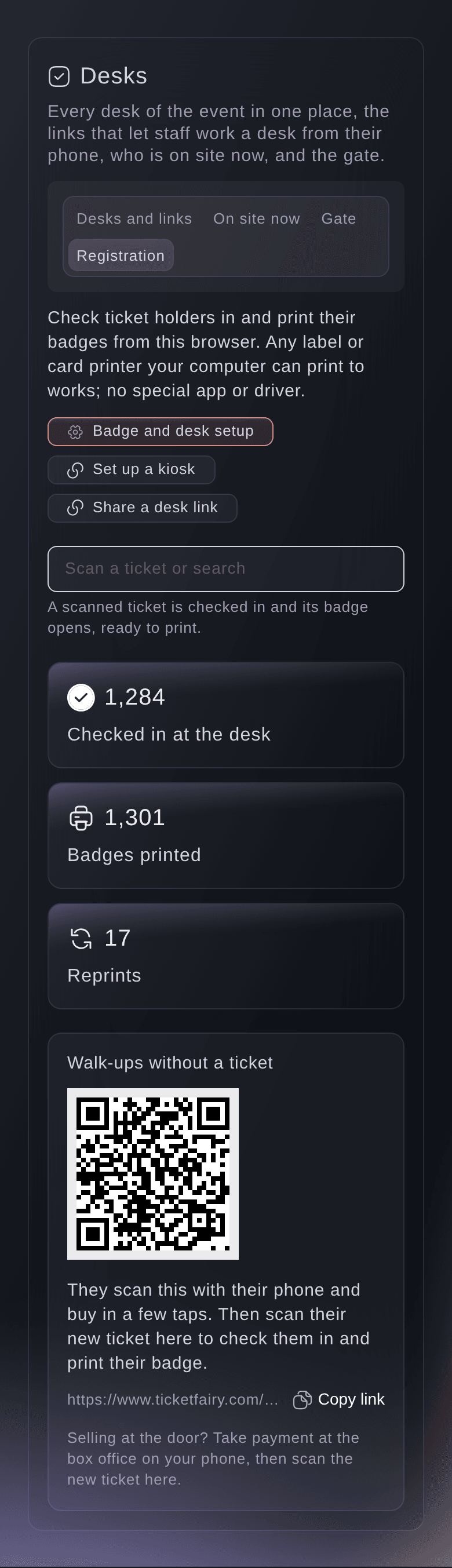
Run your registration desk at your conference, trade show or festival from any browser. Scan a ticket or find the attendee by name, email or order number, check them in and print their name badge on a label or card printer. Put a self-service kiosk by the entrance, let volunteers work the desk from a link and sell walk-ups a ticket from a QR code on the desk.

  • Attendees checked in with one scan
  • Name badges printed on the spot
  • Kiosks and volunteers to share the work
Ticket Fairy Event Operating System: Registration & badges

Check In and Print Badges at the Desk

Scan the code on a ticket with a USB or Bluetooth scanner, or search by order number, email or name. Check in goes through the same check-in as your door app and says plainly when a ticket was already used, refunded or is outside its check-in times. The badge prints straight away with your event's logo and colour, the attendee's name, their company and job title from your checkout questions, the ticket type and a QR code.

  • Scan or search: order number, email or name
  • Same check-in as the door: a later scan at the door shows them checked in
  • Name badges: A6 lanyard or CR80 card, from your brand kit
Ticket Fairy Event Operating System: Check In and Print Badges at the Desk

Let Attendees Check Themselves In

Put a tablet and a badge printer by the entrance with a kiosk link. Attendees scan the ticket from their email, or enter their email address and a six-digit code sent to it, then check in and print their own badge. The kiosk prints each ticket's badge once, and nobody can search for another person's name there.

  • Kiosk link: on any tablet, with no sign-in
  • Email code: for attendees without their ticket to hand
  • One badge each: another badge is printed at the desk with a reason
Ticket Fairy Event Operating System: Let Attendees Check Themselves In

Share the Desk With Volunteers and Welcome Walk-Ups

Give volunteers a registration link that opens only your registration desk, with no dashboard login. Everything done through it is recorded under the link's name, and you can stop it at any time. Walk-ups scan a QR code on the desk to buy on your event page, then check in like everyone else.

  • Registration link: for volunteers without a dashboard login
  • Walk-ups: buy a ticket from a QR code on the desk
  • Badge setup carried over: copy it to your next edition
Ticket Fairy Event Operating System: Share the Desk With Volunteers and Welcome Walk-Ups

Run Registration From Any Browser

  • Registration desk

    A Registration view in the Desks section for conferences, trade shows and festivals.

  • Scan or search

    Scan a ticket with a USB or Bluetooth scanner, or find the attendee by order number, email or name.

  • Name badges

    Your event's logo and colour, the attendee's name, company and job title, ticket type and QR code.

  • Reprints with a reason

    Every badge is kept with who printed it and when, and a second badge asks why.

  • Self-service kiosk

    Attendees scan their ticket or confirm their email with a code, then print their own badge.

  • Registration link

    Volunteers work the desk from their own laptop or tablet, and you stop the link at any time.

  • Walk-ups

    Show a QR code for your event page or quick-buy page, or sell at the box office.

  • One check-in

    The desk, the kiosk and your door app all check tickets in the same way.

Questions About Registration and Badges

Registration & badges

Any label or card printer your computer can print to. Choose the printer and the A6 or card paper size in your browser's print dialog.

Yes. The desk checks tickets in the same way the check-in app does, so a later scan at the door says the ticket is already checked in.

The first desk checks them in. The other desk asks staff to try again in a moment, then shows the person as already checked in.

Up to 3 an hour for one email address and 2,000 a day for the kiosk. Each code allows 5 tries.

Ready to Build a Stronger Event Business?

Book a live demo and we will switch the Event Operating System on for your events and set up the first one with your team.

Start Selling Tickets Online

Sign up without a credit card and build a test event before you commit. Go on sale in minutes when you are ready.

No monthly subscription required for ticketing
Start selling tickets immediately
Ticketing tools included in the service fee
Get Started for Free Talk to Fai Now

Ask Fai, our AI assistant, about Ticket Fairy’s features, pricing and how it could work for your event.

No credit card required

Book a demo call

See the referral model that drives 20% more ticket sales on average, learn which campaigns sell tickets, answer buyers faster and keep queues moving.

45-Minute Video Call
Pick a Time That Works for You

The Ticket Fairy, Inc. is a fintech company and technology platform. The Ticket Fairy, Inc. is not a bank, financial institution, or regulated financial services provider. Vault banking services are provided through regulated banking partners. Ticket Fairy Capital financing is provided by third-party private credit partners. The Ticket Fairy, Inc. does not make credit decisions, and all funding terms, approvals and conditions are determined by those lending partners.