1. Event Operating System
  2. Show day
  3. Messages & incidents

Tell the Right People Fast and Handle Every Incident From Report to Closed

A gate change or a weather hold has to reach every steward, bar volunteer and trader in minutes, and a fainting at the bar has to reach the person who can help without a round of phone calls. With Ticket Fairy, you pick the groups who need to know, start from a show-day template or a draft from Fai, check exactly who gets it and send it now or at the time you choose, then see who it reached and send it again to anyone it missed. Anyone on your team logs an incident in three answers, Fai suggests its type and how serious it is, and your safety lead is emailed the moment something serious comes in. Every message and every incident keeps its full record for your debrief and your licensing officer.

  • The right groups reached by email or text in minutes
  • Every incident logged in seconds with your safety lead told at once
  • A complete record of who was told and what was done
Ticket Fairy Messages section with a scheduled weather hold and a sent gate change, each showing who it went to and how many it reached

Reach Only the People Who Need to Know

Tick the groups a message is for: departments, people on the rota, all crew, volunteers, performers' teams, traders, press, sponsors or the people who answered one of your forms. Narrow each group by its status, role, day, team or shift, so a gate change goes to Saturday's gate stewards and nobody else, and someone in two groups gets the message once.

Every team working on your event is already in the dashboard, so there is no list to export and no group chat to keep up to date. Narrow the people who answered a form by your decision or by one of their answers, such as every volunteer applicant you accepted, or everyone who chose the bar team in their answers.

  • Who gets it: every team working on your event, ready to tick
  • Narrow each group: by status, role, day, team or shift
  • People who answered a form: narrowed by your decision or by one answer
Ticket Fairy Message people dialog with the groups to choose from, email or text message, quick show-day messages, a box to ask Fai for a draft and the message fields

Say It Fast With Show-Day Templates and Fai's Drafts

Start from a quick show-day message such as Weather hold, Gate change, Set time change, Running late or All clear, or tell Fai what you want to say and she drafts it in your brand's voice. Add each person's first name, shift time, team, role or stage so every message reads as written for them, and send it by email, by text or both.

Under pressure, nobody wants to compose a message from scratch. The templates carry the words an event team uses, with the gaps marked for the gate, the time or the stage, and Fai's draft gives you a starting point you can change before anything goes. With a form's group ticked, you can drop in each person's answer to one of its questions, such as the day they arrive.

When a set time on the run of show moves by a quarter of an hour or more, Fai suggests an email to the teams it affects on the event's Today page, and nothing goes until someone on your team approves it.

  • Quick show-day messages: weather hold, gate change, running late and more
  • Ask Fai for a draft: say what you need and check her words
  • Each person's details: first name, shift time, team, role or stage
  • Email and text: one channel or both in the same message

Check Who Gets It, Then Send Now or Later

Before anything goes, see who gets it by email and by text, and who is left out and why, such as a missing mobile number or a number that replied STOP. Send it straight away or schedule it in the event's time zone, and cancel a scheduled message any time before it goes. On show day, Message people sits at the top of the show-day view too.

If the group changes between your check and your send, such as new volunteers joining the rota, you see the new count and check again, so the number you agreed to is the number that goes. Schedule the next morning's briefing the night before, and the crew get it at breakfast while you sleep.

  • Check before sending: every person who gets it, by channel
  • Send later: at the time you choose, in the event's time zone
  • Cancel: a scheduled message, until it goes

See Who Each Message Reached and Send It Again

Open any message to see each person as sent, opened, on the way or not sent, and narrow it to the people it did not reach. Once it has finished sending, send it again to just those people, and open any crew member to see every message they were sent about the event.

When a steward says they never heard about the gate change, you can see what they were sent and when, and whether it reached them. Email replies go to your brand's email address, so a reply from a trader lands with the people who can answer it.

  • Delivery: sent, opened, on the way or not sent for each person
  • Send again: only to the people it did not reach
  • Messages to one person: everything they were sent about the event
Ticket Fairy message panel showing who a gate change reached, who opened it and who it did not reach

Send Your Rota and Lists to the Team on a Schedule

Send the rota, run of show, advancing status, rooming list or pickups to the right people every day or every week, at the day and time you choose. Each person gets an email with a link and signs in to download the file, which is always made from the list as it is at that moment. Make a file now whenever you need one, and pause or stop a schedule at any time.

This replaces the Monday spreadsheet run: the rota to the security lead, the rooming list to the travel team, the pickups to the transport manager. Lists that hold people's names go only to owners and admins, every file and every download is recorded, and if nobody chosen can still see a list, Ticket Fairy pauses the schedule and tells the owners and admins.

  • Send regularly: every day or every week, at your time
  • Your lists: rota, run of show, advancing, rooming list and pickups
  • Signed-in downloads: a link to the file, never an attachment
Ticket Fairy dialog to send the rota regularly, with how often, the day and time, who gets the email, the schedule already set and the latest file

Log What Happened in Seconds

Enter what happened, where, and how serious it is, and the report is in. The time is now and the reporter is you unless you change them, and you can pick the spot on your site map. The people involved go under more details, kept apart from what happened, where only your safety team can read them. Anyone on your event's team can also ask Fai to log an incident or add an update from their phone, and she waits for their yes first.

Seriousness comes with a plain description for each level, so a steward knows that danger to life is critical and a minor knock noted for the record is low. Mark a report sensitive and only your safety team and the person who reported it read it in full; everyone else sees only that something happened, when and how serious it is. Medical, safeguarding and welfare incidents start sensitive, and every opening of a sensitive incident is recorded.

  • Three answers: what happened, where and how serious it is
  • Pick on the map: the spot on your site plan
  • Sensitive: on from the start for medical, safeguarding and welfare
  • Report through Fai: for anyone on your event's team
Ticket Fairy Report an incident dialog with what happened, where, how serious it is and the Sensitive switch

Tell Your Safety Lead the Moment Something Serious Happens

When an incident is reported as high or critical, or raised to either later, Fai emails your safety lead and the event's owners and admins straight away, with how serious it is, the type, where and when, and a link to the incident. The email never says what happened or who was involved. If a critical incident is still open later, they are emailed again and an urgent task shows your team it is being chased.

Fai also checks your incident log every hour for patterns. When several incidents of the same kind happen in the same place close together, such as medical calls at the main bar, she drafts an email to your safety lead asking whether the area needs more cover, or a task when no safety lead is named, for your team to approve.

  • Safety alerts: for every high or critical report
  • Raised later: an incident made more serious alerts them too
  • Patterns: the same kind of incident in the same place

Let Fai Sort Each Report While Your Team Decides

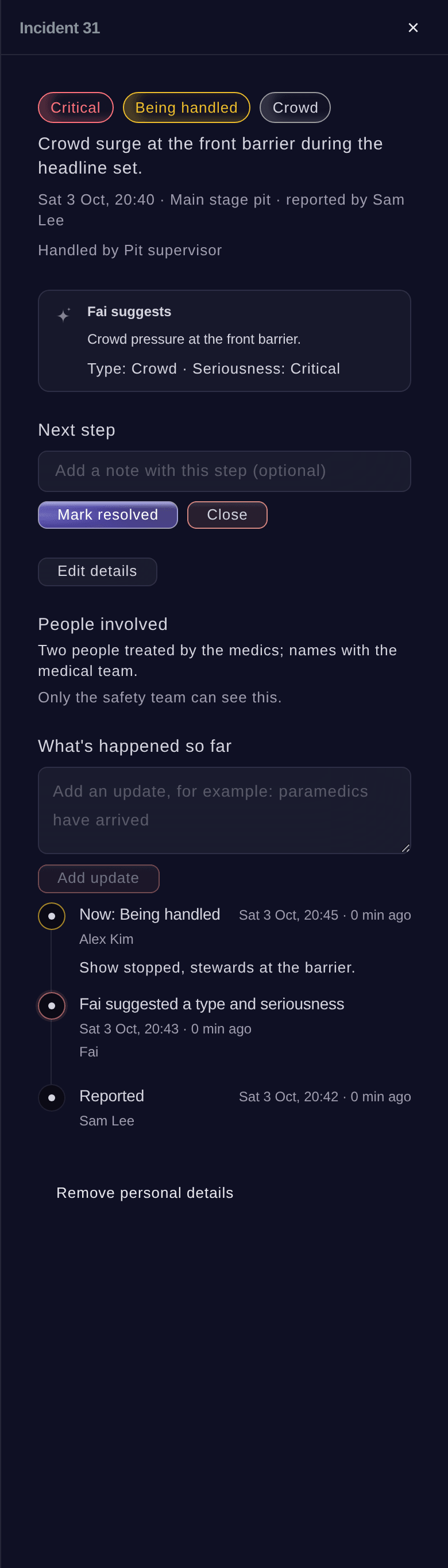
Fai reads every report and suggests its type and how serious it is, and the person handling it takes her suggestion with one button or keeps their own. Name who is handling it, move the incident from new to being handled, resolved and closed, and add updates as things happen. Every step joins its timeline with who took it and when, and updates are added, never written over.

The log lists what needs handling first, most serious at the top, with counts by status, so the duty manager sees at a glance what is open. Incidents are never deleted: one logged by mistake is closed with a note, and a closed incident can be reopened. When the time comes, remove an incident's personal details, and the people involved and the text of every update are cleared while the record of who did what and when stays complete.

Each incident also feeds the next event. Fai reads the incidents at your brand's earlier events when she drafts a risk register, so a kind of incident that keeps happening shows up on next year's register with the count beside it.

  • Fai suggests: the type and how serious it is
  • Next step: start handling, mark resolved, close or reopen
  • What's happened so far: every step and update with who and when
  • Remove personal details: the people and updates cleared, the record kept
Ticket Fairy incident panel for a crowd surge, with its seriousness, the next step, Fai's suggestion, the people involved and what has happened so far

How Event Teams Keep Everyone Informed and Safe

  • A Weather Hold at an Open-Air Festival

    Lightning is forecast at four. The site manager sends the Weather hold template by text to every steward and bar volunteer on Saturday's rota and to the traders, checks who it will reach, and sends All clear to the same people an hour later.

  • A Gate Change at a Stadium Show

    Gate C closes after a burst pipe. The gate stewards on that shift get a text with their first name and the new gate, the message panel shows two people it did not reach, and the supervisor sends it again to just those two.

  • A Busy Night at a Club

    Stewards log three fainting cases near the front bar within the hour. Fai spots the pattern and drafts an email to the safety lead, who adds a welfare officer and water at the bar before the headliner.

  • A Conference With Volunteers

    The rota goes to the volunteer coordinator every morning at seven, and accepted volunteer applicants get their first-day briefing scheduled the night before. On the day, a lost-badge incident is logged through Fai from a phone at registration.

  • A Market With Many Traders

    The organiser texts every trader, with their first name filled in, to say the power hook-ups go live an hour early. A slip on the wet ground is logged with a pin on the site map and closed with the first aider's update.

Questions About Team Messages and Incidents

Messages & incidents

The event's owners, admins and producers, from Messages and Incidents on the event's Operations page, once your brand and account are verified for messaging. Any member of your event's team can ask Fai to log an incident or add an update, and Fai waits for their yes first.

One message can go to up to 2,000 people, and your team can message up to 10,000 people a day and send 20 messages an hour. A text runs to 480 characters, and numbers that replied STOP are left out.

At least 5 minutes and at most 60 days from now, in the event's time zone. A message cannot be taken back once it is sent.

Email replies go to your brand's email address. Replies to a text get an automatic answer and are not collected, so ask people to reply by email or phone.

No. Messages is for the people working on the event. Email or text your ticket buyers from the event's Messaging page.

Up to 10 people from your event team. The rota, rooming list and pickups hold people's names, so only owners and admins schedule them and receive them. Each file lasts 7 days.

Your safety lead, named with their email in Rota rules, and the event's owners and admins, up to 20 people, once for each rise to high or critical. A critical incident still open 30 minutes after it was reported is chased again at Fai's next hourly check.

Three or more incidents of the same type in the same place within two hours. Fai drafts an email to your safety lead, or a task if Rota rules name none, and the safety lead decides what to do.

No. Incidents are never deleted, so the record stays complete. Close it with a note saying it was logged by mistake. Removing personal details cannot be undone.

On the event's Operations page, under Incidents. Sports events and food and drink festivals show it from the start; on any other event, open it from More sections. The log refreshes every 20 seconds.

Ready to Build a Stronger Event Business?

Book a live demo, and we will set up your first event on the Event Operating System with your team.

Start Selling Tickets Online

Sign up without a credit card and build a test event before you commit. Go on sale in minutes when you are ready.

No monthly subscription required for ticketing
Start selling tickets immediately
Ticketing tools included in the service fee
Get Started for Free Talk to Fai Now

Ask Fai, our AI assistant, about Ticket Fairy’s features, pricing and how it could work for your event.

No credit card required

Book a demo call

See the referral model that drives 20% more ticket sales on average, learn which campaigns sell tickets, answer buyers faster and keep queues moving.

45-Minute Video Call
Pick a Time That Works for You

The Ticket Fairy, Inc. is a fintech company and technology platform. The Ticket Fairy, Inc. is not a bank, financial institution, or regulated financial services provider. Vault banking services are provided through regulated banking partners. Ticket Fairy Capital financing is provided by third-party private credit partners. The Ticket Fairy, Inc. does not make credit decisions, and all funding terms, approvals and conditions are determined by those lending partners.