1. Event Operating System
  2. Venue operations
  3. Holds & offers

Know Who Holds Every Date and Price Every Offer With Confidence

A busy Saturday can carry three holds for months before anyone confirms, a spreadsheet never says who is really first in line, and last year's fee for an act is usually buried in someone's sent mail. With Ticket Fairy every hold and show sits on one calendar for each room and stage, in queue order, and you hold, challenge, confirm and release in a few clicks. Every offer to an agent is built with what you paid the act before and Fai's suggested fee range beside it, every counter-offer is kept as a version, and when the agent says yes, the act is booked on your event with the agreed terms.

  • Every hold in queue order on each room
  • Past fees beside every new offer
  • Accepted deals booked straight onto the event
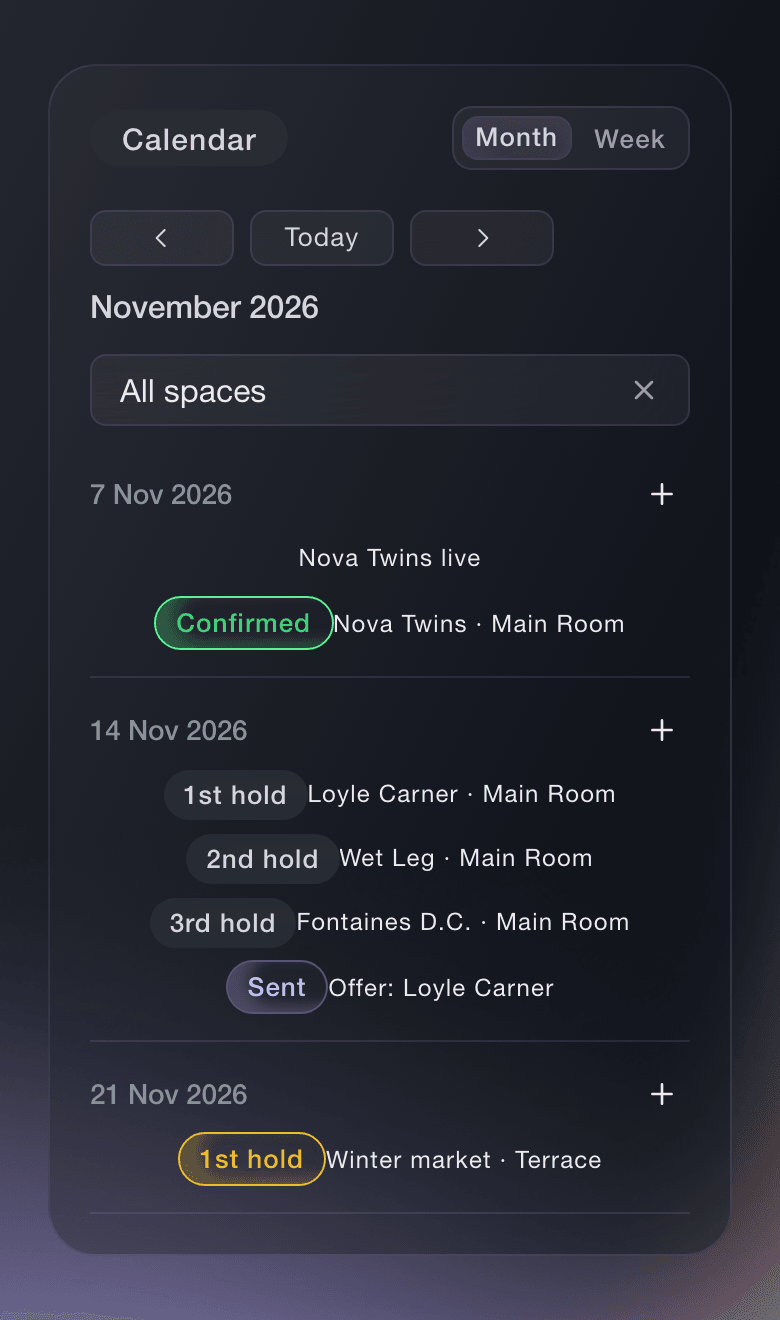
Ticket Fairy Event Operations calendar for November, with a confirmed show on the 7th and a 1st, 2nd and 3rd hold on Saturday the 14th

See Every Room's Holds and Shows at a Glance

The calendar in your brand's Event Operations shows your events, every hold and each open offer on the day it covers, across every room and stage you run. Each hold shows its place, such as 1st hold, and a booked date shows Confirmed, so the whole team knows which dates are free and who is in line for the rest.

Add each room, stage or area you book once, with its capacity, and hold dates on it from then on. Switch to a week, or pick one space, when a busy day is crowded. A venue group sees all its rooms together, and a promoter who books several venues keeps every date on the same calendar.

  • Month and week: holds, shows and open offers on the days they cover
  • Spaces: each room, stage or area with its capacity
  • Queue order: 1st, 2nd and 3rd hold on every date
Ticket Fairy Event Operations Spaces list with a Main Room and a Terrace, each with its capacity

Hold a Date in Seconds and Know Your Place

Pick the day, enter who the date is held for in your own words, the artist, the promoter or the client, and a message tells you your place in the queue. Add more days, start and end times, a contact, a lapse date or one of your events when you have them, and the hold keeps them all with its full history.

A hold with a lapse date ends by itself at the end of that day, and every hold behind it moves up a place. Leave the date empty and the hold stays until you confirm or release it. Nobody outside your team is told about your hold, so you decide when to tell the other side.

  • Hold a date: the artist, promoter or client in your own words
  • Hold lapses on: a hold that ends by itself and moves the queue up
  • Several days: a run of dates held together
Ticket Fairy Hold a date dialog holding Saturday 14 November in the Main Room, asking who the date is held for

Challenge the First Hold When You Need the Date

Behind someone else on a date you need? Challenge the first hold and give them a deadline to confirm or let the date go. If they confirm, the date is theirs and your hold keeps its place. If they do not answer in time, the date goes to the challenger with one approval, and every hold keeps its full history of when it moved up and why.

  • Challenge the first hold: a deadline to confirm or let the date go
  • Moves up by itself: holds behind a released or lapsed one rise a place
  • Hold history: every change, when and why
Ticket Fairy Challenge the first hold dialog, giving the first hold on 14 November 48 hours to confirm or let the date go

Confirm the Show and Choose What Happens to the Other Holds

When the show is agreed, the 1st hold confirms the date. Keep the other holds as backups in case the booking falls through, or release them, and link the show's event so Fai can draft its settlement when the night is over. The calendar shows Confirmed beside the name, with any backups kept in their new order underneath.

  • Confirm: the date booked, shown as Confirmed
  • Keep them as backups: other holds stay in the queue
  • Link to an event: the show's settlement drafted when it ends
Ticket Fairy Confirm dialog for a performer in the Main Room, choosing whether to keep the other holds as backups or release them, and linking an event

Act on the Dates and Deals That Need You Today

Needs attention at the top of Event Operations lists missed challenges, holds about to lapse, offers with no answer and shows with no settlement, each with the button to act. Fai checks every hour, and where a show is linked to an event she drafts the follow-up in that event's suggestions for you to approve, so a date never goes to the wrong promoter while everyone is busy.

Ask Fai what is held on a Saturday, to place or challenge a hold, to confirm the first hold or release one. She shows you each change and waits for your yes before she makes it, and nothing on your calendar changes on her own say.

  • Needs attention: the holds and deals to decide now
  • Give the date to the challenger: one approval when a challenge is missed
  • Hourly checks: Fai looks again every hour
Ticket Fairy Needs attention list with a missed challenge and the button to give the date to the challenger, a hold about to lapse, an offer with no answer and a show with no settlement

Start Every Offer From What You Paid Before

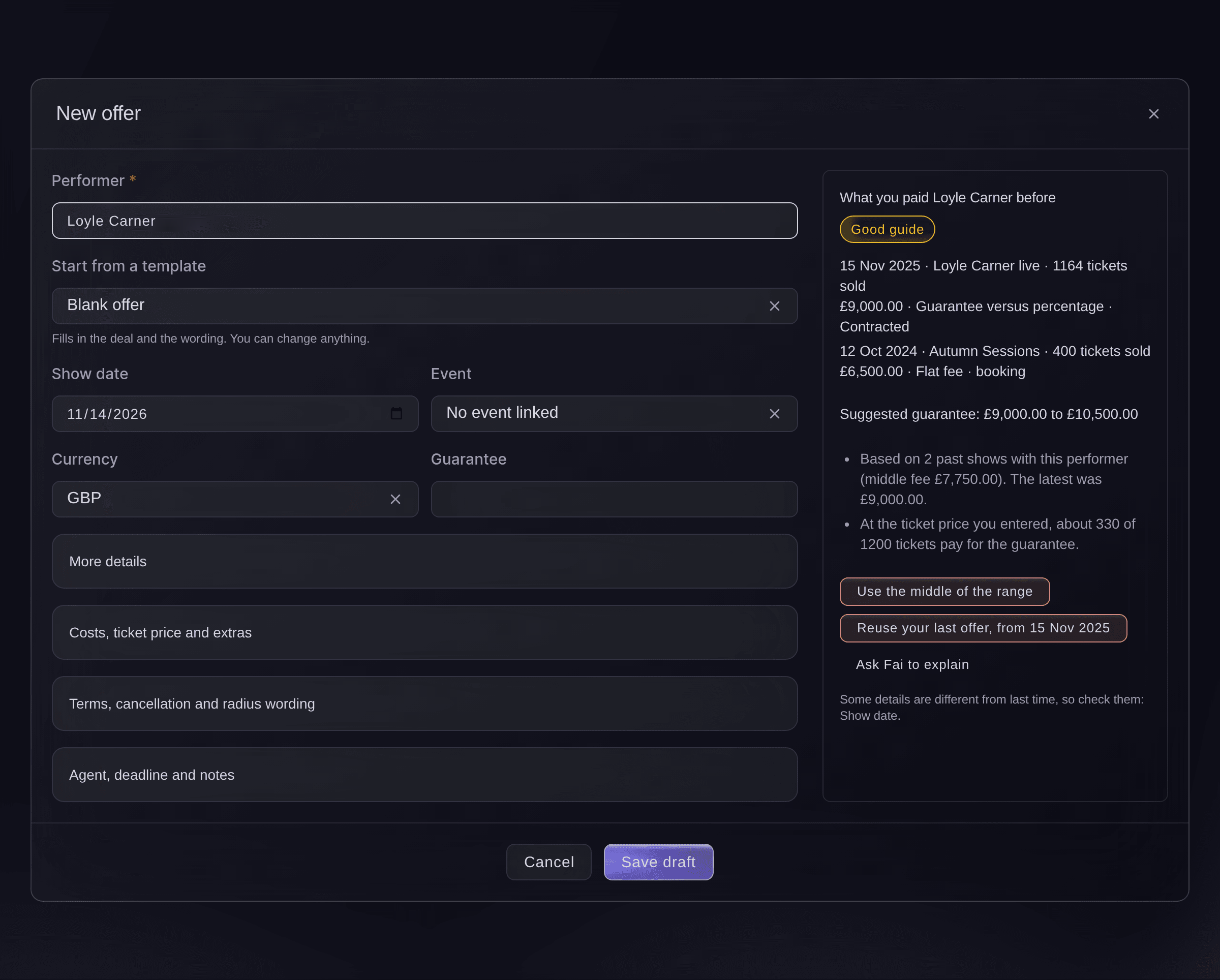
Enter the performer and What you paid them before appears beside the offer, with each past show, the fee and how many tickets it sold. Fai suggests a guarantee range from your own shows with the act, adjusted for the room's capacity, or from shows of a similar size when you have none, with a badge for how much history it rests on.

Use the middle of the range, or reuse your last offer to the act with its deal and wording, and the offer names anything that differs from last time. Ask Fai to explain puts the reasons behind the range into words. Start an offer from a hold and it comes filled in with the performer, the space and the dates.

  • What you paid them before: past fees with the tickets each show sold
  • Suggested guarantee range: from your history, with Ask Fai to explain
  • Reuse your last offer: the deal and wording, with what differs named
Ticket Fairy New offer form beside what you paid the performer before, a suggested guarantee range and the buttons to use the middle of the range or reuse the last offer

Set Out Any Deal the Way Agents Expect and Send It From Your Mailbox

Choose how the fee is worked out: a flat fee, a guarantee versus a percentage, a guarantee plus a percentage, a door deal or a deal in your own words. Add the deposit and balance with their due dates, the set length, costs and ticket price, cancellation and radius wording and the agency fee, and keep notes for your team that never reach the agent.

Fai drafts the email to the agent with the whole offer set out, finding the agent on the offer, the performer's booking or your last offer to them. Change anything, check the addresses and send it from your connected mailbox, and a copy of exactly what went out stays with the offer. Set an Open until date and Fai reminds you before it passes.

Save your standard deals and wording as offer templates, so a new offer for a regular support slot or a residency starts from terms you already trust.

  • Every kind of deal: flat, versus, plus, door deal or your own words
  • Prepare and send: the offer email drafted by Fai for you to change
  • Offer templates: your standard deals and wording, ready to use
  • Open until: a deadline with a reminder from Fai before it
Ticket Fairy Offers list with a counter-offer, a draft and a contracted offer, and two offer templates beneath it

Keep Every Counter-Offer and Book the Act the Moment They Say Yes

When the agent replies, Fai finds the answer in your brand's email and fills in what they said. Their terms are kept as a new version beside the one you sent, and if you answer with your own terms, you send them before you can record an acceptance, so the agent always agrees to what they saw. Record a yes and the act joins your event's Artists list with the agreed fee, deposit, due dates and set length, ready to advance.

Undo takes the booking back if you picked the wrong event. Once the contract is signed the offer is marked as contracted, and uploading the countersigned copy of the agent's own contract does it for you. The agreed agency fee reaches the act's all-in cost and the show's settlement, so the deal you struck is the deal you pay.

  • Check for their answer: the agent's reply found and read by Fai
  • Versions: each set of terms sent and countered, in order
  • Booked on the event: the agreed terms on the act's booking
  • Undo: the booking taken back if the event was wrong
Ticket Fairy dialog asking what the performer's side said, with They accepted, They asked for different terms and They declined

How Venues and Promoters Run Their Dates With Ticket Fairy

  • A Venue With Two Rooms

    The booker holds the same Saturday in the Main Room for three promoters. When the second promoter needs an answer, they challenge the first hold with a 48-hour deadline, and Needs attention offers them the date when the deadline passes.

  • A Promoter Rebooking a Returning Act

    What you paid them before shows last year's fee and that the show sold out. The promoter offers a little above the middle of Fai's range, and the agent accepts on the first version.

  • A Talent Buyer Handling a Counter-Offer

    The agent asks for a higher guarantee and a lower percentage. Both versions sit side by side on the offer, the buyer sends a middle position, and the accepted terms land on the act's booking.

  • A Residency Through the Season

    The venue places a hold on each Friday of a resident DJ's season and saves the deal as an offer template. Each new month starts from the template with one change to the dates.

  • A Show That Ends at Midnight

    The confirmed hold is linked to its event. The next morning Needs attention lists the show with no settlement, and Fai has drafted it in the event's suggestions for the promoter to approve.

Questions About Venue Holds and Offers

Holds & offers

You need an owner, admin or producer role on the brand, from Event Operations. Every other role on the brand can look at the calendar and the holds, but not offers or fees.

Only the 1st hold on a date can confirm it. If someone is ahead of you, challenge the first hold or ask them to release it. A confirmed date can only be released.

24, 48, 72 or 168 hours. The dialog starts on 48 hours.

No. Holds, challenges and released dates are not sent to anyone, so tell the other side yourself.

No. Fai lists what needs a decision and suggests the next step, and nothing changes or is sent until someone approves it.

No. You can hold the date again, but the new hold joins the back of the queue. To move a hold to another date or space, release it and place a new one.

The second change does not overwrite the first. The dashboard loads your teammate's version and asks you to check it and try again.

From your brand's own offers and artist bookings for that performer, with the tickets each show sold. An offer that was never agreed is shown for context only and marked that way.

No. An email cannot be unsent. Withdraw the offer and tell the agent yourself, because withdrawing does not email them. A withdrawn offer cannot be sent again, so start a new one.

An offer whose email could not be sent stays a draft and its history says so, so you can send it again. One that passes its Open until date with no answer shows Closed, no answer, and you can send it again with a new date.

Ready to Build a Stronger Event Business?

Book a live demo, and we will set up your first event on the Event Operating System with your team.

Start Selling Tickets Online

Sign up without a credit card and build a test event before you commit. Go on sale in minutes when you are ready.

No monthly subscription required for ticketing
Start selling tickets immediately
Ticketing tools included in the service fee
Get Started for Free Talk to Fai Now

Ask Fai, our AI assistant, about Ticket Fairy’s features, pricing and how it could work for your event.

No credit card required

Demo‑Gespräch buchen

Sieh dir das Empfehlungsmodell an, das im Durchschnitt 20 % mehr Ticketverkäufe bringt, erfahre, welche Kampagnen Tickets verkaufen, antworte Käufern schneller und halte Warteschlangen in Bewegung.

45‑Minuten‑Videoanruf
Wähle eine Zeit, die dir passt

The Ticket Fairy, Inc. is a fintech company and technology platform. The Ticket Fairy, Inc. is not a bank, financial institution, or regulated financial services provider. Vault banking services are provided through regulated banking partners. Ticket Fairy Capital financing is provided by third-party private credit partners. The Ticket Fairy, Inc. does not make credit decisions, and all funding terms, approvals and conditions are determined by those lending partners.