1. Features
  2. Add-ons & upsells
  3. Extras & upsells

Earn More From Every Buyer With the Extras They Already Want

Your buyers still need to park, sleep, eat and get home, and every extra they sort out somewhere else is money your event never sees. Sell parking, camping pitches, merchandise, shuttles and upgrades in the same checkout as the ticket, each with its own price and stock. Let buyers come back to their order to add more, put rooms and pitches on sale by the night, and sell a season pass that books the nights your regulars want as you announce them.

  • A bigger order from every buyer
  • Extras bought weeks after the ticket
  • Money for a whole season taken up front
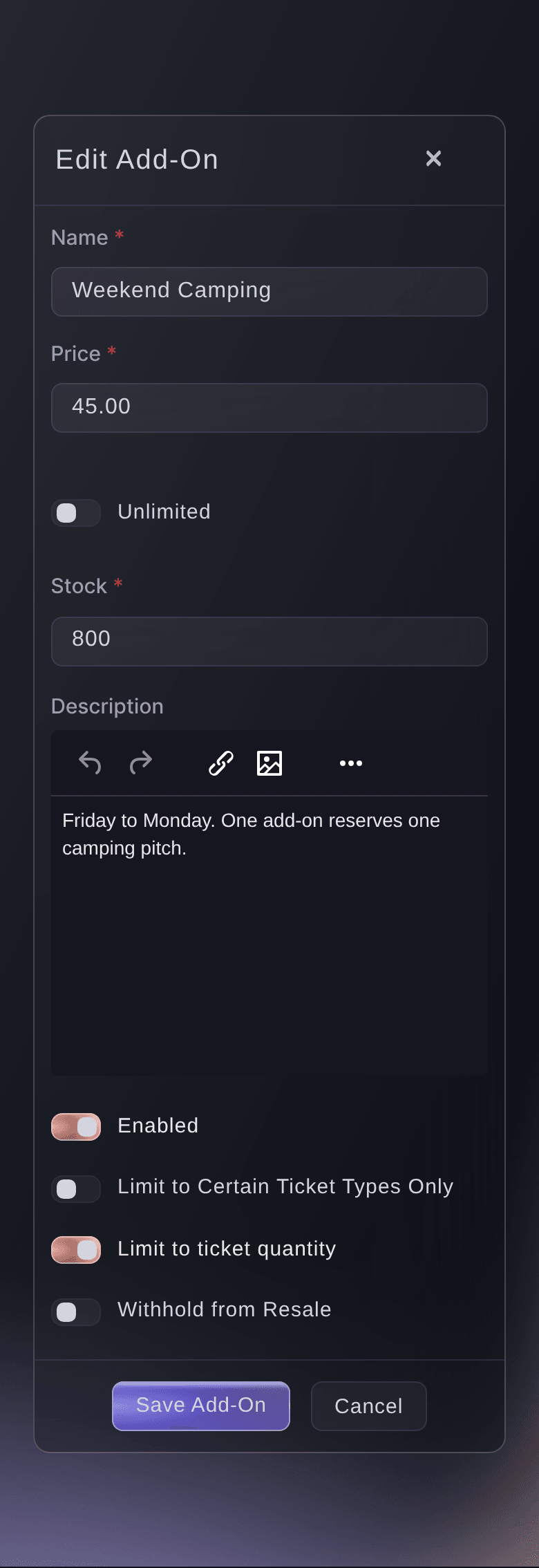
Ticket Fairy add-on form filled in for a weekend camping pitch with its price, stock and description

Sell Every Extra in the Same Checkout as the Ticket

Create an add-on for anything a buyer wants on top of entry: a car park space, a camping pitch, a meal deal, a programme, a t-shirt, a drinks package or a seat on the return shuttle. Buyers pick it under the tickets and pay for both in one order, so a festival weekend is one checkout, one confirmation email and one bigger basket.

Give each add-on a name a buyer understands at a glance, such as Return shuttle from the city centre, a price and a description with the details they need before they add it: where the shuttle leaves from, when the car park opens or which sizes a t-shirt comes in. Add a photo or a short video so buyers can see what they are getting.

Sell a t-shirt or a hoodie in several sizes and colours as one add-on with variants, each with its own stock, so the medium sells out on its own while the large stays on sale. Set the stock you can supply, or make an extra unlimited, such as a digital programme. When your event takes payments in more than one currency, give the add-on a price in each one, so buyers pay for their extras in the same currency as their tickets.

  • Add-ons: a name, price, stock and description for each extra
  • Variants: sizes and colours, each with its own stock
  • Photo or video: show buyers what they are adding
  • Prices in each currency: for events that take more than one currency
Ticket Fairy Create Add-On form with the name, price, stock, a description editor and the switches below it

Offer Each Extra With the Tickets It Belongs To

Show camping to weekend ticket buyers and a bottle package to the people booking a booth. Limit an add-on to the ticket types and table types it goes with, and buyers see it as soon as a matching ticket is in their basket, so a day ticket buyer is never offered a pitch they cannot use.

Limit to ticket quantity allows one add-on for each ticket in the order, so four friends on one order get four shuttle seats and no more. When one buyer may want several, such as drinks tokens, you set your own maximum for the order or for each ticket.

Choose whether an add-on travels with a resold ticket. Withhold from Resale keeps it with the person who bought it, which suits a campervan permit tied to a registered vehicle, while a merch bundle can go to the new holder with the ticket.

  • Limit to Certain Ticket Types Only: the add-on appears with the tickets it belongs to
  • Limit to ticket quantity: one add-on for each ticket in the order
  • Withhold from Resale: the add-on stays with the original buyer
Ticket Fairy add-on form with Limit to Certain Ticket Types Only turned on and the chosen ticket types listed

Keep Selling After the First Sale

Buyers decide how they travel, where they sleep and who joins them long after they buy a ticket. Every ticket on a buyer's order has its own Upgrades and Add-ons section, so they come back, pick the extras you sell with that ticket and pay in a few taps, with no email to your team.

The extra joins the ticket it was bought for, so your door team checks it in when they scan that ticket. Sell VIP area access, a fast-track lane or a meet-and-greet as an add-on limited to the tickets it upgrades, and a general admission buyer can move up whenever they are ready. A table host who booked for six adds guests to the table from their order and pays your price for each extra guest, so the booking grows without a call to your team.

When a buyer and your team agree a different ticket type, your box office moves the whole order with Change Ticket Type. Every ticket moves in one go and the buyer keeps their barcodes, so the tickets they already have still scan. Sell a single extra on its own, with no ticket in the basket, through a QR Quick-Buy link that points straight at the add-on.

  • Upgrades and Add-ons: a section on every ticket in the buyer's order
  • Upgrade add-ons: VIP access sold to the tickets it upgrades
  • Change Ticket Type: move an order to the ticket type you agreed
  • QR Quick-Buy links: sell one add-on straight from a link or poster
Ticket Fairy Change Ticket Type dialog with the ticket type list and a note about a ticket that cannot move

Restock, Refill and Take Extras Off Sale Whenever You Need To

When the last t-shirt goes, buyers see the add-on marked sold out and your tickets stay on sale. Raise the stock and it is back on sale with nothing new to create. Turn Enabled off to take an extra off sale while every buyer who already has it keeps it.

Stock is how many you have left, so a second run of t-shirts goes on sale the moment you raise the number. With the add-on waiting list on, buyers who missed a sold-out pitch or parking space join its waiting list. When one comes back, the next buyer waiting is offered it by email, so a returned pitch sells again with no post from your team.

At the gate, your door team scans the ticket and its add-ons are checked in with it. At a collection point such as the merch stand, your team scans the add-on's own code, so the buyer's ticket stays ready for entry.

  • Stock: how many are left, raised whenever you have more
  • Enabled: take an extra off sale and keep its orders
  • Add-on waiting list: returned extras offered to the next buyer
  • Collection point scans: the add-on's own code, with the ticket kept for entry
Ticket Fairy ticket settings with the waiting list switches for tickets and add-ons turned on

Sell Rooms, Tents and Glamping by the Night

A pitch for the weekend is an add-on. A hotel room, a bell tent or a glamping pod that buyers book for chosen nights belongs on the Accommodation page, where you sell places to stay by the night beside your tickets. Buyers browse the stays on your event page and book theirs with their tickets at checkout.

Add each property, such as a hotel, a campground or a glamping field, with its check-in and check-out times, house rules and cancellation policy. Add the room types guests book, such as a Double Room or a 4-person Tent, with how many it sleeps, how many you have and the price per night. Change the rooms on sale and the price for a run of nights, or for weekends only, and add a city tax, a cleaning fee or a site fee that is charged when guests book.

Bookings shows every stay with its guests, nights and total, and you check guests in and out from there. The guest list for each night shows who is staying, and you download it for the site team. When a hotel holds a block of rooms for your ticket buyers, add the block on the event's Operations page: buyers book those rooms at checkout at the rate you agreed, you see what is booked and still for sale each night, and the rooms nobody books go back to the hotel after the last day buyers can book.

  • Properties and room types: hotels, campgrounds and glamping with a nightly price
  • Nightly availability: rooms and prices set for any run of nights
  • Hotel blocks for ticket buyers: a hotel's rooms on sale at your agreed rate
  • Guest list: who is staying each night, ready to download
Ticket Fairy Hotel blocks for ticket buyers table on the Accommodation page with each block's room, nights, room nights held, booked and still for sale

Take a Whole Season's Money Up Front With One Pass

Your regulars come back several times a year, and each visit is one more checkout to win. Sell one pass that covers a season, a series or a tour, take the money up front, and let holders book the nights they want as you announce them. Each pass has its own buy page under your brand to share in your newsletter, on social and on your venue's website.

Attach an event series, and every event in it counts, including the ones you have not created yet, so a winter season goes on sale before you announce a single date. For a programme that does not run as a series, add each event under Included events, and the list shows which nights a holder can book.

Choose when a pass expires: never, which suits a venue with a year-round programme; on a set date, so the pass and the season end together; or a number of months after each buyer pays, which suits a pass you sell all year. Leave the ticket choice automatic and a pass books the cheapest ticket on public sale, which suits nights that cost about the same. For a mixed season with premium nights, pick the ticket a pass books at each event yourself, so a headline night is never given away at the price of an ordinary one.

Each booking uses one event of the pass, so a holder brings a friend by booking twice for the same night. Each pass shows passes sold, events booked and the bookings still to come, with revenue moving to each event as holders book it. Passes sold lists every holder with the events they have booked, the value remaining and when their pass runs out, and cancelling a booking puts the credit back on their pass. When the season closes, archive the pass: it comes off sale and every pass already bought still books events.

  • Event passes: one purchase that books several events
  • Event series: every event in it, including future ones
  • Expiry: never, a set date or months after purchase
  • Passes sold and events booked: with the bookings still to come
Ticket Fairy Event Passes list showing each pass with the events it covers, its expiry, its price and whether it is active or archived

Let Fai Set Up Your Extras and Passes

Tell Fai, the assistant inside your dashboard, what you want to sell, such as a return shuttle at your price, limited to the seats on the coach and one per ticket. She shows you the add-on before she creates it, and she can change the price, stock or ticket limits of one already on sale, or take it off sale.

Ask her to build a season pass, choose the events it covers and read back how many have sold and how many nights holders have booked. She can set up your properties, room types and nightly prices, and add a hotel block for ticket buyers. Fai asks you to approve every change before she makes it, because each one changes what buyers can buy.

  • Asked in a sentence: Fai sets the price, stock and limits
  • You approve it: nothing changes until you say so

How Organisers Sell More Extras

  • A Weekend Festival With Camping

    The festival offers camping pitches only with weekend tickets and parking with every ticket, one per ticket. When pitches sell out, the waiting list fills every pitch that comes back. Buyers who decide on a campervan permit a month later add it from their order.

  • A Tour With Merch at Every Date

    The promoter sells the tour t-shirt as one add-on with a variant for each size and colour. The merch stand scans each add-on's own code as fans collect, and a reprint of the large size goes back on sale by raising its stock.

  • A Theatre Season

    The theatre sells a season pass tied to its autumn series before the last two plays are announced. Holders book each play as it goes on sale, and the pass books the premium opening night at the ticket the theatre picked for it.

  • A Club Night With VIP Upgrades

    General admission buyers see a VIP area upgrade in their order and add it during the week as their plans firm up. Each upgrade is checked in with their ticket at the door, so the VIP host knows who to let through.

  • A Conference With a Hotel Block

    The organiser adds the conference hotel's block for ticket buyers at the agreed rate. Delegates book a room with their pass at checkout, and the rooms nobody books go back to the hotel after the last day to book.

Get this page as a PDF Read it later or share it with your team. We email you a link to the PDF.
What to put in your PDF

We will email you this deck. We may also email you now and then about Ticket Fairy features that can help your events. You can unsubscribe at any time with one click.

Questions About Event Add-Ons and Upsells

Extras & upsells

You need an owner or admin role on the event to create add-ons under Tickets, and an owner or admin role on the brand to create passes under Event Passes. Hotel blocks for ticket buyers also need an owner or admin of the event, because buyers book those rooms at checkout.

Not on your event page, where an add-on goes into an order with a ticket. To sell an add-on on its own, create a QR Quick-Buy link that points straight at it.

Use an add-on when a pitch is optional alongside admission for the whole event. Use a ticket type when the camping product admits the holder or needs its own entry. Use Accommodation when guests book a room, tent or pod for the nights they choose, with a price per night.

Buyers still see it in the checkout, marked sold out, and cannot add it. Your tickets stay on sale. Raise the stock and it is back on sale, and with the add-on waiting list on, returned extras go to the next buyer waiting.

Buyers see what they pay. Where your event passes fees on to buyers, the add-on shows your price plus those fees.

While their ticket is valid and your event has add-ons on sale. A buyer whose ticket is listed for resale takes it off sale first, and an order with a refund in progress waits until the refund is finished.

No. Change Ticket Type moves the tickets and keeps the order total the buyer paid. To charge for an upgrade, sell it as an add-on limited to the tickets it upgrades.

From 1 to 100 events. A rolling pass lasts from 1 to 120 months from the day each buyer pays. A pass with no price saves as a draft with no buy page, and a blank total for sale means no limit.

That event has no ticket a pass can book. Give it a ticket that is neither hidden nor switched off, or pick the ticket for that event yourself, and it becomes bookable.

Shortly after midnight on the day after the last day buyers can book, in your event's time zone, the rooms nobody booked go back to the hotel and stop selling. Buyers who booked keep their rooms.

Sell more tickets. Build the crowd that comes back.

Start Selling Tickets Online

Sign up without a credit card and build a test event before you commit. Go on sale in minutes when you are ready.

No monthly subscription required for ticketing
Start selling tickets immediately
Ticketing tools included in the service fee
Get Started Talk to Fai Now

Ask Fai, our AI assistant, about Ticket Fairy’s features, pricing and how it could work for your event.

No credit card required

Book a demo call

See the referral model that drives 20% more ticket sales on average, learn which campaigns sell tickets, answer buyers faster and keep queues moving.

45-Minute Video Call
Pick a Time That Works for You