1. Features
  2. Add-ons & upsells
  3. VIP tables & auctions

Sell Every VIP Table Before the Night and Let Fans Bid on the Best Ones

A booth held on a phone call can leave you with an empty table and nothing paid. Sell each booth and bottle-service package online as one booking for the whole party, with a deposit taken at checkout and an identity check before the booking is confirmed. Your promoters sell tables through their own links, your door team collects the balance when the host arrives, and the one front-row booth or signed poster goes to whichever fan bids the most.

  • Tables paid for before the night
  • Every booking made by a buyer you know
  • The top price a fan will pay for your rarest extras
Ticket Fairy Create Table Type form with the name, price, stock, guest limits and online deposit for a VIP booth

Book Each Table for the Whole Party

Create a table type for each booth, position or bottle-service package, with its price and how many you can sell. Set the smallest and largest party one booking holds and what each guest above the minimum adds. Buyers choose a table and their party size in the Reserve Tables section of your event page, and the price follows as they add guests.

The table price covers the minimum party, so a booth for four to eight at your price with a charge for each extra guest pays more when the party grows. Enter the same number in both party fields when a booth is for a fixed group, and enter 0 for extra guests when the table price covers everyone.

A table booking is one ticket for the whole party, so the host shows one code at the door and the guest count is on the booking for your floor team. Create a separate table type for each booth size, position or package, such as a dancefloor booth, a mezzanine table and a bottle-service package, each with its own price and stock. Sell entry tickets as normal ticket types for everyone who is not at a table, and add a bottle package or a birthday cake as an add-on limited to the table types it goes with.

  • Table types: a booth, position or package with its own price and stock
  • Party size: the smallest and largest party one booking holds
  • Price per additional guest: what each guest above the minimum adds

Take a Deposit Online and Collect the Rest at the Door

Choose the share of each booking the buyer pays at checkout, from a deposit to the whole price. When you save, the confirmation repeats your split, such as a deposit now and the remaining share collected directly, so nobody on your team is surprised on the night. Your event page shows the deposit on each table, and checkout shows the rest as Pay on Check-in.

When your door team scans the booking in the Entry Fairy app, the ticket shows the balance still to pay, worked out from the table price and any extra guests. They take the payment however your venue takes it and mark it paid in the app, so the booking no longer shows a balance.

Pick a smaller deposit when your bookings come late and on impulse, and a larger one, or the whole price, when a no-show booth costs you a night of bottle sales.

  • Online Deposit Percentage: the share of the booking paid at checkout
  • Balance at the door: shown when your door team scans the booking
  • Marked paid: so the booking no longer shows a balance
Ticket Fairy confirmation asking you to approve a 25% online deposit on a table type

Know Who Booked Before You Charge the Card

Every table booking includes an identity check. After paying, the buyer photographs an ID document and takes a selfie, and the deposit is held on their card until they pass. If the check passes, the card is charged, the ticket is issued and the confirmation email goes out. A buyer who passed before is confirmed at once.

If a check fails, the buyer gets an email with the likely reason, such as a blurred photo, and tries again on the same page. A buyer who leaves before finishing sees a Verify Account prompt on your event page and gets a reminder email.

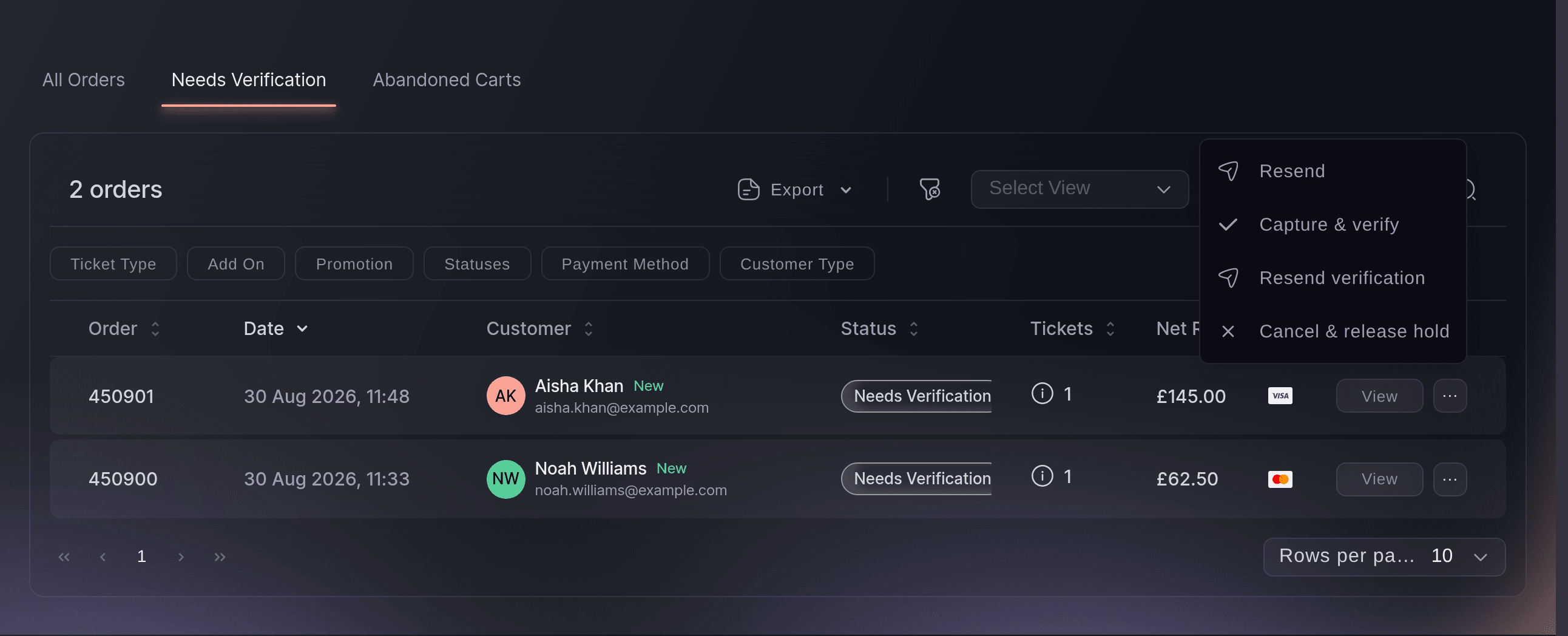
The Needs Verification tab in Orders lists every booking still waiting, so nobody chases a booking by hand. Resend verification sends the buyer the link again. Capture & bypass charges the hold and confirms the booking yourself, for a regular you know. Cancel order releases the hold and puts the table back on sale sooner. Each one asks you to confirm first, because capturing or cancelling cannot be undone.

  • Identity check: an ID photo and a selfie before the booking is confirmed
  • Needs Verification: the bookings still waiting for their check
  • Capture & bypass: confirm a booking yourself
Ticket Fairy Orders page on the Needs Verification tab with two held table bookings and the row menu open

Open the Next Booth When the First One Sells Out

Choose when each table type goes on sale: always, from a date and time, or once the previous table type sells out. Open a pricier booth only after the first one is gone, and set a sales end a few hours before doors so your floor team works from the final list.

From the table's row menu under Table Types, Deactivate Table Type hides it from buyers and keeps its bookings, and Activate Table Type puts it back. Mark as Sold Out shows it as sold out on your event page, which tells buyers your booths went fast. Delete Table Type is offered only while nothing has been booked or added to a basket.

  • Sales start and end: the window buyers can book a table in
  • Once the previous sells out: the next booth opens by itself
  • Mark as Sold Out: shown as sold out, with its bookings kept
Ticket Fairy table type sale dates with a sales start and end for a VIP booth

Let Your Promoters Sell Tables Through Their Own Links

Invite your promoters with the Promoter role, and when you publish, each one gets an email with their own link and a QR code for it. A table booked through a promoter's link counts on their row in Sales by Promoter.

Add a promoter who sells across every night to the brand team, and they get a link for every event you run, including the ones you create later. Add a promoter who only works one night to that event's team. A whole street team joins at once from one invitation link shared in their group chat.

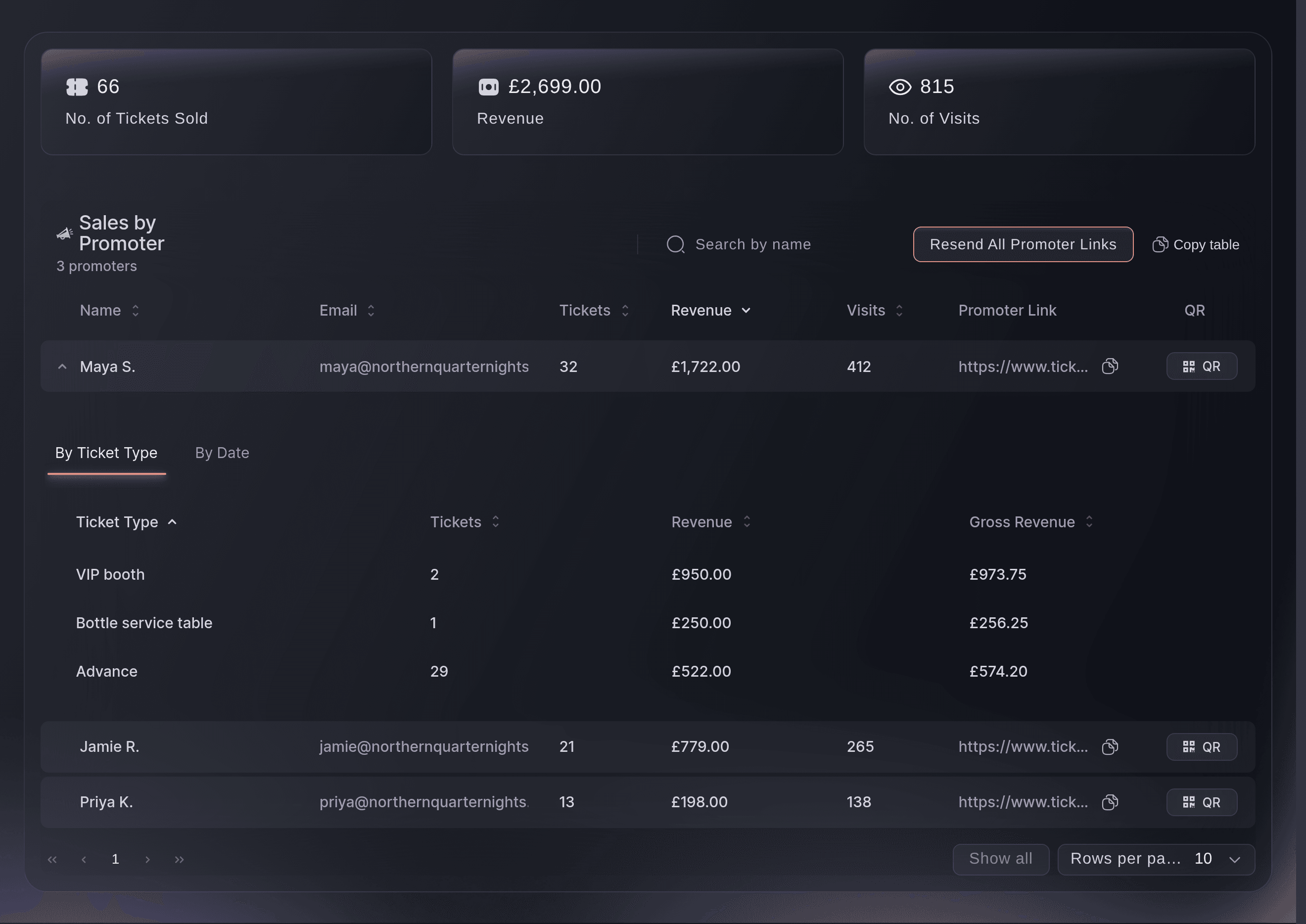
Sales by Promoter shows each promoter's tickets, revenue and visits, with a breakdown by ticket type that names the table types they sold and a breakdown by date that shows when. Revenue on a table includes the balance you collect at the venue, so you can pay commission on the full booking. A promoter sees their own link and the event's ticket sales, and never your tables, your team or other promoters' figures.

  • Promoter links: a link and a QR code for every promoter
  • Sales by Promoter: tables and tickets each promoter sold
  • By Ticket Type: which table types each promoter sold
Ticket Fairy Sales by Promoter table with tickets, revenue, visits and a promoter link for each promoter, one row opened by ticket type

Auction Your Rarest Extras to the Fans Who Want Them Most

A fixed price on the one front-row booth or the signed poster earns the same whether one fan wants it or twenty. Put a VIP table, signed merch or a backstage pass up for auction on your event. Fans bid on the auction's own page, each bid is held on their card, and when the auction ends the top bidders are charged and get their tickets.

You set the minimum bid, the bid increment, a reserve and when bidding opens and closes, and you choose how many winners there are and the ticket type each winning place gets, so the top bid wins the best booth and the next bid the one beside it.

A bidder who is overtaken gets an email saying they were outbid, so they come back and bid again. A bidder below your reserve is told their bid has not reached it yet. Show the auction on your event page beside your tickets, or turn on Hide on the event page and share the auction URL only with your fan club, your VIP list or your followers.

The Auctions page shows each auction as Scheduled, Live, Ended or Completed, with its highest bid and how many bids it has. View bids lists every bidder, their company, their bid and its status, and Cancel bid drops a bid you do not want and releases the hold on that card. End the auction when bidding closes, or end a live one early when the price is right: the top bids win, the winners are charged and emailed their tickets, and every other hold is released.

  • Auctions: a minimum bid, a bid increment and a reserve
  • A card hold on each bid: only the winners are charged
  • Number of winners: with a ticket type for each winning place
  • Outbid emails: a reason for the bidder to come back

Set Up Tables, Promoters and Auctions by Asking Fai

Tell Fai, the assistant inside your dashboard, the booth you want to sell, such as a VIP booth for four to eight guests at your price with a charge for each extra guest and a deposit online. She shows you the table type before she saves it, invites your promoters, resends their links and reads back Sales by Promoter.

Ask her to deactivate a table type, put it back on sale or mark it sold out, and she asks whether buyers who already have it in their basket may finish paying. Ask her to set up an auction with its winners and ticket types, list the bids, or end it when the bidding closes. She asks you to approve every change first, and always before she ends an auction and charges the winners.

  • Asked in a sentence: Fai fills in the price, party size and deposit
  • You approve it: nothing changes until you say so

How Venues and Promoters Sell Tables and Auctions

  • A Nightclub Weekend

    The club sells dancefloor booths with a deposit online and opens the mezzanine tables once the booths sell out. Online booking closes at ten, the floor team works from the final list, and the door team collects each balance as the host arrives.

  • A Promoter Team Selling Bottle Service

    Every promoter on the brand team gets their own link for each night. On Monday the manager opens Sales by Promoter, sees the table types each promoter sold with the balances collected at the venue, and pays commission on the full booking.

  • A Festival With One Side-Stage Booth

    The festival auctions its only side-stage viewing booth with a reserve and two winners. The top bidder gets the booth, the runner-up gets the table beside it, and every other bidder's card hold is released when the auction ends.

  • A Charity Gala

    The gala runs a hidden auction for a signed shirt and a backstage pass, shared only with its donor list. Each winner is charged when the auction closes and receives their ticket by email with the rest of their order.

  • A Day Party at a Rooftop Bar

    The venue sells cabanas as fixed parties of six with the whole price online, so there is no balance to collect on a busy door. Regulars who passed the identity check before are confirmed the moment they pay.

Get this page as a PDF Read it later or share it with your team. We email you a link to the PDF.
What to put in your PDF

We will email you this deck. We may also email you now and then about Ticket Fairy features that can help your events. You can unsubscribe at any time with one click.

Questions About VIP Tables and Auctions

VIP tables & auctions

You choose a share from 1 to 100 percent, and every table takes some payment online. Our booking fee is charged on the amount paid online, not on the balance you collect at the venue.

They see a Verify Account prompt on your event page and get a reminder email after 12 hours. The card hold lapses after about 7 days on most cards and about 30 on some, and then we cancel the booking, put the table back on sale and email the buyer.

No. A table booking is one ticket for the whole party, and your door team scans it once for the host. The guest count is on the booking, so the team knows how many to seat.

A buyer can hold one unconfirmed table booking at a time. Once the identity check confirms it, they can book another.

A booking counts for a promoter when the buyer opens their link and books within 7 days in the same browser, and once the identity check confirms it. A booking you refund leaves the promoter's row along with its revenue.

No. Buyers who share your event earn no money back on a table booking. Promoters do get credit for every table booked through their link.

You need an owner or admin role on the event to create table types, invite promoters and run auctions. With a stats role you can open Sales by Promoter but not change tables.

Only when the auction ends, and only the winners. Every other bid is cancelled and its card hold is released. Ending an auction cannot be undone.

Ending the auction charges nobody, and the dashboard tells you the reserve has not been met. Bidders below the reserve are told so when they bid, so they can raise their bid.

The second save is refused with a message to reload, so that person sees the latest version before saving again and neither of you overwrites the other's change. A new auction uses your event's time zone, and the form tells you when an auction uses a different one.

Sell more tickets. Build the crowd that comes back.

Start Selling Tickets Online

Sign up without a credit card and build a test event before you commit. Go on sale in minutes when you are ready.

No monthly subscription required for ticketing
Start selling tickets immediately
Ticketing tools included in the service fee
Get Started Talk to Fai Now

Ask Fai, our AI assistant, about Ticket Fairy’s features, pricing and how it could work for your event.

No credit card required

Book a demo call

See the referral model that drives 20% more ticket sales on average, learn which campaigns sell tickets, answer buyers faster and keep queues moving.

45-Minute Video Call
Pick a Time That Works for You