Launch one ad campaign on all your networks at once

Set one budget and launch on Meta, TikTok, Google, Reddit, Spotify and ChatGPT, with Fai drafting the ad copy. Then compare networks, posts and partners by the tickets they sold.

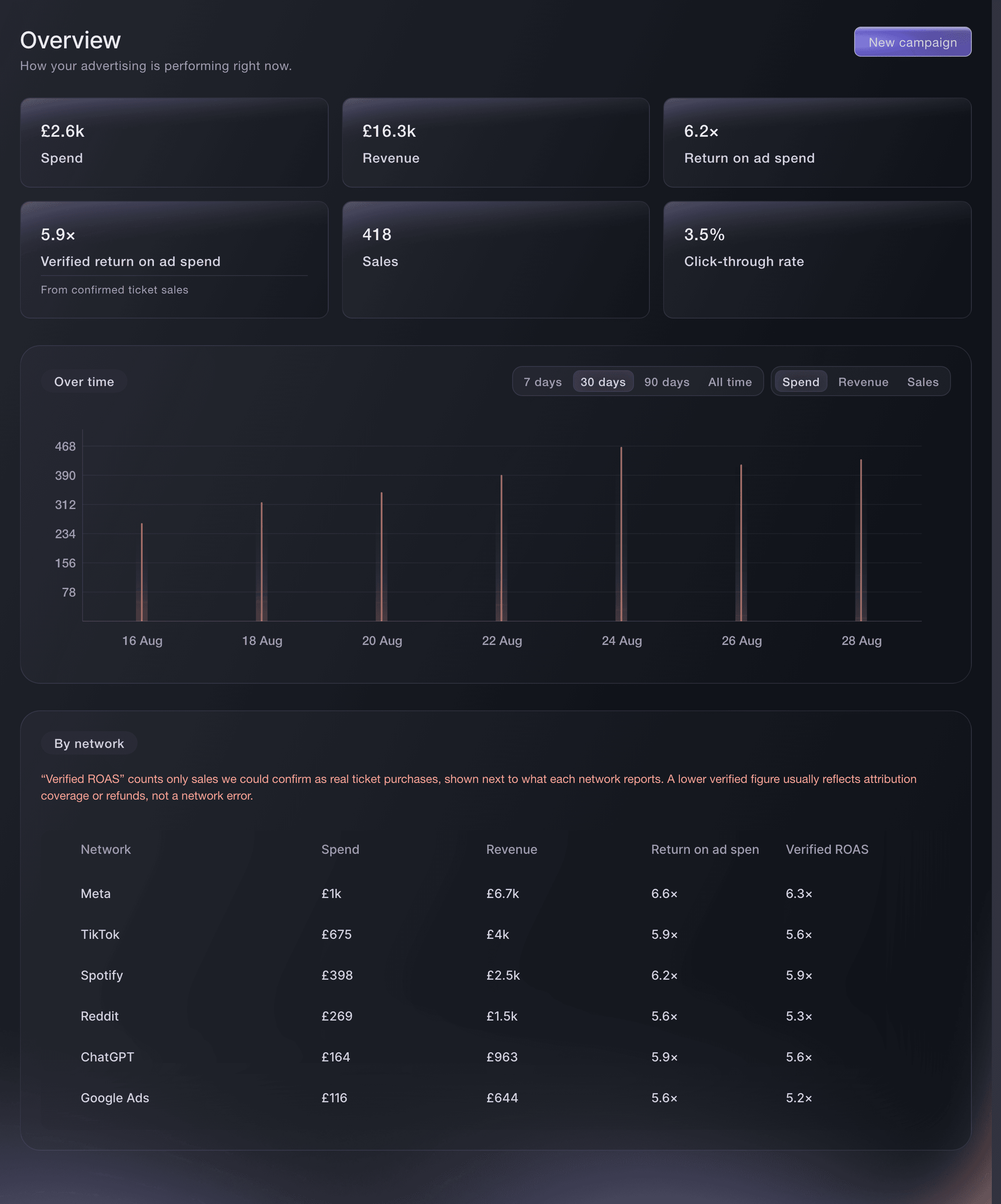
Ticket Fairy advertising overview with spend, revenue, return on ad spend and sales, a day-by-day chart and a table of results by network
  • One campaign on each network you pick
  • Return on ad spend from confirmed ticket sales
  • Clicks, orders and revenue for each link

Launch one campaign on each network you advertise on

Connect Meta, TikTok, Google, Reddit, Spotify and ChatGPT under Connected networks, by signing in or by entering the details from your ad account. Build a campaign once, pick the networks it runs on and launch it. Pause or resume it on all of them in one step.

Start with what you want the campaign to achieve. Choose Sell tickets, Sell merch, Fill the room, Drive traffic, Boost engagement or Promote the app. Win back interested fans reaches people who looked but did not buy. Choose the event, and Ticket Fairy fills in the destination and the sales tracking for you. Send people to your event page, to one of your tracking links, or to a web address of your own. The builder tells you how fully each destination reports sales.

Skip people who already bought is on for each new campaign. You never pay to reach anyone who already has a ticket for that event, and they still see ads for your other events. Turn it off when you want to reach recent buyers, for example to sell them an upgrade. Choose where your Google ads run, by location and language, under Connected networks.

  • Connected networks: Meta, TikTok, Google, Reddit, Spotify and ChatGPT
  • Campaign goals: from selling tickets to winning back interested fans
  • Skip people who already bought: no budget wasted on buyers who have a ticket

Put your budget behind the networks that sell

Enter a budget per day or a total for the campaign, and Ticket Fairy splits it across your networks. Each network shows its minimum daily budget before you choose it, so there are no surprises at launch. Adjust the split to give a network a bigger or smaller share.

Change the split while the campaign runs, and your live ads on each network get the new split straight away. To change the other details of a live campaign, pause it first. If a network rejects a change, the campaign shows which networks took it and which need attention. You see the network's own details and try again on that network alone.

  • Per day or total: one budget, with optional start and end dates
  • Adjust the split: a bigger share for the network that sells
  • Needs attention: see exactly which network refused a change

Get ad copy in your brand's voice from Fai

Tell Fai the event, the network and the angle you want, such as final release tickets. Pick a tone from Match my brand, Hype, Urgency, Premium or Informative. Fai drafts headlines, primary text and calls to action that fit that network.

Compare as many options as you ask for, keep the one you like and review it before it becomes a creative. Fai's copy is a draft. Nothing is saved until you apply it and create the creative, and no money goes out until you confirm the launch.

  • Draft ad copy with Fai: headlines, primary text and calls to action
  • Tone: from Match my brand to Urgency or Premium

Launch with confidence and keep your team in step

Review the goal, event, networks, budget, creative and destination before any money goes out. Confirm the launch with the most the campaign can cost in front of you. Each campaign shows who last edited it. When a teammate changes it while you have it open, you see their latest version.

When you delete a campaign, Ticket Fairy stops your ads on each network first. If a network cannot be stopped, the campaign stays, so no ad keeps running unseen. If a pause does not reach a network, the campaign tells you that network is still charging you and offers Retry stopping.

  • Review before launch: each detail and the most it can cost
  • Last edited by: who changed each campaign
  • Retry stopping: no network left running ads unseen

Compare networks by the tickets they actually sold

Each network's own report claims its own sales. The advertising Overview shows your spend, revenue, return on ad spend, sales and how often people who saw your ads opened them. The By network table puts Meta, TikTok, Google, Reddit, Spotify and ChatGPT side by side.

Verified return on ad spend counts only the sales Ticket Fairy can confirm as ticket purchases, net of refunds. It sits next to what each network reports for itself. When a network claims more than you can confirm, you see the gap before you raise its budget. The Over time chart plots spend, revenue or sales for each day across the last 7, 30 or 90 days or all time. You see an on-sale lift, a campaign that faded and the day a budget change began to pay back.

Do buyers also buy on pages outside Ticket Fairy? Add one sales tracking snippet to your own website, and you see which of your ads led to those sales too.

  • Verified return on ad spend: from confirmed ticket sales, net of refunds
  • Over time: spend, revenue or sales day by day
  • Sales tracking for your own website: one snippet for pages outside Ticket Fairy

See which post, poster and partner sold the most

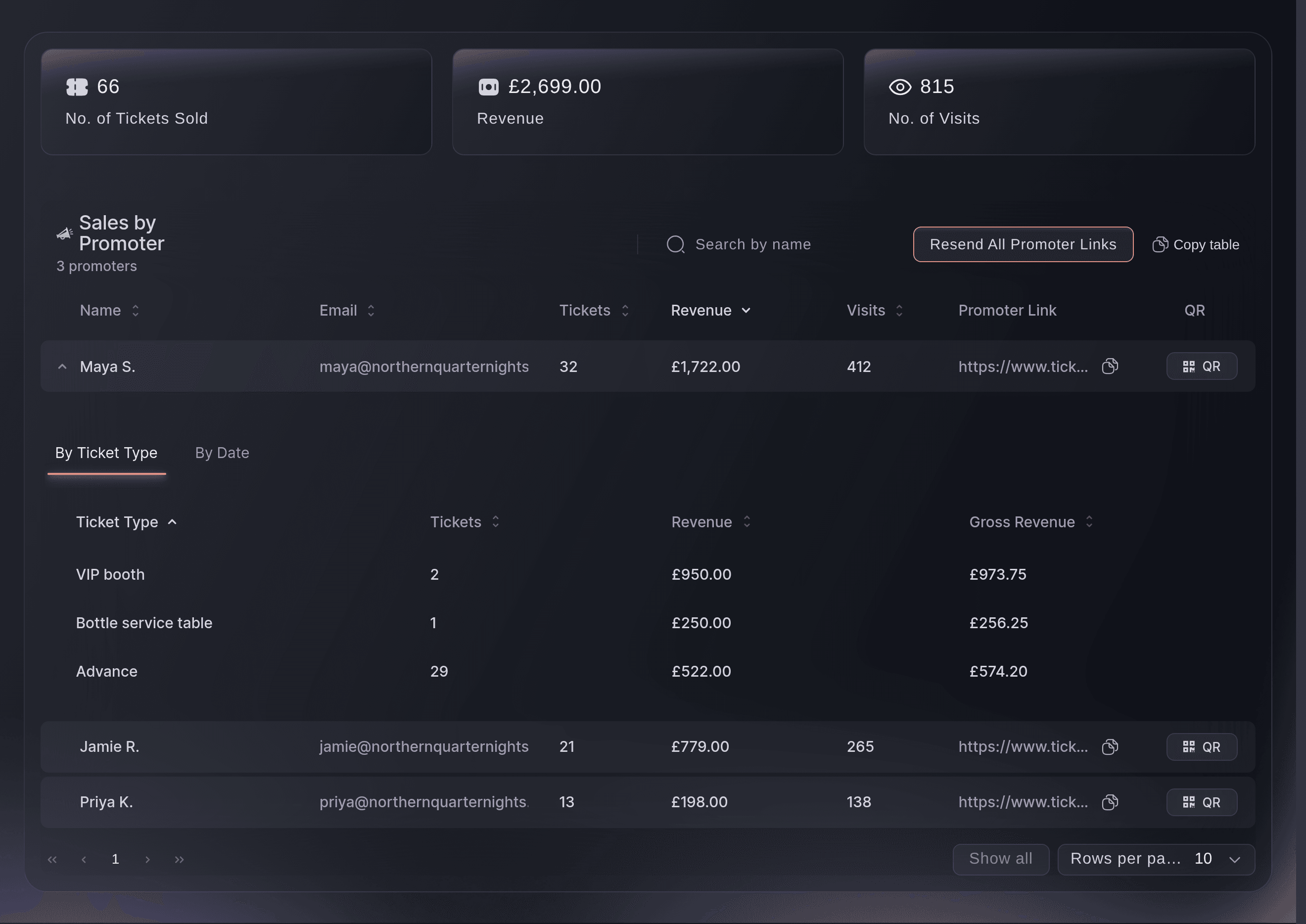
A newsletter, a partner's page, an Instagram story and a printed flyer can all promote the same event at once. Create a tracking link for each one, and your event shows the visits, orders and revenue each link brought in. Download any link as a QR code, and your posters sit in the same table as your ads.

The Tracking Links table opens with the busiest link first. Sort by any column to find the one that sold the most. Or copy the whole table into a spreadsheet for your team or partners. Choose a promoter when you create a link, and the sales through it count for that team member in Sales by Promoter. Your own posts stay as plain tracking links.

Each promo code can carry its own sales tracking link too. Add source, medium and campaign tags to the links you share. The Campaigns tab of your event's Traffic report adds up the visits, orders, tickets and revenue each tag brought in. The Funnel tab shows how many visitors went from your event page to checkout and on to a purchase.

  • Tracking links: a short address for each ad, post or partner
  • Download QR: the same link for posters and flyers
  • Clicks, orders and revenue: for each link, sorted by what it brought in
  • Campaign tags: sales by source, medium or campaign
Ticket Fairy Tracking Links page for an event with one row per link and the clicks, orders and revenue each one earned

Ask Fai to build, run and report on your campaigns

Tell Fai, the assistant inside your dashboard, the event, the goal, the budget and the networks, and she sets up the campaign. She can launch, pause and resume it, change the budget split and tell you what it sold. She asks you to approve each change, and always before a campaign starts costing you money.

Ask Fai which campaign brought in the most ticket sales for an event and what each sale cost. She breaks the figures down by network, campaign or day and separates confirmed sales from what a network claims. She tells you when a figure is still unknown. Ask which link or campaign tag sold the most, and she gives you the same visits, orders and revenue you see.

  • Campaigns in a sentence: event, goal, budget and networks
  • You approve the budget: nothing launches until you say so

How organisers run and measure their ads

  • A festival final release

    The marketing team builds one Sell tickets campaign on Meta, TikTok and Google with Fai's Urgency copy. After three days the Overview shows TikTok with the highest verified return. They move the budget split towards it while the campaign runs.

  • A club night with no wasted budget

    Skip people who already bought keeps the promoter from paying to reach fans who already have a ticket. A Win back interested fans campaign reaches people who looked at the event page but did not buy.

  • A concert promoted in print and online

    Each poster, newsletter and partner page gets its own tracking link and QR code. The Tracking Links table shows the record shop poster sold more than the paid story, so the next tour prints more posters.

  • A conference with partner channels

    Speakers, sponsors and associations each share a tagged link. The Campaigns tab of the Traffic report shows which partner brought the most delegates. The Funnel tab shows where visitors dropped off before checkout.

  • An agency running several brands

    The agency asks Fai for each brand's results by network each Monday. Fai separates confirmed sales from what each network claims, so the agency moves budget only on sales it can prove.

Get this page as a PDF Read it later or share it with your team. We email you a link to the PDF.
What to put in your PDF

We will email you this deck. We may also email you now and then about Ticket Fairy features that can help your events. You can unsubscribe at any time with one click.

Questions About Ad Campaigns and Results

Ad campaigns & results

Meta, TikTok, Google, Reddit, Spotify and ChatGPT. You connect each one with your own ad account for that network. Ads you buy on a network outside Ticket Fairy do not appear in the overview.

You need to be an owner, an admin or on the marketing team for the brand. Ask an owner or an admin to give you access, or to run the campaign for you.

Each network has its own minimum daily budget, and the builder shows it beside the network before you choose it. If your budget or split leaves a network below its minimum, raise the budget, change the split or remove that network. A total budget needs an end date so each daily minimum can be checked.

A network counts the sales it believes it caused, and counts them for itself. Ticket Fairy counts the paid orders your event took, once each. An order can hold one ticket or ten, so treat the sales as orders.

A confirmed zero means it sold nothing. An empty figure means nothing has been matched to it yet. The sales may not have come through its link, or the pixel is missing. Only a confirmed zero is a reason to pause a campaign.

When your campaigns run in more than one currency, the overview adds the totals as plain numbers and says so. Narrow to an event that sells in one currency to see exact amounts.

Two or three days. An on-sale day lifts everything that ran through it. A figure checked the morning after says more about the announcement than the campaign.

Revenue is your share after Ticket Fairy's fees, not what the buyer paid. An order counts from the moment it is placed, so one awaiting a bank transfer appears beside a paid one. A refunded order stays in the count while the refund lowers the revenue. A Limited Stats login shows the clicks and orders with all money figures hidden.

A sale counts towards a link when the buyer opens that link and buys in the same browser. One visitor counts once for each link. That resets when they open a different link for the same event, and it lasts for 30 days or until they clear their browser.

You cannot rename a link, so create a new one for future promotions. Deleting a link removes its clicks and orders from the report without changing the orders. The address then opens the general events page, so keep links on printed material. Tracking links belong to one event, while you set pixels once for your brand.

Sell more tickets. Build the crowd that comes back.

Start Selling Tickets Online

Sign up without a credit card and build a test event before you commit. Go on sale in minutes when you are ready.

No monthly subscription required for ticketing
Start selling tickets immediately
Ticketing tools included in the service fee
Get Started Talk to Fai Now

Ask Fai, our AI assistant, about Ticket Fairy’s features, pricing and how it could work for your event.

No credit card required

Book a demo call

See the referral model that drives 20% more ticket sales on average, learn which campaigns sell tickets, answer buyers faster and keep queues moving.

45-Minute Video Call
Pick a Time That Works for You