See which ads sold your tickets on each network

Connect Meta with one sign-in, and add TikTok, Google and other networks by pasting their code. Each network records the sales from your event pages and checkout, with their value.

Ticket Fairy Network Conversion Tracking Pixels panel with a tab for each advertising network
  • Ticket sales matched to the ads behind them
  • Set up once for all your brand's events
  • Meta counts sales even when browsers block tracking

Count more Facebook and Instagram sales, even with tracking blocked

When a buyer's browser blocks tracking, Meta never learns about their ticket sale, and your best ads look weaker than they are. Connect Meta to your brand with one sign-in and pick the pixel for your sales. Meta then gets each sale from our servers as well as from the buyer's browser, and matches more of your sales to the ads behind them.

You copy no pixel ID and paste no access token. You pick from the ad accounts and pixels you can use in Meta, and if you have no pixel yet, you create one in the same step. Meta records when a visitor opens your event page, when they start checkout and when they complete the sale, with the order value.

Move your sales to another pixel whenever you like, and your current pixel keeps counting until the new one is on. If your team already holds a pixel ID and an access token, enter them in the manual setup below the guided one.

  • Connect Meta: sign in and pick your ad account and pixel
  • Sales from our servers: as well as from the buyer's browser
  • Create a new pixel: made in the ad account you connected
Ticket Fairy Meta conversion tracking card with an ad account connected and a pixel selected

Add other ad networks by pasting their code

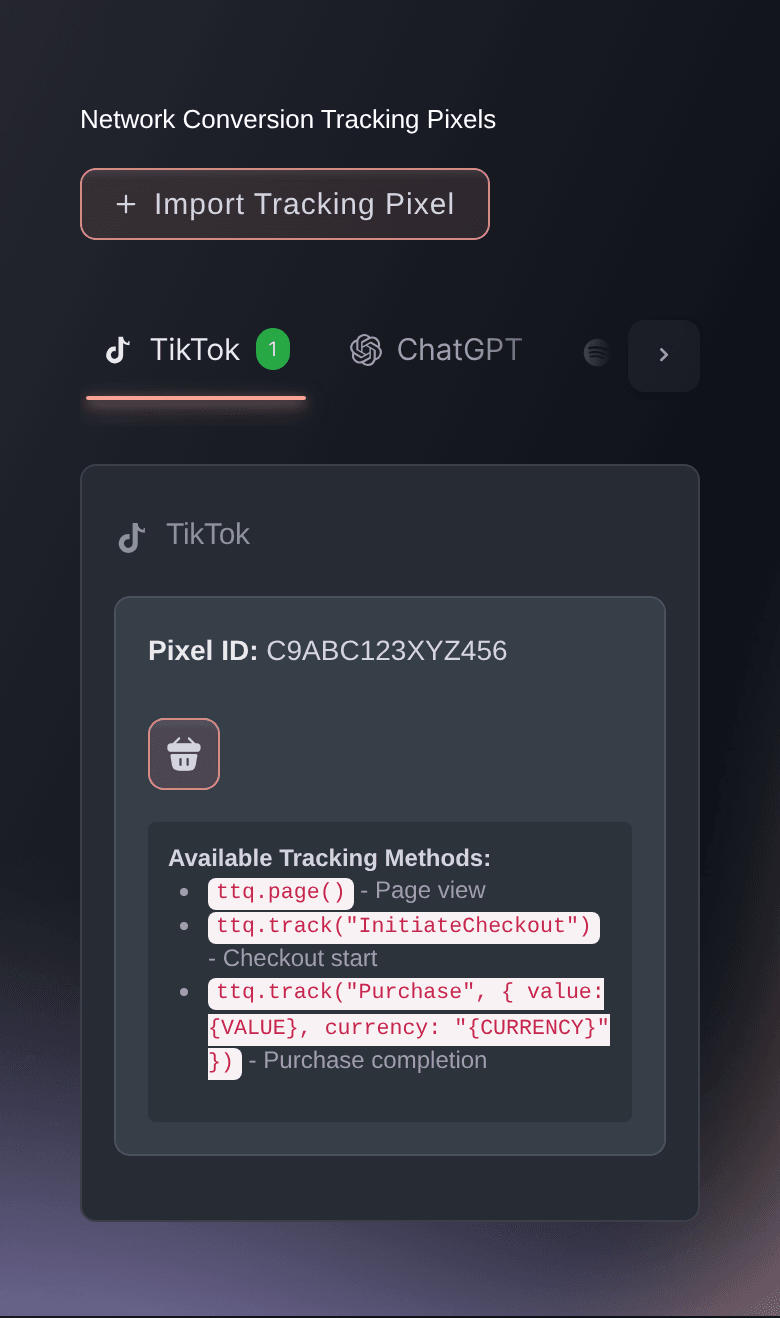
Add TikTok, Snapchat, Reddit, Pinterest, X, LinkedIn, Microsoft Bing, Spotify, Amazon DSP or ChatGPT by pasting the complete tracking code from that ads account into Import Tracking Pixel. The dialog picks out the network and the pixel ID from the code, so you check what it found and import it. Each network then gets its own tab with the pixels you added and the events it records.

The complete code carries the settings each network needs to count a sale correctly: the conversion ID for LinkedIn, the configuration key for Spotify, and the region and purchase event for Amazon DSP. If you paste only the base tag where a network needs its sale event too, the dialog asks you to copy the complete conversion setup.

Advertising one event from two accounts on the same network, such as your own TikTok account and your agency's? Import a pixel from each, and both record each sale, so each team sees the tickets its own ads sold. Remove a pixel from its tab when an account stops advertising for you.

  • Import Tracking Pixel: paste the code and the dialog finds the network
  • A tab for each network: the pixels you added and the events each records
  • Two accounts, one network: import a pixel from each
Ticket Fairy Import Tracking Pixel dialog after it detects TikTok and its pixel ID

Count ticket sales as Google Ads conversions and in GA4

Bid on the searches that sell tickets, with the revenue to prove it. Paste the Google tag and the event snippet of your ticket sale conversion action from Google Ads together. Google Ads then records each completed sale against that conversion action, with the order value, the currency and the order's transaction ID.

Your website already reports to Google Analytics, and your event pages can report to the same property. Paste your measurement ID, or the complete Google tag that holds it, and we keep the full ID that starts with G-. Google Analytics then records view_item when a visitor opens your event page, begin_checkout when they start buying and purchase when they complete the sale, with the ticket items in the order. The ecommerce reports show which tickets sell and what they bring in. To compare networks, give each ad and post its own tracking link and see the visits, orders and revenue each one brought in.

  • Google Ads conversions: each sale with its value and transaction ID
  • Google Analytics ecommerce: your ticket items in GA4 reports
Ticket Fairy Google Analytics tab of Network Conversion Tracking Pixels with the saved measurement ID and the tracking calls it sends

See which LinkedIn, audio and programmatic ads sold tickets

Selling delegate passes to a summit? Paste your LinkedIn Insight Tag with the conversion code for completed sales, and LinkedIn records each registration against your conversion action with its value. Microsoft Bing records the tickets each of your search campaigns sold in the same way.

Running Spotify audio ads for a tour? Paste the code from Spotify Ad Analytics, and Spotify records a product view, a checkout and a purchase with its value. Buying programmatic through Amazon DSP? Paste your Amazon Ads tag with the purchase event from Events Manager. Each sale carries its value, quantity and its own order ID, so Amazon counts it once. Connect your Spotify ad account to Ticket Fairy too, and the advertising overview puts your Spotify ad costs beside the ticket sales they brought in, so you can move budget to the network that sold.

Ads in ChatGPT put your event in front of new fans. Paste your ChatGPT pixel, and ChatGPT records when a visitor opens your event page, starts checkout and places an order, with its value and currency. Buyers who ask AI shopping assistants about events can also start a ticket order there, at your prices and with your ticket rules, then pay on the Ticket Fairy checkout page.

  • LinkedIn and Microsoft Bing: delegate and search sales with their value
  • Spotify and Amazon DSP: audio and programmatic sales counted once each
  • ChatGPT: event page visits, checkouts and orders
Ticket Fairy LinkedIn tab of Network Conversion Tracking Pixels showing the pixel ID and the events reported to LinkedIn

Set up once for all your events and website

Your pixels belong to your brand, so each event page and checkout under it reports to your networks. That includes next month's tour dates and next year's edition before you create them. Buyers who check out on your own website through the embedded checkout count the same way, so a sale on your site counts for your ads too.

Need a pixel on one event only, such as a sponsor's or a co-promoter's? Each event's Advanced Options take extra tracking code for the event page view, the checkout start and the completed purchase, with the sale value and currency filled in for you. You can also add a Google Analytics measurement ID and a Google Tag Manager container for that event alone.

  • Brand-wide pixels: each event page and checkout under your brand
  • Your own website: sales on your site count the same way
  • Advanced Options: extra tracking codes for one event
Ticket Fairy event Advanced Options with the tracking code fields for an event page view, a checkout start and a completed purchase above Save Advanced Options

Ask Fai to turn on your tracking

Once you have signed in to Meta, ask Fai, the assistant in your dashboard, to show the pixels on your ad account, create a new one or turn tracking on for the pixel you advertise with. Give her a TikTok, Snapchat, Reddit, Pinterest, X, Bing or ChatGPT pixel ID, or a Google measurement ID, and she adds it to your brand.

Before a new campaign starts, ask Fai which pixels your brand already reports to. She asks you to approve each change before she makes it, and you can always make the same change in Integrations yourself.

  • Add pixels in a sentence: from the ID or the complete code
  • You approve it: nothing changes until you say so

How organisers see which ads sell tickets

  • A festival on Meta and TikTok

    The festival connects Meta with one sign-in and pastes its TikTok code once. Both networks record each sale with its value from all events under the brand, so the marketing team moves budget to the campaigns that sold weekend tickets.

  • A conference selling delegate passes

    The organiser pastes the LinkedIn Insight Tag with its conversion code and the Microsoft Bing tag. Delegates who register on the conference website through the embedded checkout count too, so the team keeps paying for the campaigns that fill the room.

  • A tour with audio ads

    The promoter runs Spotify audio ads for each date and adds the pixel once for the brand. Each new tour date reports to Spotify from the day the promoter creates it, with no extra setup.

  • A club night with an agency

    The agency advertises from its own Snapchat account while the club runs another. The club imports both pixels, and each team sees the tickets its own ads sold.

  • A venue with a sponsor's pixel

    A drinks sponsor wants its own pixel on one headline show. The venue enters the sponsor's code in that event's Advanced Options, and all its other events stay on the venue's own pixels.

Get this page as a PDF Read it later or share it with your team. We email you a link to the PDF.
What to put in your PDF

We will email you this deck. We may also email you now and then about Ticket Fairy features that can help your events. You can unsubscribe at any time with one click.

Questions About Ad Tracking Pixels

Ad tracking pixels

You need to be an owner, an admin or on the marketing team for the brand to open Integrations. If you cannot open it, ask an owner or an admin to add the pixel or to give you access.

No. Once you sign in, you pick your pixels from Meta, and we keep the connection credential on our side. If you prefer, Set up manually takes a pixel ID and access token, but do not add the same pixel in both places.

Each network records when a visitor opens your event page, starts checkout and completes a sale, with the order value and currency. Meta receives ViewContent, InitiateCheckout and Purchase. Google Analytics receives view_item, begin_checkout and purchase with the ticket items. ChatGPT receives contents_viewed, checkout_started and order_created.

In Import Tracking Pixel, paste the complete code so the dialog can find the network and keep its settings. For Google Analytics, the measurement ID that starts with G- is enough. For TikTok, Snapchat, Reddit, Pinterest, X, Microsoft Bing and ChatGPT, Fai can add a pixel from its ID once you approve the change.

Yes, for all networks except Spotify and Microsoft Bing. For those two, use one pixel for each brand, from the ads account that runs that brand's campaigns.

When a buyer completes an order, we share their email address and phone number with your TikTok pixel, and TikTok uses them to match the sale to your ad. Each purchase also carries an ID from its order, so TikTok recognises the same sale if the buyer opens their confirmation page again.

No. You add each pixel once for your brand, and each event page and checkout under it reports to that pixel, including events you create later. Use an event's Advanced Options only for a code that belongs on that one event.

Yes. Your networks record sales through the embedded checkout at the same points as sales on your Ticket Fairy event page.

Buy a ticket on your own event, or place a test order. The purchase then appears in that network's reporting, such as Meta Events Manager or the Google Analytics Realtime report, with the order value. Realtime usually shows new activity within a few minutes.

No. The ChatGPT pixel measures the sales from ads you run in ChatGPT. Selling tickets through AI assistants is part of the AI ticket concierge, and you can use both.

Sell more tickets. Build the crowd that comes back.

Start Selling Tickets Online

Sign up without a credit card and build a test event before you commit. Go on sale in minutes when you are ready.

No monthly subscription required for ticketing
Start selling tickets immediately
Ticketing tools included in the service fee
Get Started Talk to Fai Now

Ask Fai, our AI assistant, about Ticket Fairy’s features, pricing and how it could work for your event.

No credit card required

Book a demo call

See the referral model that drives 20% more ticket sales on average, learn which campaigns sell tickets, answer buyers faster and keep queues moving.

45-Minute Video Call
Pick a Time That Works for You