1. Features
  2. Checkout
  3. Fair access

Keep Your Tickets With the Fans Who Want Them

On a night that sells out in minutes, the fastest buyers are not always fans, and a few large orders can take the tickets many more people were waiting for. With Ticket Fairy, you cap how many tickets one order and one customer account can buy, decide who gets a ticket before it is issued, and ask buyers to prove who they are with their card held until they do. Every ticket carries a name your door team can check, and tickets that come back go to the fans on your waiting list at the price you set, so nobody has a reason to pay a tout.

  • Your allocation spread across more fans
  • Tickets only for the buyers you approve or verify
  • Returned tickets kept at face value for the fans who are waiting
Ticket Fairy Anti-Scalping/Fraud Settings dialog with Names required, Name checks, ID required, Ticket resale and Add-on resale

Spread a Sell-Out Release Across More Fans

A release you expect to sell out fast reaches more people when no single basket can take a big share of it. Set the most tickets one order can hold, and the most one customer account can buy across all its orders, for the whole event or for one ticket type. A buyer who comes back for a second and third order still stops at your limit, so a tout needs a new account and a new card for every few tickets, and buying a block to resell stops being worth the trouble.

Give VIP a tighter limit than general admission, or sell a table ticket that must be bought in multiples of two. Ticket Fairy counts the active tickets of that type on the customer account when a signed-in buyer adds tickets and again at checkout, and cancelled or refunded tickets do not count against them.

When a partner sells part of your event, turn on This ticket type is being sold on a different platform and enter the address in External Platform Link. Your event page shows a button for that ticket type that opens the partner's page, beside the tickets you sell yourself.

  • Per order: the most tickets one basket can hold
  • Per account: the most one customer can buy across every order
  • A limit for each ticket type: tighter on VIP, looser on general admission
Ticket Fairy ticket type form with Set custom maximum quantity per order turned on and a limit entered

Decide Who Gets a Ticket Before It Is Issued

A membership tier, an industry night, a student rate or a curated party admits people on your decision. Turn on order approval, and buyers place a request at checkout instead of receiving a ticket straight away. Ask for approval on every order for the event, or only on the ticket types that need a decision, and buyers of your other ticket types check out as normal.

An order that includes one ticket needing approval waits for you as a whole, and approving it issues every ticket in it. Buyers can still find your event and place a request, so order approval suits an event where anybody may ask. Use a password, personal invitations or an access code when only invited guests should reach checkout at all.

  • The whole event: every order waits for your decision
  • Chosen ticket types: approval only where you need it
Ticket Fairy Ticket Settings with Require order approval and Hold payment until approved turned on for the event

Charge the Buyer Only When You Say Yes

Turn on Hold payment until approved, and checkout reserves the amount on the buyer's card and takes it when you approve. If you decline, the hold is released and the buyer pays nothing. The Needs Approval tab in your event's Orders lists every request with the buyer, the tickets, the total and when the payment hold expires, so you can see which requests to decide on first.

Approve an order and the buyer is charged and gets their tickets. Decline it, and the buyer hears your decision straight away, with the hold released or a payment taken at checkout refunded, so a buyer you turn away is never left out of pocket. Each decision shows you the order number to confirm, on a desktop or a phone. Leave the hold off when you would rather take every payment at checkout and refund the buyers you decline.

  • Hold payment until approved: the amount is reserved, not taken
  • Needs Approval: every request with its Hold expires time
  • Approve or Decline: confirmed with the order number
Ticket Fairy Needs Approval tab with two student orders waiting and the Approve and Decline actions

Ask Buyers to Prove Who They Are on High-Demand Nights

Ask for an ID check on the whole event or on the ticket types under most pressure. Buyers finish checkout as normal, then photograph their ID and take a matching selfie on their phone. Their card is held, not charged, until they pass, so a bulk buyer with no identity behind each order never gets the tickets.

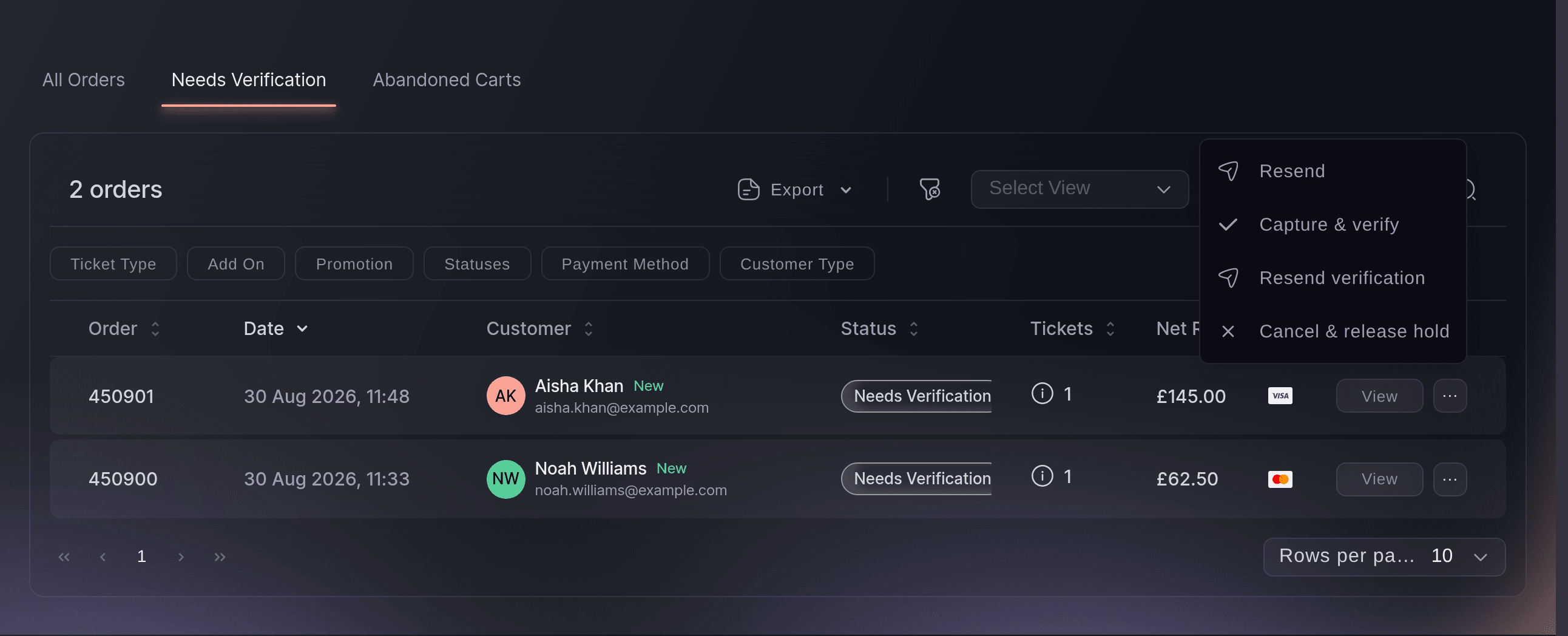
Every order still waiting appears on the Needs Verification tab of Orders. Send a buyer the check again when they closed the page before finishing it. Take the payment without the check when you have satisfied yourself another way, and the buyer gets their tickets. Release a hold that is going nowhere, and the tickets go back on sale. Taking a payment and releasing a hold each ask you to confirm first.

  • ID and selfie check: the buyer proves who they are on their phone
  • Card held, not charged: until the buyer passes
  • Resend verification: a fresh link for a buyer who closed the page
Ticket Fairy Orders page on the Needs Verification tab with two held orders and the row menu open

Put a Name on Every Ticket and Check It at the Door

Turn on Names required, and every attendee gives their name when the tickets are bought. Turn on Name checks, and your door team checks those names at entry. Turn on ID required, and attendees show ID at the door as well as their ticket. A ticket bought to resell then carries a name the tout does not share.

  • Names required: a name for every attendee
  • Name checks: names checked at entry
  • ID required: attendees show ID at the door

Send Returned Tickets to Fans at Face Value

With Ticket resale on, a buyer who cannot come passes their ticket back through Ticket Fairy, and it goes out again at the price you set. With the waiting list on, the next fan waiting for that ticket type is offered it first. A fan who knows they can get a ticket at the original price has no reason to buy from a resale site, and the old ticket's code stops working at the door once the new holder has theirs.

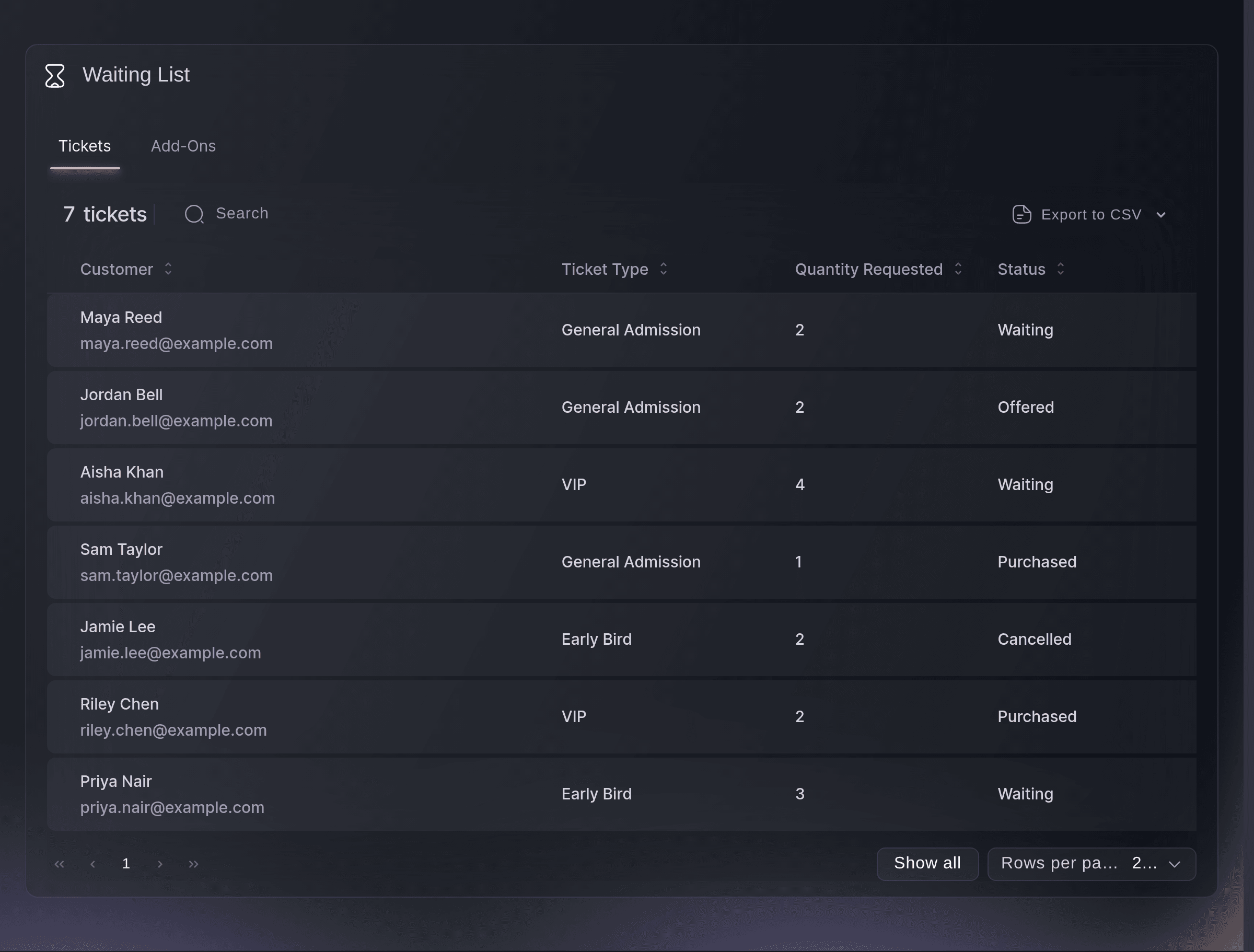
The Waiting List tab on Performance shows who is waiting for each ticket type once it sells out, which tells you how much demand you did not serve and who to offer the next release to. Add-on resale works the same way for parking, camping and other extras.

  • Ticket resale: returns go out again at your price
  • Waiting list: returned tickets offered to fans in order
  • Old codes refused: only the new holder gets in
Ticket Fairy ticket settings with the waiting list switches for tickets and add-ons turned on

Keep Your On-Sale Where Only Fans Reach It

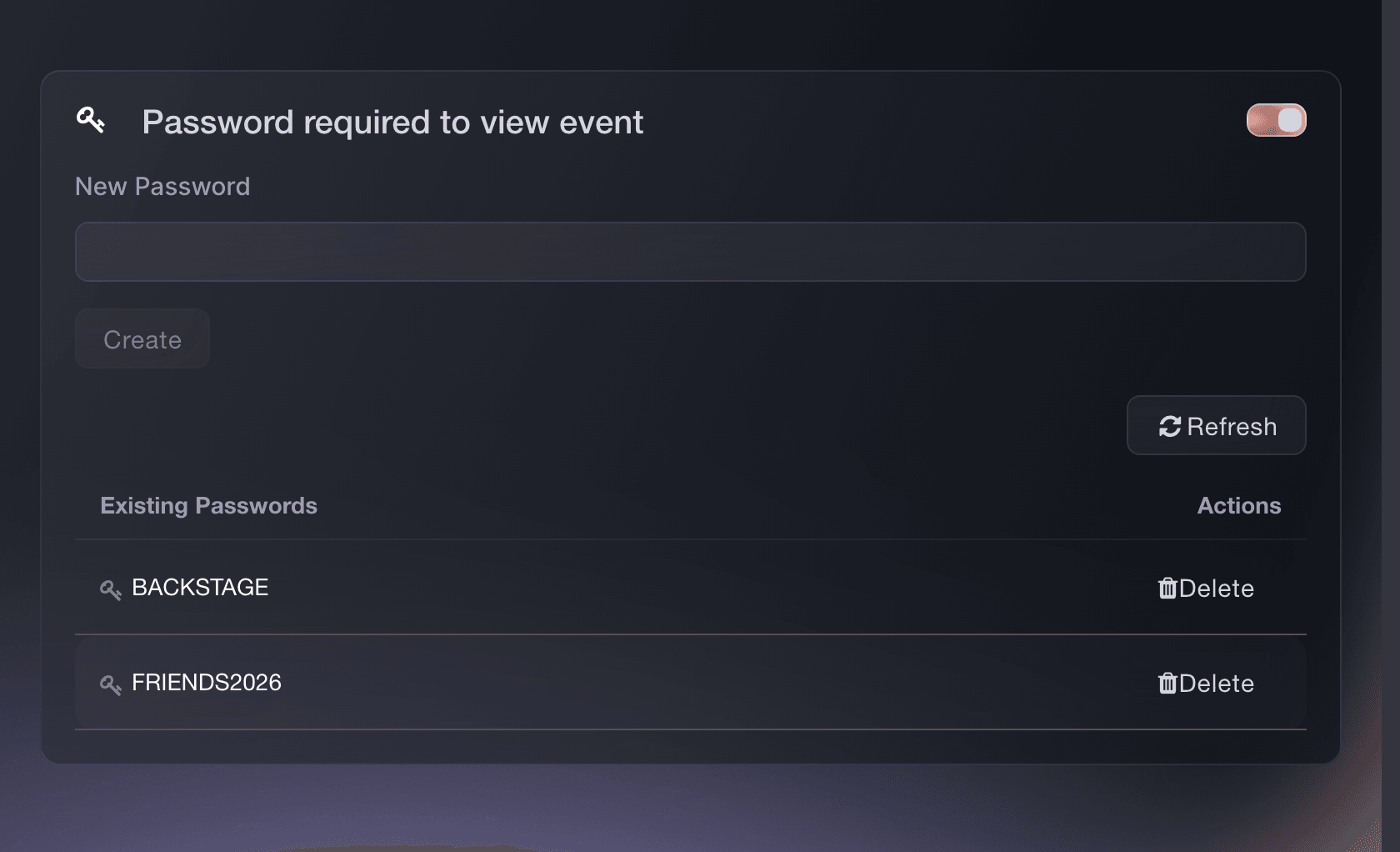
Run your highest-demand on-sale by invitation, by presale code or behind a password, so your tickets never sit on a public page for a bot to find. When the public sale opens, a waiting room in front of checkout shows each buyer their place and lets them in turn, so the buyers already paying finish quickly and refreshing the page gains nobody an advantage.

Split your tickets into releases with their own on-sale times, and two smaller rushes replace one big one, with a reason for fans who missed the first release to come back. Pre-registration and invitations move your most likely buyers ahead of the public crowd.

  • Invitation, code or password: tickets only your fans can reach
  • Waiting room: buyers move into checkout in turn
  • Releases: demand spread across on-sale times
Ticket Fairy event settings with Password required to view event turned on and two passwords

Set Your Protections by Asking Fai

Tell Fai, the assistant inside your dashboard, the limit you want on a ticket type, and she sets the per-order limit, the per-account limit or the external sales address. She can turn on order approval for the event or the ticket types you name, change the anti-scalping settings and switch the waiting list on, and she shows you each change and saves it only once you approve.

Ask Fai to open a pending order, and she shows you the buyer, the tickets, the total and the payment hold, then approves or declines it once you choose. Approving can take the held payment and declining emails the buyer, so she asks you again before either one.

  • Limits in a sentence: per order, per account or an external link
  • Pending orders: approved or declined once you choose
  • You approve each change: nothing is saved until you say so

How Organisers Keep Tickets Fair

  • A Headline Show That Sells Out Fast

    The promoter caps general admission at four per order and six per account, turns on the waiting list and asks for an ID check on the front-row ticket type. Returned tickets go to the next fan in line at face value, and resale sites have little to list.

  • A Student Rate at a Club Night

    The student ticket type needs approval with the payment held. The promoter checks each request on Needs Approval, approves real students and declines the rest, who are never charged.

  • A Curated Members' Party

    Every order needs approval, and Names required puts each guest's own name on their ticket. Name checks at the door make sure the person who was approved is the person who arrives.

  • A Festival With a Partner Allocation

    Weekend camping is capped per account, and a coach travel package sold by a partner gets an External Platform Link. Buyers find every option on one event page, and the festival's own tickets stay within its limits.

  • A Theatre Run With a Password Presale

    Members get a password presale a week before the public on-sale, and the waiting room handles the public rush. Members buy without competing with bots, and the public sale opens without a slowdown at checkout.

Get this page as a PDF Read it later or share it with your team. We email you a link to the PDF.
What to put in your PDF

We will email you this deck. We may also email you now and then about Ticket Fairy features that can help your events. You can unsubscribe at any time with one click.

Questions About Fair Access and Touting

Fair access

You choose a number from 1 to 20 for each ticket type. The per-order limit caps one basket, and your event page never offers more than the event's own per-order limit.

It applies to buyers who already have a customer account. A buyer whose email has no customer account yet can buy up to the per-order limit in a first order, so set a per-order limit as well when the first order matters. New limits apply to later purchases, and orders already placed keep their tickets.

With Hold payment until approved on, a payment method that supports a hold reserves the amount and you take it when you approve. A payment method that cannot hold the amount charges the buyer at checkout and refunds them if you decline, and you may not get the processing fees back.

The reserved amount is released and the order is declined, because the payment can no longer be taken. The buyer then needs to place a new order, so decide before the Hold expires time.

No. Approval covers the whole order. Ask the buyer to place separate orders when different tickets need different decisions.

Ticket Fairy emails the buyer a reminder after twelve hours and every twelve hours after that, and starts clearing an untouched order after seven days. The ticket goes back on sale once the bank lets the hold expire, so releasing old holds yourself gets tickets back on sale sooner.

No. Both ask you to confirm first, because one takes the buyer's money and issues the tickets and the other puts the tickets back on sale.

It appears once an ID check is asked for, on the event or on one of its ticket types. You need an owner or admin role on the event to manage held orders and to change these settings.

Yes. Turn Ticket resale off and no buyer can pass a ticket on through Ticket Fairy. Leaving it on with the price held at face value gives a buyer who cannot come a fair way to pass their ticket on, and the person who returned it receives the face value less any resale fee.

The per-order and per-account limits and the waiting list, on every event. Ask for the ID check when a show sells out in minutes, and run the on-sale by invitation when you already have the list.

Sell more tickets. Build the crowd that comes back.

Start Selling Tickets Online

Sign up without a credit card and build a test event before you commit. Go on sale in minutes when you are ready.

No monthly subscription required for ticketing
Start selling tickets immediately
Ticketing tools included in the service fee
Get Started Talk to Fai Now

Ask Fai, our AI assistant, about Ticket Fairy’s features, pricing and how it could work for your event.

No credit card required

Book a demo call

See the referral model that drives 20% more ticket sales on average, learn which campaigns sell tickets, answer buyers faster and keep queues moving.

45-Minute Video Call
Pick a Time That Works for You