1. Features
  2. Sell more
  3. Emails to buyers

Tell Your Ticket Holders Everything They Need to Know

Send the doors time, the set times, a change of entrance or a thank-you after the show to everyone attending, one ticket type or your waiting list, now or at a time you choose, and see who opened it. Add your own words to the confirmation email every buyer gets, and reveal a secret venue when you are ready.

  • The right email to the right ticket holders
  • Fewer questions in your inbox
  • A secret venue revealed when you choose
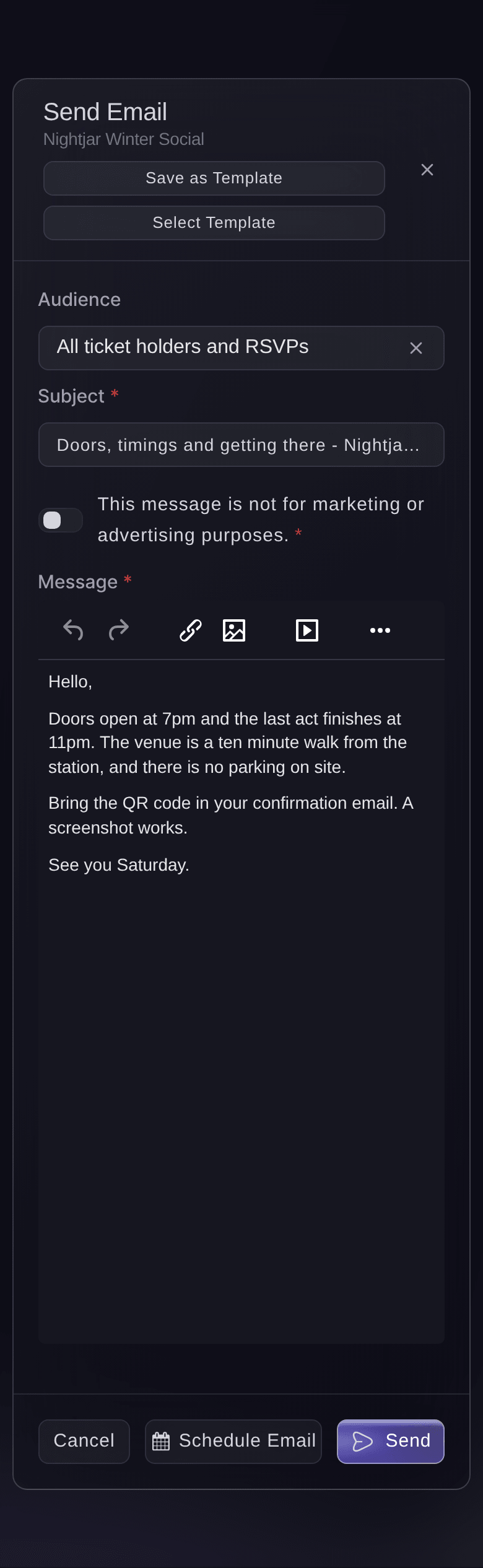
Ticket Fairy email composer for an event, with the audience selector, the subject and the message

Reach Exactly the Ticket Holders Who Need to Know

Email everyone attending, the holders of one ticket type or one add-on, the people already inside or the ticket holders who have not arrived yet. Reach your waiting list, your pre-registered fans, the buyers who left a cart or the buyers who share your event. Every email goes out under your brand's name, and replies come to your brand's email address. Send a test to yourself and check the subject and message before you send.

  • Audiences: ticket types, add-ons, check-ins, waiting list and more
  • Test send: see the email as your buyers will
  • From your brand: your brand's name, with replies to your address
Ticket Fairy Review Email confirmation showing the subject and message before it is sent

Send Each Email at the Right Moment and See Who Opened It

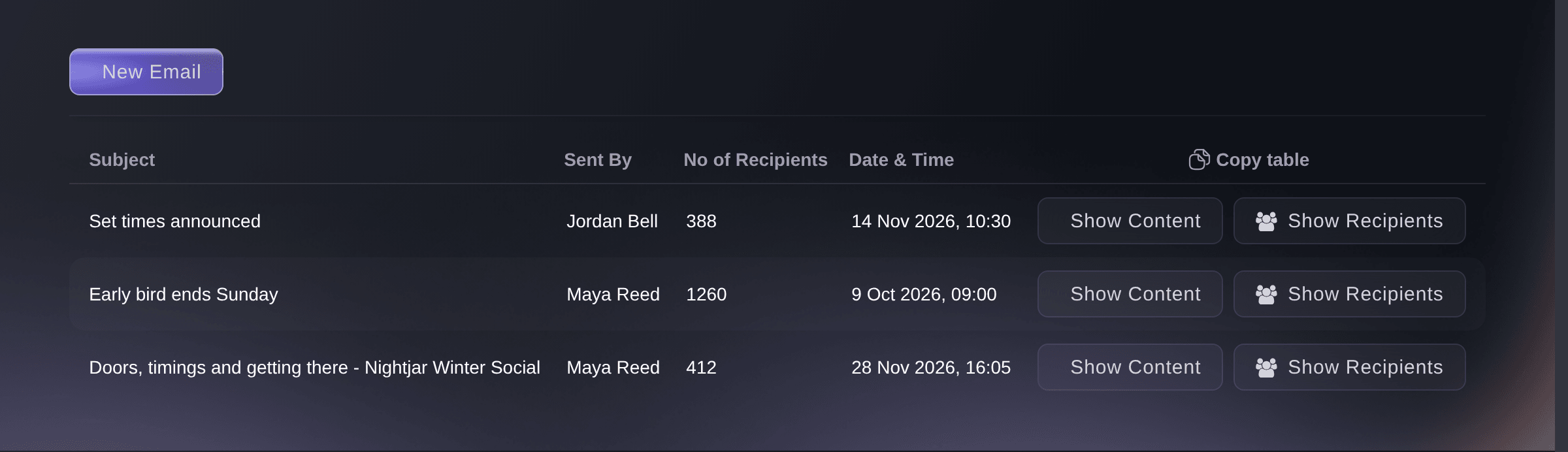
Schedule a doors reminder for the morning of the show, in your event's own time zone, and it waits on your Messaging page until then. Cancel a scheduled email if plans change. Every email you have sent stays listed with who sent it and how many people it reached. Open the recipients to see when each person opened it, and the content as it was sent, which is your record when a buyer asks what they were told.

  • Scheduled emails: sent at the date and time you choose
  • Opened at: when each person opened your email
  • Sent emails: every email with its sender, recipients and content
Ticket Fairy Schedule Email dialog with the date and time the message will be sent

Answer Buyers' Questions in Their Confirmation Email

Add the door time, last entry, the age limit, what to bring and how to get home to the confirmation email every buyer gets with their ticket. A preview beside the editor shows your words inside the real email. Enter your team's address so buyers' replies reach a person who reads them. Ask Fai to draft the text from what she knows about your event, and she shows it to you before it is saved.

  • Confirmation email text: your own words beside every ticket
  • Reply-to address: buyers' replies go to your team
  • Drafted by Fai: you approve the text before it is saved
Ticket Fairy confirmation email card with saved custom text about door times and travel, and a reply-to address

Keep Your Venue Secret Until You Are Ready to Reveal It

Hide the venue from your event page and choose the date and time it is disclosed. At that moment the venue appears on your event page and every ticket holder gets an email with the location, with nothing for you to send. When the venue or entrance changes, enter the new directions and announce the location straight away to every ticket holder and RSVP, after you confirm the message.

  • Hidden venue: kept off your event page until you choose
  • Disclosure date: the venue revealed and emailed by itself
  • Announce Location: an update to every ticket holder and RSVP
Ticket Fairy Announce Location confirmation with the subject and the location information for ticket holders

Send Your Regular Emails in Your Own Words Every Time

Save the doors email, an invitation, an application answer or a gift certificate message as a template, and pick it by name the next time you send it. Save any email you draft in Messaging as a template in one step. Copy a template to start the next one in a set, preview it as it will arrive, and switch off last year's without deleting it. Templates you save on your brand are offered when you email ticket holders on any of its events.

  • Email templates: for messages, invitations, applications and gift certificates
  • Preview: see the email as it will arrive
  • Switch off: keep the wording for next year
Ticket Fairy Email Templates page of a festival, with saved messages, their status and the Edit, Preview and Duplicate controls on each row
Get this page as a PDF Read it later or share it with your team. We email you a link to the PDF.
What to put in your PDF

We will email you this deck. We may also email you now and then about Ticket Fairy features that can help your events. You can unsubscribe at any time with one click.

Keep Every Ticket Holder Informed

  • Email your ticket holders

    Send the doors time, set times, a change or a thank-you to the people with tickets, from your brand's name.

  • Audiences

    Choose all ticket holders and RSVPs, ticket types, add-on holders, check-ins, the waiting list, pre-registrations, refunded buyers or abandoned carts.

  • Test and review

    Send a test to yourself or your team, and read the email once more before it goes.

  • Scheduled emails

    Choose the date and time in your event's time zone, and cancel a scheduled email if plans change.

  • Who opened it

    See everyone an email went to and when each person opened it.

  • Confirmation email text

    Add your own words and a reply-to address to the confirmation email every buyer gets.

  • Venue announcements

    Email a new venue or entrance to every ticket holder and RSVP, after you confirm it.

  • Secret location reveal

    Keep the venue hidden and reveal it on a date you set, with the email sent for you.

  • Email templates

    Save the emails you send every event, on the event or on your brand, and pick them by name.

  • Emails with Fai

    Ask Fai to draft an email, send a test and send or schedule it to the audience you name. She shows you the email and who gets it, and waits for your approval.

  • Directions on tickets

    Print the entrance, door times and what to bring on every ticket PDF.

    Learn more

  • Abandoned cart emails

    See who left checkout without paying and email them back to your event.

    Learn more

  • Your email list

    Send buyers who agreed to hear from you to the email platform you already use.

    Learn more

  • Personal invitations

    Invite chosen people to buy, with their own link and reminders.

    Learn more

  • Texts to ticket holders

    Send a text as well as an email to the ticket holders who need to know, and let Fai suggest and draft the emails and texts each event needs for your approval.

  • Automatic messages

    Switch on messages such as Know before you go once, and they go out for every event.

Run the Event Itself With the Event Operating System

Plan, staff and run the production side of your event, from artists and crew to accreditation and show day.

Questions About Emails to buyers

Emails to buyers

An owner or admin of the event, once your brand is verified. Messaging closes 15 days after the event ends, so send your thank-you in the fortnight after the show.

Yes. In Messaging, choose Marketing as the kind of message and send your announcement or offer to everyone who agreed to your emails, or to fans who have not bought for this event yet. A marketing email goes only to people who agreed to hear from you and carries a link to unsubscribe, and you are warned before you send the same people more marketing messages in a week than your brand allows. You can also connect your email platform to your brand, and buyers who agreed to hear from you join your list there.

At least 15 minutes ahead. A scheduled email cannot be changed, so cancel it and schedule the corrected one.

No. Each confirmation keeps the words it was sent with, so email earlier buyers yourself when a detail changes.

Every ticket holder's email address once, then every RSVP address that is not already on that list. The email cannot be recalled once you confirm it.

No. The venue shows once you turn off Hide this venue from customers, or once the disclosure date passes. When the disclosure date passes, ticket holders get the location email within about five minutes.

A template saved on your brand is offered when you email ticket holders on any of its events. A template saved on an event stays on that event.

Sell more tickets. Build the crowd that comes back.

Start Selling Tickets Online

Sign up without a credit card and build a test event before you commit. Go on sale in minutes when you are ready.

No monthly subscription required for ticketing
Start selling tickets immediately
Ticketing tools included in the service fee
Get Started Talk to Fai Now

Ask Fai, our AI assistant, about Ticket Fairy’s features, pricing and how it could work for your event.

No credit card required

Book a demo call

See the referral model that drives 20% more ticket sales on average, learn which campaigns sell tickets, answer buyers faster and keep queues moving.

45-Minute Video Call
Pick a Time That Works for You