1. Features
  2. Sell tickets
  3. Event pages & website

Turn More Visitors Into Ticket Buyers

Give every visitor what they need to choose a ticket: your flyer, a clear description and the answers to the questions they would otherwise email you. Give each ad campaign, sponsor or audience a page made for them, test two versions against real buyers and keep the version that sells. Buyers can also check out on your own website.

  • Fewer emails asking what time doors open
  • A page made for every campaign
  • Tickets sold on your own website
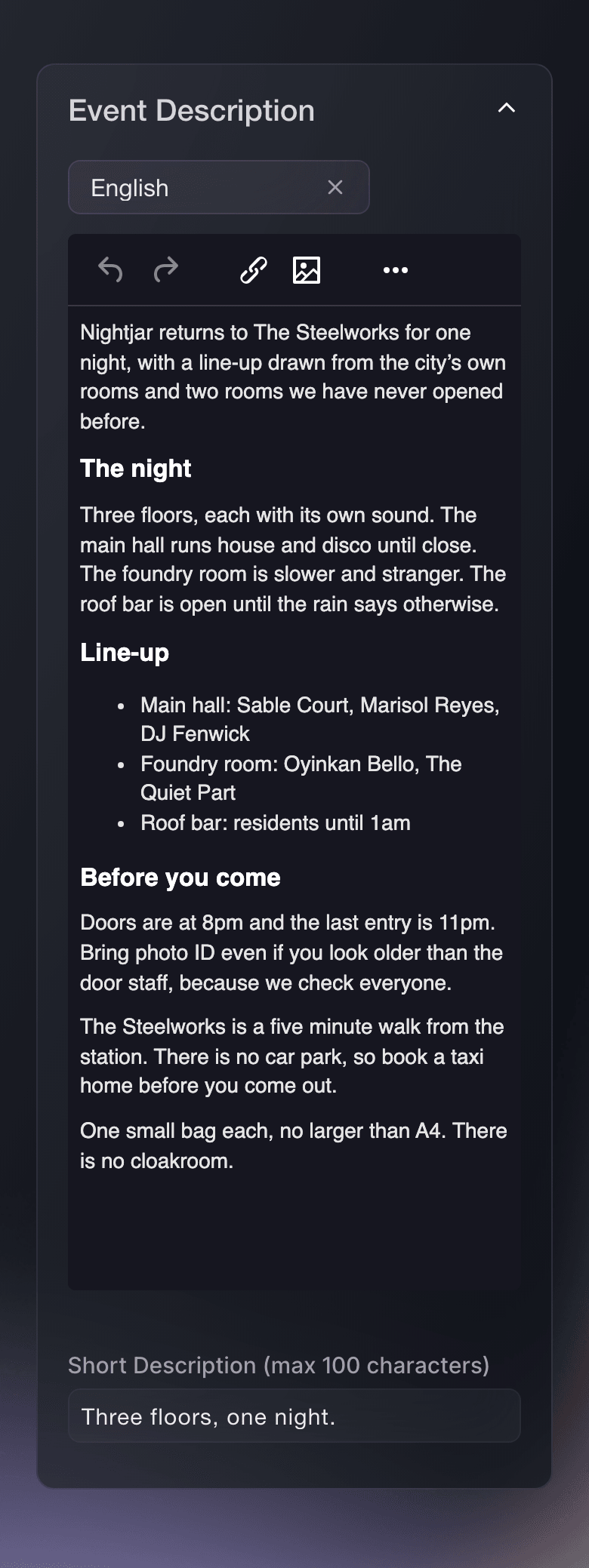
Ticket Fairy Event Description card with a formatted description and a one-line short description

Give Buyers Everything They Need to Choose a Ticket

Add your flyer and Ticket Fairy builds a matching background for the page, or upload wide artwork of your own. Show your logo in place of the event name where your brand is the draw. Describe the line-up, the door times, the age rule and how to get there, with headings, lists and links, and add a short description for listings and shared links. Each language on your event gets its own description and its own flyer, and Fai drafts the wording for you to approve.

  • Flyer and background: a background built from your flyer, or your own wide artwork
  • Description: headings, lists and links, with a short version for shared links
  • A page in each language: its own wording and artwork for every language you sell in
Ticket Fairy Event Images card with upload areas for the flyer and the background, each stating its size

Answer Buyers' Questions Before They Email You

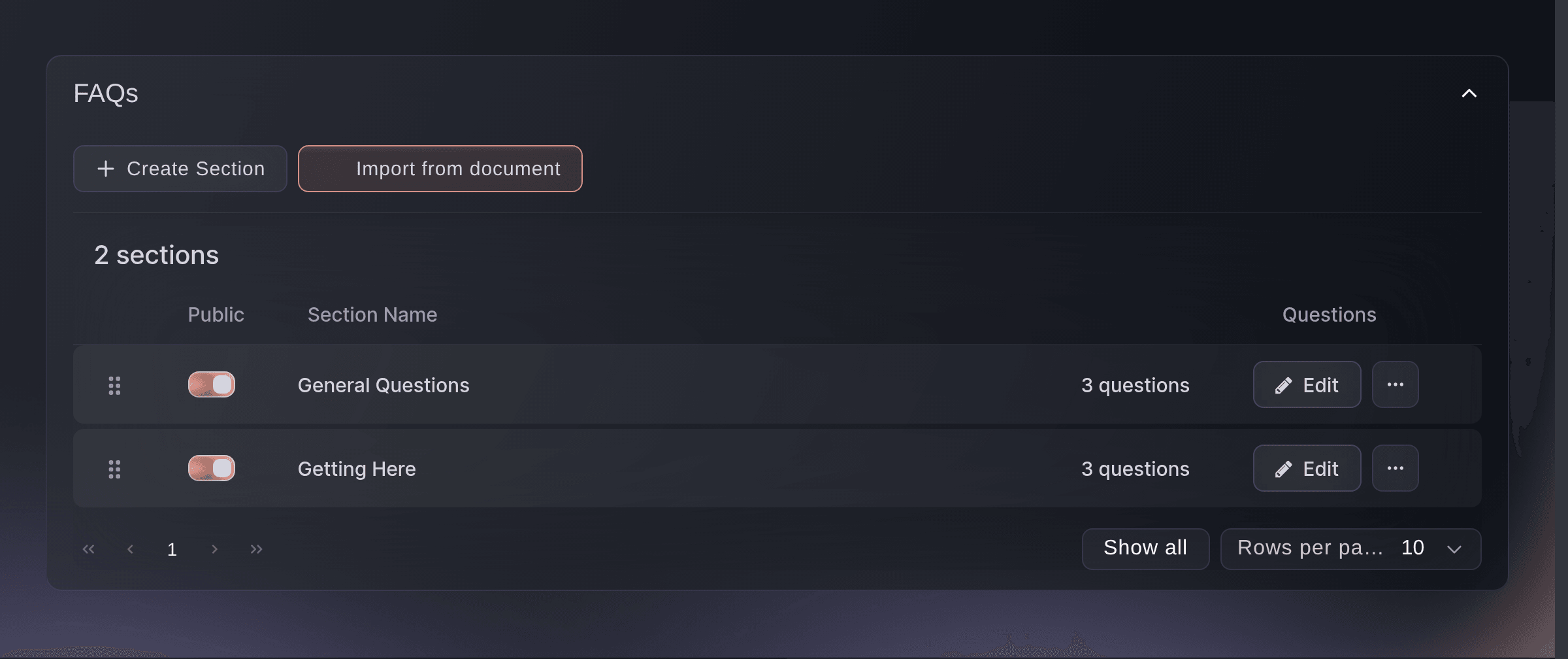
Put the answers to the questions buyers ask again and again on your event page, grouped into sections such as General Questions and Getting Here. Drag the sections into the order buyers ask in. Keep a question private while you wait on the answer, and switch it on when you have it. If you already have a know-before-you-go sheet, import the questions from it, and everything imported waits for you to read it before buyers see it.

  • FAQ sections: questions grouped under headings on your event page
  • Private questions: kept off the page until the answer is settled
  • Import from a document: questions read from a Word file, a PDF or a photo of your sheet
Ticket Fairy FAQs page with two public sections, each holding three questions

Give Every Campaign, Sponsor and Audience a Page of Its Own

Create extra pages for the same event, each at its own address. Give a page its own name, dates, venue details, images, description or ticket types, so a sponsor's listeners, an artist's fans or the people who click one ad campaign land on a page that speaks to them. Every ticket a page sells comes out of the same event, so your capacity, orders and reports stay together. Your sales report shows the tickets and revenue from each page.

  • Extra landing pages: their own address, name, dates, images and description
  • Tickets for each page: choose which ticket types each page offers
  • Sales by page: tickets and revenue from each page beside your main event page
Ticket Fairy Create New Alternative View form with its purpose, address and an overridden event name

Find Out Which Version Sells More Tickets

Put two versions in front of real buyers and let the results decide. Compare your event page with one of your extra pages, or compare different checkout questions and answers. Choose whether you are aiming for more buyers or more revenue from each visitor, and how many of your visitors take part. The results show the visitors, conversion rate and revenue for each version, so you keep the version that sells more.

  • Event page tests: your current page against one or more extra pages
  • Checkout tests: different questions and answers shown at checkout
  • Clear results: visitors, conversion rate and revenue for each version
Ticket Fairy experiment results comparing visitors, conversions, conversion rate and revenue for two versions

Sell Tickets on Your Own Website

Copy a snippet from your event's Embed page and paste it into your own event page, and buyers choose tickets, pay and get their confirmation without leaving your website. New buyers check out without an account, and returning buyers sign in with a code sent to their email. The checkout works on phones and desktops, including browsers opened from social apps, and buyers pay by card or with their phone wallet.

  • Embedded checkout: one snippet on your own event page
  • Wallet payments: buyers pay with the wallet on their phone
  • No account needed: new buyers check out as guests
Ticket Fairy website embed install page with ready-to-paste checkout code
Get this page as a PDF Read it later or share it with your team. We email you a link to the PDF.
What to put in your PDF

We will email you this deck. We may also email you now and then about Ticket Fairy features that can help your events. You can unsubscribe at any time with one click.

Build Event Pages That Sell

  • Flyer and background

    Add your flyer and Ticket Fairy builds the page background from it. Upload your own wide artwork when you have it.

  • Your logo as the event name

    Show your transparent logo at the top of the page where your brand is the draw.

  • Event description

    Describe the line-up, door times, age rule and travel with headings, lists and links. Fai drafts it for you to approve.

  • Short description

    Enter the one line that appears in listings and beside a shared link.

  • Each language

    Give every language on your event its own description and flyer.

  • Event page FAQs

    Group answers into sections, keep unsettled questions private and put the sections in the order buyers read them.

  • FAQs from a document

    Import the questions from a sheet, PDF or photo you already have, and check them before they go live.

  • Extra landing pages

    Give a campaign, sponsor or audience a page at its own address with its own wording, images and tickets.

  • A/B tests

    Split visitors between versions of your event page or checkout and see which brings more sales or revenue.

  • Embedded checkout

    Sell tickets on your own website with one snippet, with card and wallet payments.

  • Scheduled go-live

    Set the date and time your event page goes public.

    Learn more

  • Ticket concierge

    Answer buyers' questions on your event page and your website with an AI concierge trained on your FAQs.

    Learn more

  • Visitor sources

    See which sites and campaigns send visitors to your event page.

    Learn more

  • Found where buyers search

    Your public events appear on the city and venue pages of Ticket Fairy and in search results, and AI shopping assistants can start a ticket order for buyers who ask about them.

    Learn more

  • A website for your brand

    Start a brand website from a template for the events you run, add pages, your upcoming events, contact and RSVP forms, and publish it at your own web address.

  • Your brand kit on your website

    Apply your brand kit and your website takes your colours, fonts and logo in one step.

  • Ready for Google

    Each public event page carries the date, venue and ticket details search engines read, and each website page has its own search title, description and share image.

Run the Event Itself With the Event Operating System

Plan, staff and run the production side of your event, from artists and crew to accreditation and show day.

Questions About Event pages & website

Event pages & website

1200 by 1600 pixels. A background of your own is 1920 by 1080 pixels. The short description holds up to 100 characters.

A Word file, a PDF, a photo or a text file up to 15 MB. Everything it adds arrives with Public switched off, so nothing reaches your event page until you switch it on.

Yes. An extra page sells your event's own ticket types, so every ticket comes out of the same capacity and appears in your event's orders and reports. Once you add ticket types to a page, that page offers only those.

One event page test and one checkout test for each event at the same time. Event page tests do not run on RSVP events, and preview visits and embedded event pages do not take part. Checkout tests change Ticket Fairy's own hosted checkout, and the experiment setup cannot change once a test starts.

Yes, for a test aimed at more buyers: the results mark the winning version once the difference is significant. For a test aimed at more revenue from each visitor, compare the revenue for each version in the results and keep the one that earns more.

Most can. Ticket Fairy opens the full event page for pay-what-you-want pricing, custom terms, custom capture forms or pages, tailored add-on choices, social or wallet checks and events with another ticketing partner, so buyers keep every purchase option.

Wallet payments need your website address listed on the Embed page and a verification file served from your own domain. Until both are in place, the checkout takes card payments only.

Card and wallet payments stay on your website. Some pay-later and bank transfer methods open their own payment page and return the buyer to your website afterwards.

The description and artwork do. Tick the FAQs option while you duplicate and the FAQ sections and questions are copied too.

Yes. Connect a web address you already own, such as tickets.yourbrand.com, and the Web address section shows the records to add at your domain provider. A change at your domain provider can take up to an hour to work. If your provider has no ALIAS or ANAME records, connect a subdomain such as www.yourbrand.com.

Each public event page carries the event's name, dates, venue and ticket prices in the form search engines read, so Google can show your event in its event results. Your public events also appear on Ticket Fairy's city and venue pages. Google decides what it shows and when.

Sell more tickets. Build the crowd that comes back.

Start Selling Tickets Online

Sign up without a credit card and build a test event before you commit. Go on sale in minutes when you are ready.

No monthly subscription required for ticketing
Start selling tickets immediately
Ticketing tools included in the service fee
Get Started Talk to Fai Now

Ask Fai, our AI assistant, about Ticket Fairy’s features, pricing and how it could work for your event.

No credit card required

Book a demo call

See the referral model that drives 20% more ticket sales on average, learn which campaigns sell tickets, answer buyers faster and keep queues moving.

45-Minute Video Call
Pick a Time That Works for You