1. Features
  2. Event pages & website
  3. Campaign pages & tests

Give Every Campaign Its Own Page and Keep the One That Sells

The people who click your bass stage ad, a sponsor's radio listeners and an artist's fans each come for a different reason, and one event page speaks to all of them the same way. Create extra landing pages for the same event, each at its own address, with its own name, dates, artwork, description and tickets, and every ticket still comes out of one event. Then put two versions in front of real buyers, split your visitors between them, and keep the page or the checkout answers that sell more tickets.

  • A page that speaks to each audience
  • Every sale counted against one event
  • Decisions made on real ticket sales
Ticket Fairy Create New Alternative View form with its purpose, address and an overridden event name

Send Each Audience to a Page Made for Them

An extra landing page, called an alternative view in your dashboard, is a second page for the same event at its own address. Give one to a stage or a genre, a sponsor's listeners, an artist's fans or one ad campaign, and each audience lands on a page that speaks to them. Every order is still an order for your event, from the same ticket types and the same capacity, so your door list, payouts and reports stay together.

Note what each page is for in its purpose field, so your team knows which one went to the sponsor and which one runs behind the Instagram ads. Buyers never see it. Each page has an address ready for your ad, email or sponsor post, and a preview so you see what buyers will see before your event is published.

Choose an extra page when the audience is different and the night is the same. When a night has its own capacity, its own door list or its own payout, it works better as a separate event, which you can duplicate from this one.

  • Alternative views: extra pages for the same event
  • Its own address: ready to copy into an ad, email or post
  • Purpose: a note for your team, never shown to buyers
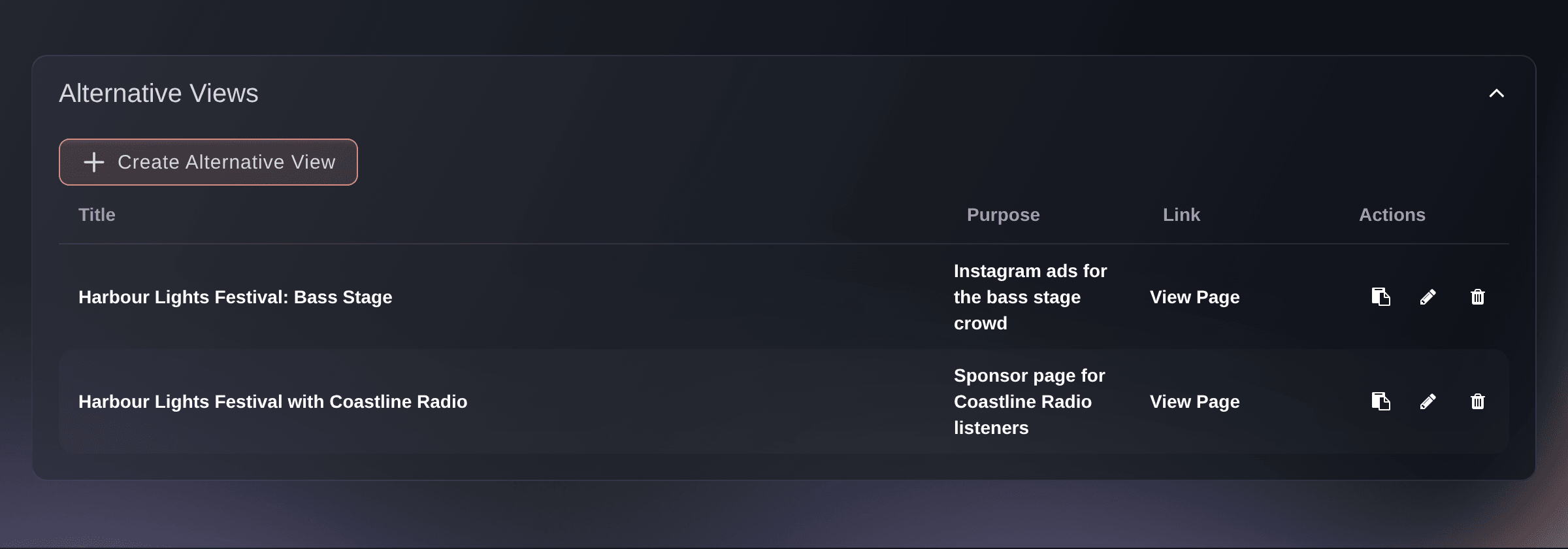
Ticket Fairy Alternative Views section listing two extra event pages with their purpose, link and actions

Change the Name, Dates and Artwork for Each Page

Give a page its own event name, dates, venue details, flyer, background, logo or description, and leave everything else as your main event page shows it. A sponsor page can carry the sponsor's name and artwork, and an artist page can lead with the headliner. Each page carries a flyer and a description in each of your event's languages.

  • Its own name and dates: speak to the audience the page is for
  • Its own artwork: flyer, background and logo for each page
  • Every language: a flyer and description for each one

Offer Each Audience the Right Tickets

Each page sells the ticket types you pick, such as a sponsor ticket only the radio listeners can buy, or the bass stage tickets for the bass stage crowd. Show in main event decides whether a ticket also appears on your main event page or belongs to that page alone.

A page can sell a ticket nobody else sees, such as a listener price or a crew rate, while every ticket still draws on your event's capacity and reports.

  • Tickets for each page: the ticket types that page sells
  • Show in main event: keep a ticket on your main event page too
Ticket Fairy Ticket Types section of an extra event page with two ticket types and their Show in main event switches

See Which Page and Which Link Sold the Tickets

The Alternative Views tab of your Performance report shows the tickets and revenue from each page beside Main Event, so you know which campaign or sponsor brought in the most. For the posts, emails and posters that send buyers to the same page, a tracking link for each one lets you compare the visits, orders and revenue each link earned.

Each tracking link has a short address and a QR code for posters and flyers, and the table opens with your busiest link first. Copy table puts the whole table on your clipboard for a spreadsheet.

  • Sales by page: tickets and revenue for each page and the main event
  • Tracking links: clicks, orders and revenue for each placement
  • Download QR: the same link on a poster or flyer
Ticket Fairy Tracking Links page for an event, one row per link, with the clicks, orders and revenue each one earned

Test Two Event Pages Against Real Buyers

Two versions of an event page can both look right, and only one of them sells more tickets. Test a new flyer, a different description or a line-up page against the page you use today. Your current page is the control, each extra landing page can be a variant, and every visitor keeps seeing the version they first saw.

Choose Conversion rate when the question is how many visitors buy, or Revenue per visitor when the question is how much each visit is worth. Then choose how many of your visitors take part. Everyone outside the test sees your normal event page, so you can start small and widen the test once you trust it. Weights split the test visitors between versions, so a weight of two gives a variant twice the visitors of a weight of one.

  • Your extra pages as variants: one or more pages against your current one
  • Weights: how the test visitors split between versions
  • Share of visitors: from a small sample to every visitor
Ticket Fairy experiment editor set to compare the current event page with a summer line-up page by conversion rate

Test the Answers Buyers See at Checkout

A buyer at the pay button may still have one question, such as whether they can transfer a ticket or what happens if the date moves. Add those questions and your answers to a checkout variant, and they appear below the pay button for the buyers in that variant. The results show whether answering them brings in more revenue.

Each variant carries its own questions and answers. The control leaves checkout as it is, and you can add more variants to compare different sets of answers in the same test. A checkout test and an event page test can run on the same event at the same time.

  • Answers below the pay button: where buyers make up their mind
  • More than one variant: different sets of answers in one test
Ticket Fairy experiment editor comparing the current checkout with a checkout that answers buyers' questions about transfers and postponements

Keep the Winner With Confidence

Results shows the visitors, conversions, conversion rate, revenue and revenue per visitor for every version, with the time the figures were last updated. In a conversion rate test, Ticket Fairy marks a variant as the winner once its lead over the control is statistically significant, so you know the difference is real before you act on it.

A paused test shows visitors your normal page and keeps the results you collected, and resuming carries on the same test. Once you have your answer, conclude and archive it, and the results and the record of what buyers saw stay with the event for your team. Send every visitor after that to the version that sold, and start a new test for your next idea.

  • Winner badge: shown once the lead is statistically significant
  • Every figure for every version: visitors, conversions, revenue and revenue per visitor
  • Concluded tests kept: what buyers saw and how each version did
Ticket Fairy experiment results comparing the visitors, conversion rate, revenue and revenue per visitor of two event pages, with the summer line-up page marked as the winner

Ask Fai to Build Pages and Run Your Tests

Tell Fai, the assistant inside your dashboard, which audience a page is for, and she creates it with its own address, name, dates, description and tickets, including whether each ticket stays on your main event page. Tell her what you want to test, and she drafts the experiment, shows you the versions and the visitor split, and starts, pauses or concludes it when you say so.

Fai asks you to approve every page and every change before she makes it, and reads the latest version of a test first, so she never overwrites a teammate's newer change. She can list your extra pages, change or delete one, and compare the results of a running test in plain words. Flyers and backgrounds for a page go up from the dashboard.

  • Pages drafted by Fai: address, name, dates, description and tickets
  • Tests run by Fai: drafted, started, paused and concluded
  • You approve each change: nothing starts until you say so
Ticket Fairy confirmation shown before an experiment starts and its setup is locked

How Organisers Use Campaign Pages and Tests

  • A Festival With Three Stages

    A festival gives its bass, house and indie stages a page each, with the stage line-up on the flyer, and points each genre's ads at its own page. The Alternative Views tab shows the bass stage page sold the most weekend tickets, so the next ad budget goes there.

  • A Sponsor Ticket for Radio Listeners

    A club night creates a page with a radio station's name and a listener ticket that stays off the main event page. The station reads the address on air, every listener ticket comes out of the same capacity, and the promoter shows the sponsor exactly what the page sold.

  • A Theatre Testing Its Artwork

    A theatre runs half its visitors to a page with production photos and half to the poster. After two weeks the photo page converts better and wears the winner badge, so the team concludes the test and uses the photos in every campaign.

  • A Conference Answering Doubts at Checkout

    A conference tests a checkout variant that answers whether a pass can be transferred to a colleague. Revenue per visitor rises in the variant, so the team adds the answer to its event page FAQs for every buyer.

  • An Agency Running Campaigns for Clients

    An agency builds a page for each of its Meta, TikTok and newsletter campaigns and asks Fai to set up a test between the two best. The client gets one report with the sales from each page and each tracking link.

Get this page as a PDF Read it later or share it with your team. We email you a link to the PDF.
What to put in your PDF

We will email you this deck. We may also email you now and then about Ticket Fairy features that can help your events. You can unsubscribe at any time with one click.

Questions About Campaign Pages and A/B Tests

Campaign pages & tests

You need an owner or admin role on the event. If Experiments is not in your event menu, ask an owner or an admin to give you access.

Once you add ticket types to a page, it offers only those. A page with none added offers every ticket type on the event, including ones another page keeps off your main event page.

An extra page lists it with Show in main event switched off. Switch it on for that page, or remove the ticket type from the page.

Use letters, numbers and hyphens. Every event and every extra page needs an address of its own, and the form shows URL already exists when the one you chose is taken. A page's event name can run to 65 characters.

Its address stops working at once. Tickets already sold through it stay valid, and ticket types only that page sold go back on your main event page.

One event page test and one checkout test at the same time. Pause or conclude the running test before you start another one in the same place.

Visitors to your event page and Ticket Fairy's own hosted checkout. Preview visits and embedded event pages do not take part, and event page tests run on events that sell tickets, not on RSVP events.

The setup is locked once a test starts, even while it is paused. Do not edit or delete a page the test uses until you conclude it, then create a new test for your next idea. You can delete a draft before it starts.

A visitor who places at least one paid order after seeing a version. More orders from the same visitor during the same visit still count as one conversion.

The winner badge is for conversion rate tests. In a revenue per visitor test, compare that figure for each version and keep the one that earns more. Revenue is shown separately for each currency, and Not enough data yet means the test needs more visitors before a version can be compared.

Sell more tickets. Build the crowd that comes back.

Start Selling Tickets Online

Sign up without a credit card and build a test event before you commit. Go on sale in minutes when you are ready.

No monthly subscription required for ticketing
Start selling tickets immediately
Ticketing tools included in the service fee
Get Started Talk to Fai Now

Ask Fai, our AI assistant, about Ticket Fairy’s features, pricing and how it could work for your event.

No credit card required

Book a demo call

See the referral model that drives 20% more ticket sales on average, learn which campaigns sell tickets, answer buyers faster and keep queues moving.

45-Minute Video Call
Pick a Time That Works for You