1. Features
  2. Many events & brands
  3. Set up events faster

Get Every New Event Ready to Sell in Minutes

Setting up tickets on a blank form means deciding every tier, price and quantity again, and a weekly club night or an annual festival repeats that work date after date. Start a new event from a template built for its kind, priced around your own ticket price and sized to your room. Copy an event you already ran and the sale windows and door times move with the new dates. Keep the editions of a recurring night together, with one public page that always shows the next date.

  • A complete ticket setup in minutes
  • Next year's event ready from last year's
  • One page for every upcoming date
Ticket Fairy event template gallery with the event assistant and built-in setups for club shows, concerts, festivals, conferences and more

Start Each Event From a Setup Built for It

Every new event starts in the template gallery, with setups for club shows, concerts, one-day and multi-day festivals, conferences, conventions, theatre shows and exhibitions, plus the setups other organisers have shared. Each template offers ways to sell, such as one price, an early bird ladder or phased releases, and says which kind of event each one suits.

What you'll get lists the ticket types, table types and add-ons the template creates before you commit to it, and you can change the ticket list right there. Prefer to describe it? Tell the Event assistant about your event in your own words, such as a two-day festival with camping, and it picks a template and keeps adjusting the same one as you add detail. Start from scratch is always there when none of the setups matches how you plan to sell.

One price suits a first event or a small room, an early bird ladder suits most events, and timed or phased releases suit a large room where rising prices keep buyers moving. Enter your capacity and Ticket Fairy suggests one, and you can change the ticket list whichever you choose.

  • Template gallery: setups for the kind of event you run
  • Ways to sell: one price, an early bird ladder or phased releases
  • Event assistant: describe your event and it picks the setup
Ticket Fairy conference template with its selling choices, the student rate and networking dinner questions, and the tickets and workshop add-on it creates

Price Every Tier Around Your Own Ticket Price

Enter what a standard ticket costs and how many people you can fit. The template prices the other tiers around your price, in your currency, and sizes the limited tiers, such as early bird and VIP, to your room, so you start from a proven combination without copying another organiser's prices.

Each template then asks about the extras its kind of event usually has: exhibitor booths and child tickets at a convention, a student rate and a networking dinner at a conference, a VIP ticket and seating at a concert, locker hire and names and ID at a festival. Say yes and the template adds them.

The template that fits your brand is marked Suggested for you, with the answers Ticket Fairy already knows from what you told Fai and from the last event you created from it filled in. Check them, change any that are different this time, and enter the ticket price yourself.

  • Your standard price: every other tier priced around it
  • Your capacity: early bird and VIP sized to your room
  • Suggested for you: the template that fits your brand, answers filled in
Ticket Fairy convention template with its selling choices, the exhibitor booth and child ticket questions, and the weekend, day and VIP passes it creates

Go On Sale With Settings That Suit Your Event

A template also sets the options its kind of event usually needs, such as an age limit and ID at a club show, or names and phone numbers with no ID at a conference. You check the sales window, the attendee checks, resale and who pays the booking fee on one step, and every value stays yours to change.

Names required, Name checks and ID required decide what your door team checks, and Ticket resale and Add-on resale let a buyer who can no longer come pass their ticket on through Ticket Fairy. Advanced options hold the waiting list, order approval and the extra details you ask buyers for.

Publish straight away and tickets go on sale at the sales start you chose, or save the event as a draft to keep it private while you finish the event page, the tickets or the team. The draft keeps everything you have done, including the template it started from.

  • Settings for your kind of event: age limit, attendee checks and resale already chosen
  • Every value editable: names, prices and quantities before you sell
  • Save as Draft: private until you are ready
Ticket Fairy sales settings step with referral rewards, sale dates, attendee checks, resale and who pays the booking fee

Set Up Your Next Date From an Event You Already Ran

A weekly club night, the next stop on a tour and next year's festival usually need the same tickets, questions and settings as the last one. Copy the event into a new draft, enter the new name, web address and dates, and choose what else comes with it. The sale windows, door times and ticket validity move with the new dates, so your early bird still closes the same distance before the show.

The copy always takes the event details, venue, descriptions and media, event settings, ticket settings, ticket types, sales tracking and advanced options. You choose which extra parts come too: the team, credentials, pre-registration, promotions, promoter promotions, email templates, team invitations, contacts, FAQs, ticket delegations and custom fields. Leave a part off when the promoter or venue team changes, or let Ticket Fairy invite the same people to the new date for you.

The event you copied keeps its orders, attendees and reports exactly as they were, and the copy stays a private draft until you publish it, so you check prices and allocations before anyone can buy. Give the copy its final web address now and the link you share later never has to change.

  • Duplicate Event: a new draft with its own name, address and dates
  • Dates that move together: sale windows, door times and validity
  • Team, codes and messages: carried across when you choose
Ticket Fairy Duplicate Event dialog with the new event name, dates and web address, and the switches for what to copy across

Sell to Last Year's Buyers Before the Public On-Sale

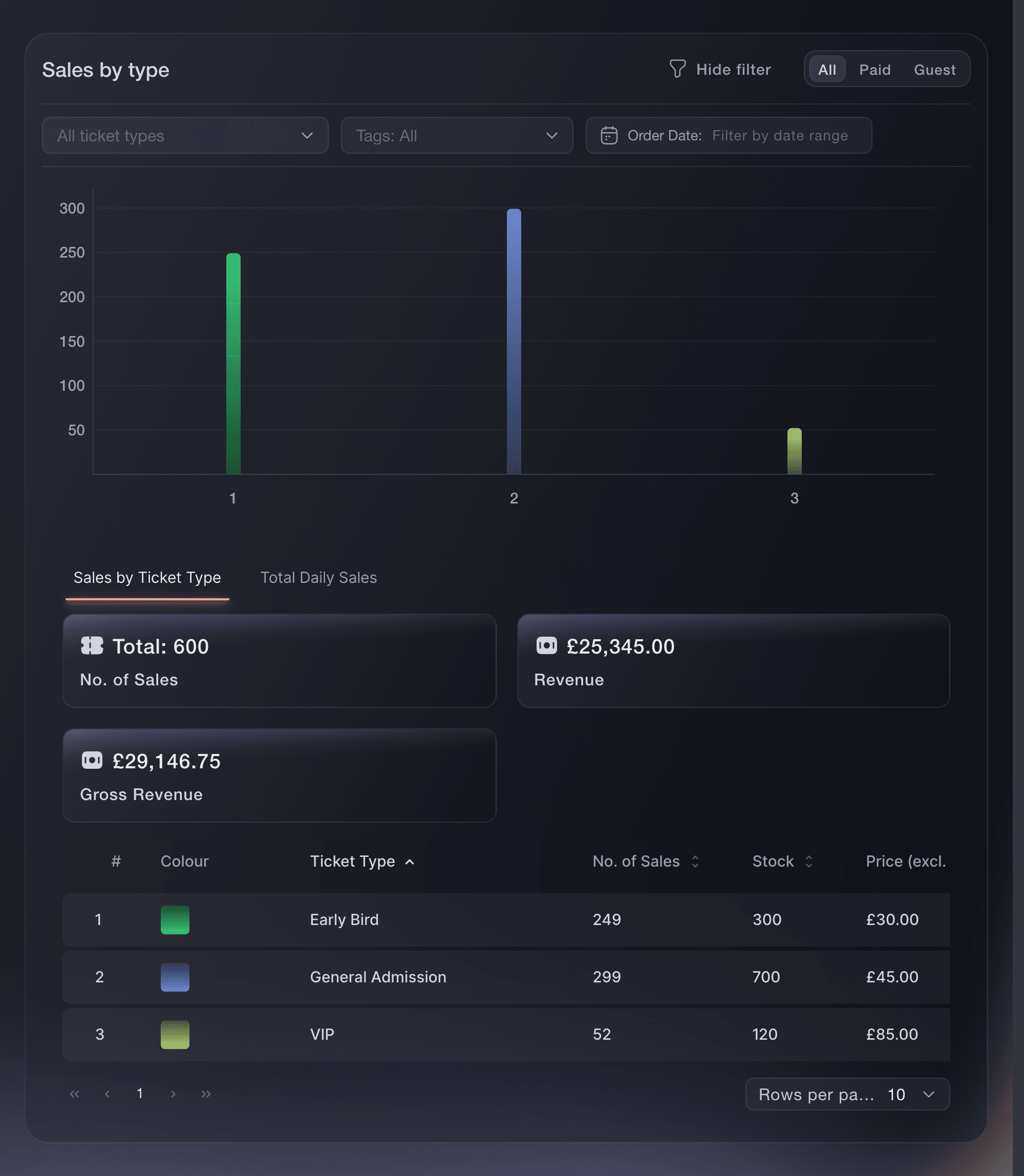
Before you copy last year's event, open Sales by Type to see how each tier sold, then change the prices that have moved on the copy. Email last year's attendees an access code or an invitation before you announce the date publicly. They are the buyers most likely to come back, and their presale shows you the demand before you set the public price.

When the copy is ready, publish it now or schedule when it goes live, and choose whether your promoters get their links for the new date by email. Made a copy by mistake? Delete the draft from Events before it takes any orders.

  • Sales by Type: what each tier sold last time
  • Presale for past buyers: an access code or an invitation first
  • Publish or schedule: with promoter links for the new date
Ticket Fairy sales breakdown showing how each ticket type performed for an event

Keep Every Edition Together in an Event Series

A weekly club night, a touring show and an annual festival build up dates that belong together, and your regulars want one link that always shows what is on next. Create an event series on your brand and turn on its public page, and buyers bookmark one address that lists every current and upcoming edition. Each edition keeps its own tickets, venue and event page.

Give the series a name rule, such as the words every edition's name contains or starts with, and each event that matches joins the series when you create or rename it. Duplicate last week's night and the copy joins as soon as its name matches. Already running a regular night? Ticket Fairy suggests series from your event history, and one selection creates the series with the editions it found.

A series works for the rest of your brand too. Set up an automatic message for the series and it goes out for every edition, now and in the future. Connect a social account for the series and its stats cover every edition, and link the series to a multi-event pass so the pass includes every future date.

  • Public series page: every upcoming edition at one address
  • Name rules: new editions join on their own
  • Suggested series: found in the events you already ran
Ticket Fairy event series dialog with the series name, a public page address and a Name contains rule for future editions

Share Your Setup as a Template Under Your Brand's Name

Share an event you run as a template from Event templates on your brand, so other organisers can start from how you priced and released those tickets. The template copies your ticket tiers and their allocations, and keeps each price as a share of your standard ticket, so the next organiser enters their own price and currency and never sees yours.

You pick the anchor tier the next organiser prices, name the template for the kind of event, say what it is for and who it suits, and our team reviews it. Once it is published, organisers find it in the template gallery with your brand's name on it. Withdraw it at any time, and events already created from it stay as they are.

  • Share an event: your tiers and allocations, without your prices
  • Anchor tier: the standard ticket every other price follows
  • Your brand's name: on every template you publish
Ticket Fairy Share an event as a template dialog with the event, the template name, what it is for, the kind of event and who it suits

Ask Fai to Create, Copy and Group Your Events

Ask Fai, the assistant inside your dashboard, to set up your next event. She recommends a template, leads with the one suggested for your brand, asks for your details and prices, and shows you the complete setup with its ticket types and add-ons before she creates it.

Fai copies an event with the parts you choose and the new name, web address and dates, and reads back what last year's event sold, tier by tier, before you copy it. She finds suggested series, creates one with a name rule, adds a special edition or past dates you name, or adds every future event at the venues you choose. She shows you each change and waits for your approval, and your developers can copy an event in one command from the command line.

  • A new event from a sentence: the full setup shown before she creates it
  • Series by name or venue: special editions and past dates added
  • You approve each change: nothing changes until you say so

How Organisers Set Up Events Faster

  • A Weekly Club Night

    The club duplicates last Friday with the team and promoter codes switched on, and enters the new date. The copy joins the Friday series by its name, and regulars find it on the series page the moment it is published.

  • An Annual Festival

    The festival reads Sales by Type from last year, copies the event with new dates and raises the price of the tier that sold out first. Last year's attendees get an access code a week before the public on-sale.

  • A First Conference

    The organiser picks the conference template, enters the delegate price and the room capacity, and says yes to the student rate and the networking dinner. The tickets and the dinner add-on are ready before lunch.

  • A Touring Show

    Each stop on the tour keeps its own venue and tickets, and every stop sits in one series. The tour's social account and its know-before-you-go message cover every city, including the dates added later.

  • A Theatre Company Sharing Its Setup

    The company shares its theatre run as a template under its name. Other companies start from its tiers and allocations with their own prices, and never see the company's sales.

Get this page as a PDF Read it later or share it with your team. We email you a link to the PDF.
What to put in your PDF

We will email you this deck. We may also email you now and then about Ticket Fairy features that can help your events. You can unsubscribe at any time with one click.

Questions About Event Templates, Copies and Series

Set up events faster

You need an owner or admin role on the brand. Sharing a template needs the same role, because it puts your brand's name on a public page.

No. You enter the standard ticket price and the capacity for your event, and Ticket Fairy works out the starting prices and quantities of the other ticket types from your answers. Leave a question blank to set that figure yourself.

Yes. Change the ticket list before you save anything, choose Change template on the event details step until the draft is saved, and change the details, settings, ticket types and add-ons at any point before the event goes on sale. A template is where the event started, not a live link to it.

No. Orders, attendees, check-ins and sales totals stay on the original event, which stays exactly as it was. The copy starts with no orders.

A copied ticket type starts with the allocation from the original setup, not the number of tickets left at the old event. Set the allocation for the new venue and date before you publish.

No. Enter the new dates in the Duplicate Event dialog to move the sale windows, door times and validity. They move by whole days, so check the weekday. A copy made without new dates keeps the original windows, which have usually closed.

Yes, if that one word is all you enter. Enter enough of the event name to identify the series. With both Name contains and Name starts with filled in, an event must match both to join.

Once at least one current or upcoming edition is public, visible without a password and has valid start and end dates. The page shows current and upcoming editions, and you see past editions on Event Series in your dashboard.

No. The events stay as they are. Move a social account that represents the series to the brand or an event first, and the confirmation lists any automatic messages it pauses.

After our team reviews it. Until then, only your team can see it. A template that is turned down goes back to draft so you can change it and submit it again.

Sell more tickets. Build the crowd that comes back.

Start Selling Tickets Online

Sign up without a credit card and build a test event before you commit. Go on sale in minutes when you are ready.

No monthly subscription required for ticketing
Start selling tickets immediately
Ticketing tools included in the service fee
Get Started Talk to Fai Now

Ask Fai, our AI assistant, about Ticket Fairy’s features, pricing and how it could work for your event.

No credit card required

Book a demo call

See the referral model that drives 20% more ticket sales on average, learn which campaigns sell tickets, answer buyers faster and keep queues moving.

45-Minute Video Call
Pick a Time That Works for You