1. Features
  2. Sell tickets
  3. Orders, refunds & resale

Answer Every Buyer Quickly and Keep Your Tickets With Real Fans

Find the order a buyer is asking about in seconds, fix their details and send their tickets again. Refund an order yourself or let buyers refund their own tickets. A fan who cannot come passes their ticket on at face value, the next person on your waiting list gets the chance to buy it, and when your plans change you can postpone or cancel the event and tell every ticket holder.

  • Buyer questions answered in seconds
  • Refunds without a support ticket
  • Returned tickets sold at face value to real fans
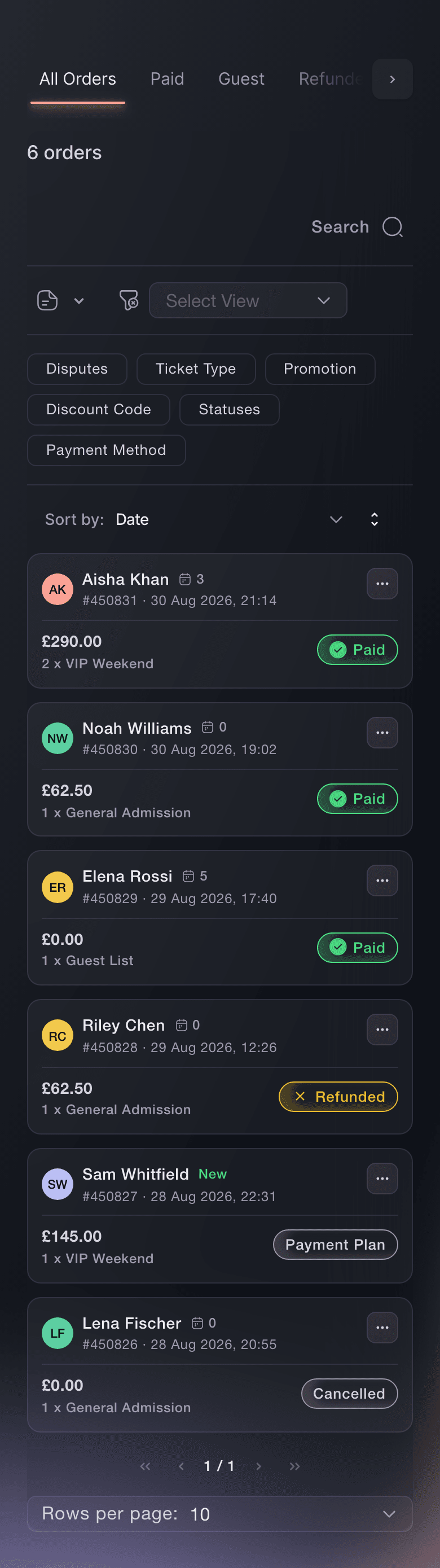
Ticket Fairy Orders page on All Orders, with Paid, Guest, Refunded, Cancelled, Payment Plan and Abandoned Carts tabs

Find the Order a Buyer Is Asking About in Seconds

Every order on your event sits in a tab for what happened to it, such as Paid, Guest, Refunded or Payment Plan. Search by the buyer's name, email address, phone number or order number, or by ticket type, promotion or the words in your team's notes. Open an order to see its tickets, the buyer's contact details, the device they bought on and where the sale came from. Leave a note for your team, and save a filtered view to come back to.

  • Order search: by buyer, order number, ticket type, promotion or note
  • Order notes: for your team only, with who added each one
  • Saved views: your filters and tab, kept for your login
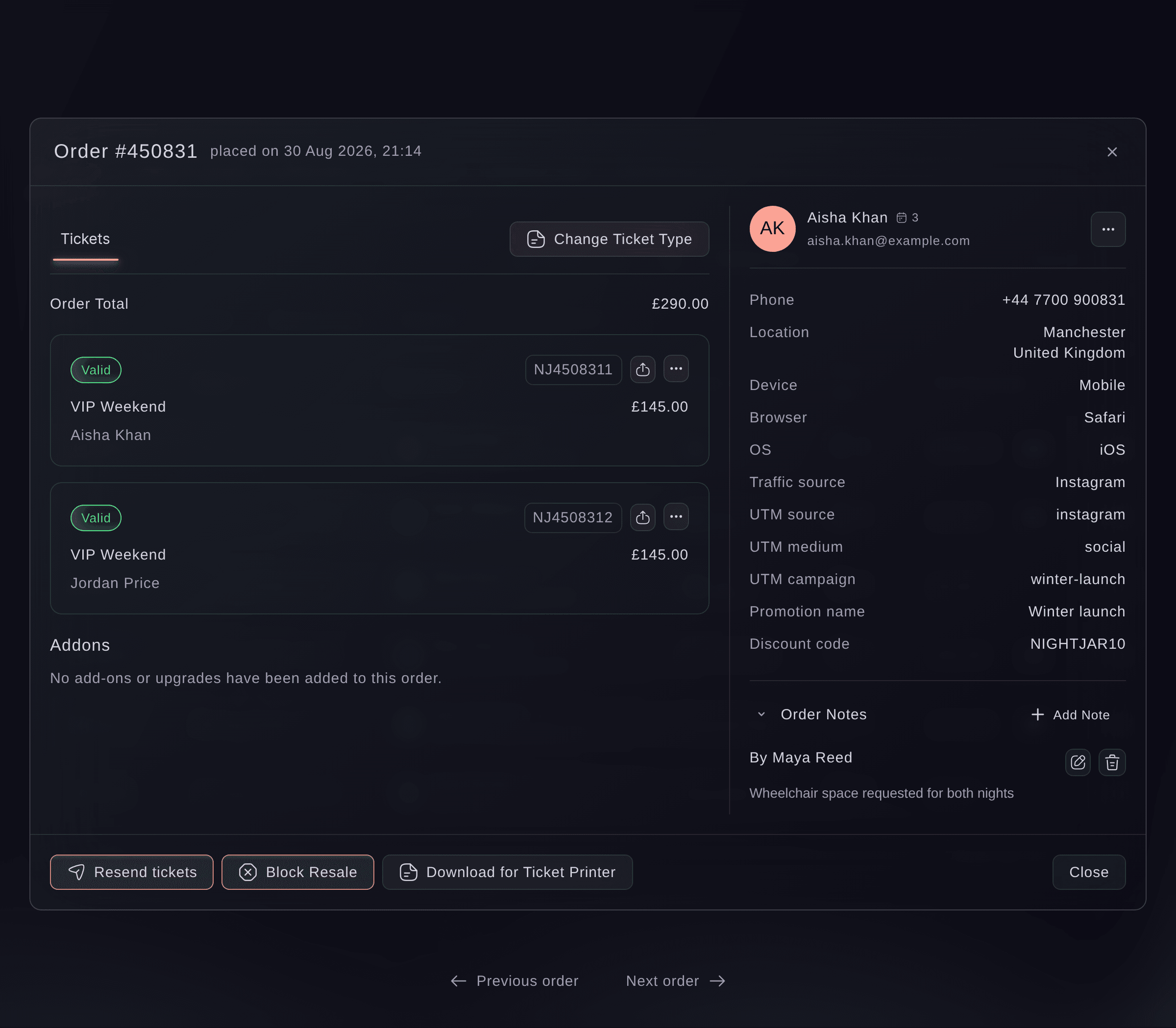
Ticket Fairy order window with two valid VIP Weekend tickets and the buyer's phone, location and device

Fix a Buyer's Tickets Without a New Order

When tickets never arrived, correct the name or email address on the ticket and send the same tickets again, so a ticket already saved to a phone still scans. Move a whole order to another ticket type when a buyer chose the wrong one or you agreed an upgrade, and the buyer keeps their barcodes. On a seated event, give a ticket holder a different seat and the old seat goes back on sale.

  • Resend tickets: to the address the buyer gives you
  • Name and email changes: the barcode stays the same
  • Change ticket type: every ticket on the order in one go
  • Change seat: pick a free seat on your seat map
Ticket Fairy order window with three Stalls tickets, their seats and Change Ticket Type above them

Refund Buyers Without Waiting on Support

Refund an order from the Orders page and confirm it with a code Ticket Fairy emails you. The money goes back to the card the buyer paid with, their barcodes stop working and the tickets go back on sale or to your waiting list. Turn on self-refunds and buyers refund their own tickets from their order page. Every refund appears in your activity log with who confirmed it.

  • Order refunds: confirmed with a code sent to your email
  • Self-refunds: buyers refund their own tickets from their order page
  • Refund history: the Refunded tab and your activity log
Ticket Fairy Refund Order dialog stating the amount and order number, with the Get authorization code button

Keep Resale at Face Value and Inside Your Event

A fan who cannot come sells their ticket through Ticket Fairy, to the next person on your waiting list or to a friend they name. The new buyer pays the ticket type's own price, so nobody can mark a ticket up. The seller can still use their ticket until the new buyer pays, then it stops and the seller gets their money back. Keep any ticket type out of resale, and follow every resale ticket on the Ticket Resale report.

  • Face-value resale: to your waiting list or to a friend the buyer names
  • Ticket types kept out: withhold any ticket type from resale
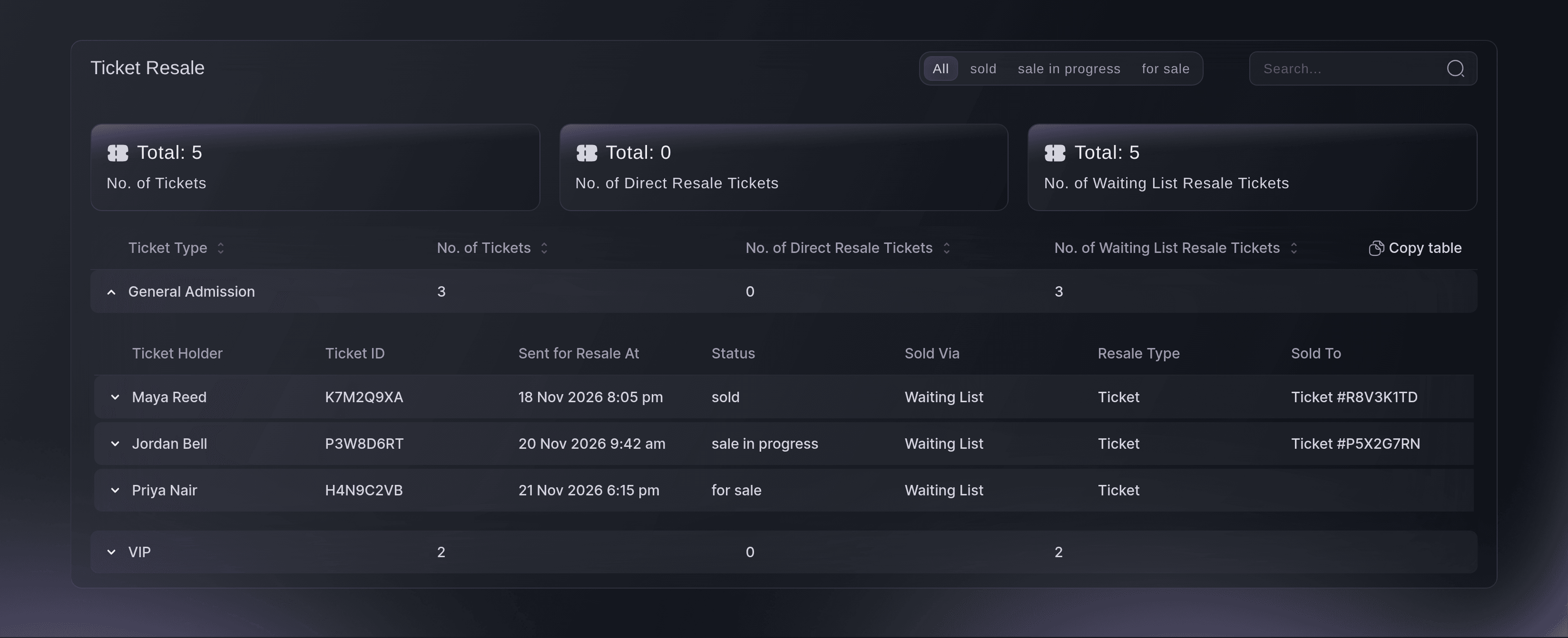
  • Ticket Resale report: for sale, in progress and sold, ticket by ticket
Ticket Fairy Ticket Resale report with General Admission opened to show tickets sold and in progress

Offer Returned Tickets to the Fans Who Missed Out

When a ticket type sells out, fans join your waiting list from your event page. Every ticket that comes back through resale, a refund or a cancelled payment plan is offered to the next person in line by email, with a link to buy at the ticket's current price. An offer nobody takes up passes to the next person. See who is waiting and when each offer expires, and email the list when you release more tickets.

  • Waiting list: for sold-out ticket types and add-ons
  • Offers in turn: each returned ticket to the next person waiting
  • Waiting List report: who is waiting, offered, bought or dropped out
Ticket Fairy Waiting List report with each person, their ticket type, quantity requested and status

Tell Ticket Holders When Your Plans Change

Postpone an event before the new date is confirmed, keep the date hidden until you are ready and choose who can ask for a refund. Ticket Fairy emails ticket holders when you confirm, and you can update the postponement, reveal the date or lift it later. When an event cannot go ahead, cancel it and Ticket Fairy refunds the orders for you, while reminders and resale for that event stop.

  • Postpone: with the new date shown or hidden
  • Refund choice: everyone, earlier buyers only or nobody
  • Cancel: every order refunded for you
Ticket Fairy Postpone Event dialog with date visibility, new event dates, the postponement banner date and refund choices
Get this page as a PDF Read it later or share it with your team. We email you a link to the PDF.
What to put in your PDF

We will email you this deck. We may also email you now and then about Ticket Fairy features that can help your events. You can unsubscribe at any time with one click.

Look After Every Order From Sale to Show

  • Orders by status

    See every order in a tab for what happened to it, from Paid and Guest to Refunded and Payment Plan.

  • Order search and filters

    Find an order by buyer, number, ticket type, promotion or note, and save the filters you use most.

  • Order notes

    Leave a note your team sees and the buyer never does.

  • Order exports

    Download the orders or tickets in front of you.

  • Resend and fix details

    Correct a ticket holder's name or email and send the same tickets again.

  • Change ticket type or seat

    Move a buyer to another ticket type or a different seat without a new order.

  • Refunds

    Refund an order to the buyer's card, confirmed with a code sent to your email.

  • Self-refunds

    Let buyers refund their own tickets from their order page.

  • Face-value resale

    Let buyers pass tickets and add-ons on at the ticket's own price, with the old ticket cancelled once the new buyer pays.

  • Waiting lists

    Offer every returned ticket to the next fan in line, for ticket types and add-ons.

  • Postpone or cancel

    Change the date or call off an event, with the right email to ticket holders and refunds handled.

  • Abandoned carts

    See who left checkout without paying and email them back.

    Learn more

  • Email your buyers

    Tell ticket holders what changed in your own words.

    Learn more

  • Support Inbox

    See buyers' chat, email, text, Instagram and Messenger messages as one team inbox, reply, leave notes only your team reads and ask Ticket Fairy support for help from the same conversation.

Questions About Orders, refunds & resale

Orders, refunds & resale

The event owner. The order must be paid by card through your own connected payment processing account, with every ticket still valid, and the event's funds not yet paid out. Ticket Fairy support refunds anything else for you.

Not from the Orders page, which refunds the whole order's face value. A buyer can refund one of their own tickets when self-refunds are on, and Ticket Fairy support handles other partial refunds.

No. A refund returns the face value and the booking fee stays charged, unless you have agreed other terms with Ticket Fairy. The refund code lasts thirty minutes and allows five attempts.

While Ticket Fairy still holds the event's ticket money. Once the money is released to you, self-refunds switch off and cannot be turned on again. Buyers refund their tickets on the terms you agree with Ticket Fairy, including the amount they get back.

The seller pays a resale fee of 10% of what they paid for the ticket, not counting the booking fee. For currencies other than US, Australian or New Zealand dollars, pounds sterling and euros, it is capped at the equivalent of US$20. Events in India carry no resale fee, and Ticket Fairy can set a different fee for your event.

Free and guest tickets, gifts, tickets from a pass or a membership, tickets still being paid off in instalments, ticket types you withhold from resale and tickets already scanned in.

Thirty-six hours when the event is more than two weeks away, shortening to eight hours on the last day. Ticket Fairy can set one fixed window for your event instead. Without a cap you set, one person can ask for up to ten tickets.

You can update or lift a postponement yourself. Only Ticket Fairy support can reinstate a cancelled event, and refunds already paid stay paid. Neither change is available after the event has ended or its funds have been paid out.

Sell more tickets. Build the crowd that comes back.

Start Selling Tickets Online

Sign up without a credit card and build a test event before you commit. Go on sale in minutes when you are ready.

No monthly subscription required for ticketing
Start selling tickets immediately
Ticketing tools included in the service fee
Get Started Talk to Fai Now

Ask Fai, our AI assistant, about Ticket Fairy’s features, pricing and how it could work for your event.

No credit card required

Book a demo call

See the referral model that drives 20% more ticket sales on average, learn which campaigns sell tickets, answer buyers faster and keep queues moving.

45-Minute Video Call
Pick a Time That Works for You