1. Features
  2. Orders, refunds & resale
  3. Resale & waiting lists

Get Every Spare Ticket to a Fan Who Wants to Come

When a show sells out, fans who can no longer go and fans who missed out end up on touting sites, and you end up answering emails about fake tickets. Give them a fair route through Ticket Fairy. A buyer who cannot come resells their ticket at its own price or gifts it to a friend, and fans who missed out join a waiting list on your sold-out ticket types. Every ticket that comes back through resale, a refund or a cancelled payment plan is offered to the next fan in line by email. The new holder gets a ticket of their own, the old barcode stops working, and you can see who holds every ticket.

  • Spare tickets resold at face value
  • Returned tickets offered to fans in turn
  • A new barcode for every new ticket holder
Ticket Fairy Anti-Scalping/Fraud Settings dialog with the names required, name check and ID switches above the Ticket resale and Add-on resale switches and a Save button

Give Fans Who Cannot Come a Fair Way to Pass Their Ticket On

With Ticket resale on, a buyer who cannot come chooses Sell Ticket beside the ticket on their own order. They can sell it to anyone who wants it, which offers it to the next fan on your waiting list for that ticket type, or to someone they know, who gets an email with a link to buy it. Nobody sets their own price, so a ticket cannot be marked up.

The seller can still use their ticket at the door until a new buyer pays for it. Then Ticket Fairy cancels the old ticket, issues the new buyer a ticket of their own, and refunds the seller what they paid the way they paid. A seller whose plans change back can take the ticket off resale from their order until somebody buys it.

The new buyer pays the ticket type's current price at an ordinary checkout, so your price rises still apply and every resale counts as a sale on your event. Your door team never meets two people holding the same ticket, because the old barcode stops working once the new buyer pays.

  • Sell Ticket: from the buyer's own order
  • Face value only: the ticket type's own price for the new buyer
  • To a friend or the waiting list: the seller chooses who gets the offer
  • Old ticket cancelled: once the new buyer pays
Ticket Fairy Anti-Scalping/Fraud Settings card with Names Required, Ticket Resale and Add-on Resale ticked and a Settings button

Send the Parking and Camping Along With the Ticket

A festival ticket often carries extras, such as a car park space, a camping pitch or a drinks package. When a buyer resells a ticket, the add-ons attached to it go to the new buyer too, so they arrive with everything the ticket included. With Add-on resale on, buyers can also resell an add-on on its own, such as a parking pass they no longer need.

Withhold an add-on from resale when it belongs to the original buyer, such as a meet-and-greet in their name, and it stays with the seller. Sold-out add-ons can have their own waiting list, so the fan who missed out on camping is offered the pitch somebody else gives up.

  • Add-ons travel with the ticket: unless you withhold one from resale
  • Add-on resale: parking, camping and extras on their own
  • Add-on waiting list: returned extras offered in turn

Let Buyers Gift a Ticket to a Friend Who Can Go

When plans change inside a group, the buyer selects Gift ticket on their order, enters their friend's name and email address and agrees to the terms of the gift. The friend accepts the ticket and finds it in their own account with their name on it, along with the add-ons that went with it. Your buyers settle the swap between themselves, and your team never has to make it.

Every gift gives the friend a ticket with its own QR code, and the ticket it replaces is refused at the door. A buyer cannot gift a ticket and then use it, and a ticket received as a gift cannot be given away again, so tickets stay with fans who are coming. The buyer can cancel a gift until the friend accepts it.

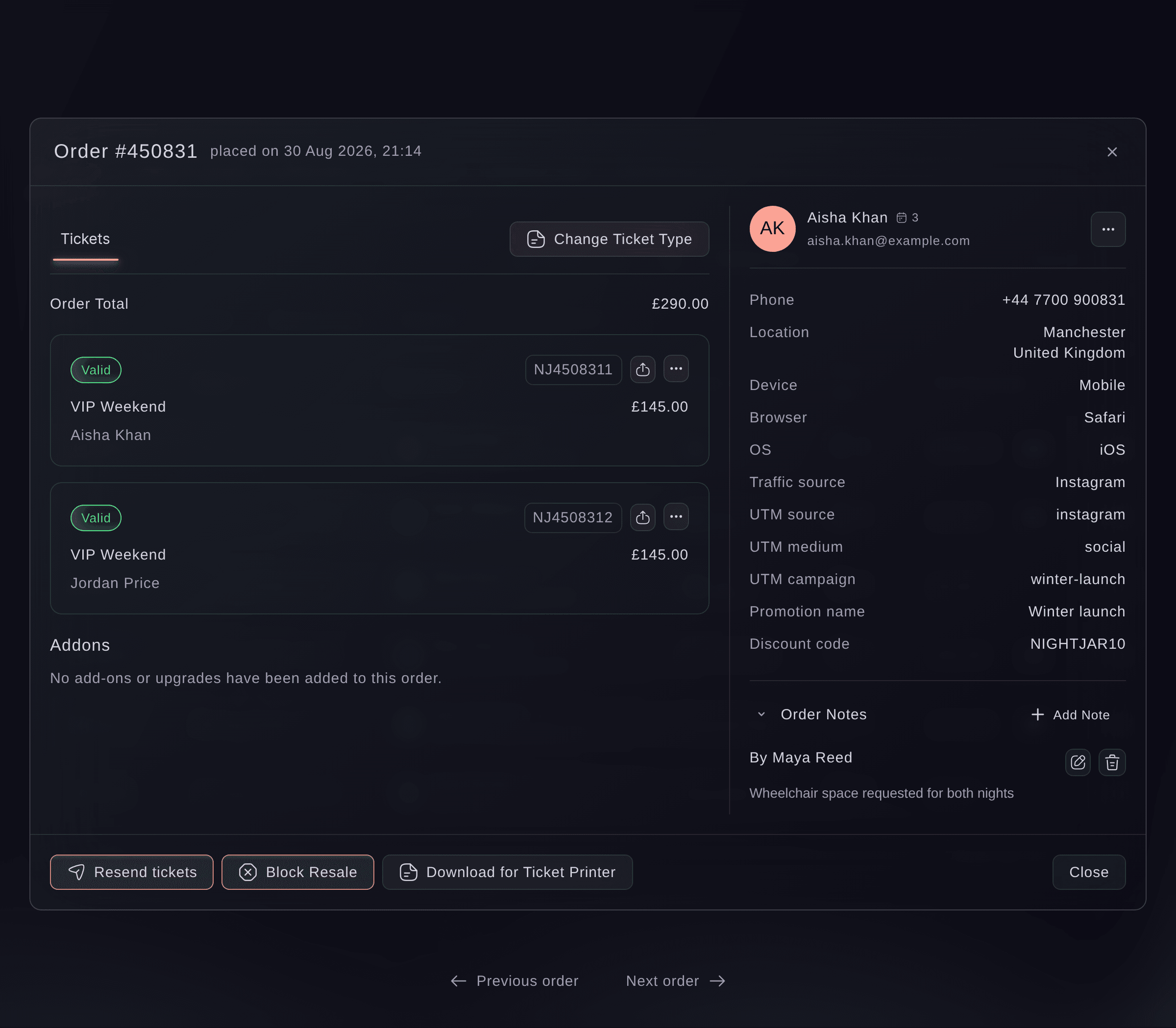
On your Orders page, each gifted ticket shows who it went to, with a link to their order. The friend's order shows who the ticket came from, so when a buyer calls about a ticket they gave away, your team sees who holds it now in seconds. A buyer who only needs to correct the name on a ticket selects Edit ticket on their order, enters the new ticket holder's name and contact details and confirms, and where you charge a name-change fee they pay it on the same page before the change is saved.

  • Gift ticket: from the buyer's own order
  • A new QR code: the replaced ticket no longer scans
  • Gifted to and Gift from: who holds each ticket, on the order
Ticket Fairy order window with two valid VIP Weekend tickets, the buyer's phone, location, device and traffic source, and a note in Order Notes

Keep Fans Who Missed Out Close to Your Event

Once a ticket type sells out, your event page shows a Join Wait List form under it. Fans choose the ticket type and how many tickets they want, enter their name and email address, and receive an email that they are on the list. They stop refreshing your event page and stop looking for touts, and you see how many fans still want to come.

Set the most tickets one person can ask for on each ticket type, and a fan asking for more sees a message when they sign up. Returned tickets then reach more of the fans who waited, which matters most on a small venue or a hot release.

A new event starts with the ticket waiting list on. Turn the add-on waiting list on separately when parking, camping or merchandise can run out.

  • Join Wait List: on your event page once a ticket type sells out
  • Place confirmed: by email as soon as a fan joins
  • Maximum tickets for waiting list: set on each ticket type
Ticket Fairy ticket settings with the waiting list switches for tickets and add-ons turned on

Offer Every Returned Ticket to the Next Fan in Line

When a ticket comes back through resale, a refund or a cancelled payment plan, Ticket Fairy emails the next fan waiting for that ticket type a link to buy it at the ticket's current price. Each offer has a window to buy, and an offer that runs out passes to the next fan, so a returned ticket keeps moving until somebody buys it.

The window shortens as your event gets closer, so a ticket returned close to your event still has time to find a buyer. A fan who asked for three tickets is offered them one after another as they come back.

On an event with ticket categories, a returned ticket is offered as the resale ticket type you set on its category, and the offer can go to the next fan waiting for any ticket type in that category. Keep tickets with different entry times or seating areas in separate categories so a fan is only offered what they asked for.

  • Offers in turn: the earliest fan for that ticket type first
  • A window to buy: then the offer passes to the next fan
  • Resale by category: the resale ticket type you set on each category
Ticket Fairy Ticket Categories section of an event's Tickets page, with four categories and the resale type each one uses

Follow Every Resale and Every Fan Waiting

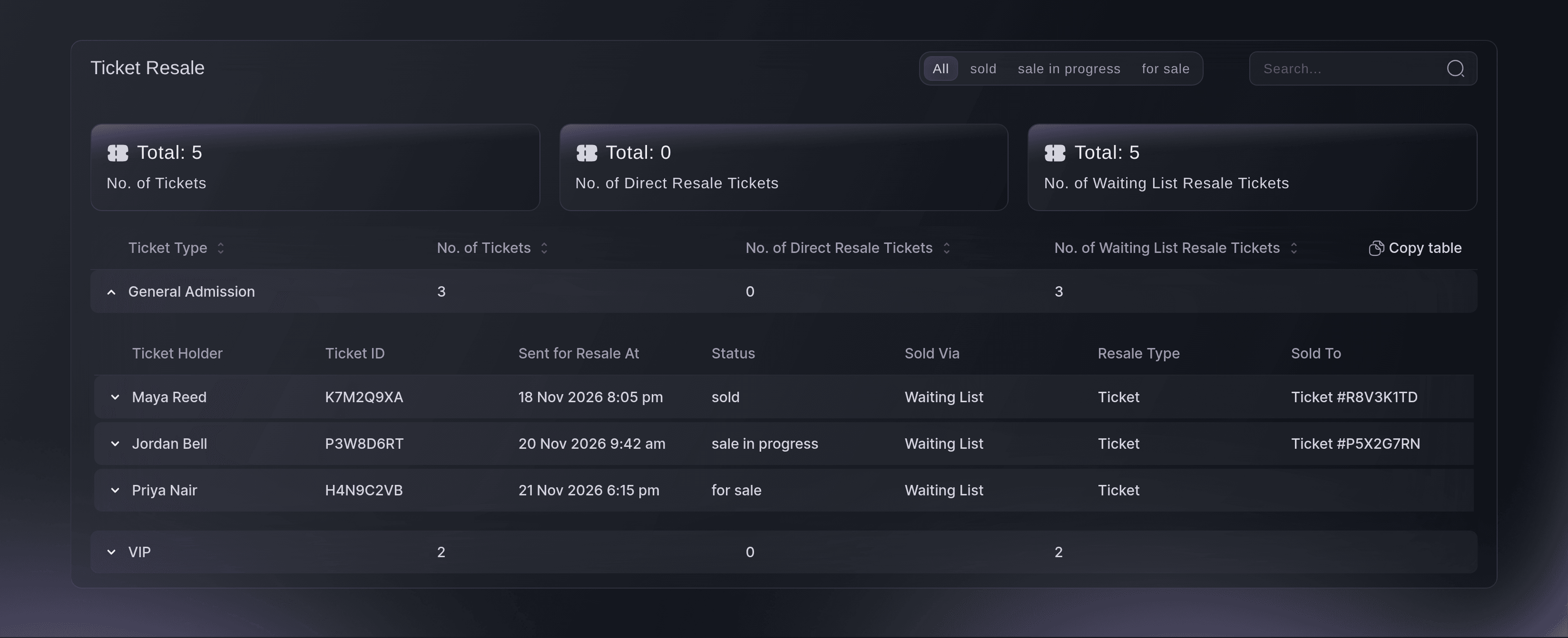
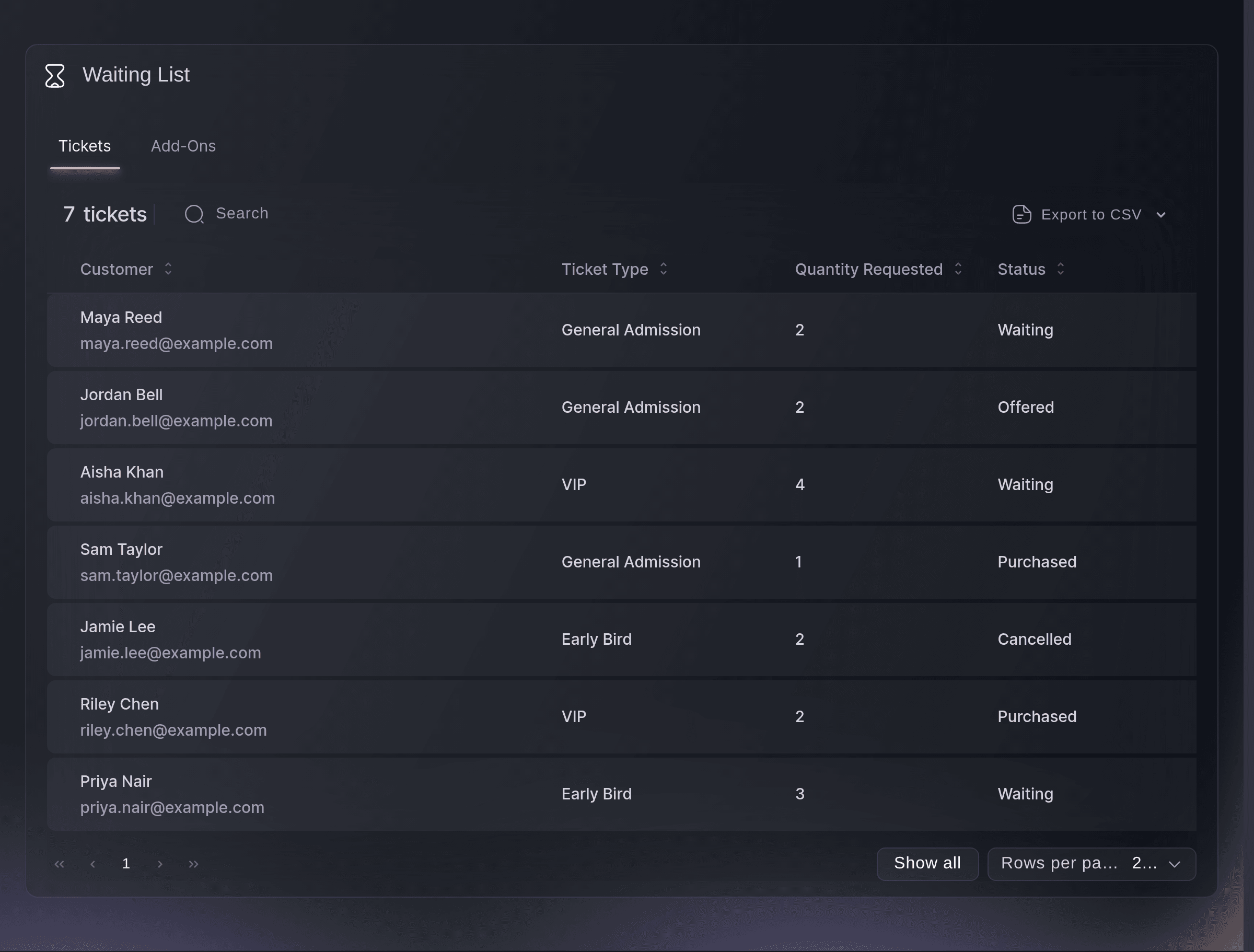
The Ticket Resale report shows how many tickets of each ticket type buyers have put up for resale. Each ticket type opens to show every ticket as for sale, sale in progress or sold, with how it sold and the new buyer's ticket number. The Waiting List report shows each fan, the ticket type or add-on they want, how many they asked for, and whether they are waiting, have been offered a ticket, bought or dropped out, with when each open offer expires.

When you release more tickets, email everyone on the waiting list from Messaging, or only the fans on it who have not bought a ticket since. Your most eager fans hear first. Export the list to a spreadsheet when you plan a release by hand.

  • Ticket Resale report: for sale, in progress and sold, ticket by ticket
  • Waiting List report: waiting, offered, bought or dropped out
  • Email the list: everyone waiting, or only fans without a ticket
Ticket Fairy Ticket Resale report with General Admission opened to show tickets sold, in progress and for sale through the waiting list

Choose Which Tickets and Orders Can Be Resold

Withhold any ticket type from resale, such as a guest allocation, a staff ticket or a heavily discounted early release. Block resale on a single order from the Orders page when you need to, and unblock it again later. Turn ticket resale off for the whole event whenever you choose.

Ask Fai, the assistant inside your dashboard, to turn resale or the waiting lists on or off for an event, or to block resale on a buyer's order. She shows you what she will change and asks you to approve it first. She can also look up a ticket and tell you who holds it and where it has been passed on.

  • Withhold a ticket type: its buyers no longer see Sell Ticket
  • Block Resale: on one order, with Unblock Resale to undo it
  • Ask Fai: she asks before she changes anything

How Organisers Keep Tickets With Fans

  • A Sold-Out Festival

    A festival sells out its weekend tickets in the first release. Resale stays on with the waiting list behind it, so every ticket a fan gives up, camping pitch included, goes to the next fan in line at face value, and touting sites have nothing to sell.

  • A Club Night Group

    One of six friends cannot make it on the night. They gift the ticket to a friend from their order, the friend arrives with their own QR code, and the door team scans one ticket with the right name on it.

  • A Theatre Run

    A theatre runs categories for stalls and circle. A returned stalls ticket is offered as the stalls resale ticket type to the next patron waiting for stalls, so nobody is offered a seat in the wrong part of the house.

  • A Venue With a Hot Release

    A small venue caps waiting list requests at two tickets for a sold-out headline show. Returned tickets reach more of the fans who waited, and the venue emails the fans without a ticket when it releases a second date.

  • An Agency With Guest Allocations

    An agency withholds its guest and staff ticket types from resale and blocks resale on a sponsor's order. Paying fans can still pass their tickets on, while free allocations stay with the people they were meant for.

Get this page as a PDF Read it later or share it with your team. We email you a link to the PDF.
What to put in your PDF

We will email you this deck. We may also email you now and then about Ticket Fairy features that can help your events. You can unsubscribe at any time with one click.

Questions About Resale, Transfers and Waiting Lists

Resale & waiting lists

The seller pays a resale fee of 10% of what they paid for the ticket, not counting the booking fee, and sees it before they list. For currencies other than US, Australian or New Zealand dollars, pounds sterling and euros, it is capped at the equivalent of US$20. Events in India carry no resale fee, an add-on resold on its own carries none, and Ticket Fairy can set a different fee for your event.

The seller gets back what they paid for the ticket and any add-ons that went with it, less anything already refunded, and the resale fee is charged once the ticket sells. The booking fee is not returned unless Ticket Fairy has set your event up to return it. The new buyer pays the ticket type's current price with the booking fee, or the price of the category's resale ticket type on an event that offers returned tickets by category.

Free and guest tickets, gifts, tickets from a pass or a membership, tickets still being paid off in instalments, ticket types you withhold from resale, orders you block and tickets already scanned in. On an event with time slots, selling to someone the buyer knows is the only choice.

A ticket offered to anyone stays up for resale until a fan joins the waiting list for that ticket type. Keep the waiting list on so returned tickets have somewhere to go.

A ticket the buyer received as a gift, a ticket booked with a multi-event pass, and any ticket once the event has ended. A buyer also cannot gift a ticket to their own email address. If the friend has no Ticket Fairy account, they get an email with a link, create their account and accept the gift.

Thirty-six hours when the event is more than two weeks away, then eighteen hours, fourteen inside a week, twelve inside two days and eight hours on the last day. Ticket Fairy can set one fixed window for your event instead. A fan whose offer lapses leaves the list.

Up to ten, unless you set a lower maximum on the ticket type.

No to both. The form appears under a ticket type once it has sold out and sales are still open, on a published event. Only tickets that come back are offered in turn, so email the waiting list from Messaging when you release more. To collect interest before your on-sale, use pre-registration.

Offers go to the next fan in line. To look after a particular fan, send them a guest ticket or a personal invitation.

You need to be the owner or an admin on the event to turn resale or the waiting lists on or off. To block resale on one order, you need to be the owner, an admin, a Stats login or a Customer Support login.

Sell more tickets. Build the crowd that comes back.

Start Selling Tickets Online

Sign up without a credit card and build a test event before you commit. Go on sale in minutes when you are ready.

No monthly subscription required for ticketing
Start selling tickets immediately
Ticketing tools included in the service fee
Get Started Talk to Fai Now

Ask Fai, our AI assistant, about Ticket Fairy’s features, pricing and how it could work for your event.

No credit card required

Book a demo call

See the referral model that drives 20% more ticket sales on average, learn which campaigns sell tickets, answer buyers faster and keep queues moving.

45-Minute Video Call
Pick a Time That Works for You