1. Features
  2. Payments & payouts
  3. Payment plans

Sell More Higher-Priced Tickets With a Deposit and Instalments

A fan who cannot pay for a weekend ticket today often buys nothing at all, or waits until the price has gone up. Turn on a payment plan for your event, and buyers pay a deposit at checkout and the rest weekly or monthly from the same card. You choose the deposit, the number of payments, how long before the event the last one is due and when an unpaid order is cancelled. Ticket Fairy takes each payment on its date and retries one that fails, buyers follow their own schedule on their order, and their tickets become valid once the plan is paid.

  • More fans able to afford your biggest tickets
  • Every plan paid off before show week
  • Buyers who manage their own payments
Ticket Fairy Payment Plans section with the deposit, the number of instalments and the cancellation date for unpaid orders

Sell Your Biggest Tickets to Fans Who Pay Over Time

Weekend camping passes, VIP upgrades and multi-day festival tickets are where fans hesitate longest. With a payment plan, the buyer chooses to pay over time at checkout, pays the deposit and has their order confirmed straight away. The rest follows from the same card on the schedule you set, so more fans commit during your early on-sale, when you most need the money and the momentum.

The plan belongs to the event, so every ticket type on it can be bought this way. Checkout offers the plan only when an order is big enough to divide into sensible payments, so a single cheap ticket is paid in full as usual. A buyer who uses a discount code can still choose the plan, and the deposit and payments are worked out on the discounted total.

  • Pay over time: chosen by the buyer at checkout
  • Deposit at checkout: the order is confirmed when the deposit is paid
  • The same card: each later payment is taken from it on its date

Set Your Terms Once, Before the On-Sale

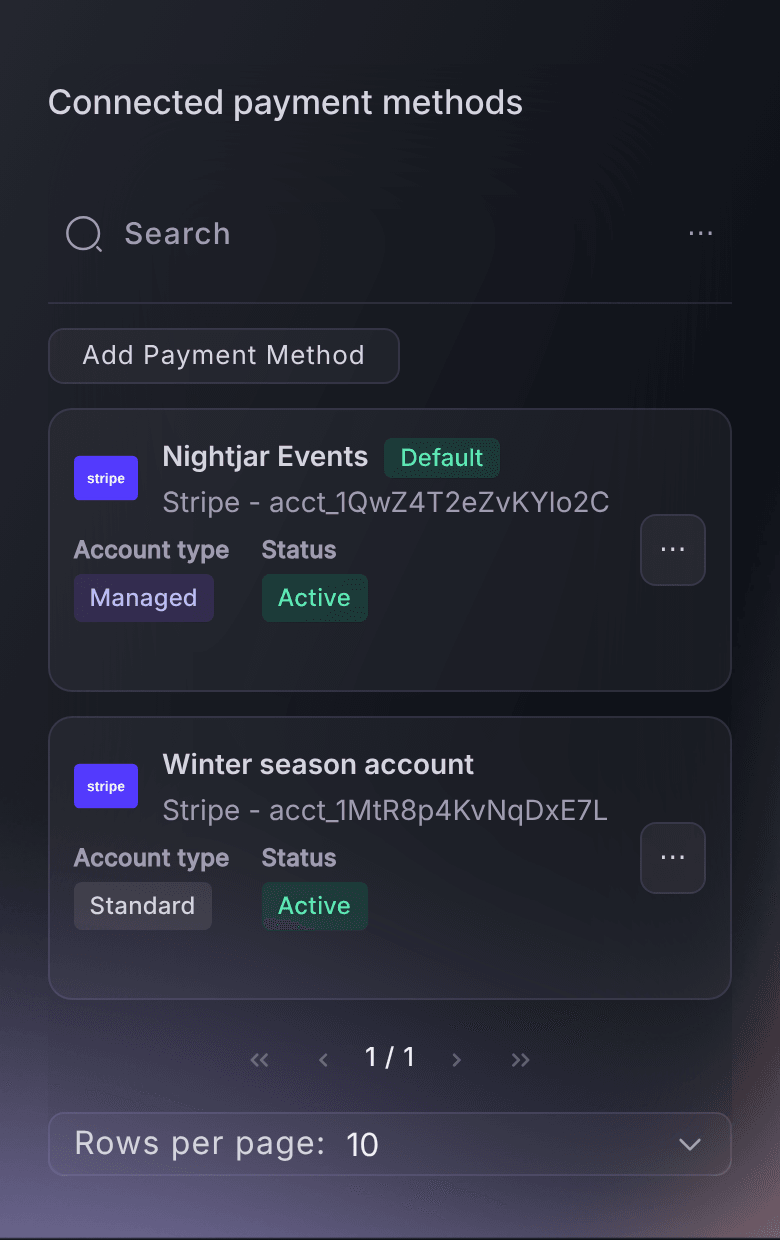
The Payment Plans section sits on your event's Payments page, beside the payment processing account the event uses, so the plan and the account that collects it are set up together. You decide the number of payments, weekly or monthly, how many weeks before the event the last one is due, how the deposit is worked out and when an unpaid order is cancelled. Change anything freely until the event makes its first sale. From then on the settings stay as they are, so every buyer pays on the terms they signed up to and nobody is moved onto a schedule they did not agree.

A buy now, pay later lender brings its own sign-up and credit check into your checkout. A Ticket Fairy plan runs on your own event, on the card the buyer pays with at checkout, with the deposit, the schedule and the cancellation date all decided by you. Tell buyers on your event page what the deposit is, how many payments follow and when the last one is due, and they choose the plan with their eyes open.

  • Enable payment plan: one switch for the whole event
  • Weekly or Monthly: the number of installments you choose
  • Terms that hold: every buyer keeps the plan they bought under

Choose the Deposit That Suits Your Buyers

The deposit decides how easy the first step feels and how much of the money you hold early. Evenly distributed installments makes every payment the same, deposit included. Fixed down payment sets a fixed amount, charged once per order or once per ticket. Percentage of order total takes a share of the order before booking fees. The remaining payments are always spread evenly over the rest of the plan.

A fixed amount per ticket suits group orders, because a buyer bringing friends pays a deposit for each of them. When your event sells in more than one currency, Different deposit per currency lets you set a flat deposit that makes sense for buyers paying in another currency, and a blank field uses the main amount.

When you choose a fixed down payment per ticket, each ticket type also offers Payment plan down payment for this ticket type. Give your VIP pass a bigger deposit than general admission, or a camping upgrade a smaller one, and leave the field empty for ticket types that should use the event's amount.

  • Evenly distributed installments: every payment the same, deposit included
  • Fixed or percentage: per order or per ticket, or a share of the order
  • Different deposit per currency: a flat amount that suits buyers paying in another currency
  • A deposit per ticket type: a different down payment where a tier needs one
Ticket Fairy Ticket Types inventory with General Admission and the Create action, where each ticket type opens with its own settings

Collect the Rest Before Show Week

A plan that is still running in show week leaves you chasing money while you build the site. Choose how many weeks before the event the last payment is due, and every buyer's plan finishes by then. Each buyer's schedule starts on the day they buy, so a fan who buys late is offered only the payments that still fit before your cutoff, and the plan gets shorter as your event comes closer.

You also choose how many weeks before the event an order that has stopped paying is cancelled. Set it closer to the event than the last payment, so a buyer whose card failed has time to catch up. Ticket Fairy retries a failed payment before your team has to act, and you keep the first instalment on every cancelled plan.

  • Last installment: every plan finishes by the cutoff you set
  • Failed payments retried: tried again before your team needs to step in
  • Order cancellation: unpaid orders cancelled on the date you choose
  • First installment kept: on every cancelled plan

See the Plan the Way Your Buyers Will

The Customer preview beside your settings shows what a buyer checking out today would pay now and later. It works from the price of any of your ticket types, or a price and ticket count you enter, and shows the down payment, each installment and the total. Later scenarios show how the plan shortens as the event approaches, so you can check a fan buying next month still gets a plan worth choosing.

Selling VIP tables with an online deposit? The preview works for a table too, showing the table deposit spread over the plan and the balance due at check-in. The preview also marks a scenario where a payment would be too small for a card to be charged, so you can raise the deposit or reduce the number of payments before you save.

  • Customer preview: the down payment, each installment and the total
  • Your own prices: pick a ticket type or a table to use its price
  • Later scenarios: how the plan shortens as the event comes closer

Let Buyers Manage Their Own Payments

Every plan payment your team does not have to chase is time back. The buyer's order shows how many payments they are making, how much each one is, how often it is taken and the date of the final payment, with each payment marked once it is paid. When a card expires, the buyer selects Update Card Details on their order and enters the new card, and nothing is charged until the next payment date.

The order also tells the buyer that their tickets become valid once all payments are made, so only tickets that are paid in full get through your door. If a plan is cancelled before it is paid off, the buyer's order shows the balance left to pay and a button to complete the plan in one payment. Once that payment succeeds, their tickets become valid for the event, so a fan who missed a payment can still come.

  • Payment summary: the number, the amount and how often
  • Update Card Details: on the buyer's own order
  • Complete the plan: the remaining balance paid in one payment

Follow Every Plan From Your Orders Page

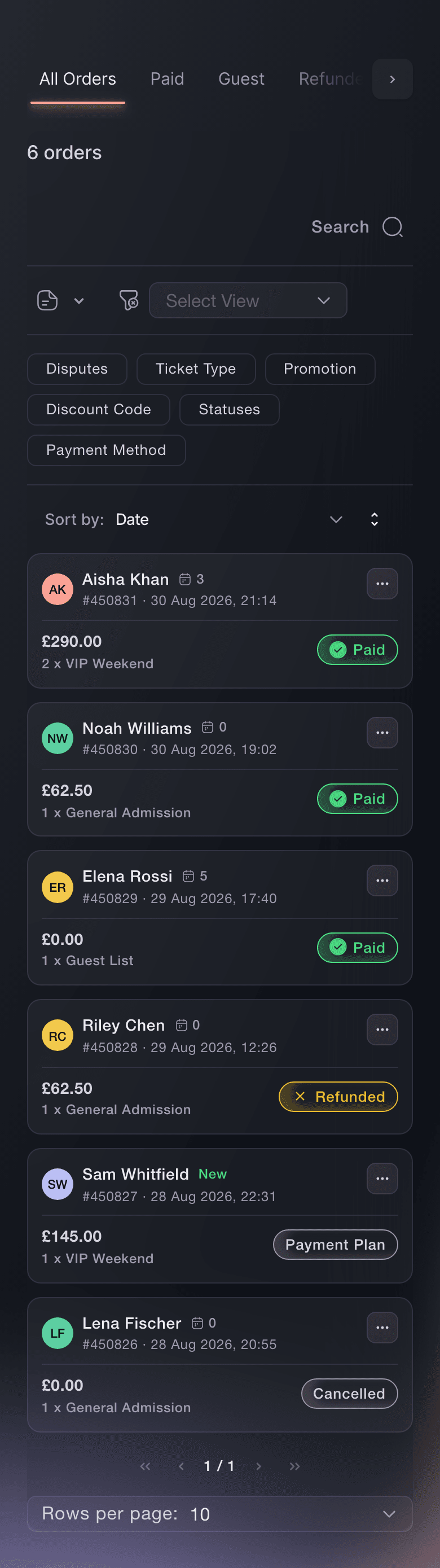
The Payment Plan tab on your event's Orders page lists every order being paid over time, beside your paid, guest, refunded and cancelled orders. Look at it a few days after each collection date. An expired card is the usual reason a payment fails, and the buyer almost always still wants to come, so a quick message to update their card saves the sale.

  • Payment Plan tab: every order being paid over time
  • A quick reminder: contact buyers whose payment failed
Ticket Fairy Orders page on All Orders, with Paid, Guest, Refunded, Cancelled, Payment Plan and Abandoned Carts tabs above six orders

Let Fai Set Up Your Payment Plan

Tell Fai, the assistant inside your dashboard, the number of payments, weekly or monthly, the last payment date, the cancellation date and the deposit you want, including a different deposit for another currency. She shows you the settings and asks you to approve them before she saves, because they change how your buyers pay. She can turn a plan off for you the same way, and set a ticket type's own deposit when you ask.

  • Set up in a sentence: Fai fills in every plan setting from your request
  • You approve first: nothing is saved until you say so

How Organisers Use Payment Plans

  • A Camping Festival

    A festival opens weekend camping tickets in winter with monthly payments and a last payment well before the gates open. Fans who could not pay the full price at once buy in the first week, and the cancellation date leaves time to chase the few expired cards.

  • A VIP Upgrade Tier

    A promoter sets a fixed down payment per ticket and gives the VIP pass its own bigger deposit. VIP buyers commit early with a meaningful payment, while general admission buyers start with a small one.

  • An Event Selling in Two Currencies

    A destination festival sells in euros and pounds. Different deposit per currency gives buyers paying in pounds a flat deposit that suits them, where the euro amount would be too high or too low.

  • A Club Selling VIP Tables

    A club takes an online deposit on its VIP tables and turns on a weekly plan. The Customer preview shows the table deposit spread over the plan and the balance due at check-in, so the club checks the numbers before it shares the booking link.

  • A Group Booking for Friends

    A buyer books four weekend passes for a group of friends on a plan with a deposit per ticket. The deposit covers every pass in the order, and the whole group's tickets become valid once the plan is paid.

Get this page as a PDF Read it later or share it with your team. We email you a link to the PDF.
What to put in your PDF

We will email you this deck. We may also email you now and then about Ticket Fairy features that can help your events. You can unsubscribe at any time with one click.

Questions About Ticket Payment Plans

Payment plans

Each buyer pays at the weekly or monthly spacing you set, counted from the day they bought. Monthly means every 30 days, not the same date each month. The last-installment cutoff decides how close to the event a new plan can still fit.

Ticket Fairy retries the payment before your team has to act. Check the Payment Plan tab a few days after each collection date, because an expired card is the usual cause. An order still unfinished at your cancellation cutoff is cancelled, and you keep the first instalment. The buyer can still pay the remaining balance from their order to complete the plan.

The plan applies to the whole event, and with a fixed down payment per ticket you can give a ticket type its own deposit. Checkout hides the plan when an order is too small to divide into payments above the smallest amount a card can be charged, and a free ticket is never offered a plan.

Yes. A discount can also take the order below what a plan needs: if the deposit would meet or exceed the discounted total, or the payments would fall below the smallest card charge, checkout does not offer the plan.

You can change every setting freely until the event makes its first sale. From then on the dashboard locks the plan settings, turning the plan off included. Until a buyer starts a plan, Fai or Ticket Fairy Support can still make a change for you, and once a buyer has started one, the terms stay as they are.

A percentage deposit is from 1% to 100% of the order before booking fees, and a fixed deposit is at least 1 in your currency. The cancellation cutoff must be earlier in the plan than the last installment, which means fewer weeks before the event. A per-ticket-type deposit can be set only while that ticket type has no orders.

A plan runs on the card payment method that supports plans, and it cannot be saved on any other payment method on the event. If the Payments page shows no Payment Plans section, the event uses a payment method without plans.

The order is confirmed at checkout, and the tickets become valid once every payment has been made. The buyer's order tells them this, so they know what is left before they arrive.

You need to be an owner or an admin on the event. Promoter, stats and door logins do not see the Payments page.

Sell more tickets. Build the crowd that comes back.

Start Selling Tickets Online

Sign up without a credit card and build a test event before you commit. Go on sale in minutes when you are ready.

No monthly subscription required for ticketing
Start selling tickets immediately
Ticketing tools included in the service fee
Get Started Talk to Fai Now

Ask Fai, our AI assistant, about Ticket Fairy’s features, pricing and how it could work for your event.

No credit card required

Book a demo call

See the referral model that drives 20% more ticket sales on average, learn which campaigns sell tickets, answer buyers faster and keep queues moving.

45-Minute Video Call
Pick a Time That Works for You