1. Features
  2. Private sales & presales
  3. Invitation-only events

Sell Your Private Event Only to the People You Invite

At a private launch, a members' night, a sponsor allocation or a brand activation, the people outside the list must not be able to buy. Send each guest their own ticket link with their own limit on tickets and orders, share one link with a whole group when you have no names, or put the event page behind a password for each group you sell to. Then see who opened their link, who bought and which password brought in the most sales, and remind the guests who have not bought yet.

  • Only the guests you invite can buy
  • Each guest or group held to what you agreed
  • A clear view of who has bought
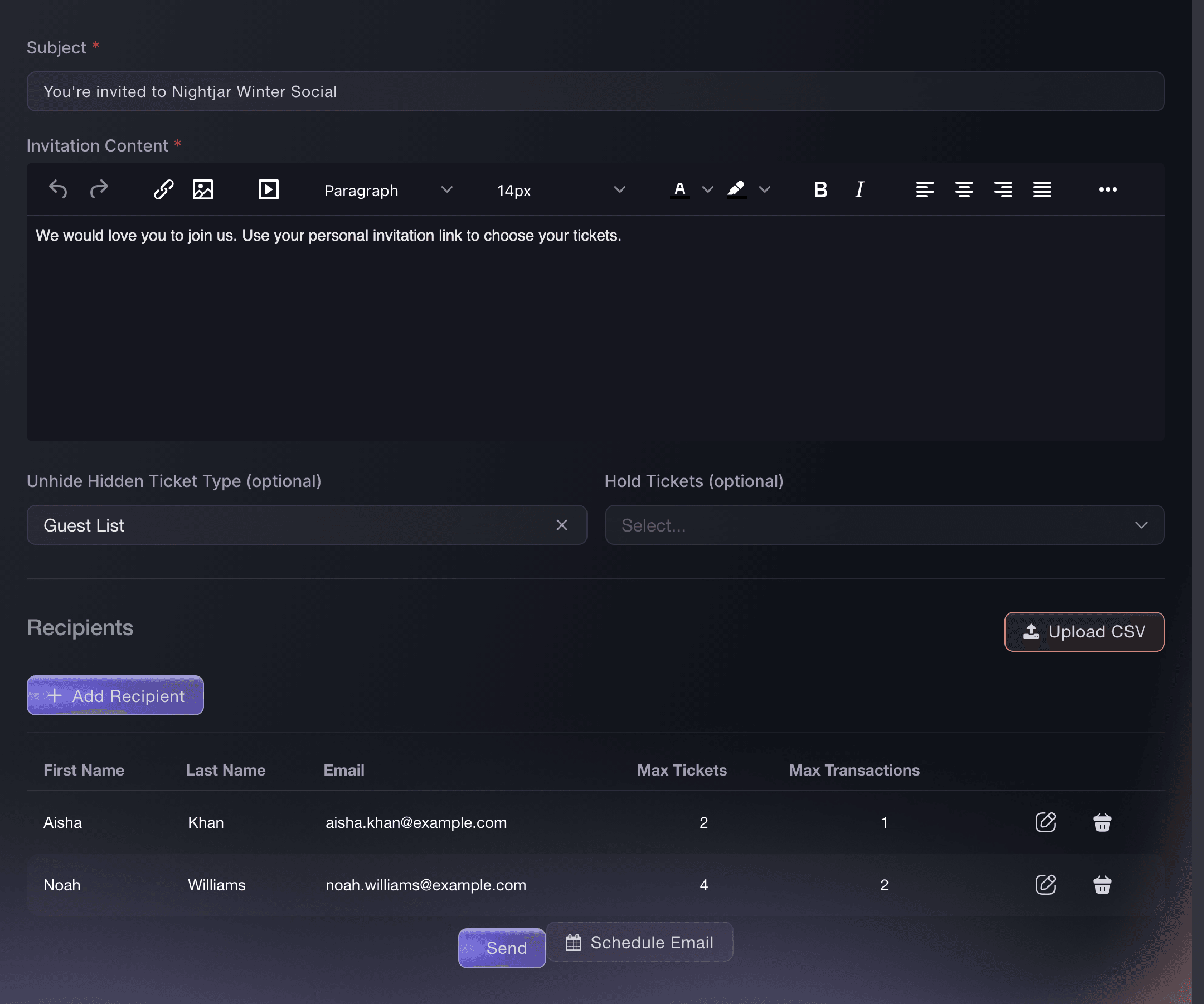
Ticket Fairy invitation form with Subject, Invitation Content, hidden-ticket access and two recipients from a spreadsheet

Choose How Private Each Sale Should Be

Private sales come in different shapes, and Ticket Fairy gives you a tool for each. Personal invitations suit a guest list where you know every name and email address. An invitation link suits a sponsor's staff or a members' chat with no list of names. A password suits a private show sold to a few trusted groups, where the event details should stay out of sight too. You can combine them on one event, such as a password on the page and personal invitations for the tickets.

Two more options sit beside these. An access code keeps your event page public and reveals hidden ticket types only to people who enter it, which suits a guest list rate on an event that is otherwise on sale to everyone. Require order approval lets anyone who can reach a ticket place an order, and you accept or decline each one after checkout before the buyer gets their tickets.

The difference that matters most is who holds the key. A personal invitation belongs to one guest, with their own limits, a status you can follow and a link you can cancel. A password, an access code or an invitation link is shared, so anyone who receives it can use it.

  • Personal invitations: a link and a limit for each named guest
  • Invitation links: one link and one allowance for a whole group
  • Event passwords: the whole page stays private
  • Order approval: accept or decline each order after checkout
Ticket Fairy Event Settings with Invitation required to attend turned on

Give Each Guest Their Own Link and Limit

Turn on Invitation required to attend, and a visitor without a personal invitation cannot add a ticket, even when they find your event page. Add each guest with their name and email, and set the most tickets they can buy and the number of separate orders they can place, so each invitation matches what you agreed with them. Draft the subject and message in your own words, and Ticket Fairy adds the guest's personal ticket link to the invitation.

An invitation can also open tickets nobody else can see. Attach a hidden ticket type, such as a guest list rate or a members' tier, and the guest's link reveals it beside your public tickets. Attach a reserve you held back on a ticket type, and invited guests buy from those tickets, so your public on-sale never eats into the guest list. Attach neither, and guests choose from the tickets everyone can see, with the invitation still deciding who can buy.

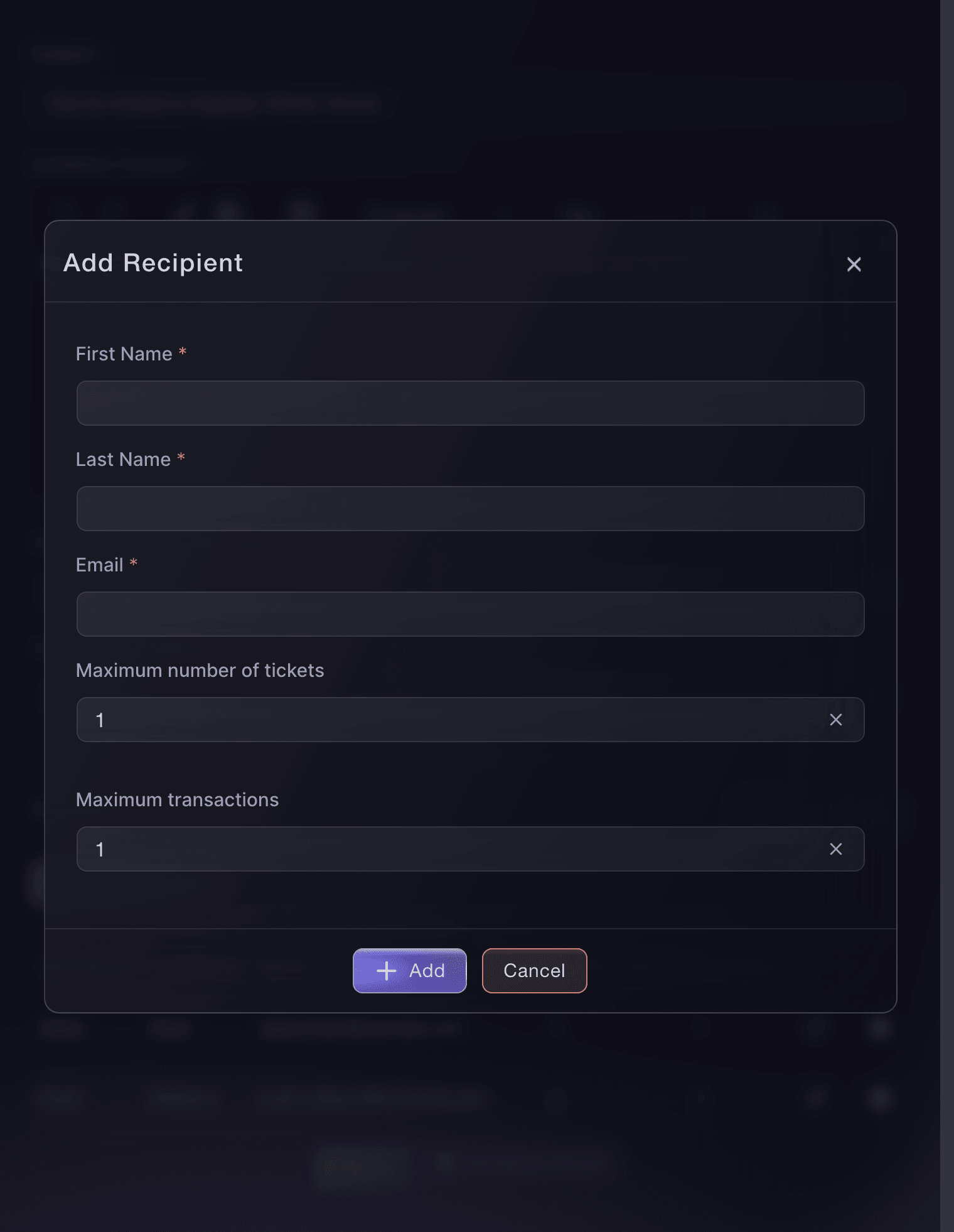
  • Add Recipient: name, email and limits for each guest
  • Max Tickets and Max Transactions: the tickets and orders each guest can buy
  • Hidden tickets: revealed only through the invitation
  • Hold Tickets: guests buy from the tickets you kept back
Ticket Fairy Add Recipient dialog with name, email, maximum tickets and maximum transactions fields

Invite a Whole Guest List From a Spreadsheet

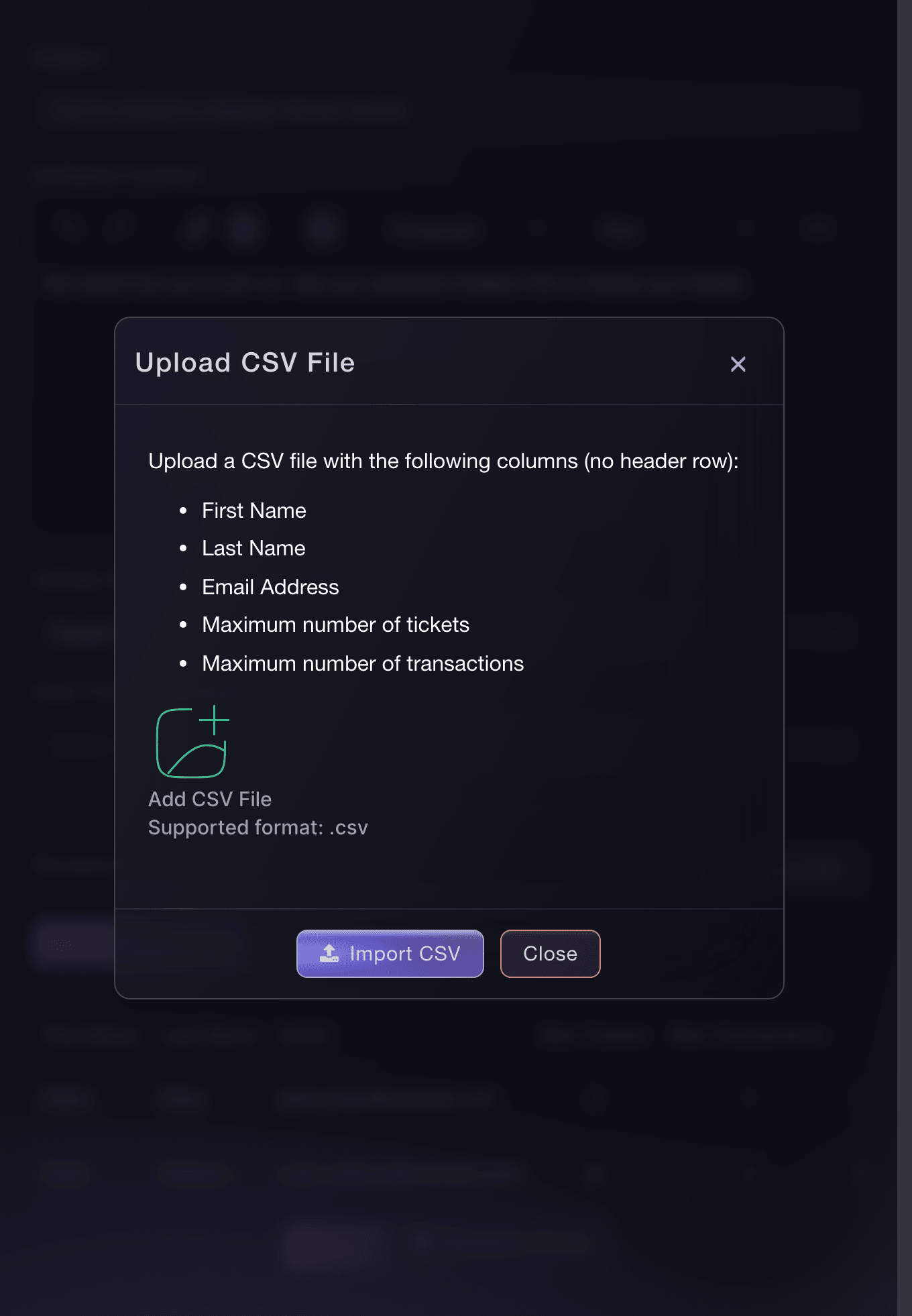
Most guest lists arrive as a spreadsheet from a sponsor, an artist's team or a venue. Upload it as a CSV with each guest's first name, last name, email and limits, one row per guest, and Ticket Fairy adds every valid row to the invitation. Import Results shows how many rows were processed, imported and failed.

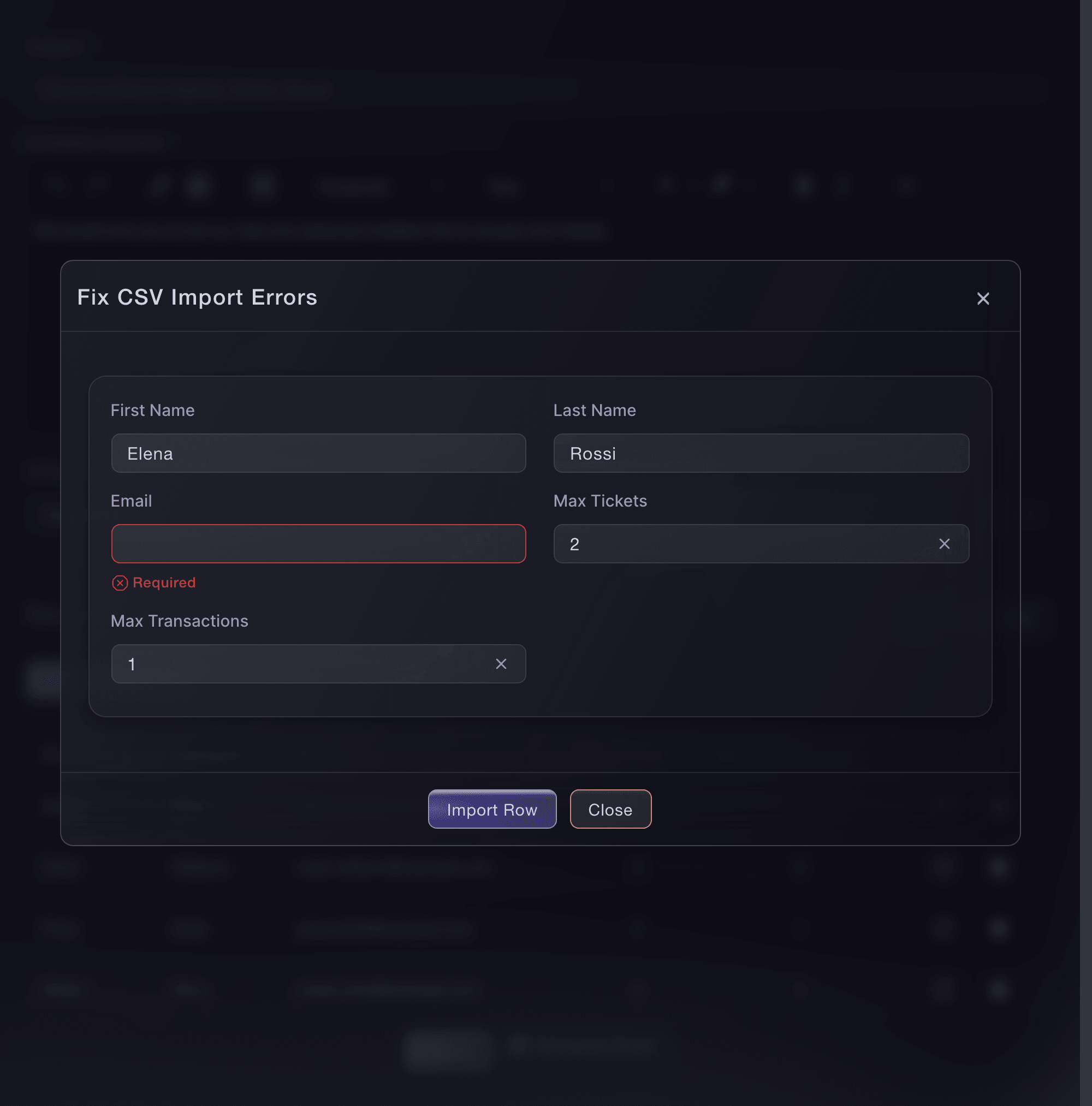
Any row with a missing or wrong value opens in Fix CSV Import Errors, with the field that needs attention marked in red. Correct the row there and import it on its own, so you never upload the good rows twice or rebuild the list by hand.

  • Upload CSV: a whole guest list in one file
  • Import Results: the rows processed, imported and still to fix
  • Fix CSV Import Errors: correct a row and import it there and then
Ticket Fairy Fix CSV Import Errors dialog with a rejected guest row, the field that needs attention marked and the Import Row button

Send Invitations When You Announce

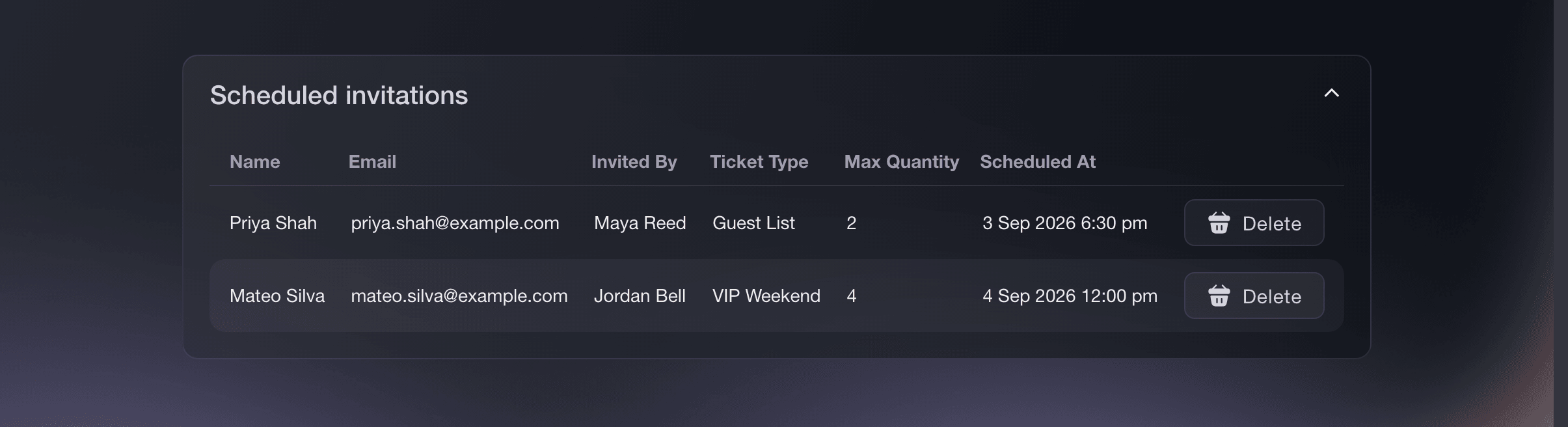
Send your invitations straight away, or schedule them for the date and time you announce, in your event's time zone, so every guest hears at the same moment. Scheduled invitations lists each guest, ticket type, ticket limit and send time, and you delete one before it goes if plans change.

Send a test invitation to yourself before the real send, and you see exactly what your guests receive and which tickets their link opens. Visitors who reach the event page without an invitation cannot add a ticket, so a page shared beyond the list does not leak your allocation.

  • Send: every invitation goes out now
  • Schedule Email: sent at the time you choose
  • Scheduled invitations: each guest and send time, with Delete
Ticket Fairy Scheduled invitations table with recipients, ticket types, ticket limits, scheduled times and Delete actions

See Who Opened, Who Bought and Who Needs a Reminder

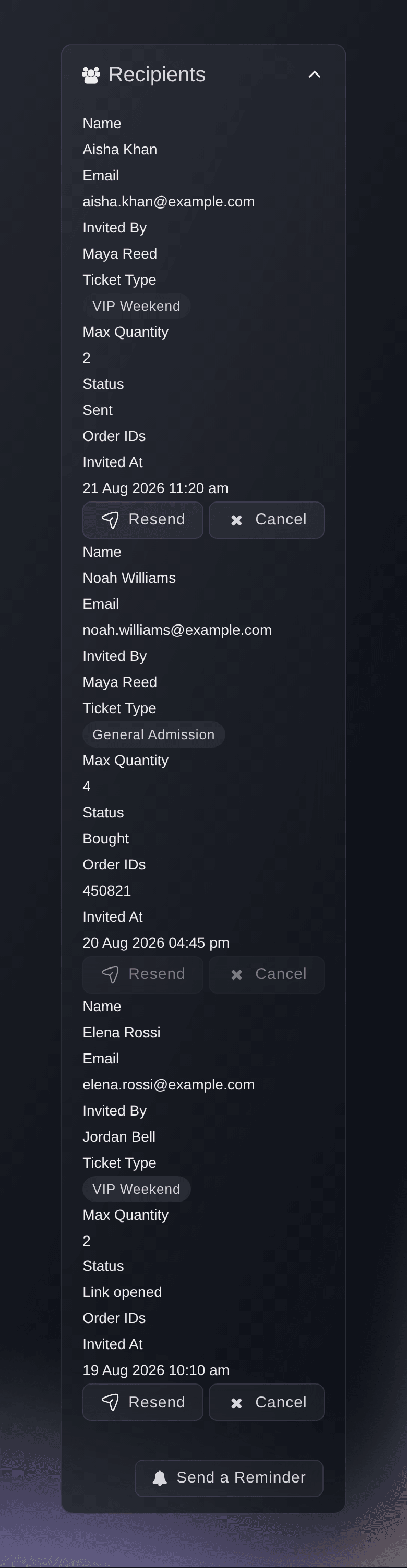
The invitations table shows each guest as Sent, Link opened, Bought or Withdrawn, with their limits and order numbers, so you know who is coming without a spreadsheet of your own. Resend one guest the same link, cancel a link that reached the wrong person, or send a reminder to every guest who has not bought yet.

A reminder can resend the original message or carry a new one, such as a deadline or a note that tickets are running low. Cancelling one guest changes them to Withdrawn and stops their link working, while every other invitation and the invitation-only setting stay as they are.

  • Guest status: Sent, Link opened, Bought or Withdrawn
  • Resend and Cancel: for one guest at a time
  • Send a Reminder: to every guest who has not bought
Ticket Fairy Invitations table with each recipient's status, limits and Resend and Cancel actions

Give a Sponsor or Members' Group One Link

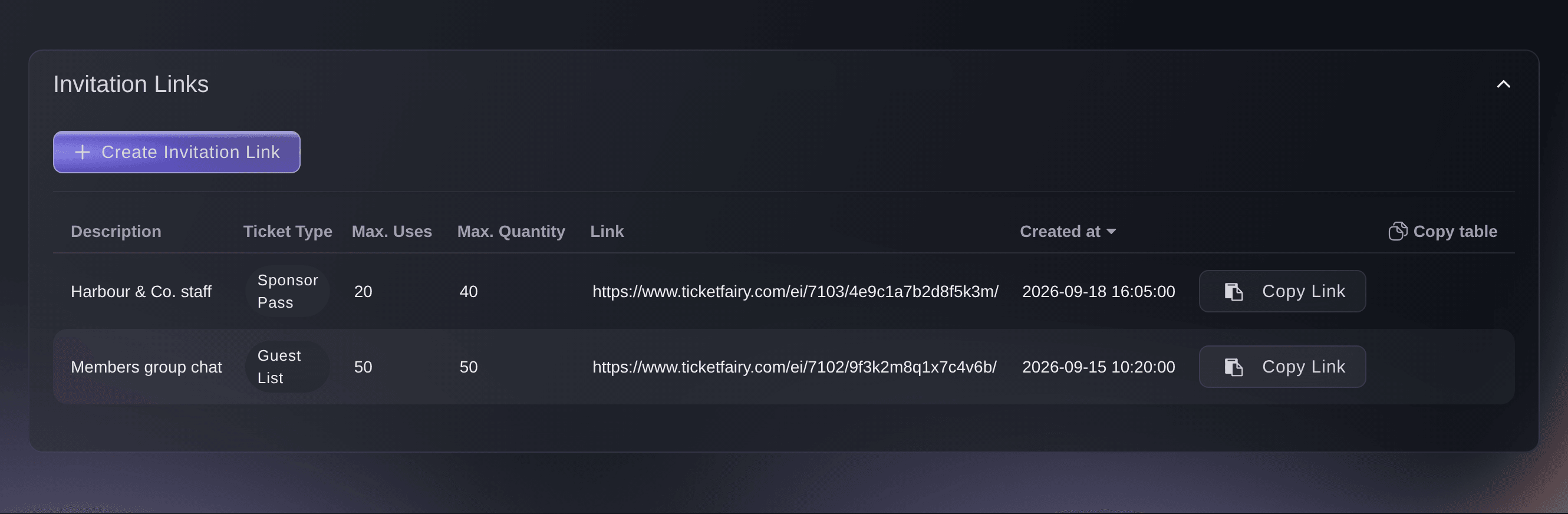
A sponsor wants tickets for their staff, or a members' chat has been promised first access, and you have no list of names. Create one invitation link for the group, choose the hidden tickets and the held allocation it opens, and cap the tickets and orders the whole group can buy through it. Share the link where the group will see it, and the group buys its share of your event without taking anyone else's.

Give each group its own link with a description your team recognises, and the table of links shows each group's tickets and limits. Buyers never see the description. Once the group reaches either limit, the link offers no more tickets, and when the sponsor asks for more, a second link keeps the new allowance apart from the first.

  • One link for each group: shared by everyone in the group
  • Limits for the whole group: the tickets and orders the group can buy
  • Copy Link: ready for a chat, an email or a newsletter
Ticket Fairy Create Invitation Link dialog with description, hidden ticket, hold and limit fields

Keep the Event Page Private With a Password

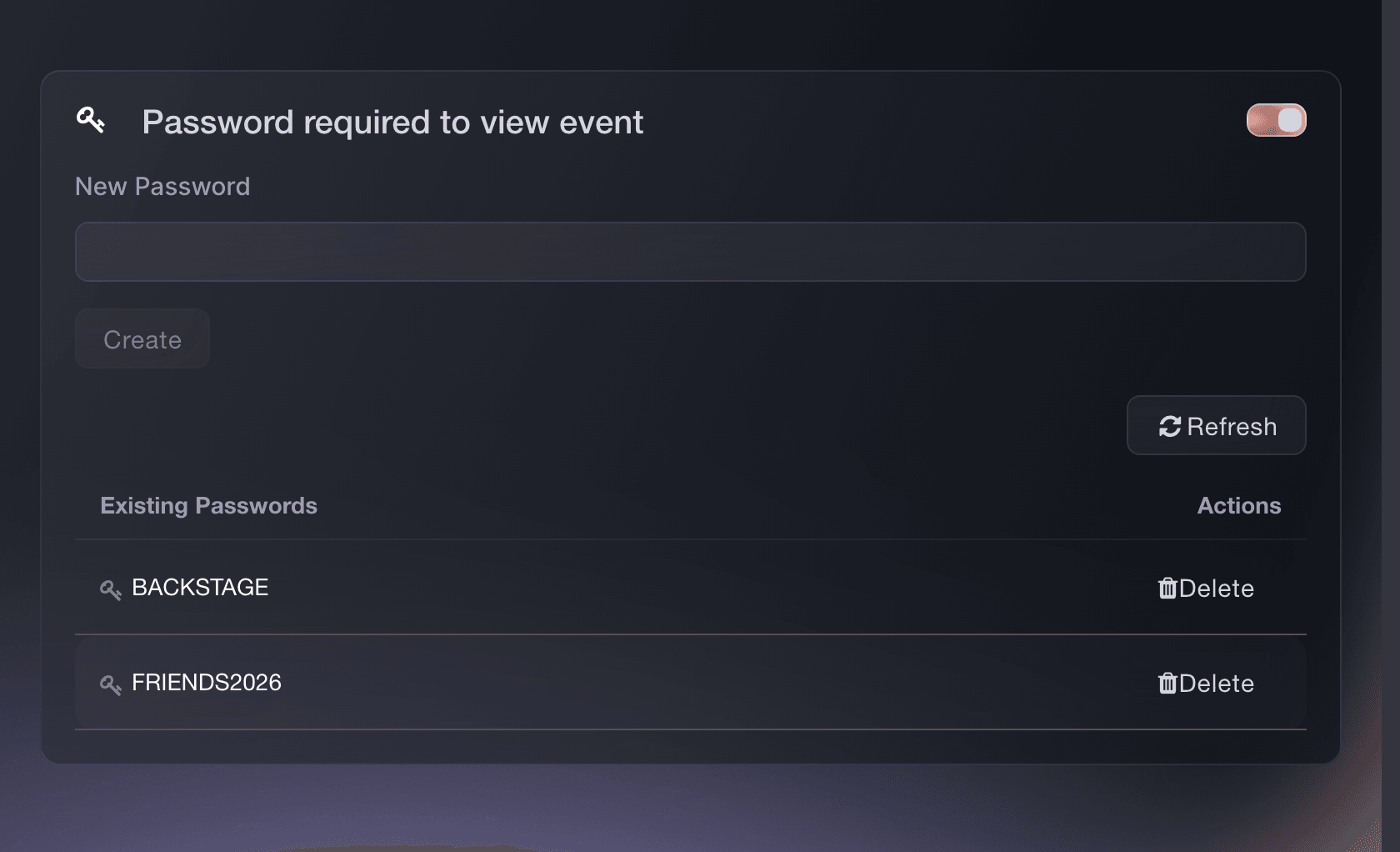
Turn on Password required to view event, and your event page asks every visitor for a password before it shows the event or its tickets. Give each group its own password, such as one for the fan club and one for your partners, and send it through the channel that group already reads. The checkout embedded on your own website asks for the password too, so the sale stays private wherever buyers find it.

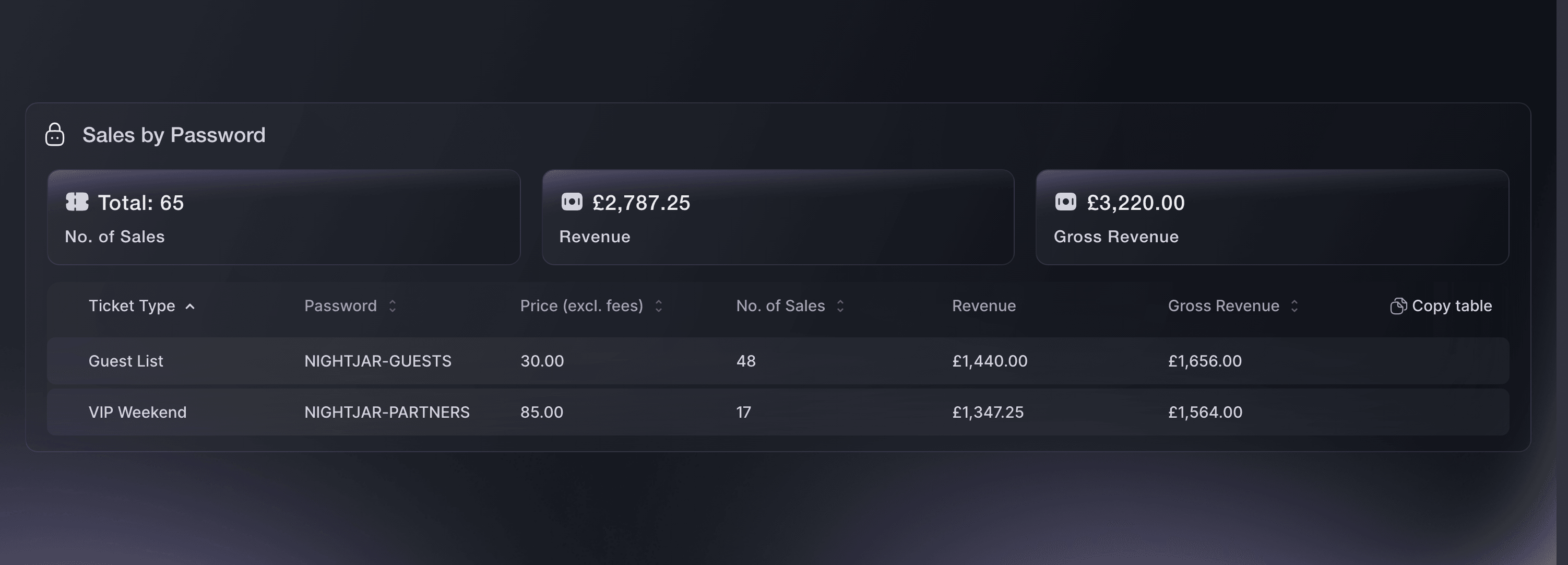
When one password reaches the wrong people, replace that one password and the other groups carry on buying with theirs. Sales by Password then shows the tickets, revenue and gross revenue each password brought in, so you know which group bought the most and how much to set aside for each group next time.

  • Password required to view event: the page opens only for people with a password
  • A password for each group: replace one and the others still open the page
  • Sales by Password: tickets, revenue and gross revenue for each password
Ticket Fairy event settings with Password required to view event turned on and two existing passwords

Let Fai Set Up Your Private Sale

Not sure which option fits? Ask Fai, the assistant inside your dashboard, to compare them for your event and check how it is set up now. She turns on the invitation requirement and prepares and sends your approved guest list, creates an invitation link with the hidden tickets it unlocks and the group's limits, and adds, replaces or removes passwords. Ask her for Sales by Password and she explains what each row shows.

Fai shows you the event, the guests or the passwords involved and asks you to approve each change before she makes it. Copy a link she creates from the Links tab and share it yourself.

  • Ask Fai: invitations, links and passwords in a sentence
  • You approve each change: nothing is sent or changed until you say so

How Organisers Run Private Sales

  • A Brand Launch Party

    A drinks brand gives its agency a guest list of press, retailers and creators. The agency uploads it as a CSV, sets a ticket and a plus-one for each guest, and schedules the invitations for the morning of the announcement. The invitations table shows who has bought, and one reminder brings in the late replies.

  • A Sponsor's Staff Allocation

    A festival owes its headline sponsor a block of staff tickets but has no names. It holds the tickets back on the general admission release, creates one invitation link for the sponsor with matching limits, and the sponsor shares it on their intranet. The public on-sale never touches the sponsor's share.

  • A Secret Show for the Fan Club

    A band plays a small club show for fan club members only. The promoter puts the event page behind a password, gives the fan club and the label a password each, and reads Sales by Password afterwards to see which group bought more.

  • A Members' Night at a Venue

    A venue opens a members-only night with a hidden members' ticket type. Each member receives a personal invitation that reveals it, with one order each, and the venue cancels the invitation of a member whose membership lapsed.

  • A Corporate Hospitality Evening

    A conference team sells a hospitality evening to partner companies. Each partner gets its own invitation link with its own limits and description, so the team sees in the table of links which partner has used its allowance.

Get this page as a PDF Read it later or share it with your team. We email you a link to the PDF.
What to put in your PDF

We will email you this deck. We may also email you now and then about Ticket Fairy features that can help your events. You can unsubscribe at any time with one click.

Questions About Invitation-Only Events

Invitation-only events

Max Tickets is the total number of tickets a guest can buy with their invitation, counting completed purchases and active payment plans. Max Transactions is the number of separate orders they can place, and a pending order counts as one. One order with several ticket types counts as one transaction.

From 1 to 50 tickets and from 1 to 50 orders for each personal invitation or invitation link. The order limit cannot be higher than the ticket limit. On a link, both limits count every purchase made through it, whoever makes it.

You need permission to edit Event Settings and send invitations for the event, and your account must be verified under Account Verification in Account Settings. Your brand needs to be verified too: if your brand is new, contact Ticket Fairy Support before you create your first invitation. Invitation links need an owner, administrator, curator or customer support role on the event.

Yes. Anyone with the link can use what is left of its allowance, so ask guests to keep it private. Cancel a personal invitation if it reaches the wrong person, and its link stops working.

The guest opened their invitation link. It does not mean they bought. Bought shows they completed a purchase or have an active payment plan.

No. A link works until the group reaches its ticket limit or its order limit, so choose limits that match the group before you create it. Buyers already checking out when the limit is reached can still finish, so set the limits a little below the most the group can have. A test order counts against the link like any other.

Yes, when your event already lets buyers purchase through referral links. Everyone else needs a personal invitation or an invitation link to add a ticket. Ticket choices can stay visible on the event page until a visitor tries to add one.

No. A password shows only that the buyer knew it, and Sales by Password shows which password was entered, not who shared it. Use personal invitations when you need a separate link and limits for each person.

An event password hides the whole event page. An access code leaves the page public and reveals only the hidden ticket types attached to its promotion.

Turn off Password required to view event or Invitation required to attend in the event's Settings, and the event opens to every visitor. Delete the passwords you no longer need once it is open.

Sell more tickets. Build the crowd that comes back.

Start Selling Tickets Online

Sign up without a credit card and build a test event before you commit. Go on sale in minutes when you are ready.

No monthly subscription required for ticketing
Start selling tickets immediately
Ticketing tools included in the service fee
Get Started Talk to Fai Now

Ask Fai, our AI assistant, about Ticket Fairy’s features, pricing and how it could work for your event.

No credit card required

Book a demo call

See the referral model that drives 20% more ticket sales on average, learn which campaigns sell tickets, answer buyers faster and keep queues moving.

45-Minute Video Call
Pick a Time That Works for You