1. Features
  2. Sell more
  3. Promo codes & discounts

Give the Right Buyers a Better Price and See Which Codes Sell Tickets

Offer a partner, a newsletter or your earliest fans a better price without changing the ticket price for everybody else. Each promotion holds its discount, the ticket types it covers, its codes, its limits and its dates. Groups who buy together get their price at checkout with no code to type, buyers can give your event as a present with a gift certificate, and you can see how many tickets every code sold.

  • A better price for exactly the buyers you choose
  • Group bookings rewarded at checkout with no code
  • Every code's ticket sales and revenue in your reports
Ticket Fairy Promotions list for an event, with the active period and redemptions of each promotion and the Create promotion button

Give Partners, Newsletters and Early Fans Their Own Price

Create a promotion, add the codes people will enter at checkout and choose the ticket types it covers. Take a percentage off, take a fixed amount off, or set the exact price a partner's audience pays. Each ticket type on the promotion can carry its own discount, so one code can take a share off general admission and set a fixed price for VIP. Several codes can share one promotion, which suits one deal sent to several partners who each want their own code.

  • Promo codes: one or many codes on each promotion
  • Three kinds of discount: percentage off, amount off or a fixed price
  • Discount by ticket type: a different price on each ticket type the code covers
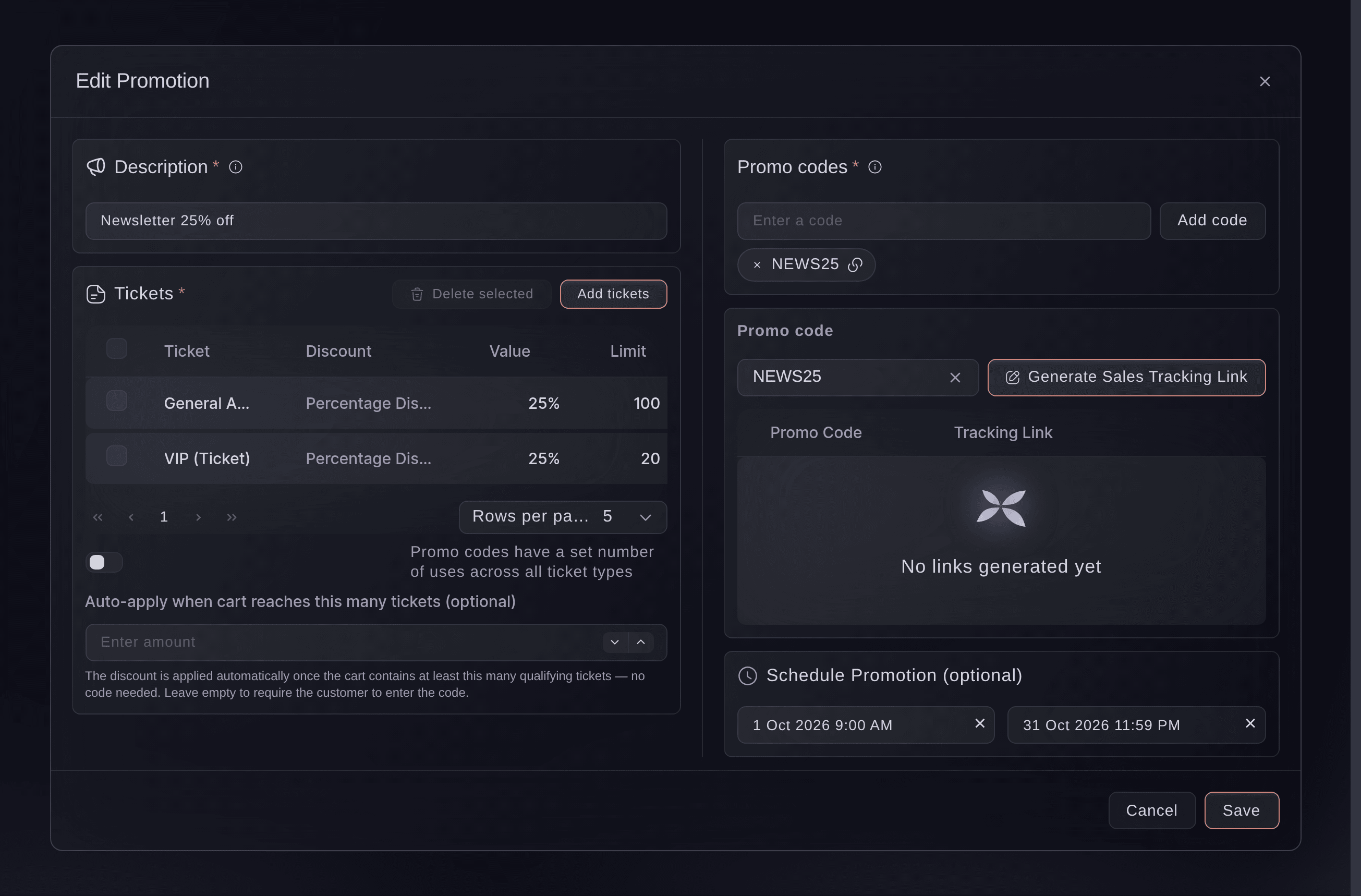
Ticket Fairy promotion editor for a newsletter discount, with its code, two ticket types at a percentage off with their limits, a schedule and the sales tracking link panel

Decide How Often and When Each Code Works

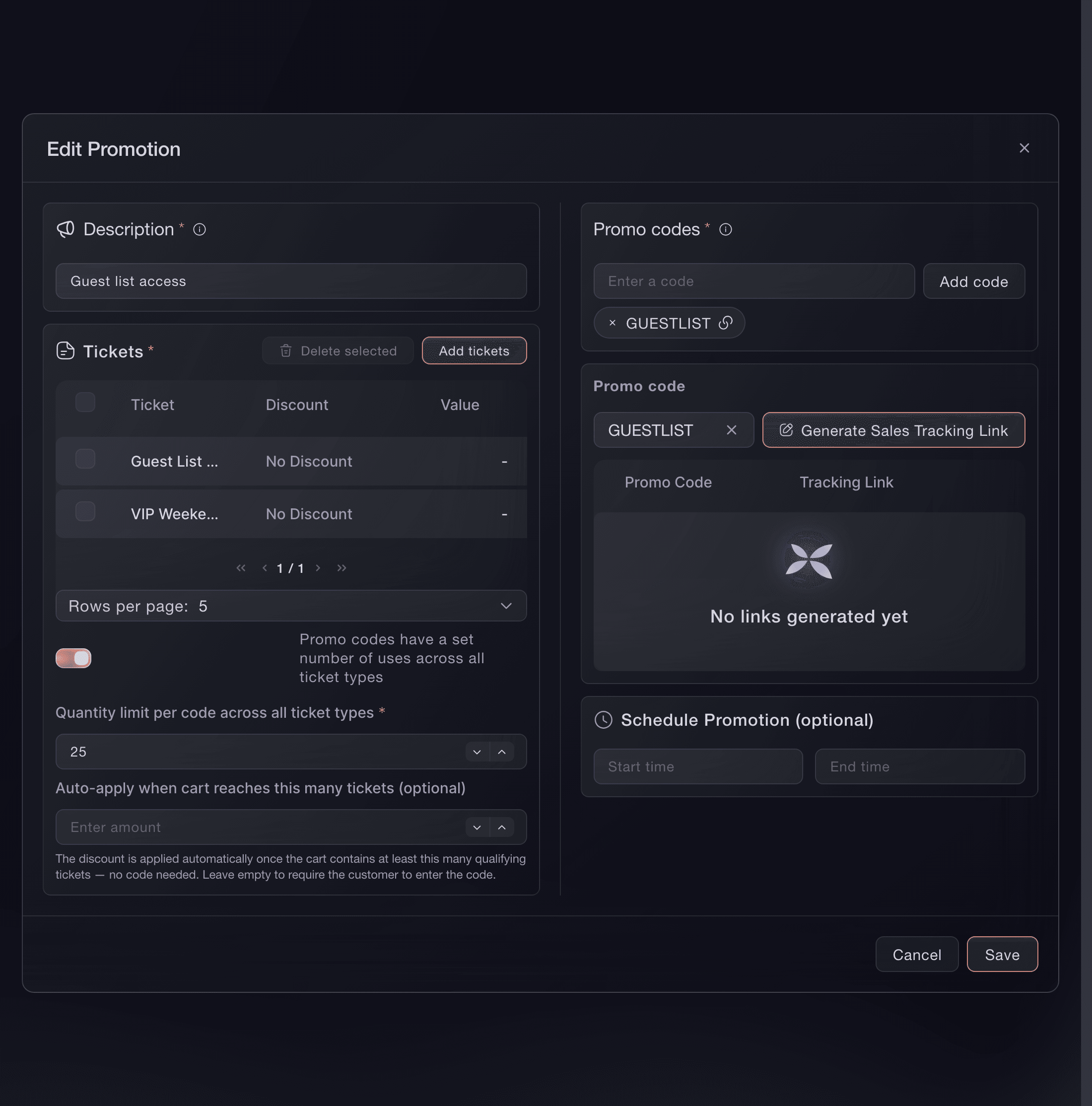
Cap how many times each code can be used on each ticket type, or set one total across every ticket type on the promotion. Schedule a start and an end time for a launch-week offer, or leave the dates empty for a code that works from the moment you create it. Change a promotion while it is live and the next buyer gets the new terms, while every earlier order keeps the price it paid. Copy a promotion link and the code is already applied when a partner's audience opens your event page.

  • Usage limits: for each ticket type or one total across the promotion
  • Start and end times: for offers that run for a set period
  • Promotion links: open your event page with the code already applied
Ticket Fairy Add ticket to the Promotion dialog, with the ticket types to choose, the Pricing Adjustment and the discount amount

Turn One Buyer Into a Group Booking

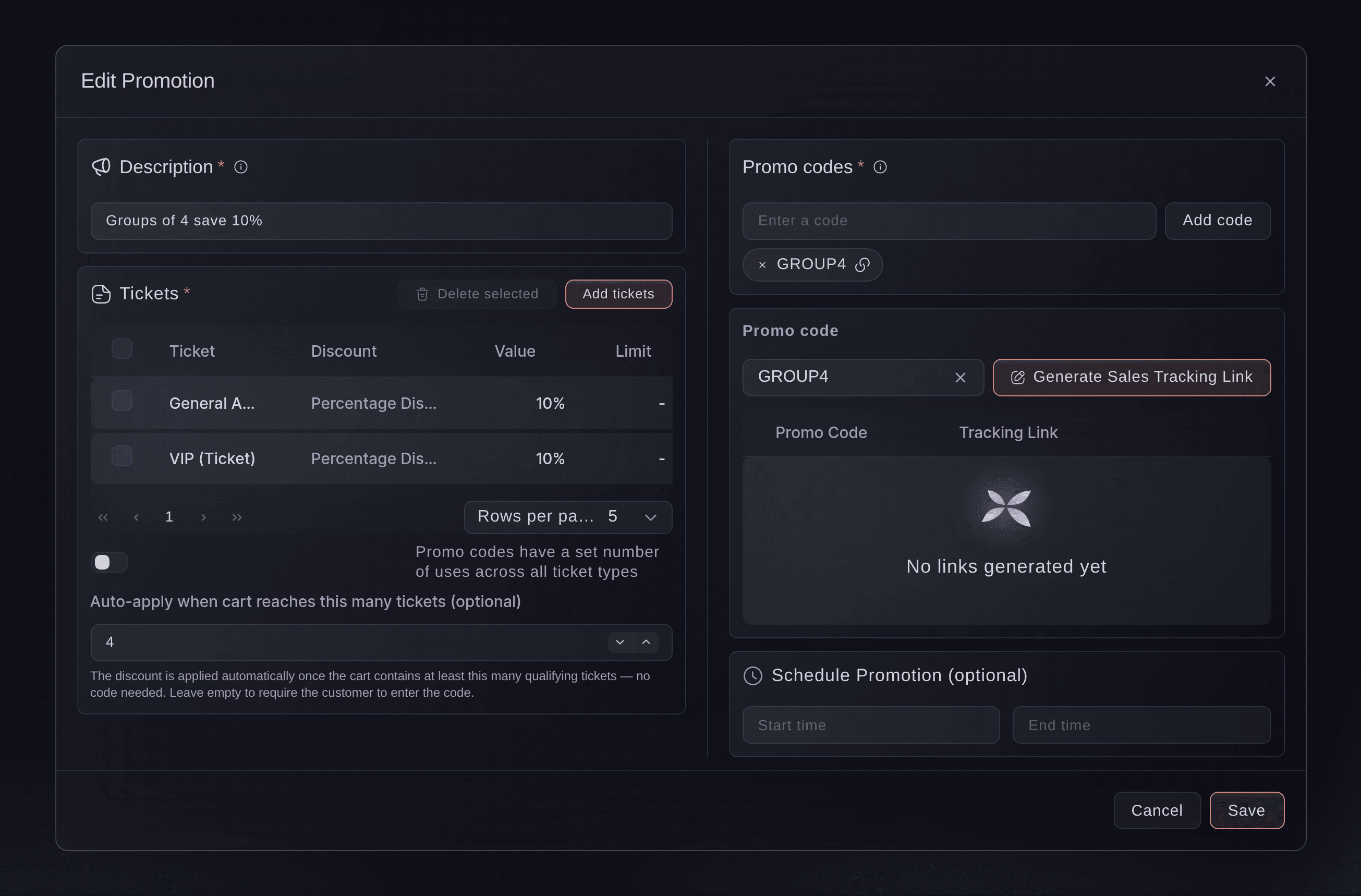
Give friends, work teams and coach parties a lower price per ticket when they buy together. Enter the group size on a promotion, and checkout applies the discount by itself once the basket holds that many tickets, with no code to find or share. Add a second promotion with a bigger group size and a bigger discount, and each basket gets the discount for the largest group it reaches. Group discounts count seats on events with a seating chart, and you can run them for a set period like any other promotion.

  • Group discounts: applied at checkout once the basket reaches the group size
  • Bigger groups, bigger discounts: a separate group size and discount for each tier
Ticket Fairy promotion editor for a group discount, with General Admission and VIP at a percentage off and the group size that applies it automatically

Sell Your Event as a Gift

A buyer who wants to give your event as a present often cannot choose a date for the person receiving it. Sell a gift certificate worth a ticket type you name, or one that comes in fixed sums the person receiving it spends on whatever is on sale. A ticket certificate takes its price from the ticket type you choose, and you set how many months each certificate stays valid.

  • Ticket certificates: worth one named ticket type
  • Amount certificates: several sums offered at once
  • Validity in months: counted from the day each certificate is bought
Ticket Fairy gift certificates page for an event, with one ticket certificate and three amount certificates

See Which Codes Sold Your Tickets

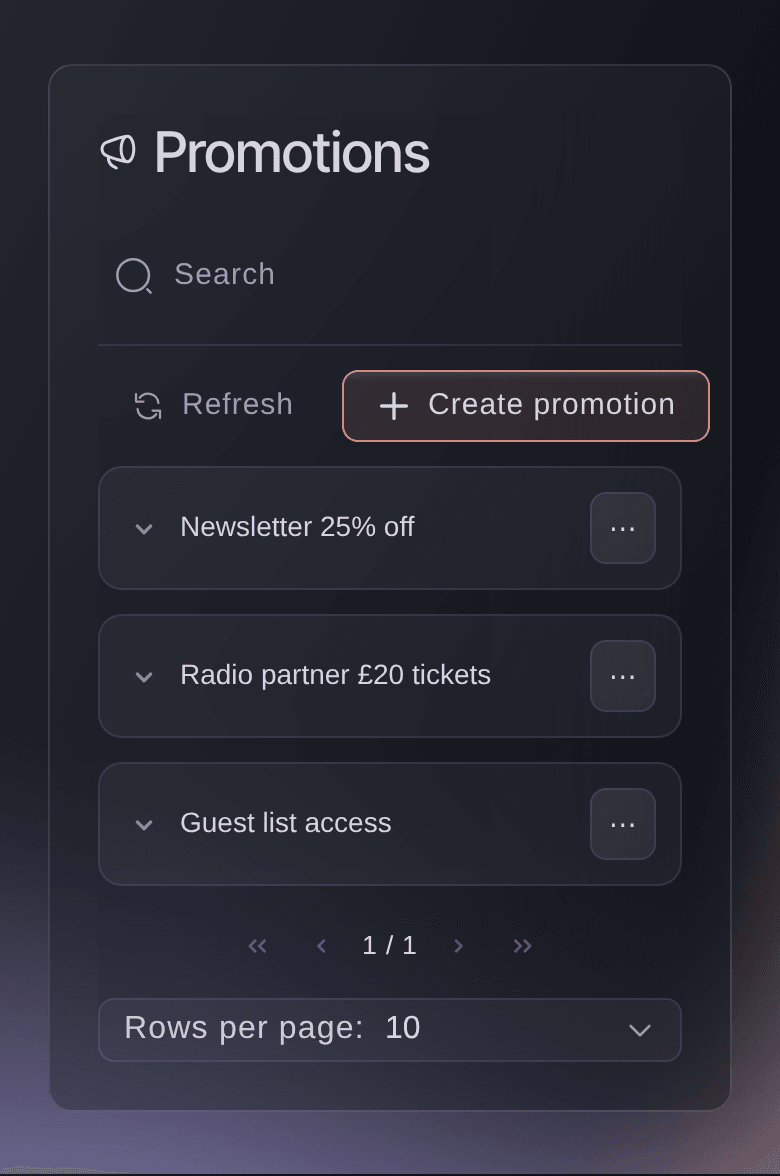
The Promotions list counts the paid orders each promotion brought in, and Sales by Promo Code on your event's Performance page shows the tickets and revenue behind each code. Give a partner a sales tracking link for their own code, and they open a read-only page of their sales with no login. A code you remove or a promotion you switch off stops working for the next buyer, and the orders placed with it stay in your reports.

  • Sales by Promo Code: tickets and revenue for every code
  • Partner tracking links: a live view of one code's sales, with no login
  • Redemptions: paid orders for each promotion on the Promotions list
Ticket Fairy Promotions list with two group discounts beside a newsletter code, each with its active period and redemptions
Get this page as a PDF Read it later or share it with your team. We email you a link to the PDF.
What to put in your PDF

We will email you this deck. We may also email you now and then about Ticket Fairy features that can help your events. You can unsubscribe at any time with one click.

Every Way to Price Tickets for the Buyers You Choose

  • Promo codes

    Add one code or many to a promotion. Each code shares the promotion's discount, tickets, limits and dates.

  • Percentage, amount or fixed price

    Take a share off, take an amount off, or set exactly what each ticket costs with the code.

  • Discount by ticket type

    Give each ticket type on a promotion its own discount and its own usage limit.

  • Usage limits

    Cap each code on each ticket type, or set one total for each code across every ticket type.

  • Promotion schedule

    Choose a start and end time, or leave both empty for a code that works straight away.

  • Promotion links

    Copy a link that opens your event page with the code applied, so a partner's audience never types it.

  • Group discounts

    Checkout applies a lower price on its own once a basket reaches the group size you set.

  • Group tiers

    Offer a bigger discount for bigger groups. Each basket gets the discount for the largest group it reaches.

  • Gift certificates

    Sell a certificate worth a ticket type or a fixed sum, valid for the number of months you choose.

  • Sales by promo code

    See the tickets and revenue behind every code on your event's Performance page.

  • Partner tracking links

    Share a read-only page of one code's sales with the partner who brought them in, with no login.

  • Promotions with Fai

    Ask Fai to create a promotion with its codes, discount, tickets, limits and dates. She shows you the promotion and creates it once you approve.

  • Access codes

    Use a code to reveal hidden ticket types at full price for a presale or a guest list.

    Learn more

  • Tracking links

    Give every ad, post and partner a link or QR code that counts the clicks, orders and revenue it brought in.

    Learn more

  • Company group bookings

    Sell a block of tickets to a company with its purchase order, budget code and payment terms, get sign-off from your approvers and raise the invoice in one step.

Questions About Promo codes & discounts

Promo codes & discounts

Letters and numbers only, up to 25 characters. A code belongs to one promotion on an event, so a code already on one promotion cannot be added to another promotion on the same event.

A promotion belongs to one event. Set the same discount up on each event that should offer it, or ask Fai to create it on several events at once. When you duplicate an event, you can choose to copy its promotions and codes to the new draft.

No. A basket carries one code at a time. A buyer who enters a promo code gets that code's discount, and the group discount stays off while their code is applied. Group discounts never add together either: a basket gets the one for the largest group it reaches.

Nothing changes for them. Each order keeps the price it paid and stays counted against its code in your reports. The change, or the switch-off, applies to the next buyer.

The discount changes the ticket price, and the fees follow whatever your event charges on that price. The basket shows the buyer the final total before they pay.

Yes. Open the gift certificates page on each event you want to sell them on, and set up a certificate for that event.

A certificate stops working at the end of the number of months you set, counted from the day it was bought. Taking a certificate off sale only stops new buyers, and a certificate a buyer has already bought cannot be deleted, so the person holding it can use it until it expires.

You need to be an owner or an admin of the event to open Promotions and gift certificates. Fai can also create and change promotions and gift certificates for you, and asks you to approve each one first.

Sell more tickets. Build the crowd that comes back.

Start Selling Tickets Online

Sign up without a credit card and build a test event before you commit. Go on sale in minutes when you are ready.

No monthly subscription required for ticketing
Start selling tickets immediately
Ticketing tools included in the service fee
Get Started Talk to Fai Now

Ask Fai, our AI assistant, about Ticket Fairy’s features, pricing and how it could work for your event.

No credit card required

Book a demo call

See the referral model that drives 20% more ticket sales on average, learn which campaigns sell tickets, answer buyers faster and keep queues moving.

45-Minute Video Call
Pick a Time That Works for You