1. Features
  2. Promo codes & discounts
  3. Codes & discounts

Offer the Right Price to the Right Buyers and See What It Sold

A partner, a newsletter and your earliest fans each want a better price, a group of friends wants a reason to book together, and someone shopping for a present wants your event without choosing a date. Ticket Fairy handles all of it from one Promotions page and one gift certificates page. Give each partner a code with the discount, ticket types, limits and dates you agreed, let checkout give groups their price with no code to type, open hidden tickets to the people you choose, and sell certificates that people redeem when it suits them. Every code shows the tickets and revenue it brought in.

  • A better price for exactly the buyers you choose
  • Bigger orders from fans who bring their friends
  • Sales from buyers shopping for a present
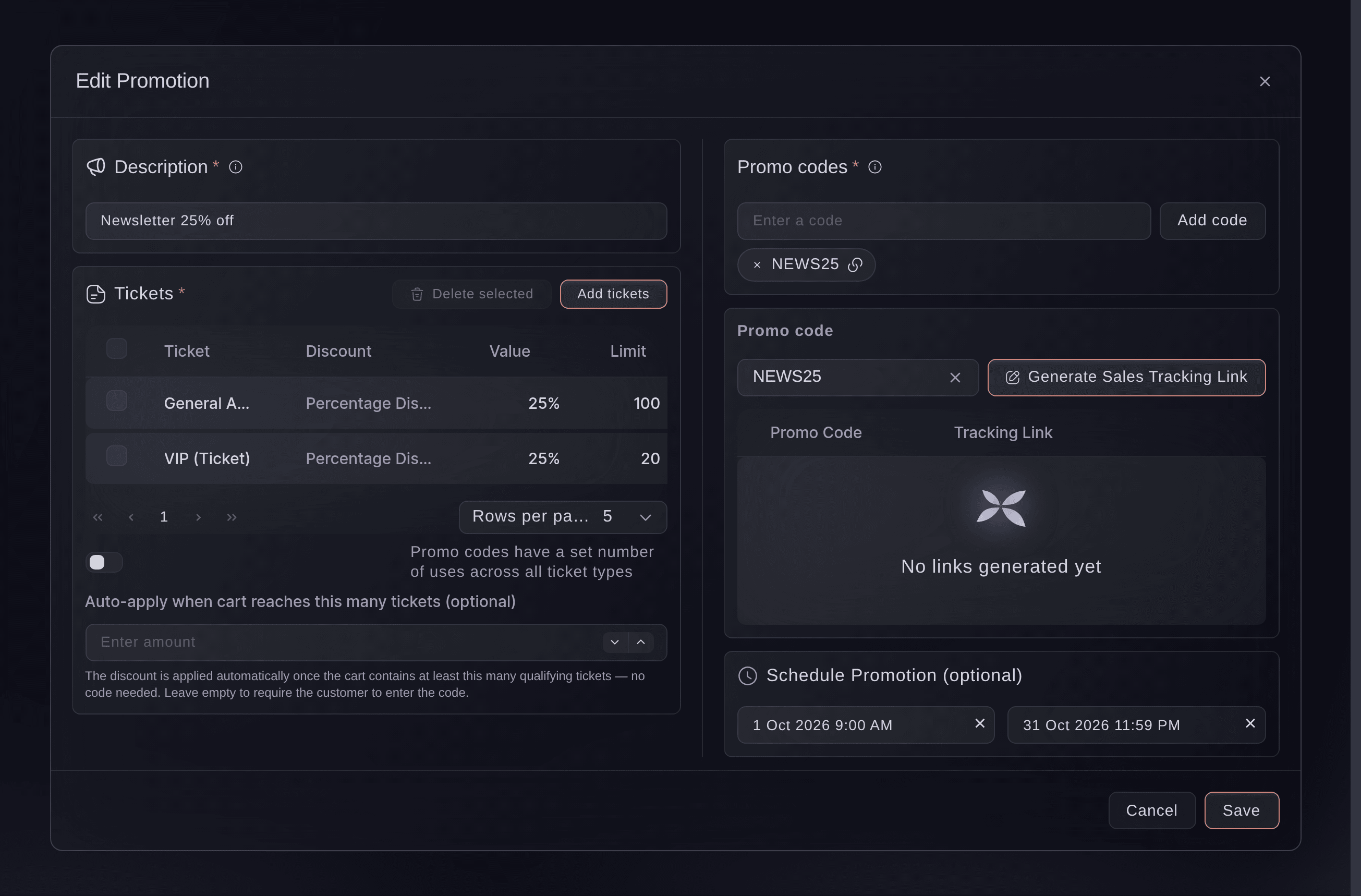
Ticket Fairy promotion editor for a newsletter discount, with its code, two ticket types at a percentage off with their limits, a schedule and the sales tracking link panel

Give Each Partner the Price You Agreed

Offer a partner's audience, your newsletter or your earliest fans a better price without changing the ticket price for everybody else. A promotion holds the codes people enter at checkout, the ticket types it covers and the discount: a percentage off, an amount off, or the exact price each ticket costs. Each ticket type on a promotion can carry its own discount, so one code can take a share off general admission and set a partner price for VIP.

Pick the discount that matches the deal. A percentage keeps the same share off through every price release, so it suits a code that stays live while your tiers move up. An amount off is the easiest to explain in a message. A fixed price is for a partner deal where you agreed exactly what their audience pays.

One promotion can carry several codes, which suits one deal sent to several partners who each want their own code to share. Promotions reach tables as well as tickets, and on a timed event they can cover every time slot or only the days you pick. On an event sold in more than one currency, you set the amount in each currency.

  • Promo codes: one code or several on each promotion
  • Percentage, amount or fixed price: the discount the deal calls for
  • Discount by ticket type: a different price on each ticket type the code covers
Ticket Fairy Add ticket to the Promotion dialog, with the ticket types to choose, the Pricing Adjustment and the discount amount

Decide How Often and When Each Code Works

Cap how many times each code can be used on each ticket type, or set one total across every ticket type on the promotion. Give a launch-week offer a start and an end time, or let a code work from the moment you create it. A promotion link opens your event page with the code already applied, so your partner's audience has nothing to type.

Your capacity always comes first: a code never sells more tickets than the ticket type holds, whatever its limit allows. Change a live promotion or switch it off, and the orders it already earned keep the price they paid and stay counted against their code. The change reaches the next buyer, and a code you remove stops working at once.

  • Usage limits: for each ticket type or one total across the promotion
  • Promotion schedule: a start and an end time for offers that run for a set period
  • Promotion link: your event page with the code already applied
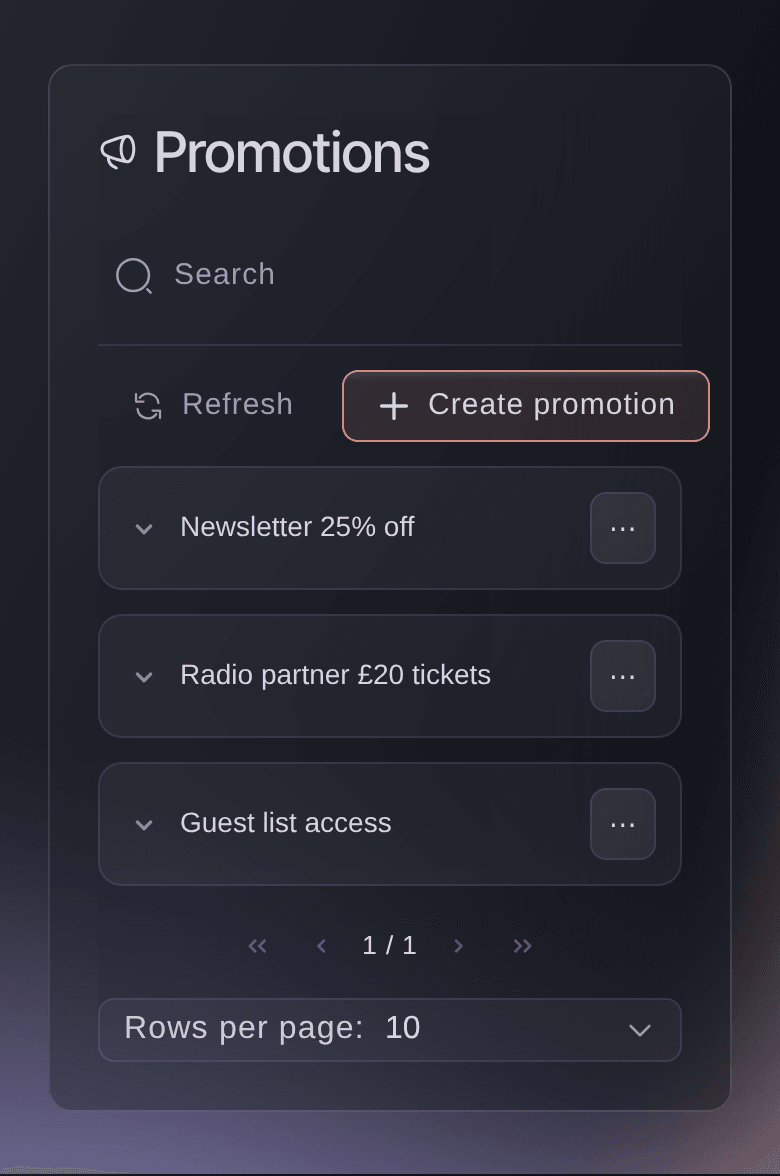
Ticket Fairy Promotions list for an event, with the active period and redemptions of each promotion and the Create promotion button

Turn One Buyer Into a Group Booking

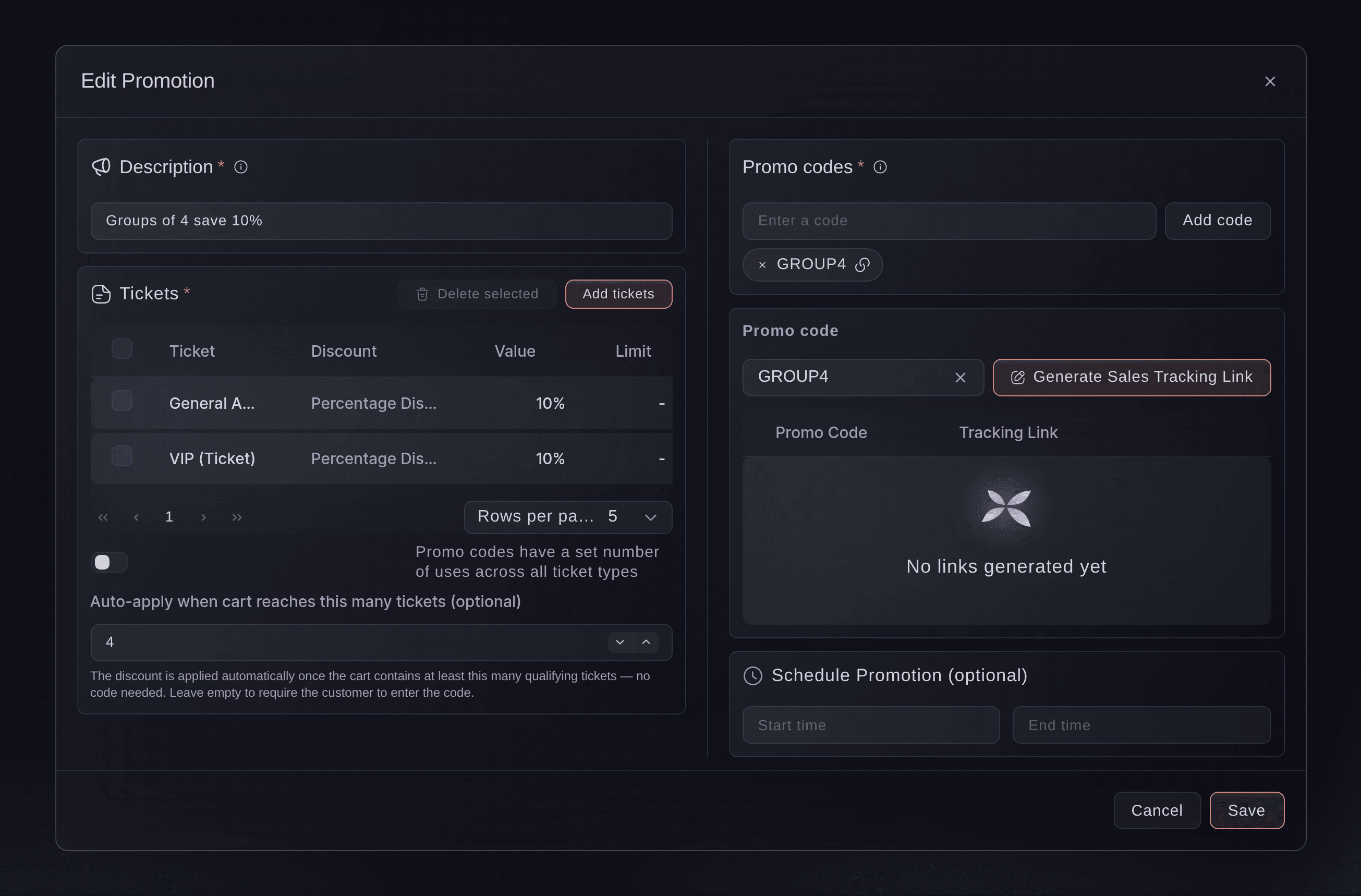
One fan who brings three friends sells four tickets, and a lower price for the group is often what gets the friends to commit. Give a promotion a group size, and checkout applies the group price by itself once the basket holds that many tickets, counting tickets of every type. Nobody has to find, share or type a code.

Add a second group discount with a larger group size and a larger discount, and each basket gets the discount for the largest group it reaches. A group that grows at checkout moves up to the better price, and a basket that drops below the group size loses it again, so the price always matches the order. A company booking a block of passes for its staff can instead book on your event's Group Bookings page, with a purchase order, payment terms and one invoice sent with its payment link.

Group discounts use the same choices as promo codes: a percentage, an amount off or a set price per ticket, on only the ticket types you pick, for a set period if you want one. On an event with a seating chart, checkout counts the seats.

  • Group size: the number of tickets that unlocks the group price
  • Applied at checkout: with no code for the buyer to find
  • Group tiers: a bigger discount for bigger groups
Ticket Fairy promotion editor for a group discount, with General Admission and VIP at a percentage off and the group size that applies it automatically

Open Hidden Tickets for a Presale or a Guest List

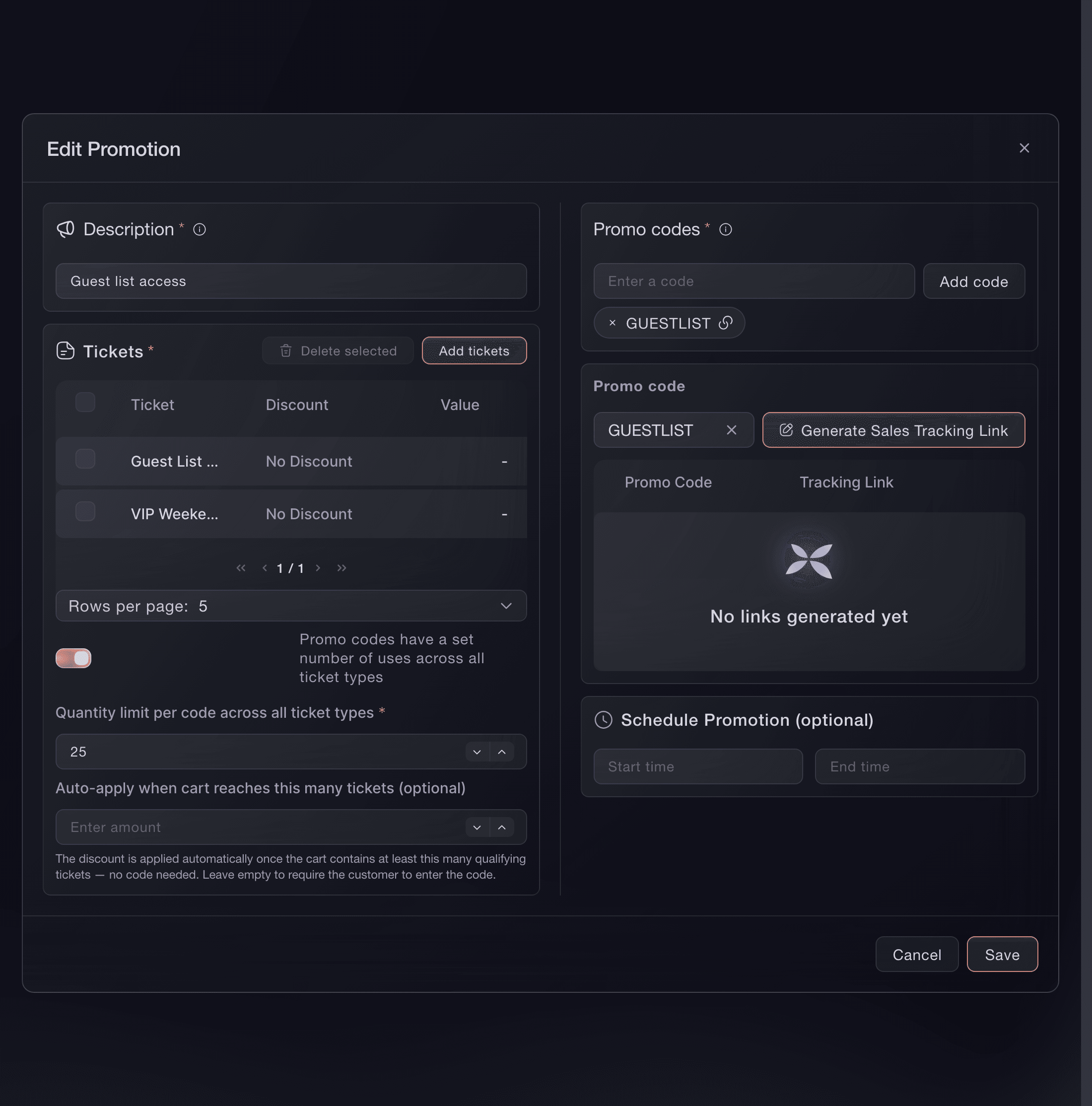
Attach hidden ticket types to a promotion with No Discount, and its code reveals them at full price to the people you give it to. Run a members' presale, a crew ticket or a guest list from the same Promotions page as your discounts, and the public never sees the tickets you keep back.

  • Access codes: hidden ticket types revealed by a code
  • No Discount: the full price, for the people you choose
Ticket Fairy promotion editor with a Guest List access code, No Discount and two hidden ticket types attached

Show Each Partner What Their Code Sold

The Promotions list counts the paid orders each promotion brought in, and Sales by Promo Code in your event's Performance report shows the tickets and revenue behind every code. A sales tracking link gives a partner a read-only page of their own code's sales, with no login, so they see the result without asking you.

Group discounts are counted the same way, under their own code, so you can see how many groups booked and what they spent. Export the codes on a promotion when a partner needs the full list, and regenerate a tracking link whenever you want the old one to stop working.

  • Sales by Promo Code: tickets and revenue for every code
  • Sales tracking links: a partner's live view of their code, with no login
  • Redemptions: paid orders for each promotion

Sell Your Event as a Gift

Birthdays, Christmas and thank-you presents bring buyers who want your event but cannot choose a date for the person receiving it. Sell a gift certificate worth one ticket type you name, or one that comes in fixed sums, and your event page shows a Buy a gift certificate button beside your tickets. The buyer pays now, the certificate is emailed to the person it is for, and they book when it suits them.

A ticket certificate takes its price from the ticket type you choose, and an amount certificate can offer several sums at once, which the person receiving it spends on whatever is on sale. You choose how many months each certificate stays valid from the day it is bought, and you can sell both kinds on the same event.

The person holding a certificate selects Redeem Gift Certificate on your event page and enters the code from their email. A ticket certificate unlocks its ticket, and an amount certificate shows its balance against the order. Take a certificate off sale whenever you want, and every certificate already bought stays usable until the day it expires.

  • Ticket certificates: worth one named ticket type
  • Amount certificates: several sums offered at once
  • Redeem Gift Certificate: the code entered on your event page
Ticket Fairy gift certificates page for an event, with one ticket certificate and three amount certificates

Send Gift Certificates Yourself

Some certificates are not sold at all: a prize for a competition, a thank-you to a sponsor, an apology to a guest whose night went wrong. Issue a certificate straight to a person by name and email, with a note, or upload a whole list at once from a spreadsheet. Every certificate you issue appears in the issued list with who issued it and when it expires.

Each certificate goes out with the email you choose. Save your own wording as a gift certificate email template, and pick it by name the next time, so a sponsor's thank-you reads differently from a competition prize.

  • Issue Gift Certificate: to one person, with your own note
  • Upload a list: many certificates in one go
  • Your own email: a saved template for each kind of gift

Let Fai Set Up Your Codes, Group Prices and Gifts

Tell Fai, the assistant inside your dashboard, the code, the discount, the ticket types, the limit and the dates. She shows you the tickets and the discounted prices and creates the promotion once you approve it, on one event or on several at once. She can add a code to a promotion, hand you its promotion link or sales tracking link, set up a group discount with its group size, and switch a promotion off or back on.

Fai also creates, changes and takes gift certificates off sale, and issues a certificate to a person for you. A certificate is something buyers pay for, or something a person receives straight away, so she shows you the settings and waits for your approval before anything is saved or sent.

  • Promotions with Fai: a promotion described in a sentence
  • Gift certificates with Fai: created, changed or issued once you approve
  • You approve it first: the prices, limit and dates shown before she saves

How Organisers Use Codes, Group Prices and Gifts

  • A Club Night With Partner Codes

    A promoter gives three local record shops their own code on one promotion, each with the same discount and a limit on uses. The shops open their sales tracking links on the weekend, and the promoter keeps the deal with the shop that sold the most.

  • A Festival Rewarding Groups

    A festival sets a smaller discount for groups of four and a bigger one for groups of eight on weekend tickets. Friends add tickets to reach the better price, and the average order grows without a single code being shared.

  • A Theatre Selling Christmas Gifts

    A theatre sells amount certificates in three round sums through December and keeps them valid for a year. In spring the people receiving them book the shows they want, and the money came in before the season started.

  • A Conference With a Members' Rate

    A conference attaches a hidden members' pass to an access code and sends it to its association list. Members see a price nobody else sees, and the Promotions list shows how many of them booked.

  • A Venue Saying Thank You

    A venue uploads a list of the volunteers from its summer season and issues each a ticket certificate with a thank-you note. Each volunteer books the night they want, and the issued list shows who still has one to use.

Get this page as a PDF Read it later or share it with your team. We email you a link to the PDF.
What to put in your PDF

We will email you this deck. We may also email you now and then about Ticket Fairy features that can help your events. You can unsubscribe at any time with one click.

Questions About Promo Codes and Discounts

Codes & discounts

Letters and numbers only, up to 25 characters. A code can be used once on each event, so two promotions on the same event cannot share it.

A promotion belongs to one event. Set the same discount up on each event that should offer it, or ask Fai to create it on several events at once.

Check that the promotion is still on the Promotions list, that the date and time are inside its schedule, that the code has uses left, and that the ticket in the basket is one of the ticket types attached to it. A code made for another event is refused on this one.

No. A basket carries one code at a time, so a buyer who enters a promo code gets that code's discount and the group discount stays off. Two group discounts never add together either.

Checkout tells them the discount applies by itself once their ticket quantity qualifies. You never need to share a group discount's code.

No. Table types cannot carry a group discount, so the group size is unavailable on a promotion that covers only tables. Promo codes and access codes work on tables.

The discount changes the ticket price, and the fees follow whatever your event charges on that price. The basket shows the buyer the final total before they pay.

It stops being usable. The duration is counted in months from the day it was bought, so choose one long enough for the gap between your events. A certificate a buyer has paid for cannot be deleted; take it off sale and every bought certificate stays usable until it expires.

Ticket Fairy fills the price in from the ticket type when you set the certificate up, and an existing certificate keeps the price it was saved with. Check it after a price change. While a certificate is applied, extras can be added once the order is complete.

You need to be an owner or an admin of the event. Regenerating a sales tracking link replaces it, and the old link stops working.

Sell more tickets. Build the crowd that comes back.

Start Selling Tickets Online

Sign up without a credit card and build a test event before you commit. Go on sale in minutes when you are ready.

No monthly subscription required for ticketing
Start selling tickets immediately
Ticketing tools included in the service fee
Get Started Talk to Fai Now

Ask Fai, our AI assistant, about Ticket Fairy’s features, pricing and how it could work for your event.

No credit card required

Book a demo call

See the referral model that drives 20% more ticket sales on average, learn which campaigns sell tickets, answer buyers faster and keep queues moving.

45-Minute Video Call
Pick a Time That Works for You