1. Features
  2. Sell more
  3. Promoters & sales teams

Give Every Promoter What They Need to Sell and See Who Sold Each Ticket

Invite your promoters, street team and resident DJs, and each of them gets their own promoter link and the artwork to post with it. Every ticket and table they sell is credited to them. Run one promoter team across all your events and brands with a collective, set the commission each promoter earns, and see who is selling, who has slowed down and who has never shared a link.

  • A promoter link and artwork for every seller
  • Every sale credited to the person who made it
  • Commission worked out for you
Ticket Fairy brand Promoters page for all events, with the team totals, the insights and the ranked team member table

Give Every Promoter Their Own Link

Invite a promoter to your brand and they get a link for every event you run, including the ones you create later, or invite them to one event for a single night. Share one invitation link in your promoters' group chat and everyone who opens it joins as a promoter. When you publish, each promoter gets an email with their own link and a QR code for it, and you can send all the links again from your sales report. Each promoter sees the event's sales beside their own link, and their figures stay private from the rest of your promoters.

  • Promoter role: on your brand for every event, or on one event
  • Invitation link: for a group chat, and you can replace it at any time
  • Links and QR codes by email: sent to every promoter when you publish
Ticket Fairy Add Team Member dialog with the Promoter permission level selected

See Which Promoter Sold Each Ticket

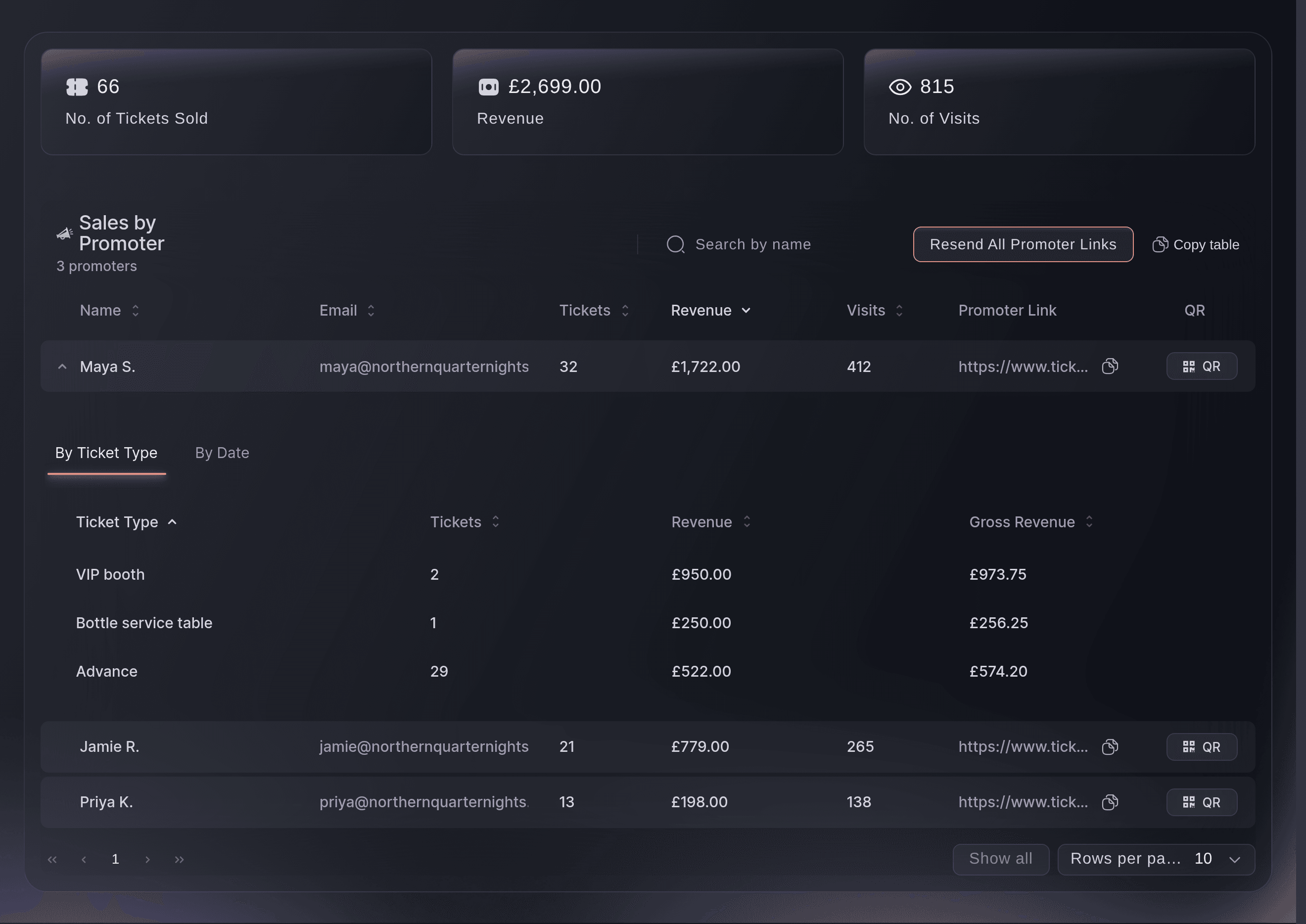
Sales by Promoter lists everyone with a link beside the tickets they sold, the revenue you keep from those sales and the visits their link brought to your event page. Open a promoter to see what they sold by ticket type or by date. VIP table bookings count for the promoter whose link the buyer came through, and a refunded booking leaves their row. Copy any promoter's link or QR code from the same table.

  • Sales by Promoter: tickets, revenue and visits for each promoter
  • By ticket type or date: what each promoter sold, and when
  • Table bookings included: each table credited to the promoter who sold it
Ticket Fairy Sales by Promoter table with tickets, revenue, visits and a promoter link for each promoter, one row opened by ticket type

Run One Promoter Team Across All Your Events

A collective is your own promoter roster, kept apart from any one brand, so the same promoters can sell for every brand you run. Invite promoters by email with the role each one needs, or share a private join link. Deploy the collective to an event, a brand or a tour, with the whole team or only the promoters you choose. Share your invite code with a venue that hires you, and the venue invites your collective to its own events with the commission it pays.

  • Collectives: one roster for every brand you sell for
  • Deploy anywhere: to an event, a brand or a tour
  • Invite code for venues: venues that hire you bring your team onto their events
Ticket Fairy Deploy this collective dialog with where to deploy, who deploys, the commission and what the host can see

Know What Commission Each Promoter Has Earned

Set the commission when you deploy your collective: a percentage of sales, a flat amount for each ticket, a flat amount for each order, or none. Sales and commission then shows the tickets sold, the revenue and the commission owed for each event, with each promoter's own figures underneath. Choose what the event's host can see, from your team's total to each promoter's sales by name.

  • Commission: a percentage, an amount per ticket or an amount per order
  • Commission owed: for each event and each promoter
  • What the host can see: your team's total or each promoter by name
Ticket Fairy Sales and commission section with two event deployments, their tickets sold, revenue and commission owed, and each promoter's figures

Give Promoters Artwork Ready to Post

Upload the flyers, videos and story artwork for your event with a caption promoters copy as it is, tips on how to use each one and the channel it is sized for. Each promoter downloads the artwork beside their own promoter link, so every post credits the sale to the person who shared it. Keep an asset hidden until an announcement goes out, or schedule when promoters see it, then email your promoters that it is ready. Logos and sponsor artwork added to your brand appear on every event.

  • Marketing assets: artwork, videos and captions for each channel
  • Scheduled release: promoters see each asset when you choose
  • Notify promoters: an email that the new artwork is ready
Ticket Fairy Download assets tab a promoter opens, with the event link and their own promoter link above the artwork and the brand library

Back the People Who Sell the Most Across Your Brand

The brand Promoters report ranks every member of your team by the tickets and revenue their links brought in across all your events. It points out who is on the rise, who is slowing down, who has never shared a link and which event-only sellers are ready for your brand team. Narrow it to a period, an event series, a venue or a city, and open anyone to see their results by event. Ask Fai to read it for you, and she can invite the person she recommends to your brand team once you confirm.

  • Brand Promoters report: every team member ranked across your events
  • What stands out: rising sellers, quiet sellers and people ready for your brand team
  • Filters: by period, series, venue, city or country
Ticket Fairy What stands out section of the brand Promoters report, with each insight, the team members behind it and the Add to the brand team action
Get this page as a PDF Read it later or share it with your team. We email you a link to the PDF.
What to put in your PDF

We will email you this deck. We may also email you now and then about Ticket Fairy features that can help your events. You can unsubscribe at any time with one click.

Equip, Track and Reward Your Promoters

  • Promoter role

    Invite promoters to your brand for every event, or to one event. They see the event's sales beside their own link.

  • Promoter links and QR codes

    Every promoter gets their own link and QR code by email when you publish, and you can send them all again at any time.

  • Sales by Promoter

    See each promoter's tickets, revenue and visits on every event, by ticket type or by date.

  • Collectives

    Keep one promoter roster that sells for every brand you run, with owner, admin and member roles.

  • Deploy a collective

    Send your whole team, or chosen promoters, to an event, a brand or a tour.

  • Commission

    Pay a percentage of sales, an amount per ticket or an amount per order, and see what you owe each promoter.

  • Work for venues

    Share your invite code so a venue can invite your collective to its events, and accept their invitation in one step.

  • What the host can see

    Choose whether a host sees your team's total sales or each promoter's sales by name.

  • Marketing assets

    Give promoters artwork, videos and captions for each channel beside their own link, and see how often each asset was downloaded.

  • Brand Promoters report

    Rank your whole team across every event, and see who is rising, who is slowing down and who never shared a link.

  • Promoters with Fai

    Ask Fai to invite promoters, deploy your collective or report each promoter's sales. She shows you each change and waits for your approval.

  • VIP tables through promoters

    Sell booths and bottle service with a deposit, and credit each table to the promoter who sold it.

    Learn more

  • Referral rewards for buyers

    Pay your buyers back when their friends buy through their own link.

    Learn more

  • Tracking links

    Measure the sales from each post, poster or partner with a link of its own.

    Learn more

  • Ready for the brand team

    Spot the people on single event teams who sold across several of your events, and add them to the brand team so they get every new event automatically.

  • What stands out

    See when a recent seller has left the team, when sales depend on a few people, and who brings lots of visitors but few sales.

  • Every currency in one total

    See your team's revenue in your home currency with other currencies converted, or show the money in another currency.

  • Email promoters when it goes live

    Tell your promoters by email the moment a new asset appears, and remind them again with Notify again.

  • Assets for each channel

    File each asset for Instagram Story, Feed Post or Reel, TikTok, WhatsApp Status, YouTube Shorts or email, and add artwork from your brand library.

  • Sales by promoter and time slot

    Break each promoter's sales down by time slot, search for a name and download each promoter's QR code from Sales by Promoter.


Questions About Promoters & sales teams

Promoters & sales teams

A ticket or table booked within 7 days of opening the link, in the same browser, counts as that promoter's sale. A buyer who opens another promoter's link afterwards, or books on a different device, is counted elsewhere.

The event's ticket sales and sales by ticket type, with their own promoter link at the top. They do not see other promoters' figures, your tables or your team, and they cannot change anything on your event.

No. You pay your promoters yourself, using the commission owed on each deployment. When a venue invites your collective, the venue sets the commission it pays.

A brand or tour deployment gives your promoters access to its events without collective promoter links. Deploy the collective to each event whose sales and commission you want to follow.

A brand team belongs to one brand and reaches that brand's events, which suits your permanent staff. A collective belongs to you, and you deploy it to any of your events and brands and to venues that invite you.

Removing a promoter from a collective ends their access to every event and brand it works on, and their past sales stay on record. Someone removed from a team keeps the sales credited while they were on it.

You see how many times each asset was downloaded. The count does not say who downloaded it.

No. A tracking link measures a placement, such as a post or a poster, so its sales appear on the event's Tracking Links page. The Promoters report covers people.

Everyone who has held a role on your brand, its events or its tours, whether or not they are still on the team. Door staff who share a link are credited like promoters. You need an owner or admin login on the brand to open the report.

The report compares each person's last 90 days with the 90 days before, once the busier of the two has at least 5 tickets. Someone is rising when they sold at least one and a half times as many tickets in the last 90 days, and slowing down when they sold half as many or fewer.

No. Refunded and resold tickets drop out of the totals, and people who have left the team keep the sales credited while they were on it.

Sell more tickets. Build the crowd that comes back.

Start Selling Tickets Online

Sign up without a credit card and build a test event before you commit. Go on sale in minutes when you are ready.

No monthly subscription required for ticketing
Start selling tickets immediately
Ticketing tools included in the service fee
Get Started Talk to Fai Now

Ask Fai, our AI assistant, about Ticket Fairy’s features, pricing and how it could work for your event.

No credit card required

Book a demo call

See the referral model that drives 20% more ticket sales on average, learn which campaigns sell tickets, answer buyers faster and keep queues moving.

45-Minute Video Call
Pick a Time That Works for You