Answer every fan with an auto-reply built for your event

Pick an event and turn on ready-made auto-replies for ticket links, presales, guest lists and event questions. Each answer follows your ticket sales, and you see what it sold.

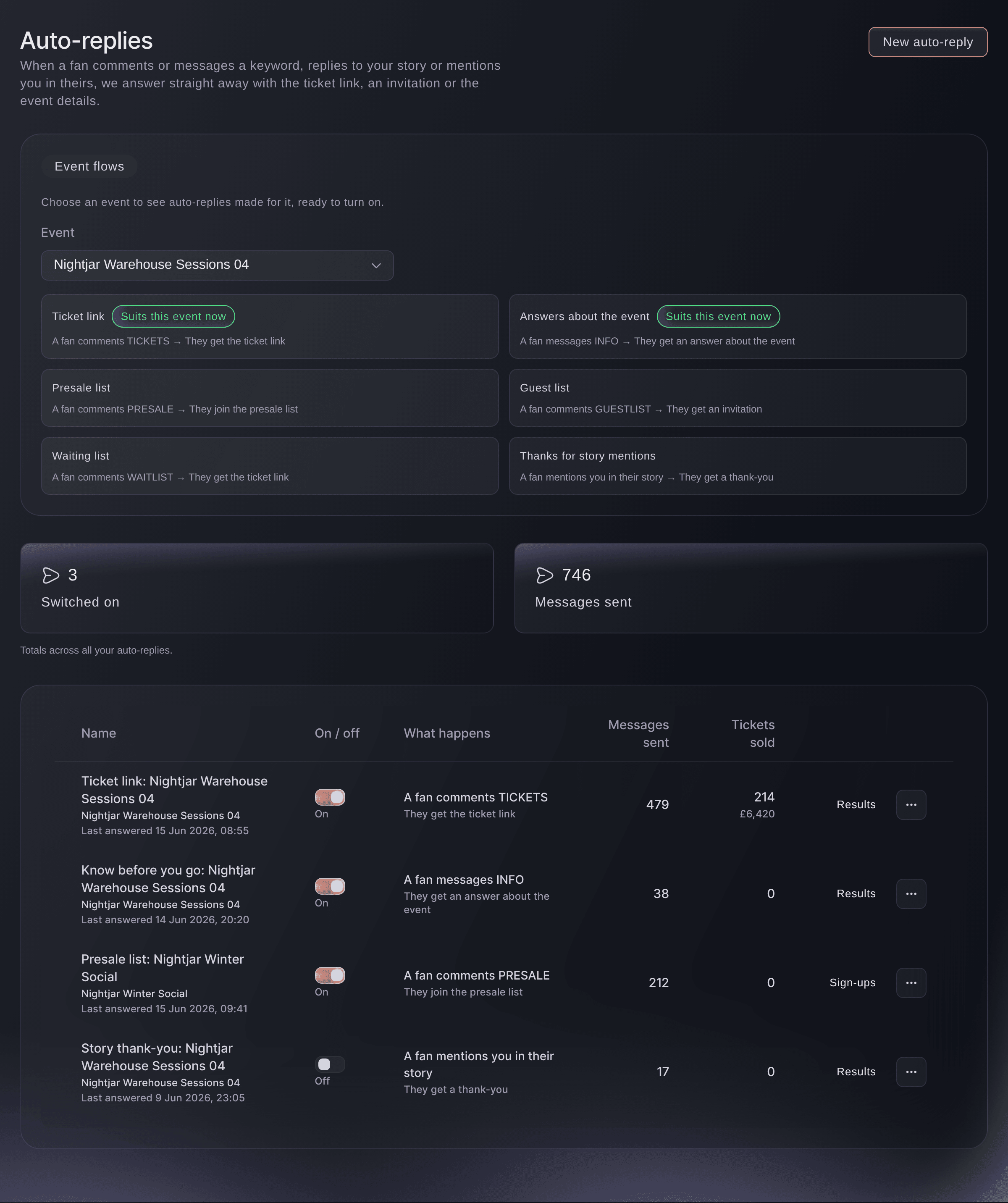
Ticket Fairy Auto-replies page with event flows for ticket link, answers about the event, presale list, guest list, waiting list and story mention thanks, above a table of messages sent and tickets sold
  • Ready-made auto-replies filled in from your event
  • The right message before, during and after the sale
  • Tickets and revenue counted for each auto-reply

Turn on a ready-made auto-reply for each event

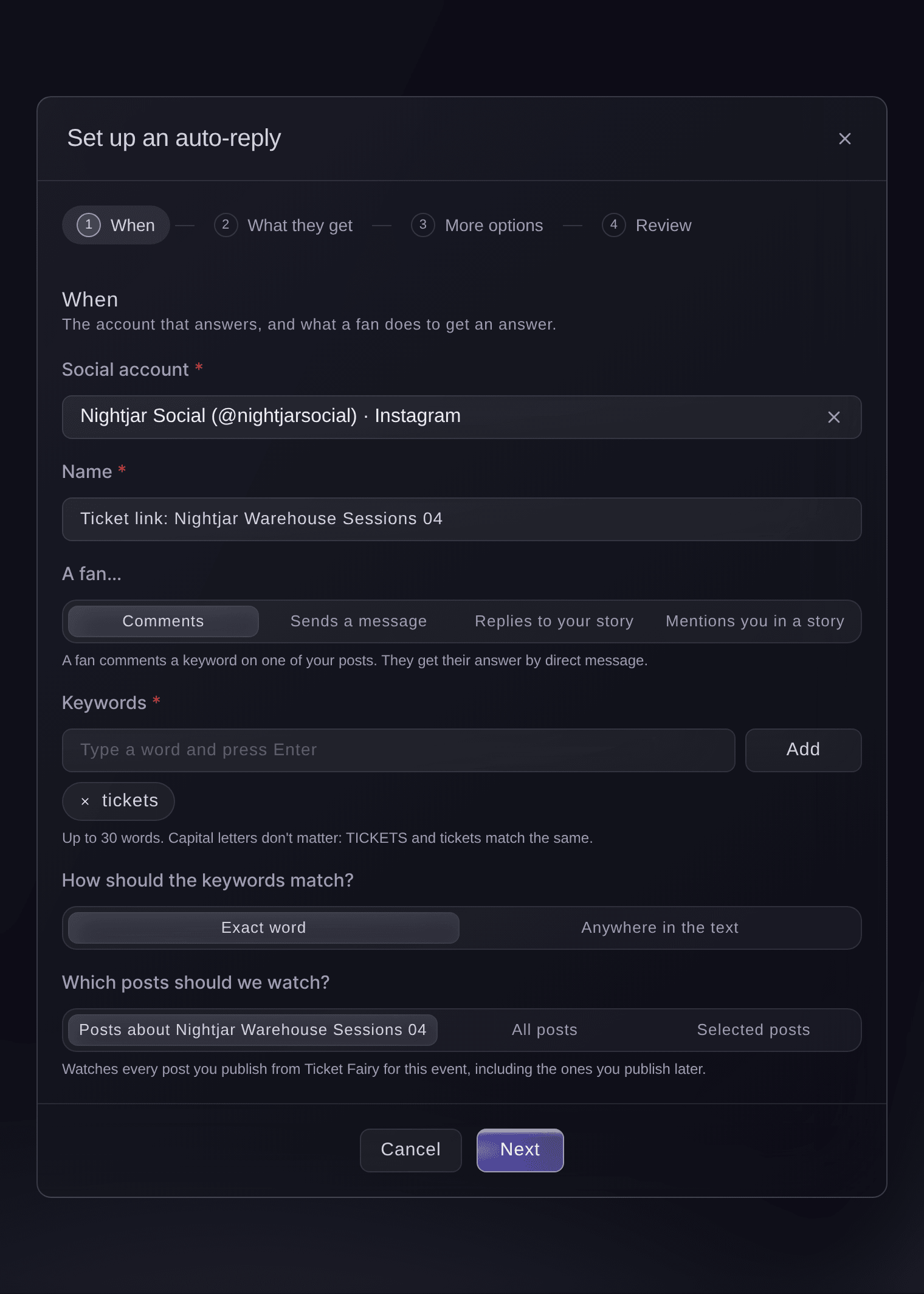
Choose an event and Ticket Fairy shows the auto-replies made for it, already filled in with its name, date and ticket link. Ticket link answers fans who comment TICKETS. Presale list signs up fans who comment PRESALE. Guest list sends an invitation to fans who comment GUESTLIST. Waiting list answers fans who ask to join it, with your waiting list once the event sells out. Answers about the event replies to fans who message INFO, and a thank-you goes to each fan who mentions you in their story.

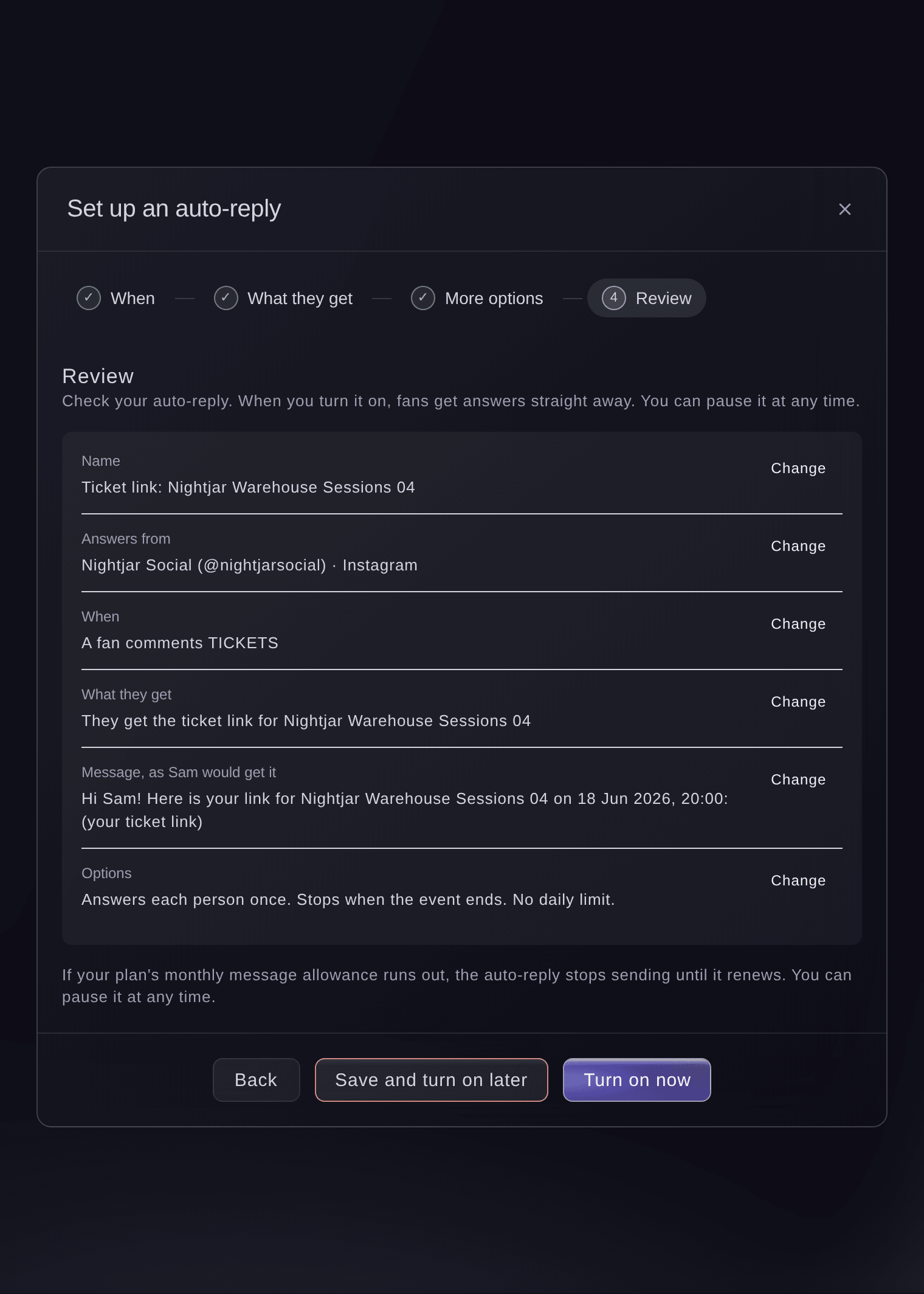
The ones that suit the event right now carry a Suits this event now label, such as the ticket link while tickets are on sale. Check the message in the review step, as the first fan would see it, then choose Turn on now or Save and turn on later. Change the keyword, the message or any option before you save, or start from a blank auto-reply when you want something of your own.

The guest list auto-reply starts with your guest list ticket types already chosen, so each invitation opens only those tickets. The story thank-you can also ask the fan for permission to repost their story, and their yes is saved with the conversation for when you share it.

  • Ticket link: a fan comments TICKETS and gets your link
  • Presale and guest lists: sign-ups and invitations from a comment
  • Answers about the event: a fan messages INFO and gets an answer
  • Story thank-you: a thank-you to fans who mention you
Send the right message before, during and after the on-sale

A ticket link auto-reply follows your ticket sales by itself. Before tickets go on sale, a fan who comments TICKETS hears when sales open, with your presale offer when you run one. While tickets are on sale, they get the link. Once you sell out, they get your waiting list, and if the event is cancelled, they get a friendly message that sales have closed. You never have to rewrite or pause it as the event moves on.

Each message greets the fan by name and includes the event name and date where you want them. The link in each message is its own tracked ticket link, so every ticket a fan buys through it counts towards that auto-reply's results.

  • Before the sale: when tickets go on sale, and your presale
  • On sale: the ticket link
  • Sold out: your waiting list
  • If the event is cancelled: a friendly message that sales have closed
Ticket Fairy Set up an auto-reply review step showing the account, the keyword TICKETS, the ticket link for the event and the message as a fan would get it

Answer fans wherever they ask on Instagram

Fans ask for tickets in more places than your comments. An auto-reply can answer when a fan comments a keyword on your posts, sends you a message with a keyword, replies to your story or mentions you in their own story. Each answer arrives as a private message straight away, day and night, so the fan has your link before they scroll on.

Choose Exact word to answer only the keyword on its own, or Anywhere in the text to catch fans who put it in a sentence. Capital letters never matter, so TICKETS and tickets both count. A story reply auto-reply can answer every reply to your story, or only replies with your keywords.

  • Comments: a keyword under your posts
  • Messages: a keyword in a direct message
  • Story replies: a reply to your story
  • Story mentions: a fan mentions you in their story
Ticket Fairy Set up an auto-reply dialog with the choices comments, sends a message, replies to your story and mentions you in a story, the keyword tickets and the posts to watch

Answer door times, age limits and parking from your event details

Fans who message INFO, or a word you choose, get an answer to their question from your event details and the answers you have saved: the door time, the age limit, what to bring, how to get there. Every time, price, date and link in the answer comes from your own details, never from a guess or from the fan's message.

When your details do not answer the question, the fan gets your handoff message, such as "Thanks, someone from our team will reply shortly", and the conversation stays open in your Inbox for a teammate. Keep your event details and FAQs up to date, and fewer questions need a person.

  • Your event details: the only source of each answer
  • The fan's question: answered in a private message
  • Handoff to your team: questions it cannot answer stay in the Inbox

Run TICKETS for several events on one account

A venue or a promoter with many shows can use the same keyword for every event. A comment auto-reply watches the posts about its own event, including the ones you publish next week, so a fan who comments TICKETS under the Friday line-up gets the Friday link and a fan under the Saturday post gets Saturday's. Nobody has to keep a list of posts up to date.

You can also point an auto-reply at all the posts on the account, or at the posts you pick, such as one announcement. When a fan sends a keyword by direct message, the auto-reply for the event that account promotes answers, or else the one for the event that comes soonest.

  • Posts about this event: including the ones you publish later
  • One keyword, many events: each fan gets the link for the post they saw
  • All posts or selected posts: when you want a wider or narrower reach

Keep every auto-reply friendly and under control

Each fan gets one answer for each post, so a fan who comments TICKETS three times gets one message. An auto-reply stops by itself when its event ends. Set the dates it runs between and a daily limit when you want one. For comments, add a few short public replies, such as "Sent you a message!", and one is picked for each fan so your comments never look like a bot.

A new auto-reply is saved switched off unless you choose Turn on now, and you can pause it from the list at any time. Every change, from who turned it on to who edited the message, is in your activity log. If you post an update because an event changes, auto-replies that would send the ticket link send fans your update instead, until you resume.

  • One answer for each fan: no repeat messages to the same fan
  • Ends with the event: no ticket links after the night is over
  • Daily limit and dates: when you want to cap or time it
  • Varied public replies: a different comment reply for each fan

See the tickets and revenue each auto-reply sold

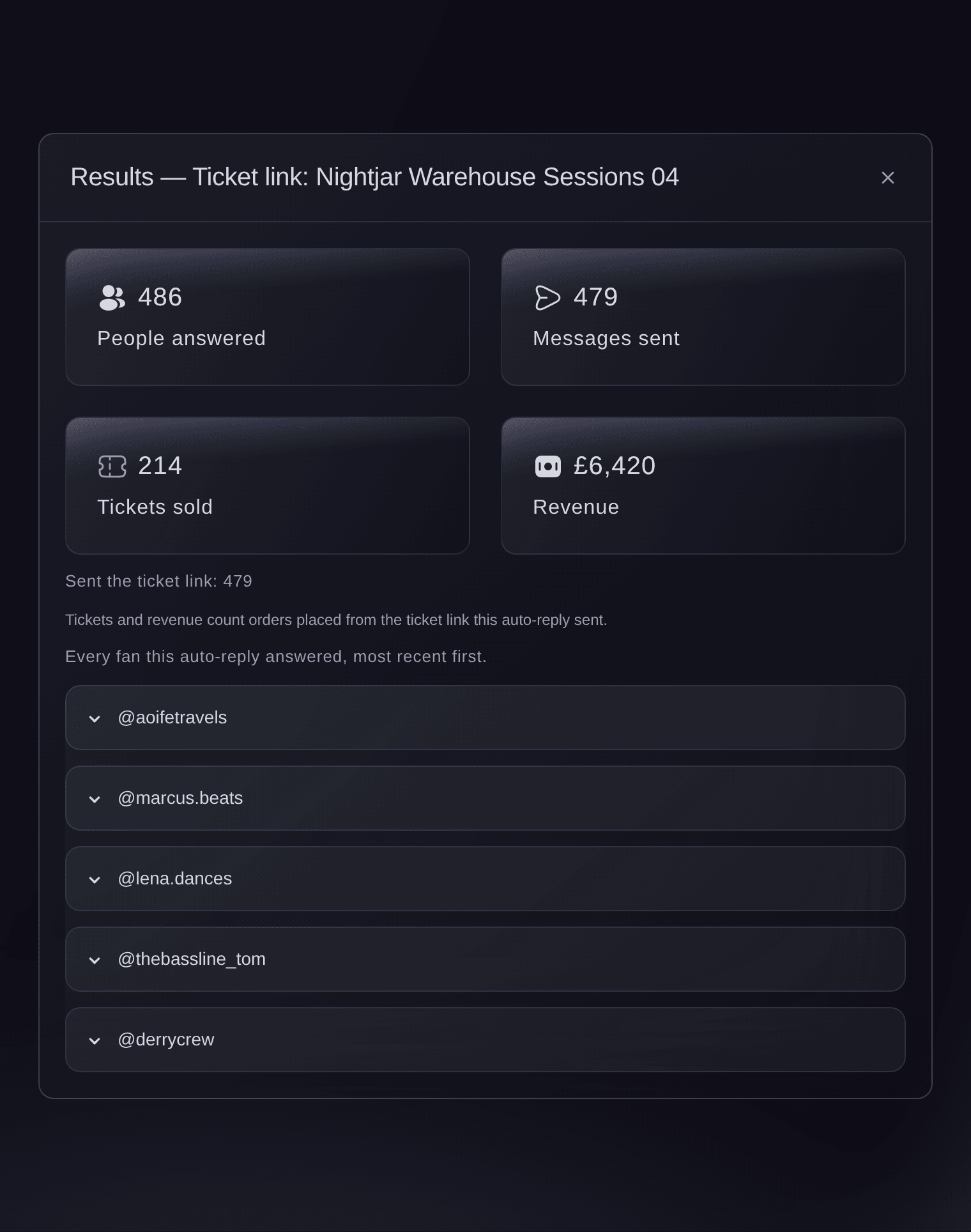
The Auto-replies list shows the messages each one sent and the tickets it sold, and Results opens the full picture: the people answered, messages sent, tickets sold and revenue, with every fan it answered, newest first. Refunds are taken off, so the figures match the event's Sales report. You know which keyword earns its place on your posts.

  • Tickets sold: for each auto-reply, after refunds
  • Revenue: from orders placed through its link
  • Fans answered: what each fan sent and what happened
Ticket Fairy auto-reply results with people answered, messages sent, tickets sold and revenue, above the fans it answered

Get the right auto-reply suggested at each stage

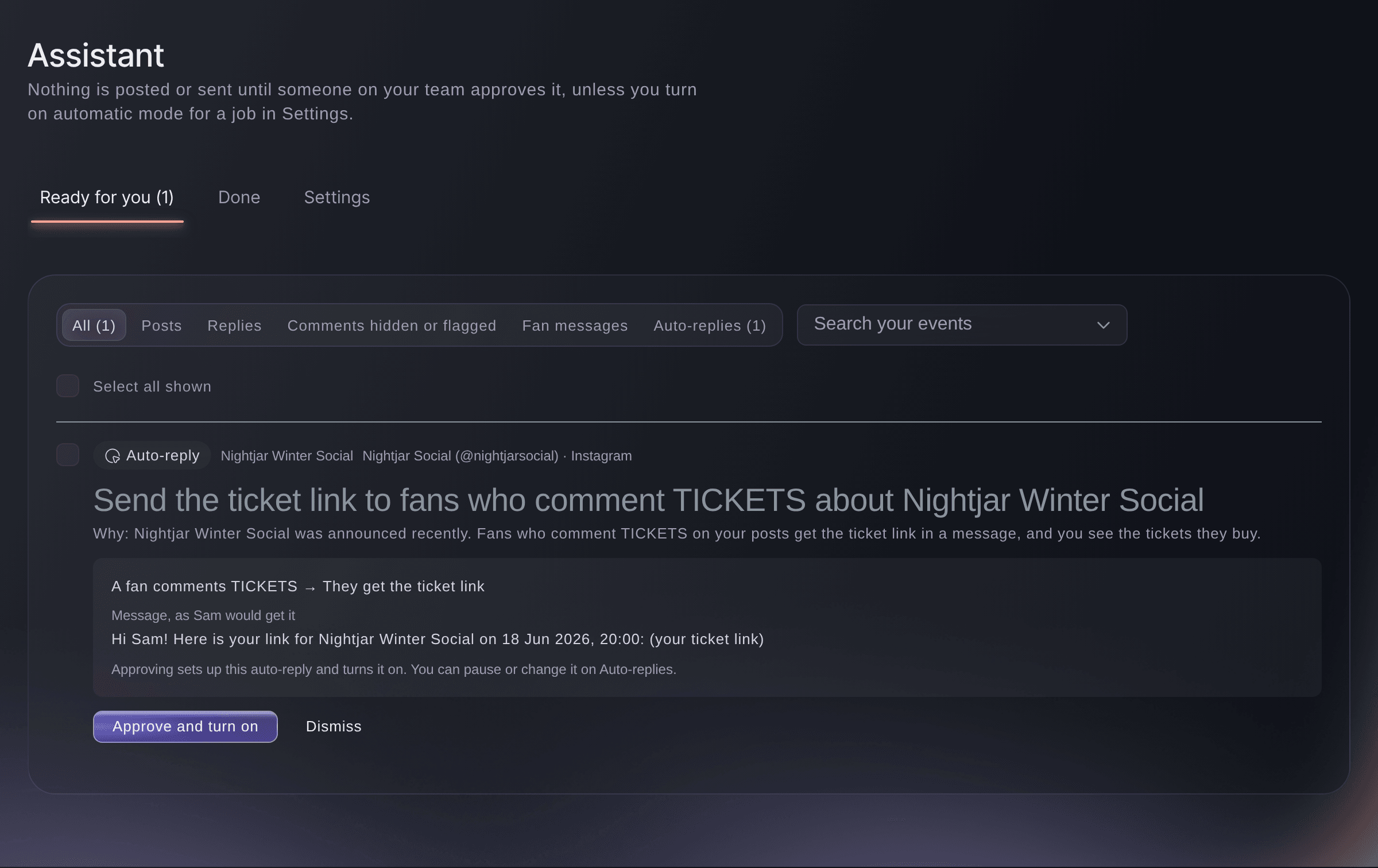
The Social Assistant suggests the auto-reply an event needs as it moves along, such as the ticket link once the event is announced or the waiting list when it sells out. Each suggestion shows the message as a fan would get it. Select Approve and turn on, and it starts answering fans straight away.

Ask Fai, the assistant in your dashboard, to set up an auto-reply for an event, change its keyword or message, pause it or tell you what it sold. She asks you to confirm before anything that fans will see changes.

  • Suggested auto-replies: the one each event needs now
  • Approve and turn on: live in one step
  • Fai: sets up and changes auto-replies with you
Ticket Fairy Social Assistant suggesting a ticket link auto-reply for fans who comment TICKETS, with the message a fan would get and an Approve and turn on button

How event teams use auto-replies

  • A club with weekly nights

    The club runs TICKETS for every night on one Instagram account. Each fan gets the link for the night whose post they commented on, and last week's auto-reply stopped by itself when that night ended.

  • A tour announcement

    The artist team turns on the ticket link auto-reply on announcement day. Fans who comment before the on-sale hear when tickets open, and the same auto-reply sends the link the moment they do.

  • A festival in its final week

    Fans message INFO about camping, parking and the bag policy. Most get their answer from the festival's FAQs in seconds, and the few unusual questions wait in the Inbox for the support team.

  • A venue rewarding fans

    The story thank-you sends a message to each fan who mentions the venue in their story and asks to repost it. The social team reposts the stories whose owners said yes.

  • A sell-out show

    Once the show sells out, fans who comment TICKETS get the waiting list. Fans join the list instead of leaving empty-handed, and nobody had to change the auto-reply.

Get this page as a PDF Read it later or share it with your team. We email you a link to the PDF.
What to put in your PDF

We will email you this deck. We may also email you now and then about Ticket Fairy features that can help your events. You can unsubscribe at any time with one click.

Questions About Event Auto-Replies

Event auto-replies

Every auto-reply works on Instagram. On a Facebook Page, auto-replies answer comments and Messenger messages. Story replies and story mentions are Instagram only.

Owners and admins of the brand, with the Instagram account or Facebook Page connected and the event published.

Each message counts towards your brand's monthly message allowance. If it runs out, auto-replies stop sending until it renews. A daily limit can be between 1 and 10,000 messages.

Instagram and Facebook allow one private message for each comment, within 7 days of the comment. An auto-reply answers as soon as the comment arrives.

No. When your event sells out without a waiting list, fans get your sold-out message. Turn on the waiting list for the event and they get the waiting list instead.

Posts you publish from Ticket Fairy with the event chosen. A post you publish in the Instagram app has no event, so choose All posts or Selected posts to answer comments on it.

Yes, when each one watches the posts about a different event, because their posts never overlap. When a ready-made auto-reply's keyword is already in use on the same posts, Ticket Fairy picks the event's own posts for it instead.

Up to 10, each up to 300 characters. One is picked at random and posted under the fan's comment after their private message.

Tickets sold count only the orders placed through the auto-reply's own link for its event, after refunds. A fan who taps the link and does not buy is not counted.

It asks for permission and saves the fan's yes. Your team reposts the story from Instagram.

Sell more tickets. Build the crowd that comes back.

Start Selling Tickets Online

Sign up without a credit card and build a test event before you commit. Go on sale in minutes when you are ready.

No monthly subscription required for ticketing
Start selling tickets immediately
Ticketing tools included in the service fee
Get Started Talk to Fai Now

Ask Fai, our AI assistant, about Ticket Fairy’s features, pricing and how it could work for your event.

No credit card required

Book a demo call

See the referral model that drives 20% more ticket sales on average, learn which campaigns sell tickets, answer buyers faster and keep queues moving.

45-Minute Video Call
Pick a Time That Works for You