Sell all your festival days from one event page

Give each day its own category and door times, open its prices in releases, and sell camping and parking in the same checkout. One set of reports shows all sales.

Ticket Fairy Multi-day festival template with its questions before the event is built, and the weekend, VIP and day passes it lays out
  • Weekend, day and VIP passes on one page
  • Day ticket holders get in on their day
  • Tickets, camping and parking in one order

Get a festival ticket plan ready in minutes

Answer the template's questions and your festival ticket plan is ready for you to change. The Multi-day festival template asks how you want to sell, your standard ticket price, how many people you can fit and how long your festival runs. It lays out weekend, VIP weekend and day passes with camping and parking add-ons, and you can change any row before you create the event.

Running a festival again? Duplicate last year's event and the categories, ticket types and add-ons come with it, ready for new dates and prices.

  • Multi-day festival template: weekend, VIP and day passes laid out for you
  • Your price and capacity: the plan follows the answers you give
  • Each row editable: change it before you create the event

Show each day and the full weekend side by side

A buyer compares the full weekend, the single days and the upgrades on one page and pays once. Give each day, the full run and each upgrade its own ticket category, and each ticket type sits under the heading it belongs to. Your event page shows Friday, Saturday, Sunday and Full Weekend as their own sections, each with its current price.

Your categories follow your poster: the full run, any single days and any upgrade above them, each with the name a buyer already knows. Buyers who want one day find it straight away, and buyers weighing up the weekend see what they save next to the day prices.

Run the festival as one event when the days share a venue, a line-up and reporting. Use separate events when each day has its own venue, line-up, marketing or accounts.

  • A category for each day: Friday, Saturday, Sunday and Full Weekend
  • Upgrades alongside: VIP next to the passes it upgrades
  • One checkout: several days and passes in one order
Ticket Fairy Create Category dialog, with the category name and resale type fields

Let day ticket holders in on their own day

Your door team knows who gets in each morning, because each day ticket has its own door times. A Saturday ticket scans in on Saturday only, while a full-run pass opens and closes with the event. Buyers see their day's times on their ticket, so fewer turn up on the wrong morning.

Day tickets with their own door times suit festivals where each day has its own line-up and capacity. A full-run pass that follows the event's own times suits the fans who come for everything, and buyers see both side by side in one checkout. Your door team scans both with the same app, and a ticket for another day does not scan in.

  • Doors Open Time: when that day's ticket starts to scan in
  • Last Entry Time: when that day's entry closes
  • Full-run passes: open and close with the whole event
Ticket Fairy ticket type options with different door times turned on and a doors open and last entry time

Let a weekend pass in once each day

A weekend pass holder comes back each morning, and nobody can pass the same ticket through the fence to a friend on the same day. Turn on repeat scanning with a daily limit on the full-run ticket, and your door team lets the pass in once each day of the festival. A second scan the same day gets turned away.

  • Repeat scanning: one pass, a scan in each day
  • A limit each day: the same pass cannot be used twice in one day
Ticket Fairy Ticket Rules with repeat scanning turned on and a daily and hourly limit

Open each day's prices in releases

Early bird rewards your first fans, and the next price is always ready when a release sells out. Each release is its own ticket type inside its day or pass. The later ones stay hidden, and each appears when the release before it sells out or at a date you choose, whichever comes first. A Saturday release that sells out at midday never leaves your buyers with nothing to buy, and the Sunday prices rise on their own.

With Current Tier on each day's category, a ticket that comes back through your waiting list is offered at the release on sale for that day. Fans who wait still pay a fair price, and you never undercut your own early buyers.

  • Releases in each day: early bird, first release and final release
  • Hidden until their turn: one clear price for each day
  • Sell-out or date: whichever comes first opens the next price
Ticket Fairy Ticket Category field on a ticket type, set to General Admission

Sell camping and parking in the same checkout

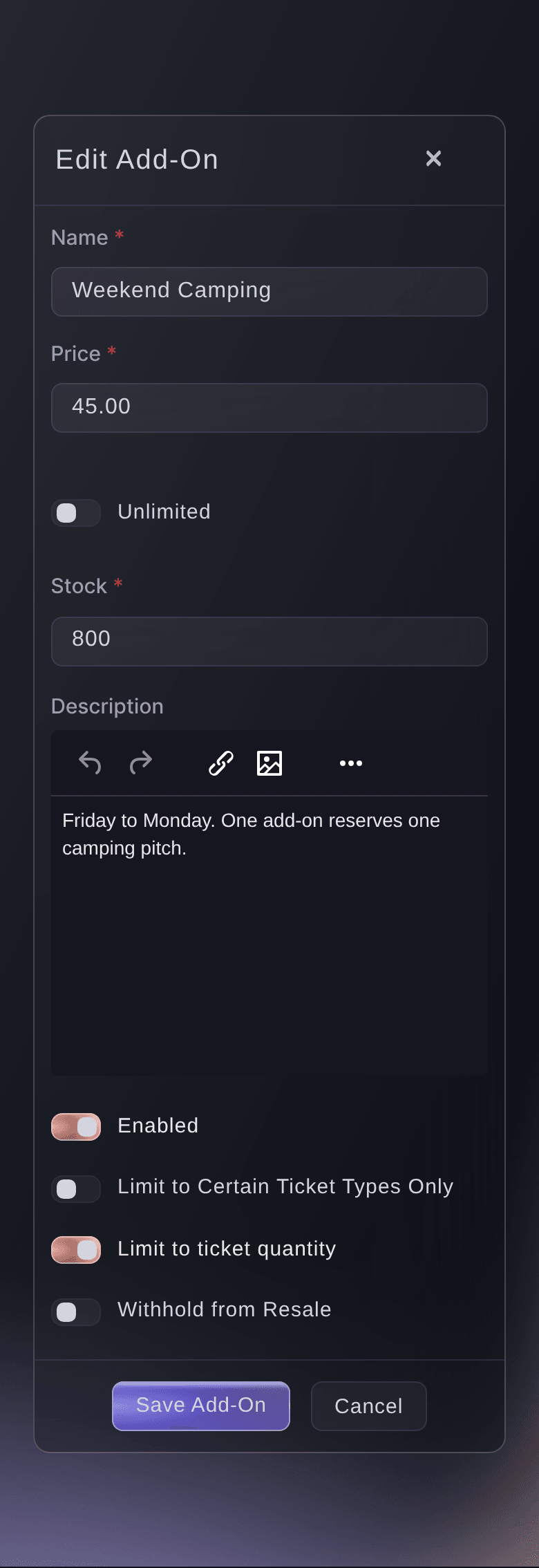
A festival weekend becomes one order and one confirmation, and you take more per buyer. Add camping pitches, campervan permits, parking, meal packages and VIP upgrades as add-ons for the whole event, with options and sizes as variants. Buyers pick them right under the tickets as they check out. You can limit an add-on to the ticket types it suits, such as camping for weekend passes only.

  • Camping and campervans: a pitch for the weekend in one row
  • Parking and meals: picked under the tickets at checkout
  • For the right tickets: an add-on only for the passes it suits
Ticket Fairy add-on form filled in for a weekend camping pitch

Keep touts away from your festival gates

Fans who cannot come pass their ticket on at face value, so touts have nothing to gain. Names Required puts the attendee's name on each ticket, and ID Required asks your door team to check it. Face-value resale gives fans who cannot come an honest way to sell. The new buyer gets the ticket in their own name at the same price, and the old code stops working at the gate.

Set a limit per order and per customer account on your most wanted releases, so one buyer cannot sweep up a day's allocation. Names, ID, limits and face-value resale together take the profit out of touting and keep your festival's tickets with fans.

  • Names and ID: the name on the ticket matches the person
  • Face-value resale: fans sell to fans at the same price
  • Purchase limits: per order and per customer account

Ask Fai to set up your festival tickets

Give Fai, the assistant in your dashboard, your days, prices, allocations and sale dates. She creates the categories, the releases with their reveal rules, each day's door times, the repeat scanning on your weekend passes and the camping and parking add-ons. Fai shows you the complete setup and asks you to approve it before she makes any change.

Fai helps again once the festival is on sale. Ask her which days fans are buying fastest, how many weekend passes are left or how this year compares with last. Ask her to open the next Sunday release or mark a day as sold out. Each change waits for your approval, so your team stays in control of prices and allocations.

  • Describe the festival: days, passes, prices and add-ons
  • You approve the setup: nothing changes until you say so

How festivals sell their days and weekends

  • A three-day music festival

    A festival sells Friday, Saturday, Sunday and Full Weekend, each with three releases, and VIP as an upgrade. Each day ticket scans in on its own day, the weekend pass gets one scan each day, and the Saturday prices rise twice as fans buy Saturday tickets.

  • A camping weekend

    A family festival limits its camping pitch add-on to weekend passes and adds campervan permits and parking as variants. Most buyers book their pitch in the same order as their tickets and get one confirmation.

  • A fan convention

    A convention starts from its template and sells weekend, day and VIP passes under their own headings. Day badges have their own door times, so the registration desk lets each one in on its own day.

  • A food and drink weekend

    A food festival sells a Saturday session and a Sunday session in one event, with a tasting token bundle as an add-on. The organiser sees the sales for both days in one set of reports.

  • A sold-out festival that beats the touts

    A sold-out festival turns on names, ID and face-value resale. Fans who cannot come resell through the event page, the new buyer gets a ticket in their own name, and the old code stops working at the gate.

Get this page as a PDF Read it later or share it with your team. We email you a link to the PDF.
What to put in your PDF

We will email you this deck. We may also email you now and then about Ticket Fairy features that can help your events. You can unsubscribe at any time with one click.

Questions About Multi-Day Festival Tickets

Multi-day tickets

One event usually works best when the days share a venue, a line-up and reporting. Use separate events when each day needs its own venue, line-up, marketing or accounts.

A class is what the buyer gets, such as general admission, VIP or a single day, and each one is a ticket category. A tier is what they pay for it depending on how early they buy, and each tier is its own ticket type in that category.

Leave This ticket type has different door times off on the full-run ticket, so it opens and closes with the event. Then turn on Tickets can be scanned multiple times per event, choose Day and set Max Scans to 1.

As an add-on, created once for the whole event. A buyer books a pitch for the weekend in a single row and picks it in the same checkout as their ticket.

Fans can resell only an unused ticket, and scanning a ticket in ends its resale until you reverse that check-in. A free ticket, a gift and a ticket redeemed from a pass stay with the person holding them.

Yes. Outside India, turning resale on adds a resale fee of 10% of what the seller paid for the ticket, not counting the booking fee. In currencies other than US, Australian or New Zealand dollars, pounds sterling and euros, it is capped at the equivalent of US$20. The seller gets the ticket price back in full, and once the ticket sells, the fee is charged separately to the card they paid with. Let sellers know about it on your event page.

Yes. The duplicate includes each category with its name and resale type, and the copied ticket types stay in their categories.

Yes. A buyer can add tickets from several days, a weekend pass and add-ons such as camping and parking in one checkout, and gets one confirmation for the order.

You need an owner or admin role for the event. Fai can set them up for you once you approve the changes. Tell her which releases start hidden and what reveals each one.

Yes. Fans can spread the cost of festival passes with flexible payment plans, where your payment processing account supports them. A multi-day music festival can sell day tickets, weekend passes and camping in one order.

Sell more tickets. Build the crowd that comes back.

Start Selling Tickets Online

Sign up without a credit card and build a test event before you commit. Go on sale in minutes when you are ready.

No monthly subscription required for ticketing
Start selling tickets immediately
Ticketing tools included in the service fee
Get Started Talk to Fai Now

Ask Fai, our AI assistant, about Ticket Fairy’s features, pricing and how it could work for your event.

No credit card required

Book a demo call

See the referral model that drives 20% more ticket sales on average, learn which campaigns sell tickets, answer buyers faster and keep queues moving.

45-Minute Video Call
Pick a Time That Works for You