1. Features
  2. Vault
  3. Account & balances

Give Your Ticket Money an Account It Can Work From

Paying next year's venue deposit usually means waiting for a payout, then moving the money to a business account before you can touch it. Open a Vault account for your brand and the money your events take has an account of its own, inside your Ticket Fairy dashboard. See what you can spend today in every currency, what each event made and when it pays out, give sponsors abroad local bank details, convert at a rate you check first and hand your accountant a statement when the season ends.

  • Ticket money you can spend before the payout
  • What each event made and when it pays out
  • Local bank details in the currencies you are paid in
Ticket Fairy Vault Overview for an active account, with balances in two currencies, quick actions and the Vault account card below them

Pay Next Year's Deposit From This Year's Ticket Sales

Vault holds what your events take, in the currencies you sell in, so a promoter or a venue team can spend it as soon as it arrives. Pay artists and suppliers from it, give your team cards that spend from it and collect deposits, sponsorship and hire fees into it. Your payouts still reach your own business bank on the schedule you agreed. Vault is where the money waits, and works, in the meantime.

Vault belongs to your brand, so the money from every event the brand runs arrives in the same balances. A festival that sells in euros keeps its euros until you decide to convert them, and a tour that sells in pounds and dollars has a balance for each currency. Every payment, card purchase and conversion shows who on your team made it.

  • Balances in your currencies: money stays in the currency you sold in until you convert it
  • Cards and transfers: spend and pay people from the ticket money you hold
  • Links and invoices: collect deposits, hire fees and sponsorship into Vault

Open Your Account From Your Brand

Your brand opens its own Vault account from the dashboard you already run events from. The account form starts with your brand's email, name, city and country filled in, so you only confirm them, say how the business is set up and name the people behind it. One person can fill every role when they run and own the business. Verification happens in a secure window inside Ticket Fairy, and the account card always tells you where the check stands.

The verification questions open from the account card in a secure window, and a colleague who is an owner or an admin on the brand can finish them for you. While Vault checks your details the card says Submitted. If Vault needs anything more, the card says Action required and Continue setup takes you straight to the questions. Once the card says Active, your balances appear and Cards, Transfers and Accounts join the Vault menu.

Your financial profile keeps your business, what it does, the people behind it and their documents, under Business, Activity, People, Documents and Review. Save it and come back whenever you have the details to hand, and the money features reuse it without asking for the same information again.

  • Filled in from your brand: contact email, business name, city and country
  • The people behind it: one person can hold every role
  • Status on the card: Created, Submitted, Action required or Active
  • One financial profile: your business details saved for every money feature
Ticket Fairy Open a Vault account form with business details, authorised person, legal representative, controlling person and beneficial owner

See What You Can Spend Today in Every Currency

Know what is free to spend before you commit to a supplier. Each currency you hold has its own row, with the money you can pay out or spend today, and On its way and Held beside it, so money still settling or set aside for card purchases never looks spendable. A fresh reading before a big payment puts the latest figures in front of you.

Needs your attention links you to a payment to check, group payments waiting to be sent and anything open in the Action centre. Quick actions starts the common jobs: Pay someone, Pay several people, Issue a card, Create an invoice and Download a statement.

The Action centre keeps every time-sensitive Vault review together, such as a card payment held for a fraud check, an information request or a cardholder review. Each one shows its priority, the team responsible and the time left, nearest deadline first, and its details say why it needs attention and which payment is behind it.

  • Available now: what you can pay out or spend today
  • On its way and Held: money still settling or set aside for card purchases
  • Quick actions: pay someone, pay several people, issue a card or create an invoice
  • Action centre: every review with its deadline, nearest first
Ticket Fairy Vault Action centre with filters and three open tasks: a card payment fraud review, an information request and a card review

Know What Each Event Made and When It Pays Out

Answer "what did this show make?" without building a spreadsheet. Each event's money shows Money in, the ticket sales and add-ons, with the orders and tickets behind them and the tax already inside them. Taken off lists refunds, Ticket Fairy fees, card processing fees, partner shares, Capital repaid and lost disputes, and Estimated to you is what is left.

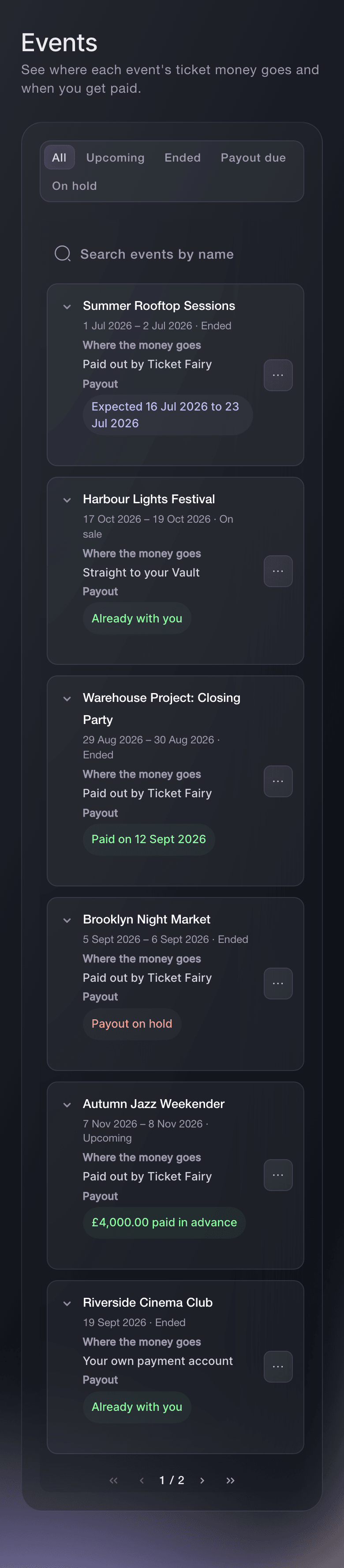
The Events page lists each event with where its ticket money goes, its payout and any Capital to repay. Show only the events with a payout due or on hold, or find one by name. A timeline on each event runs from the day it ends to the day the money reaches you, then shows Paid with the date. An event paid straight to your Vault shows its money arriving as buyers pay.

You can read your events' money before your Vault account is open, so the Events page is useful from your first on-sale.

  • Money in: ticket sales and add-ons, with the orders and tickets behind them
  • Taken off: refunds, fees, partner shares, Capital repaid and lost disputes
  • Payout due and On hold: the events to follow up, picked out for you
  • When you get paid: the payout window, then Paid with the date
Ticket Fairy Vault Money from this event for an ended event, with ticket sales and add-ons, refunds, fees, partner shares, Capital repaid, disputes and the estimate of what reaches you

Give Sponsors and Partners Abroad Local Bank Details

Touring promoters and festivals with international partners get paid in one currency and spend in another. Open a receiving account in the country your payers bank in and the currency you want, and the sponsor, venue or partner pays you the way they pay any bank account at home. Each payment arrives in Vault in the currency it was sent in.

A local transfer suits payers in the account's own country, and SWIFT suits payers sending from abroad, so you pick the cheaper route for the people paying you. Each account carries a nickname your team recognises, such as European tour, while payers see the account name. View transactions on each account shows who paid, the amount, any fee and its status.

  • Receiving accounts: local bank details in the currencies you are paid in
  • Details to share: account name, number and bank code, ready to copy
  • View transactions: who paid, the amount, any fee and its status
Ticket Fairy Vault Account details for a pound receiving account, with its account name, account number, sort code and bank details

Convert Currencies at a Rate You See Before You Agree

Move your euro festival takings into pounds when the rate suits you. Convert from any balance into the currency you need, and work from the amount you convert or the amount you need to end up with. Before you agree you see your rate, the mid-market rate, the fee already inside your rate and when the money arrives, with a timer while the rate is held for you.

Link the conversion to an event and enter what it is for, so your team knows why the money moved. Every conversion shows who made it, and you follow it under Conversions from Scheduled to Done. Activity lists every movement of your event money, newest first, from ticket money in to payments, conversions, card payments, refunds and fees, with the balance after each one. Narrow it by dates, currency and type to find the payment your accountant asks about.

  • Convert money: from any balance into the currency you need
  • Rate and fee shown: beside the mid-market rate, before you agree
  • Every movement: with the balance after each one
Ticket Fairy Vault Convert money dialog converting pounds into euros, with the rate held, the mid-market rate, the fee and the box to agree ticked

Hand Your Accountant Statements and Proof of Payment

Close the books on a season without exporting bank lines by hand. Get an official PDF statement for one currency with opening and closing balances, or every payment in and out as a spreadsheet, for last month, the last three months or the dates you choose. When an artist, agent or supplier asks for proof that you paid, download a payment confirmation letter from the payment itself.

Each request on the Statements page shows who asked for it and when, and you download the file once it says Ready. Vault records every download and every payment confirmation letter in your brand's activity log, so you can always answer who took a copy of your figures.

  • Account statement: an official PDF with opening and closing balances
  • All activity: every payment in and out, as a spreadsheet or a PDF
  • Payment confirmation: a letter that proves you paid
Ticket Fairy Vault Statements page with the Get a statement form and earlier requests that are preparing, ready, could not be made and expired

Ask Fai Where Your Money Stands

Ask Fai, the assistant inside your dashboard, what is in Vault right now and how much of it is still settling, or what an event made, what came off it and when its payout reaches you. She marks the estimate as an estimate and changes nothing to answer. She lists your Vault activity for any dates and the reviews waiting in the Action centre.

Fai can also do the work. Ask her for a rate and she quotes it, then converts once you agree to the rate she shows. She opens, renames or closes a receiving account and asks for a statement, and she shows you each change and waits for your yes before she makes it.

  • Balances in a sentence: what you hold and what is still settling
  • Event money on request: what came in, what came off and when it pays out
  • You approve each change: conversions, accounts and statements wait for your yes

How Organisers Use Their Vault Account

  • A Club Night Promoter

    A promoter running weekly nights reads Available now on Friday afternoon and pays the headliner's deposit for next month from this month's ticket money. Nobody waits for a payout, and the deposit leaves with the artist's invoice number as its reference.

  • A Festival Selling in Euros

    A festival keeps its euro takings in euros until the pound rate suits it, converts with the rate and fee shown first and links the conversion to the event. The finance lead sees who converted, when and why.

  • A Touring Promoter

    A tour opens receiving accounts in pounds, euros and dollars and sends each sponsor local bank details. Sponsors pay like they pay any account at home, and every payment arrives in the currency they sent.

  • A Venue Group

    A venue group follows the Events page each Monday, filtered to Payout due, and opens each event's money to see what came off it. The finance team stops asking support why a payout differs from the gross.

  • An Agency at Year End

    An agency downloads an official statement for each currency and a spreadsheet of all activity for the year. Its accountant reconciles from the files, and every download is on the brand's activity log.

Get this page as a PDF Read it later or share it with your team. We email you a link to the PDF.
What to put in your PDF

We will email you this deck. We may also email you now and then about Ticket Fairy features that can help your events. You can unsubscribe at any time with one click.

Questions About Vault Accounts and Balances

Account & balances

No. The Ticket Fairy, Inc. is a technology platform and is not a bank. Vault banking services are provided through regulated banking partners.

You can finish setup in Ticket Fairy for a company, partnership or sole trader in the United States, Australia, Canada, the United Kingdom, Singapore, any EU country, Iceland, Liechtenstein or Norway. A business in the United Kingdom or one of those European countries accepts the agreements for its own country before it sends its details.

You need an owner or admin login on the brand. Event-level logins such as promoter, door and stats do not see Vault. A brand has one Vault account, so money from every event the brand runs arrives in the same balances.

Ticket money reaches your Vault balance as buyers pay on events that take their card payments through Vault. You can also collect money into Vault with payment links and invoices, and receive bank transfers into your receiving accounts. Payouts on your other events still run on the schedule you agreed and land in your own business bank.

It is what Vault can move today. It does not take off refunds you still owe, Capital you have not repaid or money due to others, so subtract those before you commit to a payment.

The estimate is worked out from your order records, and your payout is the final figure. Refunds and disputes after the figures were read, card fees recorded later and anything we paid you in advance all change what arrives. We read each event's money again at least every 5 minutes, and straight away when a refund, a dispute or a payout changes.

Australia, Canada, Denmark, Estonia, Germany, Hong Kong, Indonesia, Israel, Mexico, the Netherlands, New Zealand, the Philippines, Poland, Singapore, the United Arab Emirates, the United Kingdom and the United States. Some take several currencies, which you see once you pick the country. A receiving account takes bank transfers, such as a sponsor paying an invoice. Buyers pay for tickets at checkout.

Our fee is already inside your rate. If you convert more than the balance holds now, the conversion waits until enough money arrives. You can cancel a conversion while the bank still allows it, and Vault shows what cancelling costs before you confirm.

A statement covers up to one year and cannot end in the future. Preparing it usually takes a few minutes, a ready file can be downloaded for 30 days, and a brand can ask for 20 statements an hour. For one event's money, open the event under Events in Vault.

Vault locks when nobody has used it for 5 minutes and hides your balances and payments. Select Unlock Vault and confirm it is you to see them again. Vault may also ask you to confirm it is you before it refreshes balances, converts money or prepares a statement.

Sell more tickets. Build the crowd that comes back.

Start Selling Tickets Online

Sign up without a credit card and build a test event before you commit. Go on sale in minutes when you are ready.

No monthly subscription required for ticketing
Start selling tickets immediately
Ticketing tools included in the service fee
Get Started Talk to Fai Now

Ask Fai, our AI assistant, about Ticket Fairy’s features, pricing and how it could work for your event.

No credit card required

Book a demo call

See the referral model that drives 20% more ticket sales on average, learn which campaigns sell tickets, answer buyers faster and keep queues moving.

45-Minute Video Call
Pick a Time That Works for You