
Your brand and team
Install the Ticket Fairy Promoter desktop app to manage your events
Promoters and venue teams who spend the day in their event dashboard can keep it in its own window on a Mac or Linux computer. Ticket Fairy Promoter is the same dashboard you use in a browser, with your events, sales and Fai, plus tabs for several events at once and updates that install themselves.
Download the Ticket Fairy Promoter app for Mac or Linux, install it and sign in, then keep several events open in tabs while the app updates itself.
- For
- Running your events from the Ticket Fairy Promoter app on your Mac or Linux computer
- Takes
- 5 minutes
Before you start
- You have a Ticket Fairy account. You can use the app with any dashboard login, and it shows the events and pages your role gives you, as the dashboard in a browser does.
- Your computer is a Mac or runs Linux. On Windows, an iPhone, an iPad or Android, you use the dashboard in your web browser instead.
-
Open the desktop app download page
In your web browser, open download.ticketfairy.com/desktop. The page offers the download for the computer you are using.
-
Select the download for your computer
Select Download for Mac on a Mac, or Download for Linux on a Linux computer.
Note: For the Debian and Ubuntu package instead of the Linux AppImage, open Other platforms under the button and choose it there.
-
Install the app on a Mac
If you are on a Mac, open the downloaded file and drag the Ticket Fairy Promoter icon onto the Applications folder, as the window shows. The app works on Macs with Apple or Intel processors.
-
Install the app on Linux
If you are on Linux, allow the downloaded AppImage file to run as a program in its properties, or install the Debian package with your software installer.
-
Open Ticket Fairy Promoter
Open Ticket Fairy Promoter from your Applications folder or your app launcher. The app opens on the Ticket Fairy sign-in page.
Note: The first time, your Mac asks whether to open an app downloaded from the internet. Select Open to carry on.
-
Sign in with your Ticket Fairy account
Sign in with the email address and password of your Ticket Fairy account, as you do in a browser.
Note: Signing in with Google or a passkey opens your web browser to finish, then brings you back to the app signed in.
-
Check that your dashboard opens in the app
Check that the app opens your dashboard on Home, with the same events, brands and Quick Actions you see in a browser.
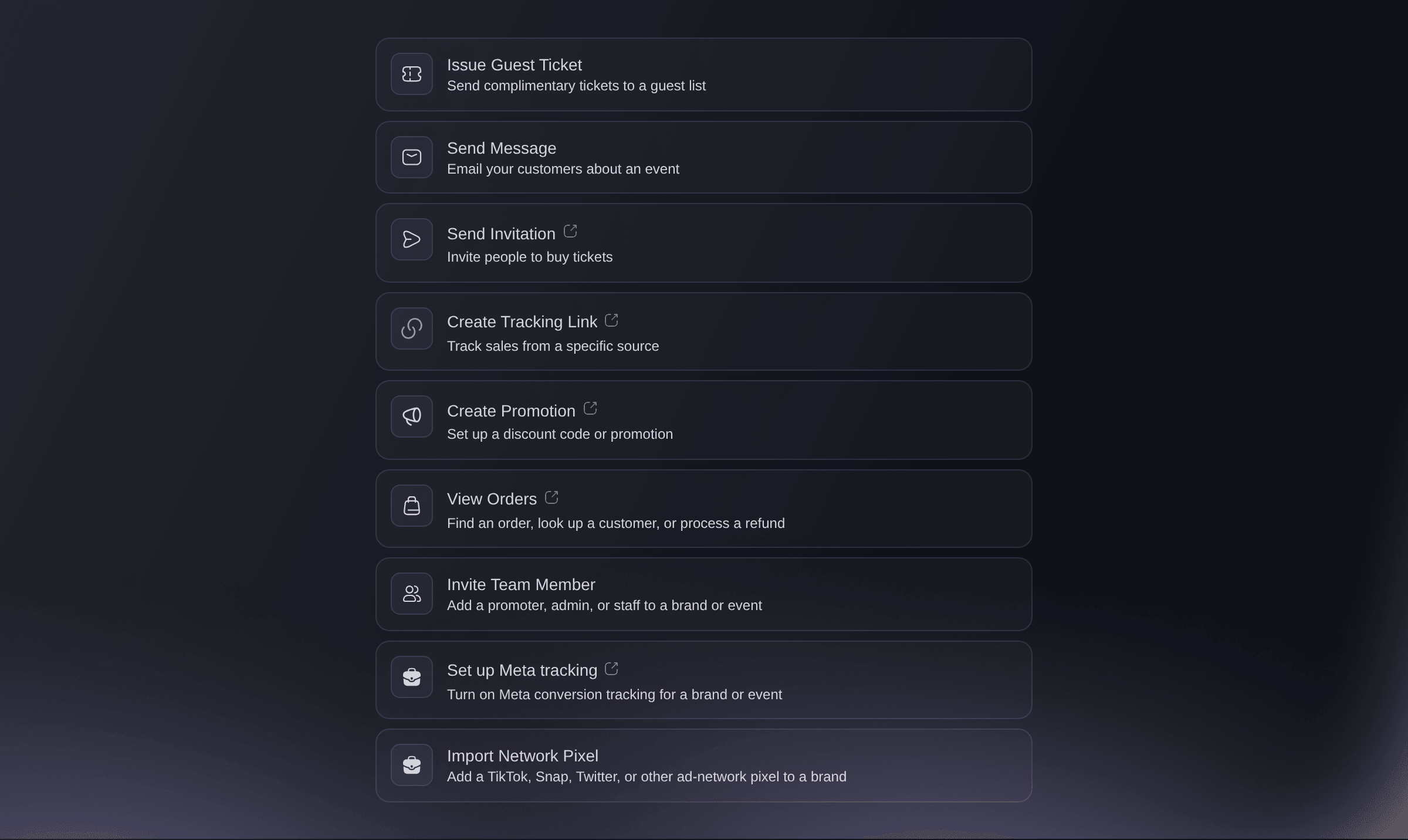
Home, in the Ticket Fairy Promoter app.

Try these steps on your own event
Create a free account, build your event and follow the steps above in your own dashboard. It takes a few minutes and you do not need to book a sales call.
No setup fees. No required monthly ticketing fee. No credit card required.
Or have it done for you
Installing the app happens on your computer, so it is yours to do. Once you are signed in, you type to Fai, the assistant inside your dashboard, in the app as you do in a browser, and in the app she can also move around the page you have open, reading it and using its controls with you.
In your dashboard, with Fai
Take me to the page where I change the ticket prices for <EVENT NAME>
Let Fai do it for you
Fai works inside your Ticket Fairy dashboard. Create your account, open Fai and paste the prompt above.
No setup fees. No required monthly ticketing fee. No credit card required.
Keep several events open in tabs
Press Cmd+T on a Mac or Ctrl+T on Linux, or select New Tab in the File menu, and a new tab opens on Home. To open a link in its own tab, right-click it and select Open Link in New Tab.
Tip: Press Cmd+N or Ctrl+N for a second window, such as one per screen during an on-sale.
Tabs and windows belong to the app on your computer, so you open them yourself.
Install an update
The app downloads updates by itself and asks when one is ready. Select Restart and update to install it now, or Later to have it installed the next time you quit.
Note: On a Mac, select Check for Updates… in the Ticket Fairy Promoter menu to look for one straight away.
Updates install on your computer, so you answer the update question yourself.
Open Fai from the keyboard
Press Cmd+I on a Mac or Ctrl+I on Linux to open Fai, the assistant inside your dashboard, and the same keys again to close her.
Fai answers the same questions and makes the same changes in the app as in a browser, and in the app she can also work on the page with you.
Questions you might have
- Is there a Windows or phone version?
- Not yet. The download page says the Windows app is coming soon, and the app does not run on an iPhone, an iPad or Android. Use the dashboard in your web browser there, which has the same pages and Fai.
- Does the app update itself?
- The Mac app and the Linux AppImage check for updates when they open and every 4 hours, and download them in the background. The Debian package does not update itself, so download the new package from the same page and install it over the old one.
- Why does signing in with Google open my browser?
- Google sign-in and passkeys finish in your web browser, where Google and your device can check it is you. Once they have, the browser hands you back to the app signed in, and you can close that browser tab.
- How do I send a teammate the page I am looking at?
- Right-click a link and select Copy Link Address. The copied link opens the same page of the dashboard in a web browser, for each member of your team who can see that page. Open Dashboard in Browser in the Help menu opens your dashboard in your browser.
- Do Ticket Fairy links open in the app?
- A dashboard link in an email opens in your web browser. Links that start with tf-promoter:// open the app on the page they name, which is how the app brings you back after you finish setting up a Stripe account in your browser.
- Can Fai do more in the app than in a browser?
- Yes. In the app she can also move around the page with you, reading it and using its controls. Talking to Fai and recording a voice message work in a browser only, and typing works in both.
- Can the app open when I start my Mac?
- Yes. In the Ticket Fairy Promoter menu, select Open at Login, and the app opens each time you sign in to your Mac.
Still have a question?
Book a demo and we will answer it on a call, on your kind of event. Or create your account and see it for yourself.
No setup fees. No required monthly ticketing fee. No credit card required.
Related guides
Do this on your own event
Create your account, build your event and follow the steps in your own dashboard. You do not need to book a sales call.