
Playbooks by event type
Run ticketing for a food or drink festival
Food, wine, beer and street food festivals sell entry by session, with a tasting glass or a token card on top and a field full of traders to get through the gate. Each session can hold only the guests the site takes at once. Traders apply, receive their passes and scan in at the same gate as your ticket holders.
Build the festival from a template, give each tasting session its own entry time, sell glasses, tokens and parking with the ticket, take trader applications, issue trader passes, hand sponsors their allocations and follow arrivals at the gate.
- For
- Food, wine, beer and street food festivals selling entry by session with traders on site
- Takes
- 16 minutes
Before you start
- You're a brand owner or admin. You can create events, change tickets and add-ons, build forms and issue passes.
- You have asked Ticket Fairy to turn on time slots for the festival if guests book a session, and passes for your brand if Multi-Entry Passes is not in your menu.
- You know your sessions, how many guests the site takes at once, and the extras you sell beside entry.
-
Build the festival from the one-day festival template
Select Create Event and choose One-day festival, which lays out your ticket tiers, a VIP ticket and a parking add-on for you to price.
Note: A festival over a weekend starts from Multi-day festival instead. A wine or beer festival sets its minimum age in the event details.
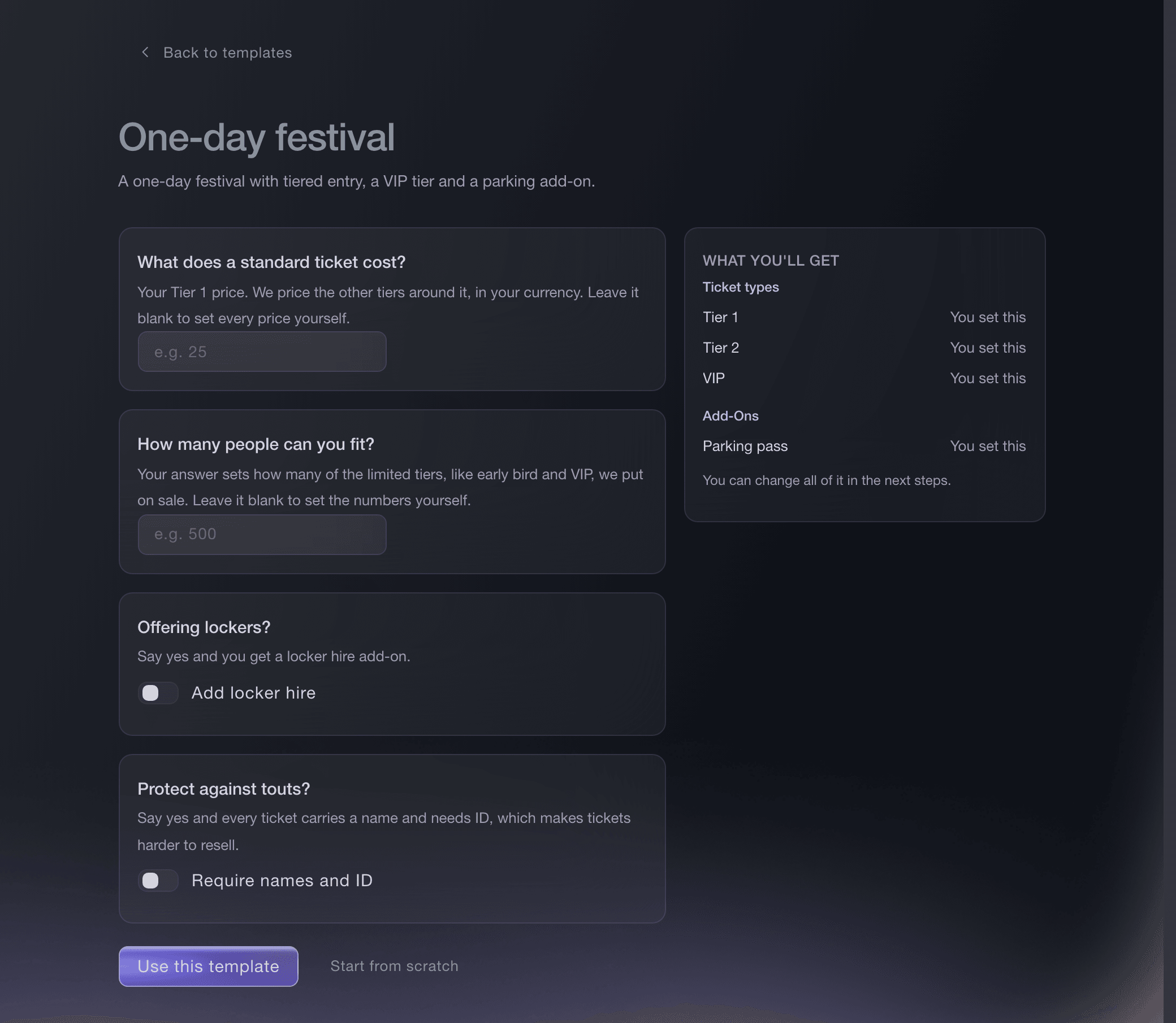
Create Event, One-day festival template. -
Give each tasting session its own entry time
Optional: On the ticket type guests book a session with, turn on time slots and set Max sales per slot to the number of guests each session can take.
Note: Each session sells out on its own count, so a full afternoon never closes the evening.
Sell timed-entry tickets for an attraction, exhibition or food event
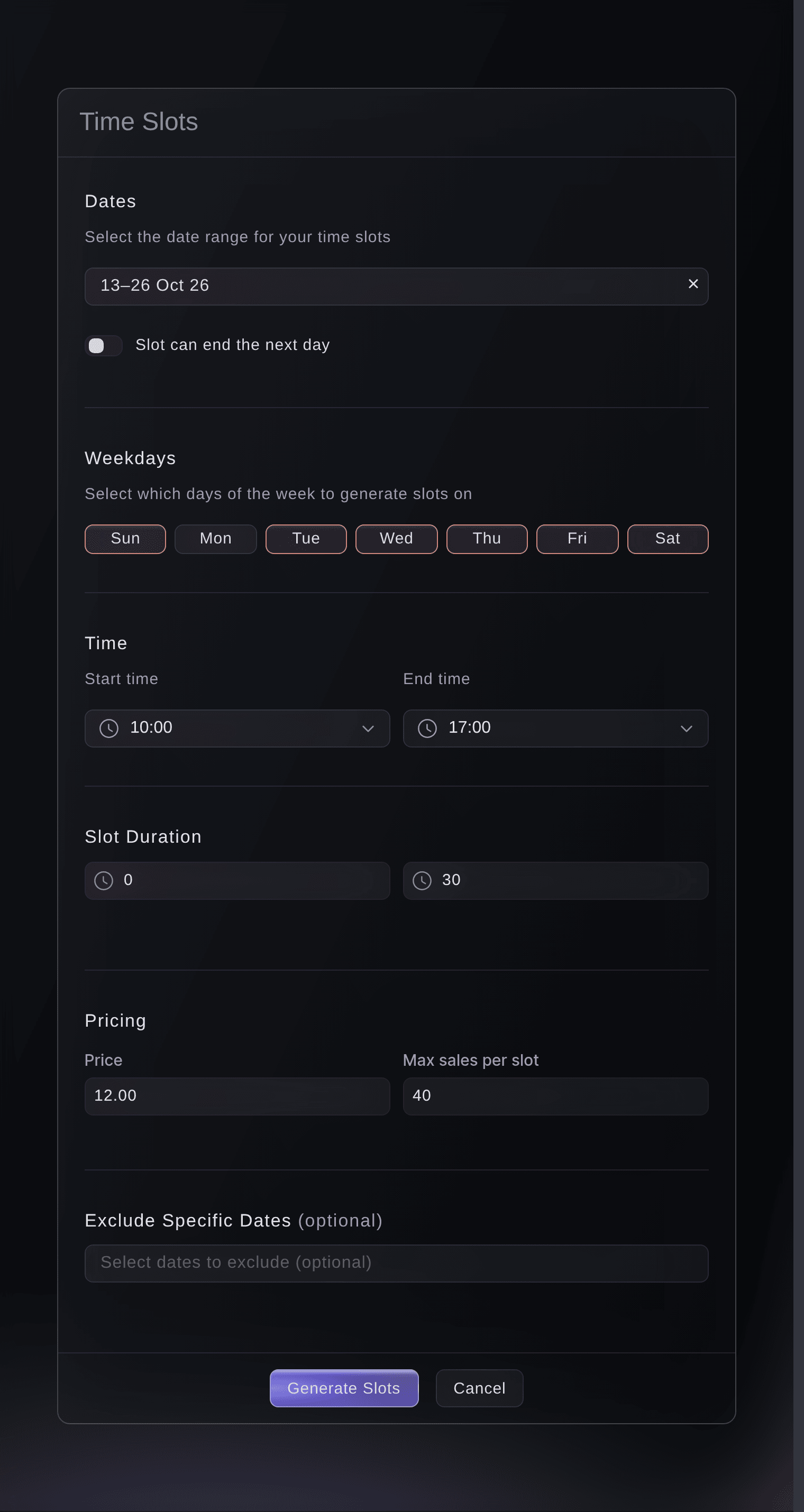
Tickets, Create Ticket Type, Generate time slots. -
Sell glasses, tokens and parking with the ticket
On Tickets, select Create Add-On under Add-Ons for each extra, such as a tasting glass, a token card or a parking space, with its own price and stock.
Note: Buyers add them in the same checkout as their ticket. When an add-on's stock runs out it stops selling and the tickets stay on sale.
Sell parking, camping and merchandise with your tickets
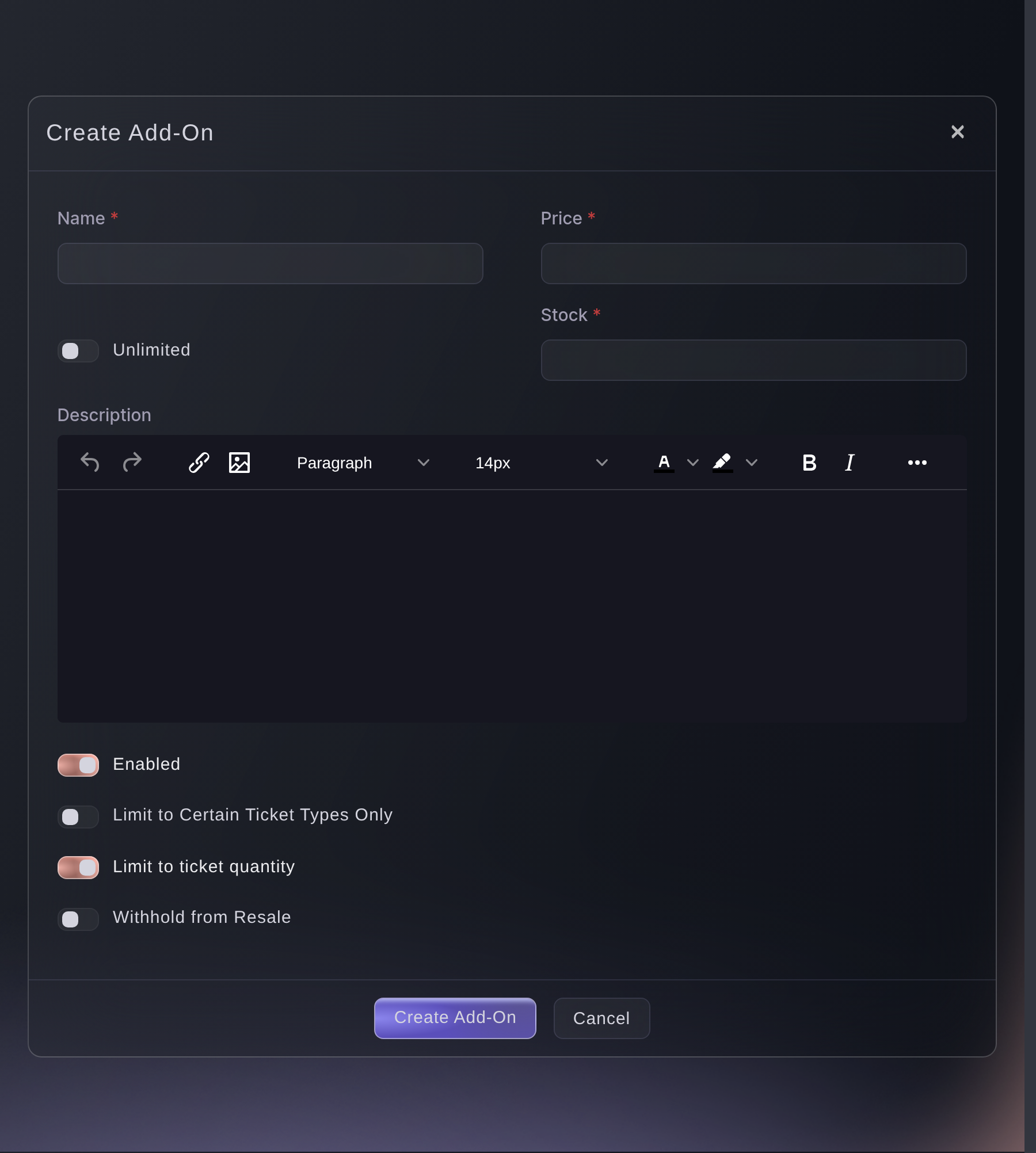
Tickets, Add-Ons, Create Add-On. -
Take applications from traders
Open Forms on the event and select Create Form for the stallholders and producers who want a pitch.
Note: Every application arrives in one list, where you accept or decline each and the email you picked goes out.
Take act and trader applications for your event
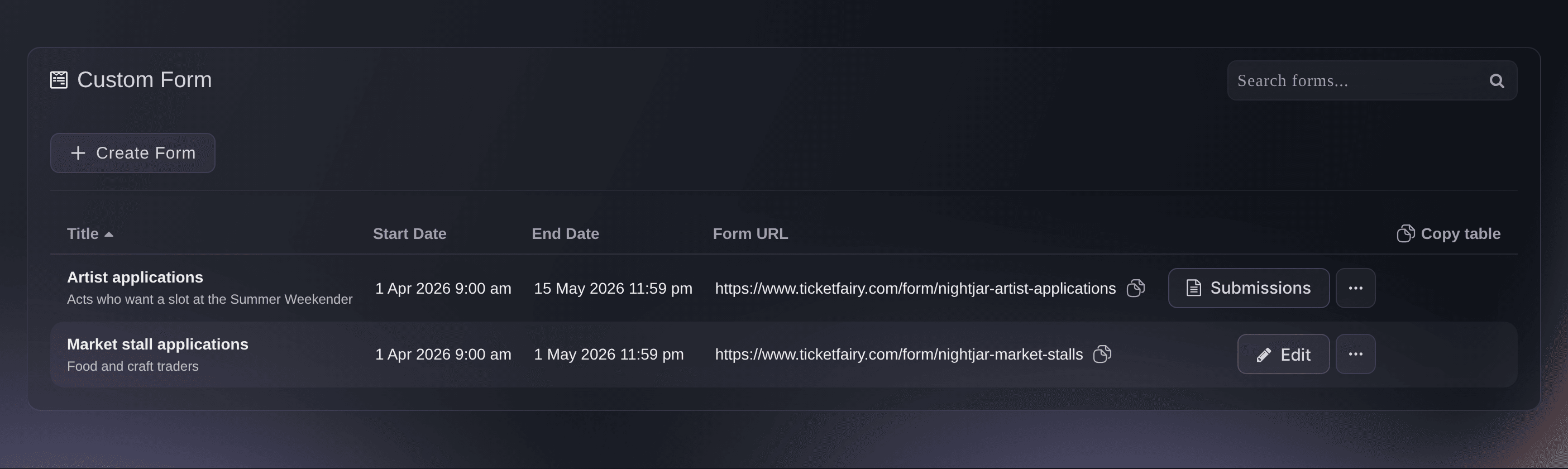
Event, Forms. -
Issue passes to your traders and their staff
Open Multi-Entry Passes on your brand, create a pass type such as Trader, then add each stallholder by name and email address.
Note: The uses you set for a pass type cover the whole event rather than one day, so allow for setting up, trading and packing down.
Issue reusable event passes to crew and artists

Brand, Multi-Entry Passes, Create New Pass. -
Give a sponsor or partner their allocation
Optional: Open Delegations on the event and select Create Delegation for each sponsor, producer or media partner who hands out tickets themselves.
Note: A partner hands out only the ticket types you already sell, up to the number you set for each.
Let a partner hand out their own tickets for your event

Event, Delegations. -
Follow arrivals at the gate
Open Check-In while the gates are open to see arrivals by hour against what sold.
Note: On a festival with time slots, the Ticket Type tab groups arrivals by date, then by time, then by ticket type.
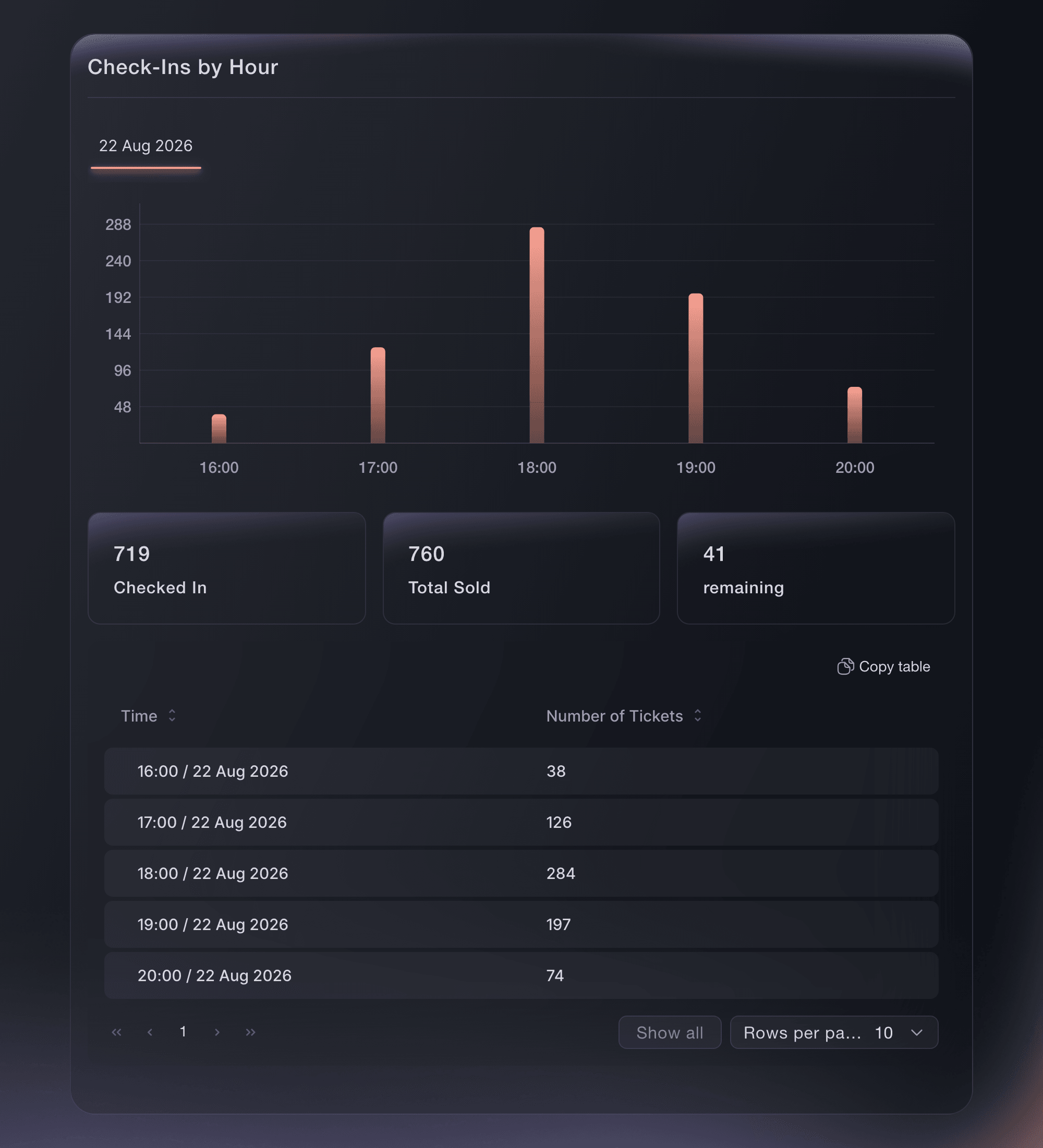
Event, Check-In.


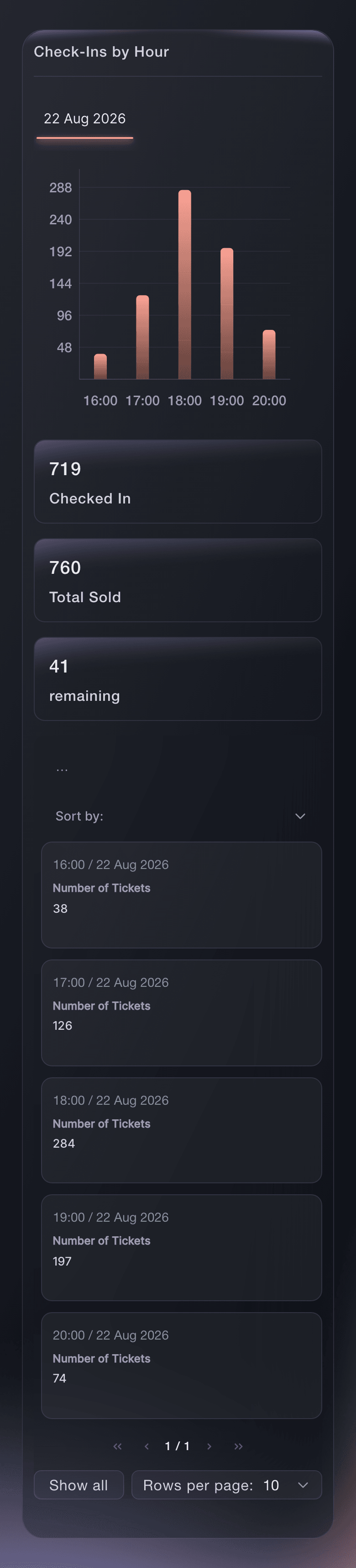
Try these steps on your own event
Create a free account, build your event and follow the steps above in your own dashboard. It takes a few minutes and you do not need to book a sales call.
No setup fees. No required monthly ticketing fee. No credit card required.
Or have it done for you
Fai, the assistant inside your dashboard, can build the festival from the one-day festival template, add the glass, token and parking add-ons, create a trader pass type and issue the passes, and read arrivals by session. She shows you each change and asks you to approve it first. Time slots and trader application forms are set up in the dashboard.
In your dashboard, with Fai
Help me set up our one-day food festival <EVENT NAME> on <DATE> at <VENUE>; ask about our ticket tiers, the tasting glass, token card and parking add-ons and our trader passes, then show me the setup before you create anything
From your terminal
Install the CLI from our CLI page, sign in with ticketfairy auth login, and choose the brand you are working on with ticketfairy brand use <BRAND_ID>. ticketfairy brand list and ticketfairy event list show the IDs the other commands use.
Use the command line to create each add-on, publish the festival and read arrivals by session. Time slots, trader forms, passes and allocations are set up in the dashboard.
Create the tasting glass add-on.
ticketfairy addon create <EVENT_ID> --name "Tasting glass" --price 5 --quantity 3000
Publish the festival.
ticketfairy event publish <EVENT_ID>
Read arrivals by session while the gates are open.
ticketfairy checkin status <EVENT_ID> --breakdown slots --output json
Let Fai do it for you
Fai works inside your Ticket Fairy dashboard. Create your account, open Fai and paste the prompt above.
No setup fees. No required monthly ticketing fee. No credit card required.
Questions you might have
- Should a tasting glass or token card be a ticket type or an add-on?
- An add-on. It is sold beside the entry ticket in the same checkout with its own price and stock, and you can limit it to the ticket types it goes with, so a buyer is only offered the extras that belong with their ticket.
- Can I cap how many guests arrive in each session?
- Yes, with time slots on the ticket type. Each slot has its own capacity and sells out on its own count, and a sold-out time shows greyed out on your event page while the other times stay on sale.
- How do traders get in before the gates open?
- Give each trader a pass, and set the event check-in window to cover setting up and packing down. Your gate team scans passes in the same app as tickets, and each pass shows the holder's name and its pass type.
- Can a sponsor give tickets to its own guests?
- Yes. Create a delegation for the sponsor with the ticket types and the number they can hand out. The person you add opens the access link and hands the tickets out from their own page, up to the limit you set.
Still have a question?
Book a demo and we will answer it on a call, on your kind of event. Or create your account and see it for yourself.
No setup fees. No required monthly ticketing fee. No credit card required.
Related guides
Do this on your own event
Create your account, build your event and follow the steps in your own dashboard. You do not need to book a sales call.