
Setting up an event
Schedule when your event goes live
An announced on-sale time arrives in the event's own timezone, and not always when your team is at a keyboard. Touring promoters and festival teams set one publish date and time, and Ticket Fairy makes the event page public within that minute.
Choose a date and time in your event's timezone so Ticket Fairy makes the event page public at that time.
- For
- Running an on-sale at a set time
- Takes
- 4 minutes
Before you start
- You're an owner or an admin on this event. If you can't find Publish, ask an owner or an admin to do this part. Ticket Fairy support can publish for you as well.
- Your event is saved. Save any changes you have open before you start.
-
Open your event and select Publish
Play from hereOpen the event you want to put on sale, then select Publish. The dialog opens on Event Details.
-
Review your tickets, payment and support details
Play from hereReview Tickets/Add-ons, then check your payment and support details on Payment/Support.
Note: The scheduling button is on Payment/Support, beside Publish Now.
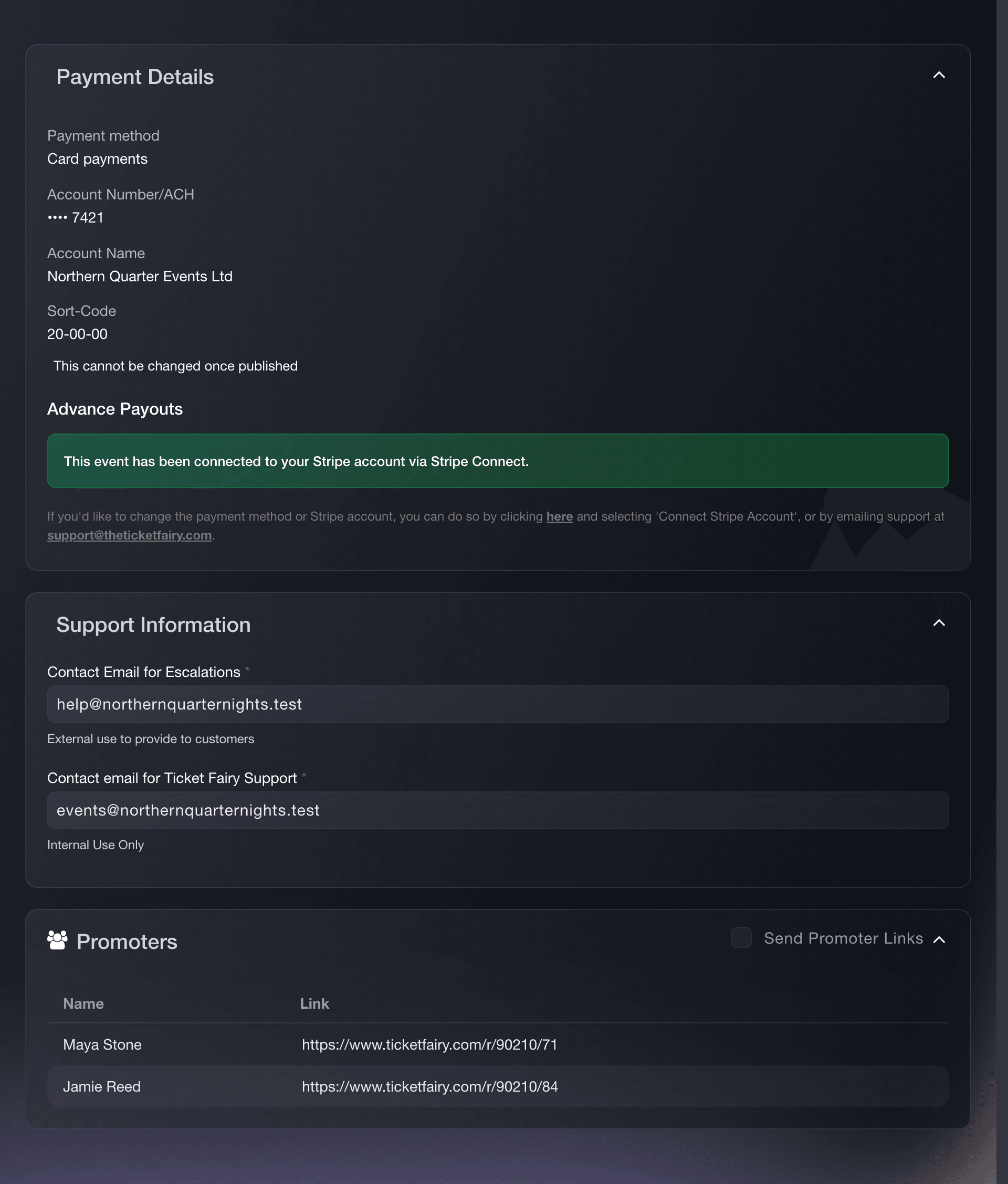
Publish event, Payment and Support. -
Select Schedule Publish
Play from hereOn Payment/Support, select Schedule Publish rather than Publish Now.
-
Choose the date and time, and confirm
Play from hereUnder When do you want to publish this event?, enter the moment your event page should go public. Select Schedule Publish.
Note: The time uses your event's timezone. You can schedule at least fifteen minutes ahead.
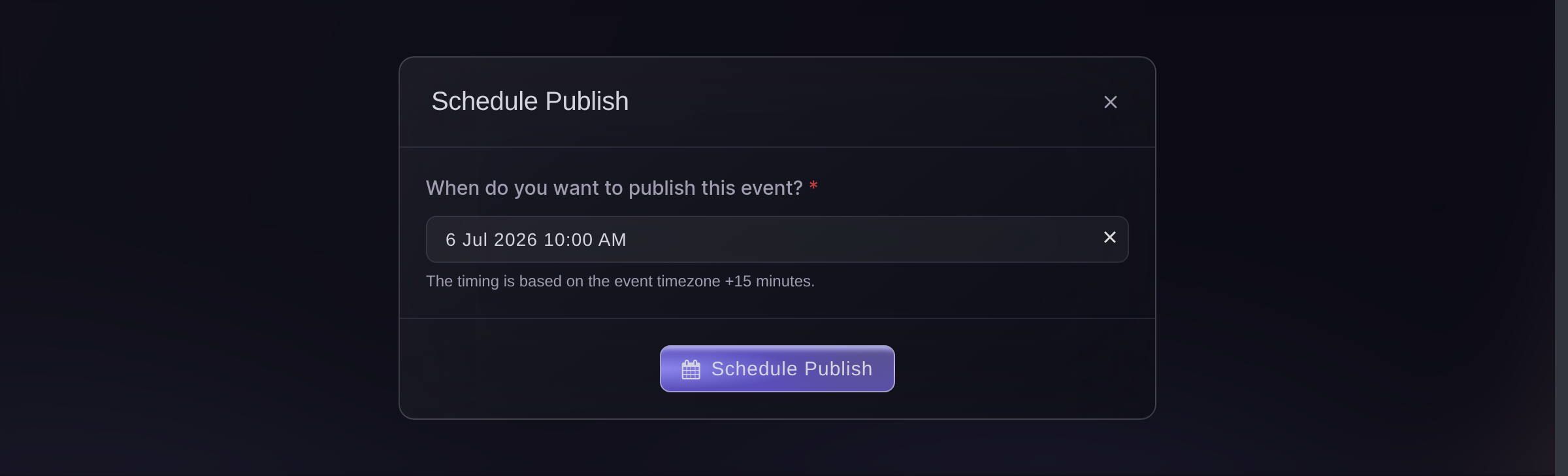
Publish, Payment/Support, Schedule Publish. -
Check the button says Scheduled
Play from hereClose the dialog and look at the event. The Publish button now reads Scheduled, and placing your pointer over it shows the date and time in your event's timezone.
Note: Nothing else changes until then: the event page stays hidden and no tickets are on sale. Publishing makes the page public, which is not the same as opening the sale, so check the sale windows on your ticket types before you advertise a time.


Try these steps on your own event
Create a free account, build your event and follow the steps above in your own dashboard. It takes a few minutes and you do not need to book a sales call.
No setup fees. No required monthly ticketing fee. No credit card required.
Or have it done for you
Fai, the assistant inside your dashboard, can set the schedule for you, and asks you to approve the schedule before saving it. You can also set the date in the dashboard. Your own AI assistant over our MCP server can tell you whether the event is live.
In your dashboard, with Fai
Schedule my event to go live at 10am on 12 September, and tell me which timezone you are using for that
From your own assistant, over MCP
Connect your assistant to our MCP server and ask it:
Keep --read-only in your MCP configuration. This task only reads data, so your assistant does not need tools that make changes.
Find my event by name and tell me whether it is live yet, and if it is not, what is holding it up
From your terminal
Install the CLI from our CLI page, sign in with ticketfairy auth login, and choose the brand you are working on with ticketfairy brand use <BRAND_ID>. ticketfairy brand list and ticketfairy event list show the IDs the other commands use.
You need to be an owner or an admin on the event to run these, the same as for the Publish button. The CLI publishes the moment you run it, and takes one back down the same way. For a future date, set the schedule in your dashboard or ask Fai.
Your event page, live now
ticketfairy event publish <EVENT_ID>
Live now, with promoter links emailed
ticketfairy event publish <EVENT_ID> --send-promoter-links
Your event page, unpublished now
ticketfairy event unpublish <EVENT_ID>
Let Fai do it for you
Fai works inside your Ticket Fairy dashboard. Create your account, open Fai and paste the prompt above.
No setup fees. No required monthly ticketing fee. No credit card required.
Questions you might have
- How do I move or cancel a scheduled publish?
- Select Scheduled on the event to reopen the dialog. Pick a new time and select Save Schedule, or select Cancel Schedule, which leaves the event unpublished for you to publish whenever you want.
- Will tickets be on sale the moment it publishes?
- Only if every ticket is on sale by then. Publishing makes the page public; a ticket type with its own sale window still waits for that window, and so does the event if you set a sales start on it. Set those to the same moment when you want the page and the sale to open together.
- What time zone is the publish time in?
- The schedule uses your event's timezone. An event in Los Angeles set for 10am opens at 10am in Los Angeles.
- Will my event publish at the exact time I choose?
- Ticket Fairy checks once a minute, so an event scheduled for 10:00 normally opens between 10:00 and 10:01. Allow about a minute rather than relying on the exact second.
- Do my promoters get their links when a scheduled event goes live?
- No. Send Promoter Links is on the publish dialog and applies to publishing now, so a scheduled publish sends nothing. If your promoters need their links at the on-sale, publish the event yourself at that moment with the box ticked.
- Why won't it publish at all?
This is a draft event. Please save it first before publishing.
means save the event and come back.The location of your venue was not found
means the address you entered could not be placed on the map, so open the event details and pick your venue from the suggestions as you type.- Why won't it take the time I picked?
The publish time you chose has already passed
means the time passed while you were choosing it.Setting the venue moved this event to a different time zone
means the selected venue uses a different timezone. Check the venue, then choose a new time in both cases.- Can I schedule an event that is already live?
- Not in one move: a live event's button unpublishes it instead. Take it down first, then schedule it, and it stays off sale until the time you set.
Still have a question?
Book a demo and we will answer it on a call, on your kind of event. Or create your account and see it for yourself.
No setup fees. No required monthly ticketing fee. No credit card required.
Related guides
Do this on your own event
Create your account, build your event and follow the steps in your own dashboard. You do not need to book a sales call.