
Setting up an event
Sell tickets only to your NFT holders
NFT projects, web3 communities and token-gated clubs run events that only their holders can attend. When you list your collection on the event, a buyer connects a wallet holding one of your NFTs before the tickets open to them. Your door team's scan checks the same wallet again, so a ticket bought with an NFT that has since left the wallet does not get in.
Require ticket buyers to connect a wallet that holds one of your NFTs before they can buy tickets to your event, for every ticket or for one ticket type, and have the door check the NFT again at entry.
- For
- Selling event tickets to the holders of an NFT collection
- Takes
- 6 minutes
Before you start
- You're an owner or an admin for the event. If you can't see Settings in the event menu, ask an owner or an admin to do this part.
- You have the contract address of each Ethereum or Polygon collection whose holders can buy, or the address of each Solana NFT that lets its holder buy.
-
Open Settings
Open your event and select Settings in the event menu. Require ownership of NFTs to attend is below the event settings and the password card.
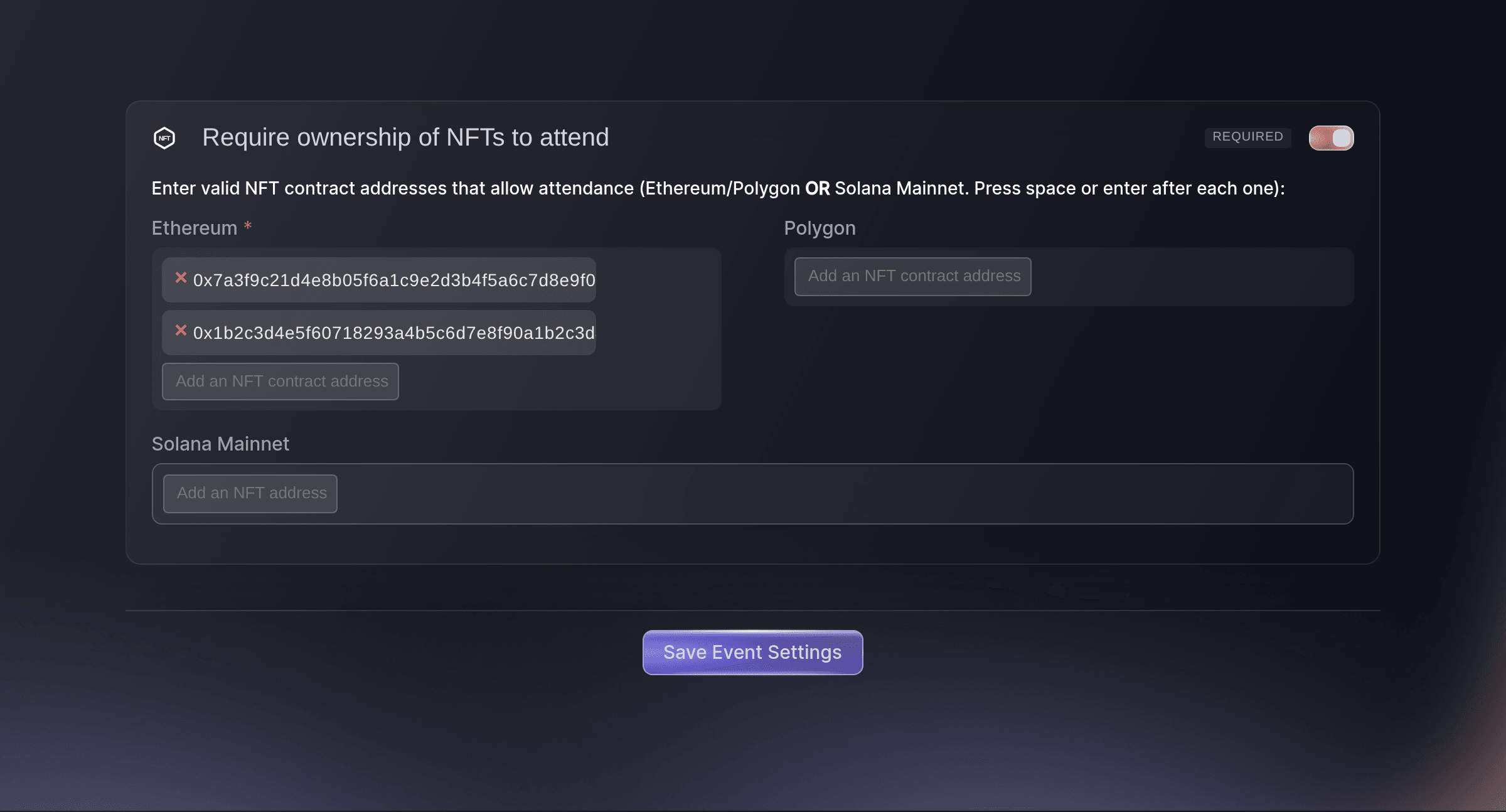
Event, Edit, Settings. -
Turn on Require ownership of NFTs to attend
Turn on Require ownership of NFTs to attend. The card opens the address fields for Ethereum, Polygon and Solana Mainnet.
-
Choose the blockchain your NFTs are on
Choose the field that matches where your collection was minted.
Note: Solana Mainnet can't be combined with Ethereum or Polygon. Once one side has an address, the other side's fields stop taking addresses.
-
Enter each address
Enter each address in the field you chose, pressing space or Enter after each one so it becomes a tag.
Note: An Ethereum or Polygon address starts with 0x and has 40 more characters, each a digit or a letter from a to f. A tag shown in red is not in that form, and the save stops on it.
-
Save the event settings
Select Save Event Settings. The dashboard confirms with
Successfully updated event settings
.Note: If the card shows
Please check this
, an address is not valid for its field. If it showsAt least 1 NFT address is required
, the switch is on with no address entered. -
Check the event page asks for a wallet
Open your event page in a browser where MetaMask or Phantom is installed. In place of the ticket list, the page asks the buyer to connect a wallet, and the tickets appear once a wallet holding one of your NFTs is connected.
Note: A browser with no crypto wallet shows
Crypto-enabled browser required
where the connect button would be. A wallet that holds none of your NFTs is turned away before any ticket is shown.
Try these steps on your own event
Create a free account, build your event and follow the steps above in your own dashboard. It takes a few minutes and you do not need to book a sales call.
No setup fees. No required monthly ticketing fee. No credit card required.
Or have it done for you
Fai, the assistant inside your dashboard, can take you to the event's Settings page, and you turn the NFT requirement on there. The command line can set the requirement for the whole event through an event update.
In your dashboard, with Fai
Open the settings page for <EVENT NAME> so I can require NFT ownership to buy tickets
From your terminal
Install the CLI from our CLI page, sign in with ticketfairy auth login, and choose the brand you are working on with ticketfairy brand use <BRAND_ID>. ticketfairy brand list and ticketfairy event list show the IDs the other commands use.
Use the same login with the command line that you use in the dashboard, as an owner or an admin for the event. Send the requirement and every address in one update, and list each collection under its own blockchain.
Requires buyers of any ticket to the event to hold an NFT from one Ethereum collection
ticketfairy event update <EVENT_ID> --body '{"flagNftOwnershipRequired":true,"nftContracts":{"ethereum":["<CONTRACT_ADDRESS>"],"polygon":[]},"nftLists":{"solana-mainnet":[]}}'
Let Fai do it for you
Fai works inside your Ticket Fairy dashboard. Create your account, open Fai and paste the prompt above.
No setup fees. No required monthly ticketing fee. No credit card required.
Require an NFT for one ticket type only
-
Open the ticket type
Open your event, select Tickets, then select Edit on the ticket type that is for holders only.
-
Turn on the NFT requirement for this ticket type
Turn on NFT ownership required for this ticket type in the ticket type's options, then enter each address in Ethereum, Polygon or Solana Mainnet.
Note: This ticket type then takes only its own addresses, in place of any addresses on Settings. The other ticket types keep selling to everyone unless the event itself requires an NFT.
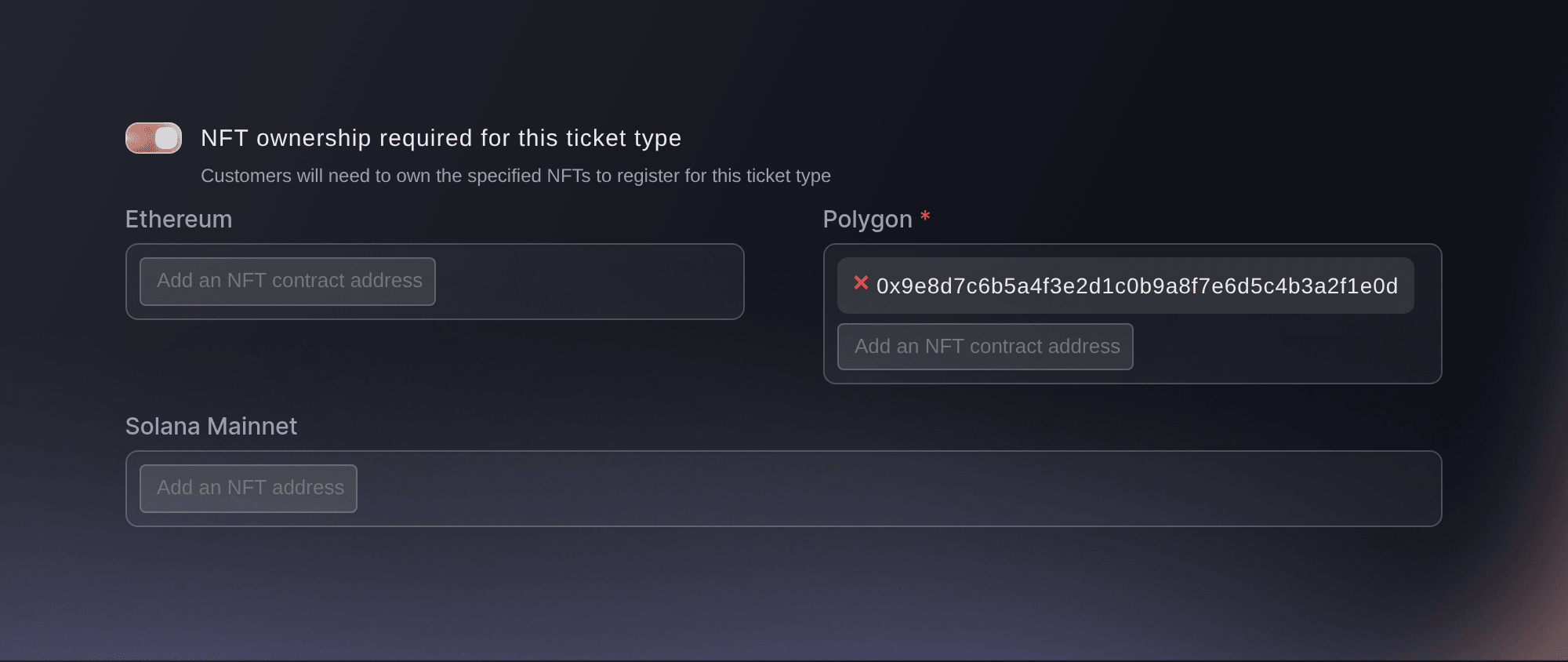
Event, Tickets, Edit, ticket type options. -
Save the ticket type
Select Save. On your event page, this ticket type shows a button to connect a wallet in place of its buy button.
Fai can take you to the event's Tickets page, and you set the requirement on the ticket type there. The command line sets it through a ticket type update.
In your dashboard, with Fai
Open the tickets page for <EVENT NAME> so I can make <TICKET TYPE> available to NFT holders only
From your terminal
Use an owner or admin login for the event. List the ticket types to find the ID, then send the requirement and the addresses in one update.
Find every ticket type and its ID
ticketfairy ticket list <EVENT_ID> --all
Requires buyers of one ticket type to hold an NFT from one Polygon collection
ticketfairy ticket update <EVENT_ID> <TICKET_ID> --body '{"flagNftOwnershipRequired":true,"nftContracts":{"ethereum":[],"polygon":["<CONTRACT_ADDRESS>"]},"nftLists":{"solana-mainnet":[]}}'
Stop requiring an NFT
On Settings, turn off Require ownership of NFTs to attend and select Save Event Settings. For one ticket type, turn off NFT ownership required for this ticket type and select Save.
Note: A ticket type whose own requirement you turn off follows the event again, so it still needs an NFT while the event requires one.
Fai can take you to the Settings page to turn the requirement off. The command line turns off the event's requirement through an event update.
In your dashboard, with Fai
Open the settings page for <EVENT NAME> so I can stop requiring NFT ownership
From your terminal
Use an owner or admin login for the event.
Stops requiring an NFT for the whole event
ticketfairy event update <EVENT_ID> --body '{"flagNftOwnershipRequired":false}'
Questions you might have
- Should I require the NFT for the whole event or for one ticket type?
- Require it on Settings when every ticket is for holders only. Require it on one ticket type when holders get their own tier, such as an early entry or discounted ticket, and everyone else can buy the rest.
- What does a buyer need to buy a ticket?
- A browser with MetaMask, for Ethereum and Polygon, or Phantom, for Solana, and a wallet in it that holds one of the NFTs you listed. The buyer connects the wallet on your event page, and the tickets appear once we have found one of your NFTs in it.
- What happens at the door if the buyer sold their NFT?
- The scanning app checks again that the wallet the buyer connected when they bought still holds one of your NFTs, and refuses the ticket if it does not. Tell holders to keep the NFT in that wallet until they are in.
- Do guest tickets need an NFT?
- No. Guest tickets you send are not bought through the event page, and the scanning app does not check an NFT for them at the door.
- Does the checkout on my own website work with an NFT requirement?
- When the whole event requires an NFT, the checkout embedded on your website hands buyers over to your Ticket Fairy event page, where they connect their wallet and buy.
- Can I list collections from Ethereum and Solana together?
- No. One requirement takes Ethereum and Polygon collections together, or Solana NFTs on their own. To offer both, use Solana NFTs on one ticket type and Ethereum or Polygon collections on another, each with its own requirement.
Still have a question?
Book a demo and we will answer it on a call, on your kind of event. Or create your account and see it for yourself.
No setup fees. No required monthly ticketing fee. No credit card required.
Related guides
Do this on your own event
Create your account, build your event and follow the steps in your own dashboard. You do not need to book a sales call.