
Styr produksjonen
Call your show live on show day
Stage managers and show callers run the day from a phone at the side of the stage. Now and next puts each stage's current and next cue, how far behind it is running and who is arriving on one page, so the whole team sees the same show as it happens.
Follow what is on now and next on every stage of your event against the event's own clock, call each cue as it happens, see how late each stage is really running from the times you call, catch a stage up, and report an incident without leaving the page.
- For
- Running each stage on the day of the show
- Tar
- 6 minutter
Før du starter
- You are an owner, admin or producer on the event. The event's Operations page opens for those roles only.
- The day has a run of show. Now and next shows the cues you planned there.
-
Open Now and next
Open the event, select Operations, then select Now and next in the list of sections.
Merk: The event's own clock is under the title, so everyone reads the same time wherever their phone is set. On a phone during the event, Now and next leads the list of sections.
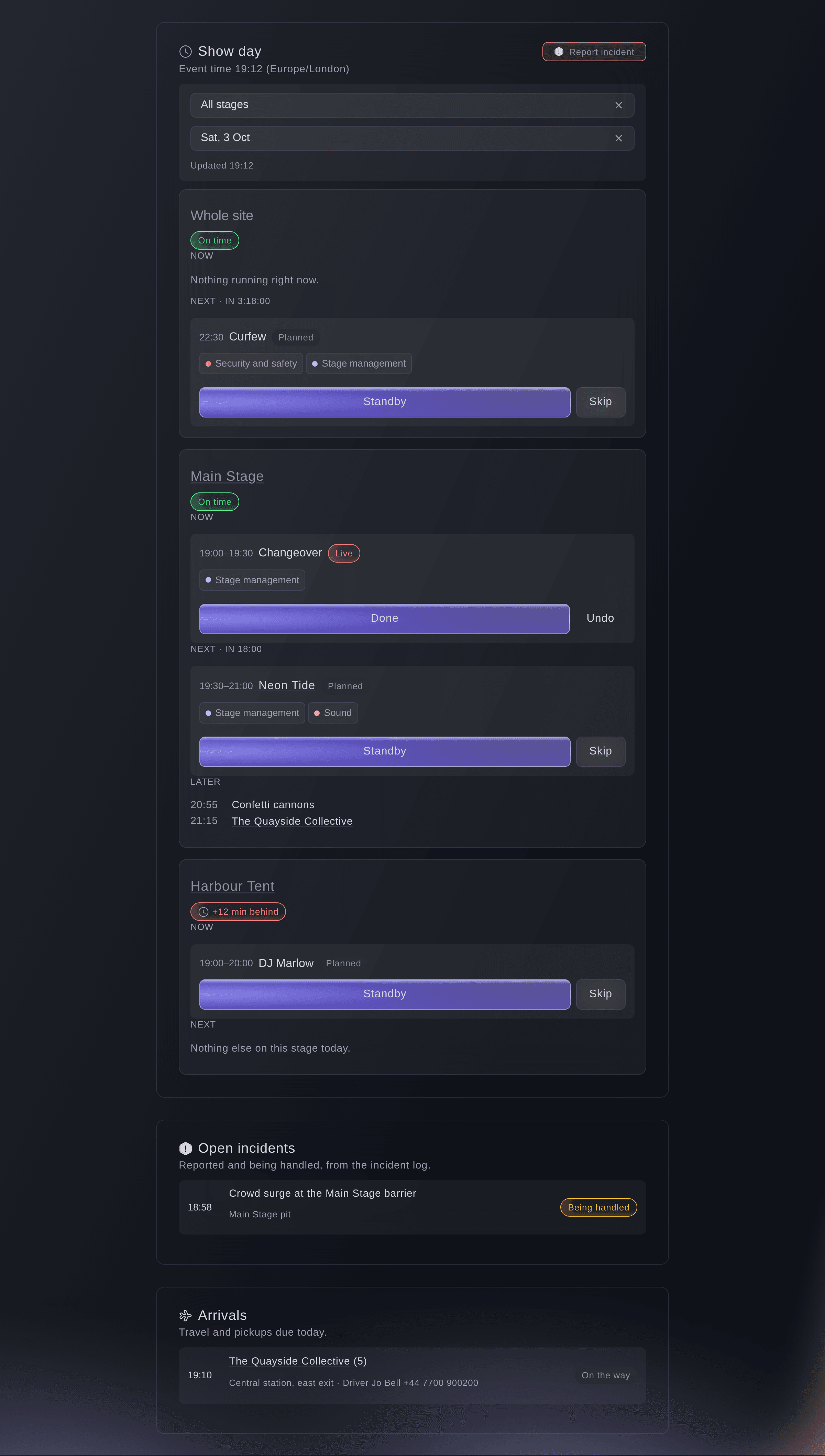
Show day at 19:12. -
Choose your stage
Optional: choose your stage in Stage, or All stages to follow the whole event.
Merk: Your phone remembers the stage, so it opens on it next time. The page updates every 20 seconds and says when it last did.
-
Call each cue as it happens
Select Standby, Go live or Done on the cue, or Skip for one that is not happening.
Merk: Each stage shows its cue Now, the one Next with a countdown, and the rest Later. Go live and Done also record when the cue really started and finished.
-
Undo a call
Select Undo on the cue.
Merk: Undo takes the cue one step back: from done to live, from live to standby, and from standby or skipped to planned. Both calls stay in the cue's history.

Running late and expected times
Once a stage has a recorded time, it says how late or early it is running, such as Running 10 min late, and each cue still to come shows when it is expected. A called cue shows when it started and finished against the plan. If the stage will finish after it closes at this pace, a warning says by how many minutes, and every day sheet for the day shows how late each stage is running.

-
Fix a time tapped late
Optional: select Fix the time on the cue, choose Started or Finished, enter the Time and a reason, then select Save.
Merk: Use it when a cue was called late or not at all. The earlier time stays in the cue's history with who changed it.
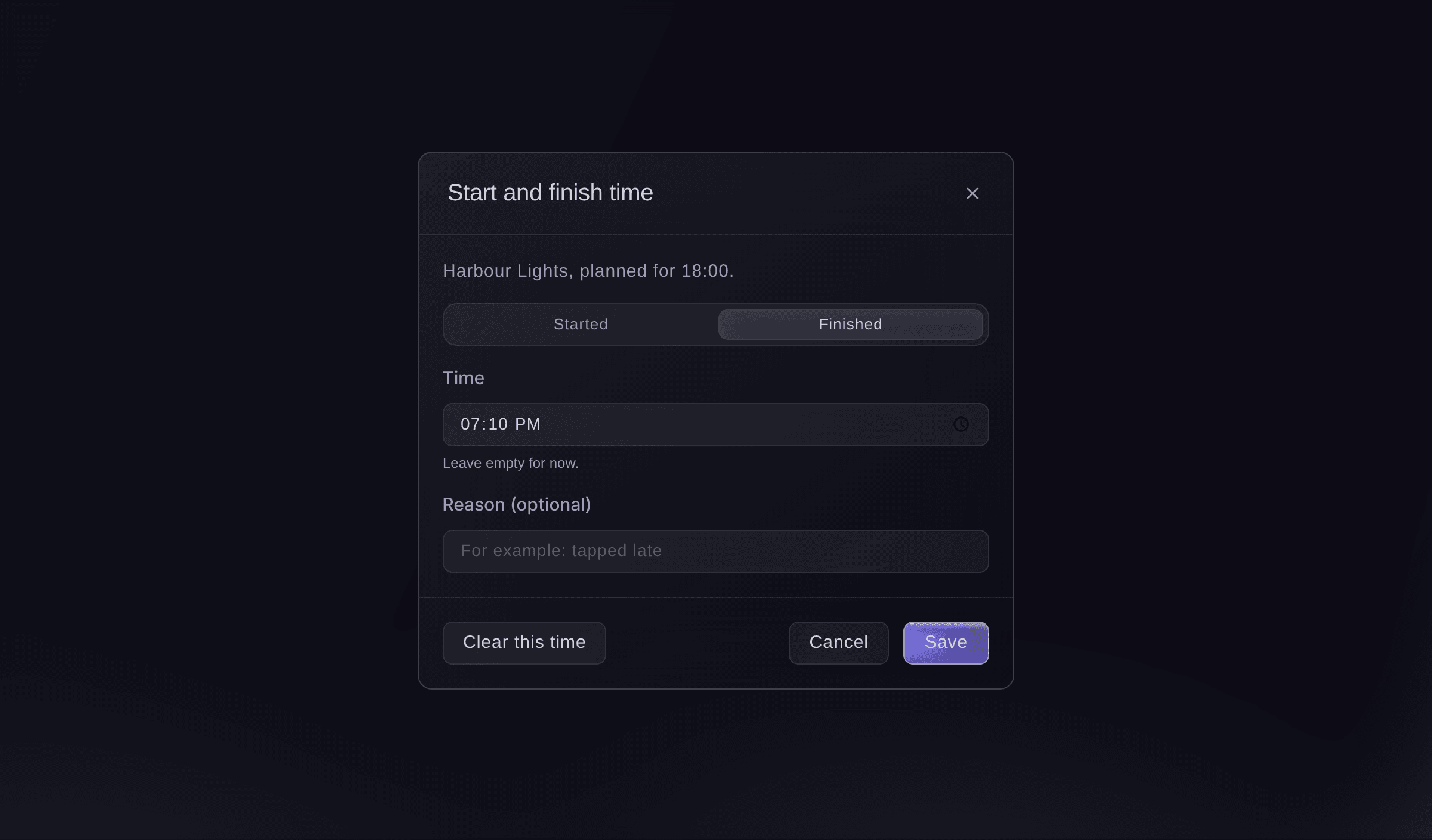
Fix the time a cue started. -
Catch up a stage that runs late
When a stage shows as behind, select the button to move the rest of today, for example "Move the rest of today by 10 minutes", then select Move them.
Merk: The minutes come from how late the stage is really running when times are recorded. Every cue from the next one on moves by that much and cues already done stay as they are; if the stage is locked, unlock it on the run of show first.
-
Report an incident
Select Report incident at the top of Now and next.
Merk: Incidents opens, where you select Report incident again to enter what happened. Open incidents on Now and next lists the ones still being handled, beside Arrivals due today.

Prøv disse trinnene på ditt eget arrangement
Opprett en gratis konto, bygg arrangementet ditt og følg trinnene over i ditt eget dashbord. Det tar noen minutter, og du trenger ikke å booke en salgssamtale.
Ingen oppstartsgebyr. Ingen obligatorisk månedsavgift. Ingen kredittkort nødvendig.
Eller få det gjort for deg
Fai reads what is on now and next on each stage and how late each stage is running, calls a cue standby, live, done or skipped, undoes a call, records or corrects when a cue started or finished, or moves the rest of a stage's day when you ask. She waits for your yes before each call or change.
I dashbordet ditt, med Fai
Neon Tide is live on the Main Stage at <EVENT NAME>, and move the rest of the Main Stage 10 minutes later
La Fai gjøre det for deg
Fai jobber inne i Ticket Fairy-dashbordet ditt. Opprett kontoen din, åpne Fai og lim inn instruksjonen over.
Ingen oppstartsgebyr. Ingen obligatorisk månedsavgift. Ingen kredittkort nødvendig.
Spørsmål du kanskje har
- What if two of us call the same cue at once?
- The first call counts. The second is told that someone else moved the cue first, and the page shows where the cue is now.
- Who can call cues?
- Owners, admins and producers call every stage, and the show callers named on the run of show call their own stage. A show caller with another role on the event asks Fai to call a cue.
- Can I see afterwards how the day ran?
- Yes. Under the running-order checks on the run of show, How the day ran shows for each stage how many cues were timed, how many started late, the average and the latest start.
- What happens when my phone loses signal?
- Show day keeps the last version it loaded and says it may be out of date, then catches up when the signal comes back.
Har du fortsatt et spørsmål?
Book en demo, så svarer vi på det i en samtale, tilpasset din type arrangement. Eller opprett kontoen din og se selv.
Ingen oppstartsgebyr. Ingen obligatorisk månedsavgift. Ingen kredittkort nødvendig.
Relaterte guider
Gjør dette på ditt eget arrangement
Opprett kontoen din, bygg arrangementet og følg trinnene i ditt eget dashbord. Du trenger ikke bestille en salgssamtale.