
Sette opp et arrangement
Run an A/B test for your event
Compare event pages or checkout questions and answers, split visitors between versions and find which one brings in more ticket sales or revenue.
- For
- Testing which event page or checkout questions and answers sell more tickets
- Tar
- 10 minutter
- Open Experiments for the event
- Name the test and choose what success means
- Choose how many visitors take part
- Choose the event pages to compare
- Add the checkout answers to compare
- Create the draft, then start it when it is ready
- Compare the results before you conclude the test
- Check that both versions drew the same kind of visitors
Dette trenger du før du starter
- You have an owner or admin role for the event.
- For an event-page test, create at least one alternative page for this event first. Your current event page remains the control version.
- Choose one question to answer, such as whether a different event page brings more ticket sales or whether different checkout questions and answers increase revenue per visitor.
-
Open Experiments for the event
Open your event, choose Experiments, then choose New experiment. The list shows where each test runs, its goal and whether it is a draft, running, paused, concluded or archived.
You need an owner or admin role for this event. If Experiments is not in your event menu, ask an owner or admin to give you access.
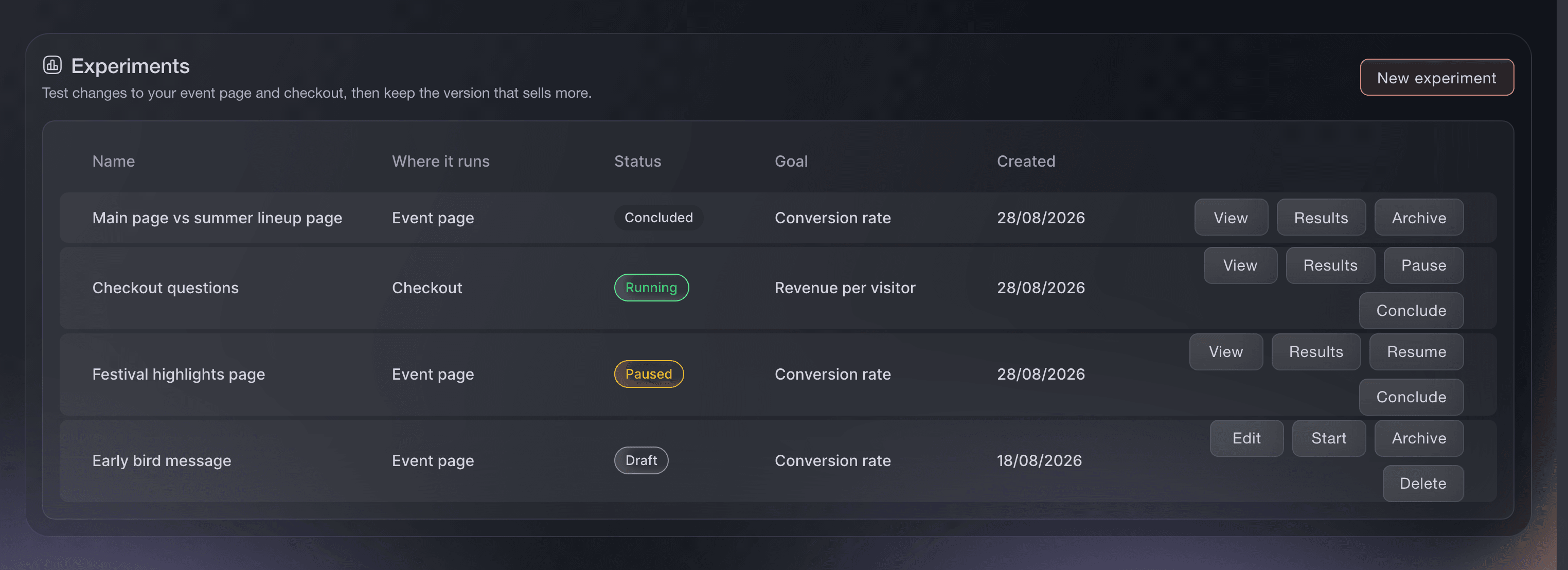
Experiments, tests for an event page and checkout. -
Name the test and choose what success means
Enter a name your team will recognise. Under Where it runs, choose Event page or Checkout. Under What you are optimising for, choose Conversion rate when you want more visitors to buy, or Revenue per visitor when the value of each visit matters more. Enter your expectation if you want to record why you are running the test.
Your expectation is a note for your team. It does not change how visitors are divided or how the results are calculated.
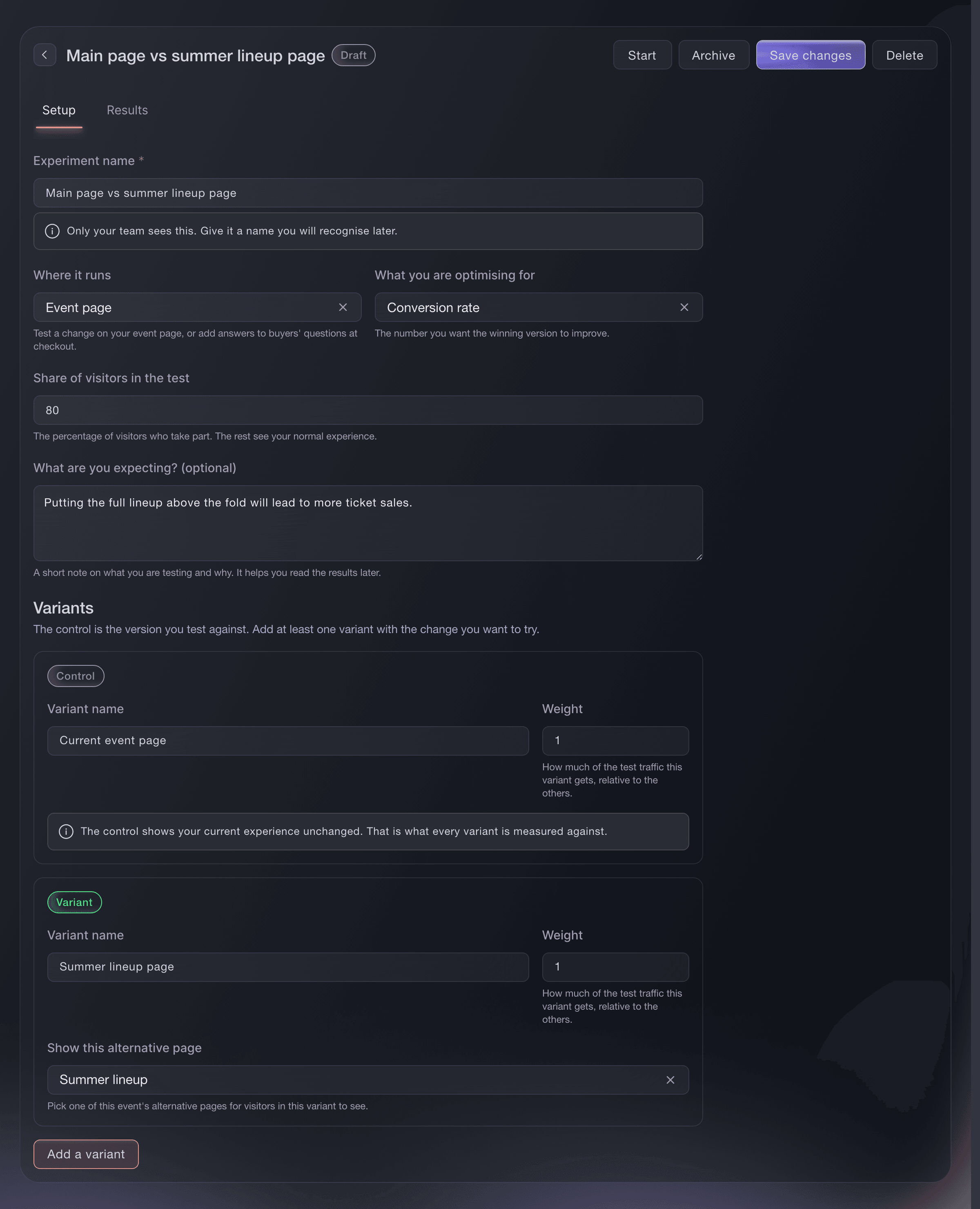
Experiments, an event-page A/B test. -
Choose how many visitors take part
Enter a whole number from 0 to 100 under Share of visitors in the test. The weights divide only those visitors between the control and your variants. With 80% of visitors in the test and equal weights of 1 and 1, 40% see the control, 40% see the variant and the remaining 20% see your normal event or checkout without joining the results. With weights of 1 and 2, the second version receives twice as many test visitors as the first.
A visitor stays with the same version throughout the test. This gives them a consistent experience when they return during the same visit.
-
Choose the event pages to compare
For an event-page test, the control shows your current event page. Give the other variant a clear name, then choose one of this event's alternative pages. Choose Add a variant to compare another alternative page in the same test.
An event-page test cannot run on an RSVP event because there is no ticket sale for this test to measure. Preview visits and embedded event pages do not join the test.
-
Add the checkout answers to compare
For a checkout test, the control leaves checkout unchanged. In each variant, enter at least one question and answer. Buyers assigned to that variant see the answers below the pay button in Ticket Fairy checkout. Add more questions or variants when you have a distinct set of answers to compare.
Checkout questions in an experiment appear in Ticket Fairy's hosted checkout. They do not change an embedded checkout or a checkout built with the React SDK.
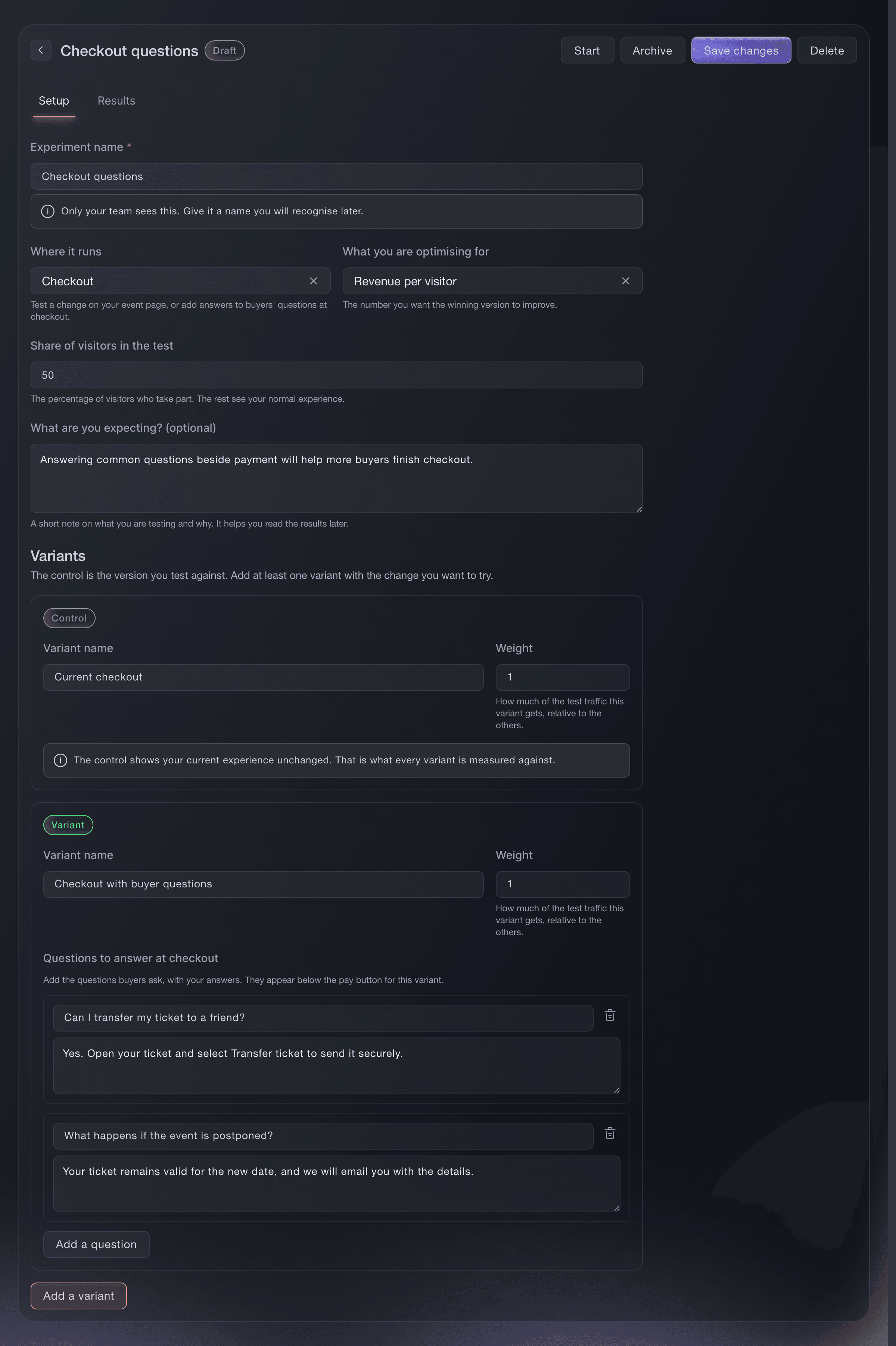
Experiments, questions shown below the checkout pay button. -
Create the draft, then start it when it is ready
Choose Create experiment. You can reopen a draft to change its name, goal, visitor share or variants. When every version is ready, choose Start, review the confirmation and choose Start experiment. Starting saves any unsaved draft changes before the test goes live.
Starting locks the experiment setup. For an event-page test, you can still edit your main event page, and you can still edit or delete alternative pages elsewhere in the dashboard. Once a test has started, do not edit or delete a page it uses, even while the test is paused. Conclude the test before changing those pages. The setup stays locked even if you pause it. Only one event-page test and one checkout test can run for an event at the same time.
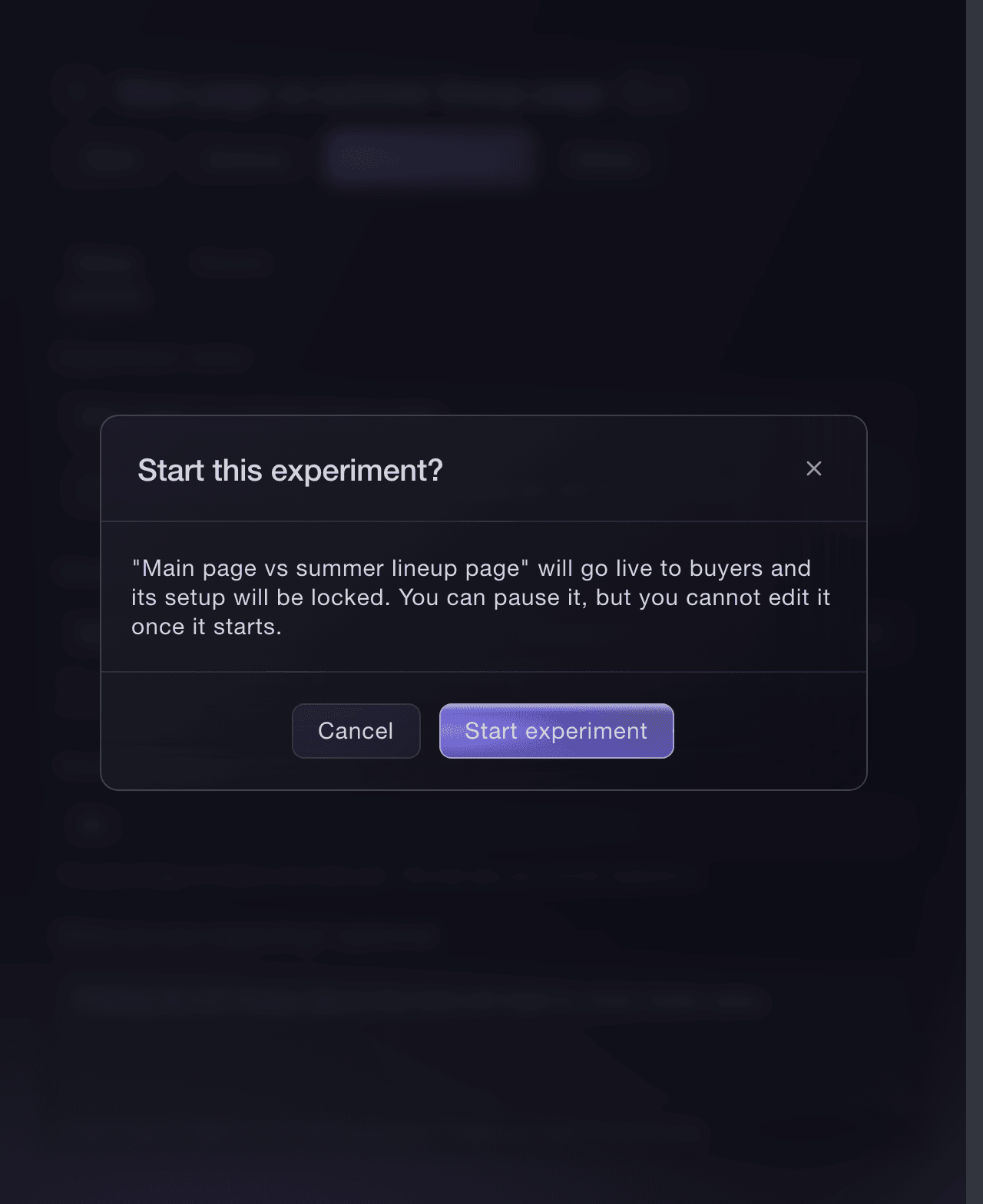
Experiments, confirmation before a test starts. -
Compare the results before you conclude the test
Open Results to compare visitors, conversion rate, conversions, revenue and revenue per visitor for every version. A conversion means a visitor placed at least one paid order after seeing a version. More orders during the same visit do not add more conversions. Revenue stays separated by currency. The updated time tells you when the figures were last calculated. Select Refresh to pull the latest figures while the test is running.
For a conversion-rate test, Clear result means the difference from the control is statistically significant. The dashboard marks a variant as the winner only when its conversion rate is both higher and statistically significant. For a revenue-per-visitor test, compare that figure for each version; the dashboard does not add an automatic winner badge. Choose Conclude when you have enough evidence to make your decision. A concluded test keeps its results and cannot resume.
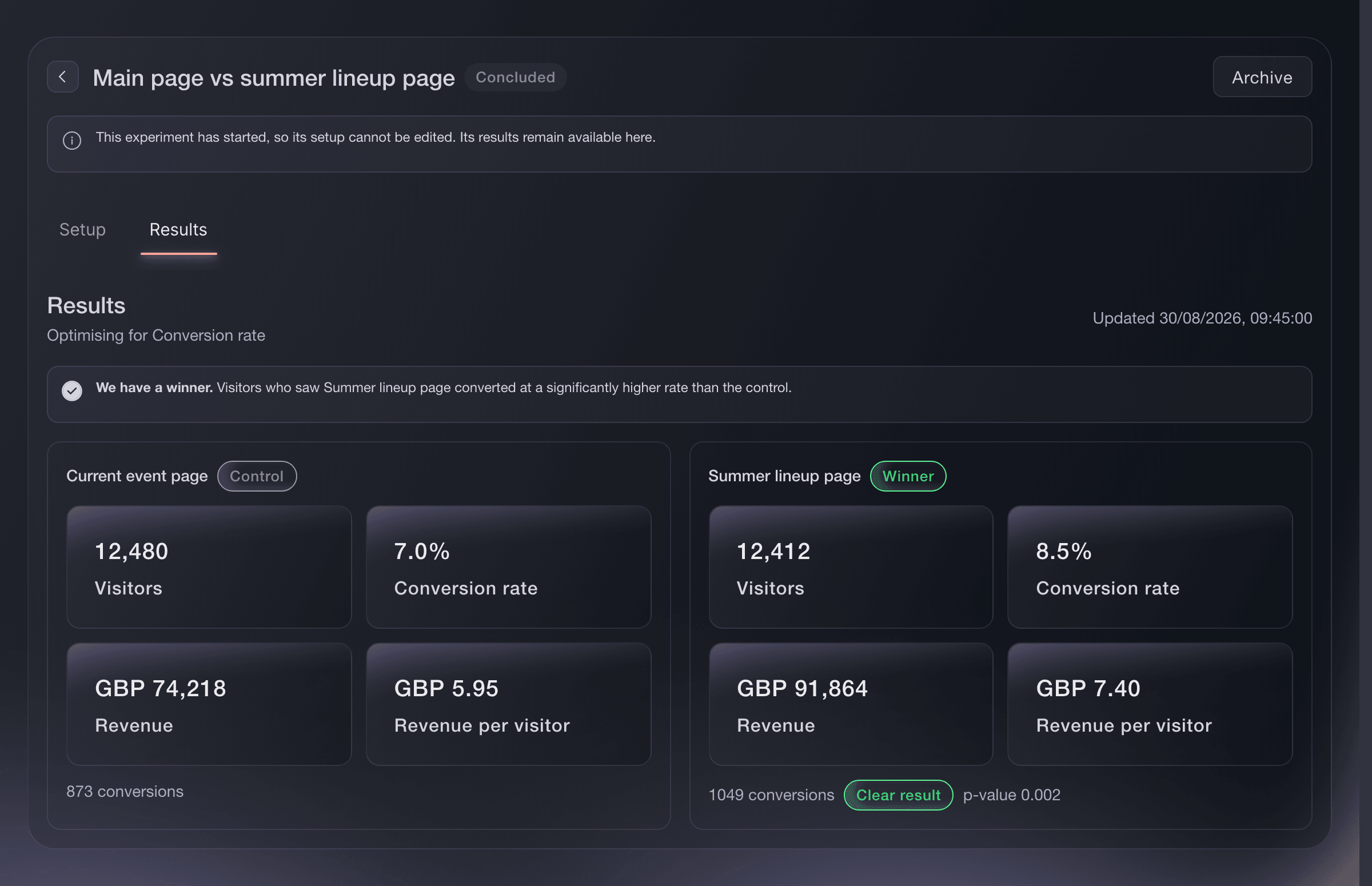
Experiments, results for each version. -
Check that both versions drew the same kind of visitors
Two versions can attract different kinds of visitors. One might draw more of your promoter and affiliate traffic, which often buys at a different rate, so a version can look like it won on the change when it really won on who saw it. When your versions draw a different mix, you see a note at the top of Results and a Traffic by channel breakdown: how many visitors each version drew from promoter links, affiliates, other referrals and direct visits, and how each group converted.
When the mix is uneven, you also see a fairer verdict beside the plain one, labelled Adjusted for traffic mix. It compares the versions within each traffic source and then combines the result, so a version whose lead came from its mix reads as Not clear yet. Trust that adjusted verdict, and keep the test running for more visitors so each version gathers enough of every source to compare. You do not get a winner until a version leads on the change itself, not on the visitors it happened to draw.

Experiments, traffic by channel and the adjusted verdict.

Eller få det gjort for deg
Fai can create and edit a draft, start or pause a test, conclude it and compare the results. She reads the latest version first and asks you to approve every change. You can do the same work in the Experiments section of the dashboard.
I dashbordet ditt, med Fai
Find my event and help me create an A/B test. Ask what I want to test, whether it should run on the event page or checkout, and whether conversion rate or revenue per visitor matters most. Show me the complete draft and visitor split before asking me to approve it. Do not start it until I approve that separately
Spørsmål du kanskje har
- What is the difference between the control and a variant?
- The control is the event page or checkout you already use. A variant is the alternative page or set of checkout answers you want to compare with it.
- What happens to visitors outside the test?
- They see your normal event page or checkout and do not appear in the test results. Set the visitor share to 100% when you want every eligible visitor included.
- Can I run an event-page test and a checkout test together?
- Yes. An event can have one running event-page test and one running checkout test at the same time. Pause or conclude the running test before starting another test on the event page or in checkout.
- Can I change a test after it starts?
- You cannot change the experiment setup after it starts. For an event-page test, you can still edit your main event page, and you can still edit or delete alternative pages elsewhere in the dashboard. Once a test has started, do not edit or delete a page it uses, even while the test is paused. Conclude the test before changing those pages, then create a new test for your next version.
- What happens while an experiment is paused?
- Visitors see your normal event page or checkout. The results already collected remain available, and resuming continues the same test.
- Why does the result say Not enough data yet?
- The test has not recorded enough visitors and conversions to compare that variant reliably with the control. Keep it running and check again after more visitors have taken part.
- Why does Results say my versions drew different kinds of traffic?
- Your two versions did not attract the same mix of visitors. For example, one drew more of your promoter or affiliate traffic, which often buys at a different rate. You see this note because that difference alone can make one version look like the winner. Read the Traffic by channel breakdown and the adjusted verdict for the fairer comparison.
- One version converted better, so why is there no winner?
- When your versions drew a different kind of traffic, the version that looks ahead may be winning on who saw it rather than on the change you made. The adjusted verdict then reads Not clear yet, and no winner is named until a version leads once the traffic mix is accounted for. Keep the test running so each version gathers enough visitors from every source.
- Does one conversion mean one order?
- No. A conversion means a visitor placed at least one paid order after seeing a version. If they place more orders during the same visit, the result still counts one conversion.
- Can I use an event-page experiment for an RSVP event?
- No. Event-page experiments measure ticket sales, while an RSVP event takes registrations instead. You can run this test on an event that sells tickets.
- Can I delete an experiment?
- You can delete a draft before it starts. Once it has started, conclude it and archive it so your team keeps the result and the history of what buyers saw.
- Can Fai run an A/B test for me?
- Yes. Fai can create and edit the draft, start or pause it, compare the results, conclude it and archive it. She asks you to approve every change and reads the latest version before acting, so a teammate's newer change is not overwritten.
Veien videre
Gjør dette på ditt eget arrangement
Opprett kontoen din, bygg arrangementet og følg trinnene i ditt eget dashbord. Du trenger ikke bestille en salgssamtale.