
Vault og Capital
Pay your venue rent, artist residencies and regular event suppliers automatically from Vault
Club operators and promoters with a weekly night pay the same people again and again: the venue rent, a Friday residency, the crew storage unit. A recurring payment from Vault pays each of them on schedule without anyone remembering to do it, and your team can see every schedule and when it next pays.
Set up a recurring payment from Vault that pays a venue, a resident artist or a regular event supplier the same amount every week, every month or once on a date, then pause, resume or stop it, with a second person approving it when your team needs one.
- For
- Paying the same venue, artist or supplier on a regular schedule for your events
- Tar
- 7 minutter
Før du starter
- You're an owner or an admin on the brand. Only owners and admins can set up, approve, pause, resume or stop a recurring payment.
- Your brand has an active Vault account, with money in the balance of the currency you pay in.
- The person or business you pay is saved as a recipient. Add a new one first, as Pay your event suppliers from Vault shows.
- You have your second factor to hand. Vault asks you to confirm it's you before it sets up a payment.
-
Open Recurring payments
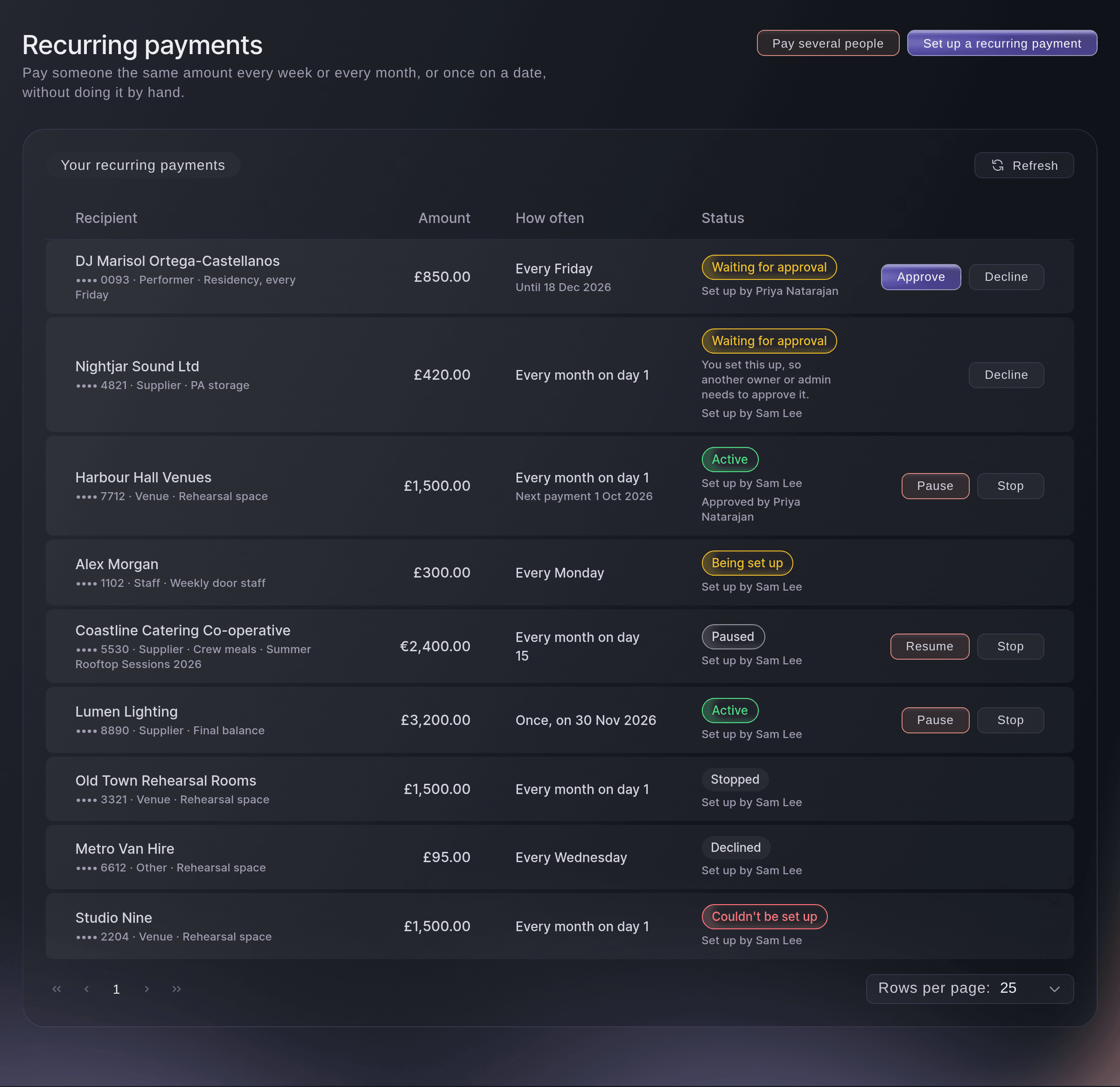
Open Vault, select Transfers, then select Recurring payments at the top of the page. Your recurring payments lists every schedule with how often it pays, its status and the date of the next payment.
Merk: The same button is at the top of Pay several people.
Vault, Transfers, Recurring payments. -
Select Set up a recurring payment
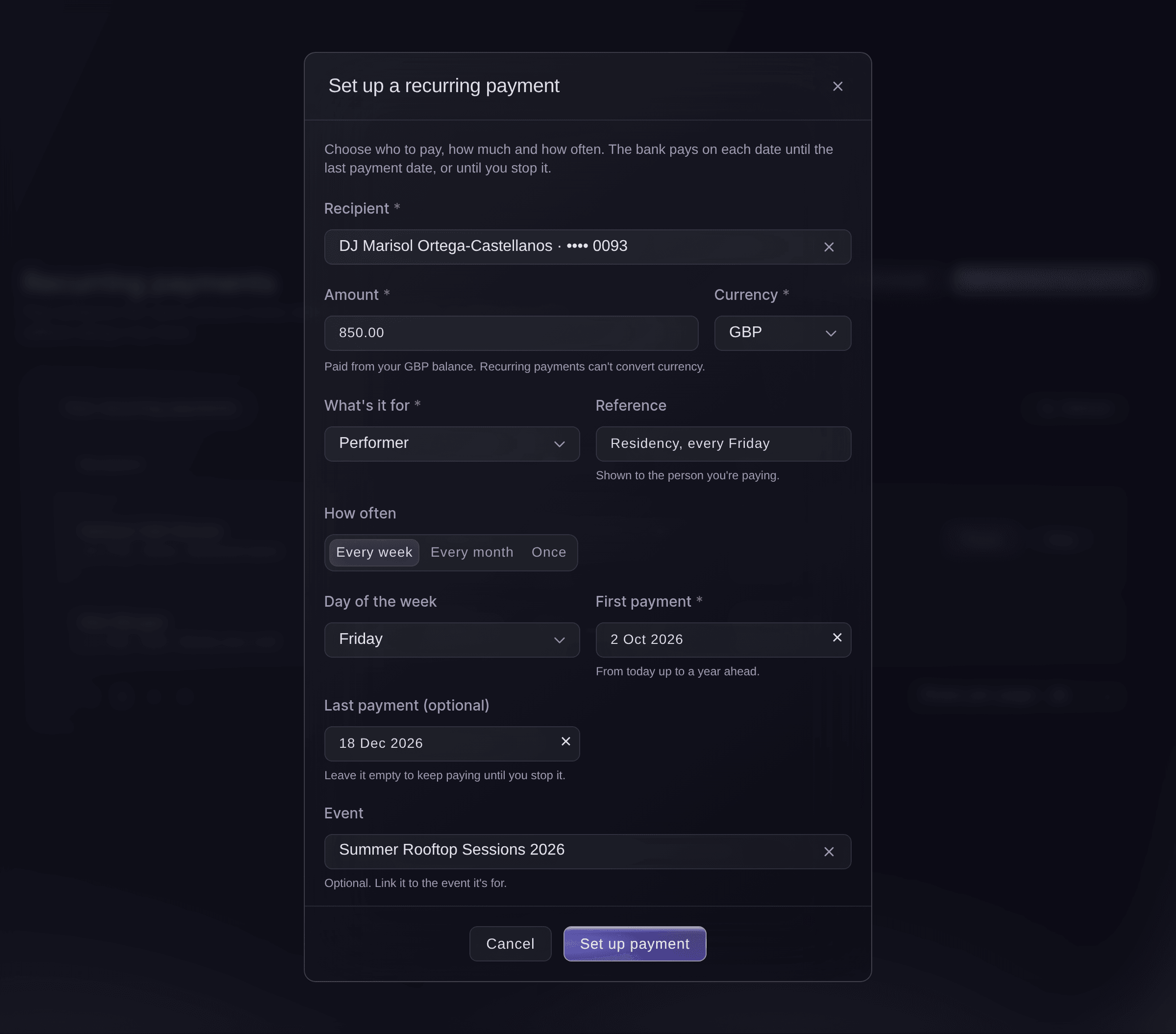
Select Set up a recurring payment at the top of the page. The dialog asks who to pay, how much and how often.
Recurring payments, Set up a recurring payment. -
Choose the recipient
Choose a saved recipient in Recipient. The list shows the last four digits of the account the money goes to.
-
Enter the amount and currency
Enter the amount in Amount, then choose the Currency of the recipient's bank account.
Merk: The money comes out of your balance in that currency, and a recurring payment can't convert from another balance.
-
Choose what it's for
In What's it for, choose Performer, Supplier, Venue, Staff, Refund or Other.
-
Enter the reference
Optional: Enter what the recipient sees on their statement in Reference, such as Monthly rent.
-
Choose how often
In How often, choose how often the bank pays.
-
Choose the first payment
Choose the date of the First payment, from today up to a year ahead.
-
Choose the last payment
Optional: Choose the date of the Last payment (optional). Left empty, the bank keeps paying until you stop it.
-
Link the event
Optional: Search for the event the payments are for in Event and choose it.
-
Select Set up payment
Select Set up payment, and confirm it's you if Vault asks.
We're setting this up with the bank. It shows as Active when it's ready.
confirms it.Merk: If your team needs a second person to send payments, you see
Saved. Another owner or admin needs to approve it before it starts.
instead, and you wait for their approval before anything is set up with the bank. -
Check that it is Active
Find the payment in Your recurring payments. Being set up changes to Active when the bank is ready, and the row shows the date of the next payment.
Prøv disse trinnene på ditt eget arrangement
Opprett en gratis konto, bygg arrangementet ditt og følg trinnene over i ditt eget dashbord. Det tar noen minutter, og du trenger ikke å booke en salgssamtale.
Ingen oppstartsgebyr. Ingen obligatorisk månedsavgift. Ingen kredittkort nødvendig.
Eller få det gjort for deg
Fai, the assistant inside your dashboard, can set up a recurring payment to a saved recipient, list your recurring payments, and pause, resume, stop, approve or decline one. She shows you the recipient, the amount and the schedule and asks before each change, and you may still need to confirm it's you in Vault. When your team needs a second person, she can't approve a payment you set up yourself. MCP and the command line have no commands for recurring payments.
I dashbordet ditt, med Fai
Set up a Vault recurring payment for <BRAND NAME> paying <RECIPIENT> <AMOUNT> every month on day <DAY>, starting <DATE>, reference <REFERENCE>
La Fai gjøre det for deg
Fai jobber inne i Ticket Fairy-dashbordet ditt. Opprett kontoen din, åpne Fai og lim inn instruksjonen over.
Ingen oppstartsgebyr. Ingen obligatorisk månedsavgift. Ingen kredittkort nødvendig.
Approve a recurring payment a teammate set up
-
Select Approve
On a row that says Waiting for approval, check the recipient, the amount and how often it pays, then select Approve and Approve again in
Approve this recurring payment?
. Confirm it's you if Vault asks.Merk: You can't approve a payment you set up yourself; that row says
You set this up, so another owner or admin needs to approve it.
Select Decline instead to discard it, and nothing is paid.
Fai can approve or decline a recurring payment a teammate set up, after she shows you the recipient, the amount and the schedule and you agree.
I dashbordet ditt, med Fai
Show me the Vault recurring payments waiting for approval for <BRAND NAME>, then approve the one to <RECIPIENT>
Pause, resume or stop a recurring payment
-
Select Pause or Resume
On the row, select Pause to skip payments until you are ready, then Resume to start them again.
Merk: If the recipient's bank details changed while it was paused, Vault won't resume it. Stop it and set up a new one for the new details.
-
Select Stop
To end a payment for good, select Stop, then Stop for good in
Stop this recurring payment for good?
.Advarsel: A stopped payment can't be resumed. To pay the recipient again, set up a new recurring payment.
Fai can pause, resume or stop a recurring payment after she shows you which one and you agree. She asks you to confirm again before she stops one for good.
I dashbordet ditt, med Fai
Pause the Vault recurring payment to <RECIPIENT> for <BRAND NAME> until I say so
Spørsmål du kanskje har
- Can a recurring payment come out of another currency balance?
- No. A recurring payment pays from the balance in its own currency. To pay from another balance, convert money first on the Activity page, as Convert currencies and follow every movement of your event money shows, or pay each time with a single payment.
- What does Couldn't be set up mean?
- The bank didn't accept the schedule, so nothing is paid. Check the recipient's bank details on the Recipients page, then set up a new recurring payment.
- What happens on the 31st in a shorter month?
- The bank pays on the last day of that month, such as 30 September or 28 February.
- Who can see who set up or approved a payment?
- Everyone who can open Vault. Each row says who set it up and who approved it, and every change is in your brand's activity log.
- Why can't I see Set up a recurring payment?
Only owners and admins can set up or change recurring payments.
appears when your login is not an owner or admin of the brand. Ask one of them to set it up.- Can two teammates change the same recurring payment at once?
- The first change wins. The other person sees
Someone else changed this recurring payment a moment ago. We've loaded the latest version. Check it and try again.
- What do I check when Vault asks me to confirm it's me?
- You are approving at the top of the check names what you are doing, such as Set up a recurring payment, with the amount and who the money goes to. Continue only if they match what you want to do.
Har du fortsatt et spørsmål?
Book en demo, så svarer vi på det i en samtale, tilpasset din type arrangement. Eller opprett kontoen din og se selv.
Ingen oppstartsgebyr. Ingen obligatorisk månedsavgift. Ingen kredittkort nødvendig.
Relaterte guider
Gjør dette på ditt eget arrangement
Opprett kontoen din, bygg arrangementet og følg trinnene i ditt eget dashbord. Du trenger ikke bestille en salgssamtale.