
E-post, SMS og markedsføring
Take enquiries and RSVPs on your event website
Venues taking private hire bookings, festivals answering trader and access questions and hosts collecting RSVPs all need the same thing: the right details from each person, in one inbox. A form on your event website asks your own questions and keeps every reply with your website.
Add a contact, private hire or RSVP form to your event website with the questions you need, get an email for each new reply, then read, sort and download the replies in one place.
- For
- Collecting enquiries and RSVPs from your website
- Tar
- 9 minutter
Før du starter
- You are an owner or an admin of the brand, and you have a website in the dashboard, as in the guide to building a website for your events.
-
Add a form section to a page
Open the website in the editor, select the page under Pages, select Add a section, then choose Contact form or RSVP form.
Tips: Choose Newsletter sign-up instead to collect email addresses for one of your mailing lists.
-
Choose the questions
Select the form section on the page, then choose under Questions.
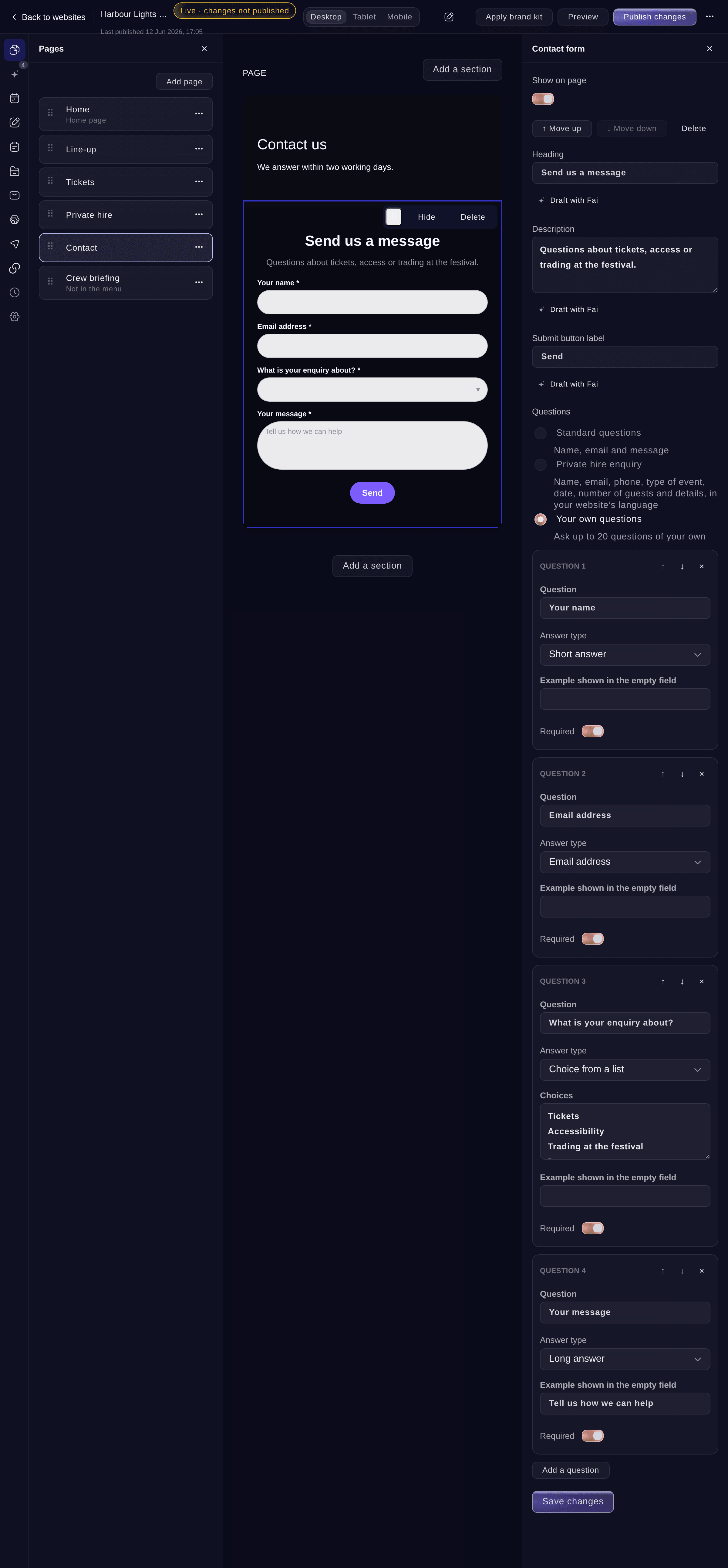
A form with your own questions. -
Add your own questions
If you chose Your own questions, select Add a question, enter the Question, then choose the Answer type.
Merk: For Choice from a list, enter one choice per line under Choices, up to 50. Turn on Required for each answer people must give.
-
Save the form
Enter the form's heading and button words if you want, then select Save changes.
Merk: An RSVP form with your own questions needs a required email question, so you can reach your guests. The form says so before you save.
-
Choose who gets the replies by email
Select Settings, enter an address under Send form replies to, then select Save changes.
Merk: We email that address about each new contact or RSVP reply. With no address here, we email your brand's email address.
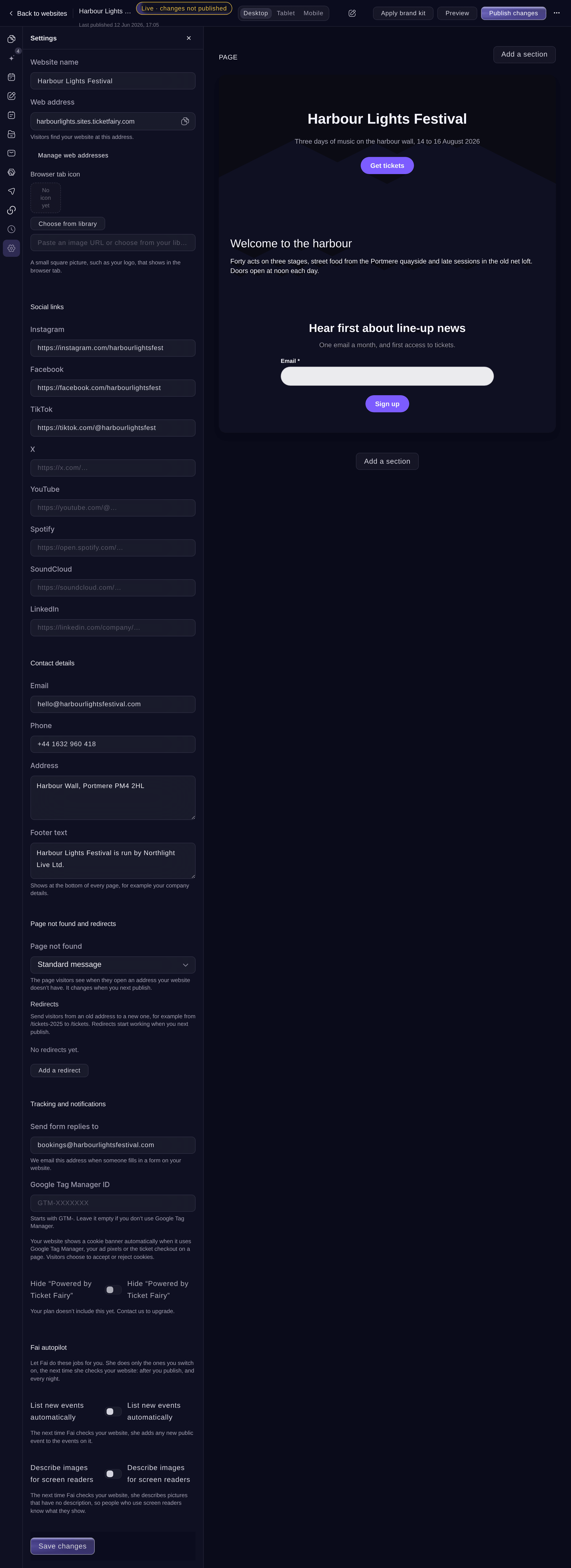
Settings. -
Publish the form
Select Publish changes at the top, then Publish changes. Visitors can fill in the form straight away.
-
Read the replies
Select Form replies. Each reply shows the answers under your own questions, newest first, and new replies are marked New.
Merk: Choose New, Read, Archived or Spam at the top to see only those. Use Mark as read and Archive on a reply to sort it.
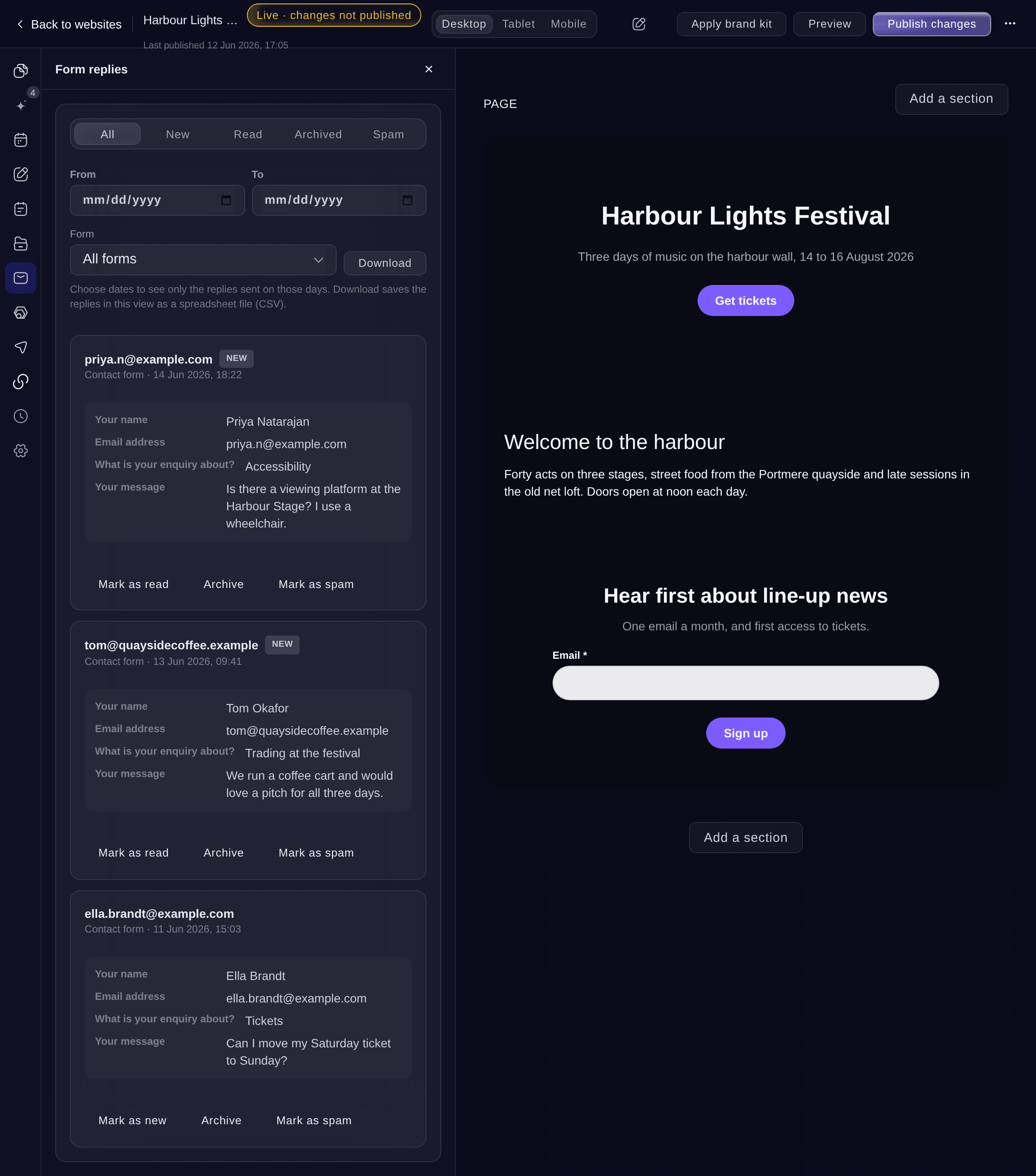
Form replies.


Prøv disse trinnene på ditt eget arrangement
Opprett en gratis konto, bygg arrangementet ditt og følg trinnene over i ditt eget dashbord. Det tar noen minutter, og du trenger ikke å booke en salgssamtale.
Ingen oppstartsgebyr. Ingen obligatorisk månedsavgift. Ingen kredittkort nødvendig.
Eller få det gjort for deg
Fai can add a contact or RSVP form with your own questions or the private hire questions, read the replies for the days you name and mark them read, archived or spam. She asks before each change. To download the replies as a file, use Download replies in the dashboard.
I dashbordet ditt, med Fai
Add a private hire enquiry form to the Private hire page of my <WEBSITE NAME> website
La Fai gjøre det for deg
Fai jobber inne i Ticket Fairy-dashbordet ditt. Opprett kontoen din, åpne Fai og lim inn instruksjonen over.
Ingen oppstartsgebyr. Ingen obligatorisk månedsavgift. Ingen kredittkort nødvendig.
Download the replies
-
Choose the replies
In Form replies, choose the days under From and To, and a Form if you want one form only.
-
Download the file
Select Download. You get a spreadsheet file (CSV) of the replies in the view, with one column for each question.
Merk: One download holds up to 20,000 replies. For more, choose a shorter range of days or a status.
Fai can read the replies for the days you name, but she cannot give you the file. Use Download in the dashboard for the spreadsheet.
Mark a reply as spam
-
Move it to Spam
Select Mark as spam on the reply. It moves under Spam, where Mark as new brings it back.
Fai marks a reply as spam after you confirm.
I dashbordet ditt, med Fai
Mark the reply from <NAME> on my <WEBSITE NAME> website as spam
Spørsmål du kanskje har
- What happens to old replies if I change the questions?
- Replies people already sent are kept with the answers they gave. Questions you keep stay linked to their earlier answers, and a new question starts empty.
- Why are some replies already under Spam?
- We check each reply as it arrives and put messages that look like spam under Spam, without emailing you about them. If one is real, select Mark as new.
- Where do newsletter sign-ups go?
- Sign-ups arrive in Form replies. Choose a list under Mailing list on the section to add people to that list as well.
- Can a form ask for a date or a number?
- Yes. The answer types are Short answer, Long answer, Email address, Phone number, Choice from a list, Tick box, Date and Number.
- Can a form go on a page that has a password?
- Yes. Only visitors who entered the page password can send it, so a crew or guest form stays private.
Har du fortsatt et spørsmål?
Book en demo, så svarer vi på det i en samtale, tilpasset din type arrangement. Eller opprett kontoen din og se selv.
Ingen oppstartsgebyr. Ingen obligatorisk månedsavgift. Ingen kredittkort nødvendig.
Relaterte guider
Gjør dette på ditt eget arrangement
Opprett kontoen din, bygg arrangementet og følg trinnene i ditt eget dashbord. Du trenger ikke bestille en salgssamtale.