1. Solutions
  2. By event type
  3. Attractions & timed entry

Fill Every Time Slot of Your Season

Sell entry by date and time, with each slot holding only the visitors your space takes at once, and add a season pass for the regulars who come back. Sell photo packages, guided tours and parking with the entry, and let an AI concierge on your website answer visitors' questions and sell tickets in the chat. Your staff scan in on their own passes, and you follow every slot as visitors arrive.

  • Every slot sold to the capacity your space holds
  • Regulars who come back on a season pass
  • A short queue at your door
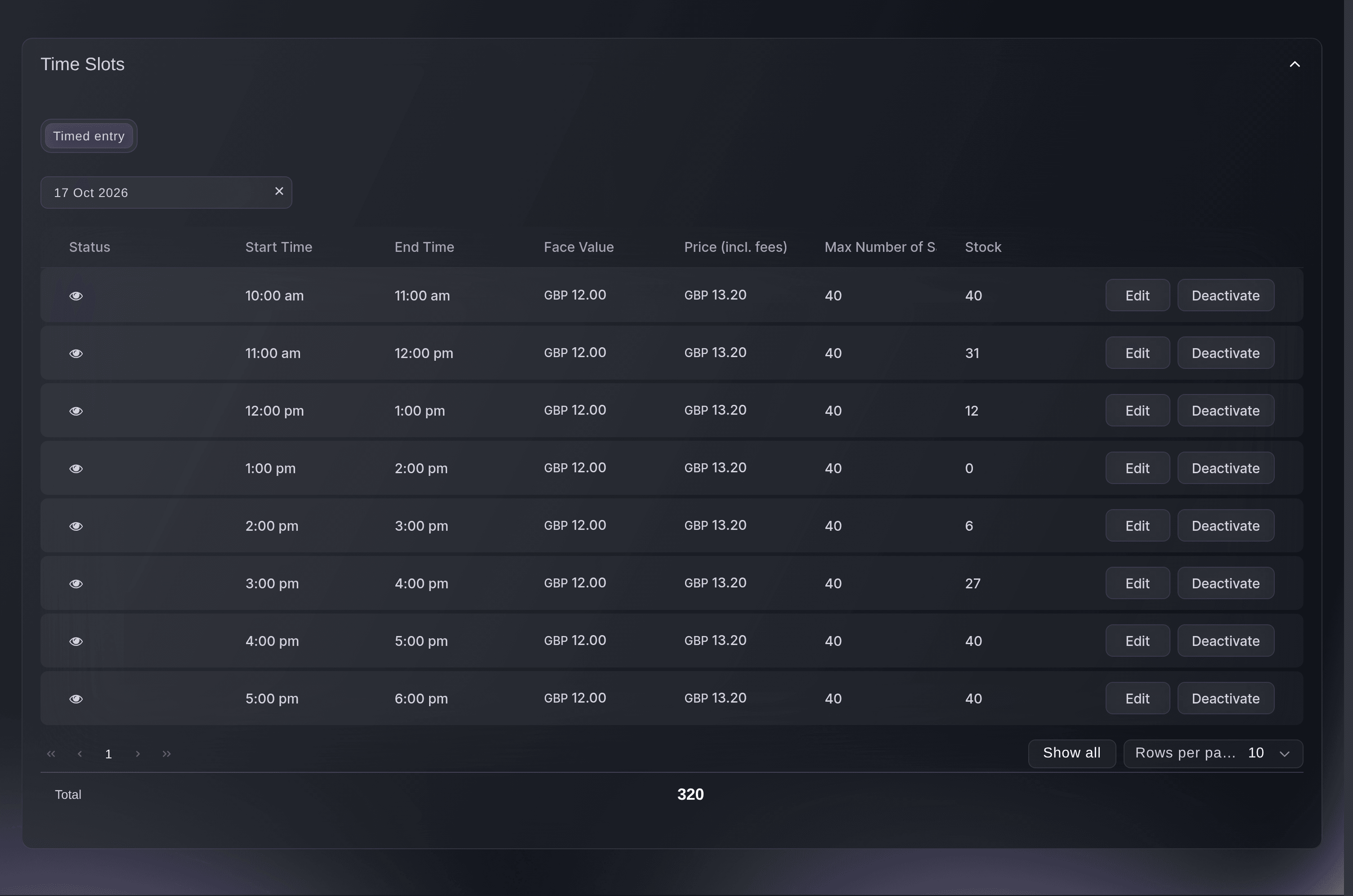
Ticket Fairy Time Slots card for one date, listing each slot with its price, maximum sales and stock

Sell Every Hour of Your Season to Its Own Capacity

Choose your dates, the weekdays you open, your opening hours and how long a slot lasts, and Ticket Fairy lays out every slot with the price and capacity you entered. Each slot sells out on its own count, so one full hour never blocks the next, and your event page shows a calendar of the dates with a slot on sale. Adult and child entry are ticket types of their own, each with its own slots, and an escape room gives each room slots the length of a game, so the group that books a time has the room to themselves. Change the price or capacity of any single slot, and add a new run of dates later to the same calendar.

  • Time slots: laid out from your dates and opening hours
  • Capacity for each slot: each slot sells out on its own count
  • Single-slot changes: a different price or capacity for one time
Ticket Fairy Time Slots dialog with a date range, weekdays, opening hours, slot length, price and maximum sales per slot

Bring Your Regulars Back With a Season Pass

Start from the Exhibition template and choose a season pass on top, and it adds a Season pass beside your entry tickets and an Audio guide add-on to price or remove. Give the pass a once-a-day scan rule, and it lets its holder in once a day for the whole season with no slot to book. When each night runs as its own event, sell a pass that covers a number of nights, and holders book the nights they want from their own account, including nights you add later. Gift certificates let visitors give a visit as a present.

  • Season pass: once a day for the whole season
  • Passes for several nights: nights booked as the holder chooses
  • Gift certificates: a visit to give as a present
Ticket Fairy Exhibition template with the season pass choice and the ticket list

Sell Photo Packages, Tours and Parking With Every Slot

Create an add-on for each extra, such as a photo package, a guided tour or parking, with its price and stock, and visitors add it in the same checkout as their slot. Show your rules, such as a waiver or a code of conduct, as sections of the checkout agreement that every buyer accepts before paying. Give groups a discount that applies once their basket reaches the size you set. Track every listing site, hotel partner and flyer with its own tracking link, and see the clicks, orders and revenue each one brought in.

  • Add-ons: photo packages, tours and parking
  • Checkout agreement: your waiver and rules, accepted before paying
  • Tracking links: clicks, orders and revenue for each listing
Ticket Fairy Checkout Agreement card with refund policy and code of conduct sections

Answer Visitors' Questions and Sell in the Chat

Put the AI concierge on your website and teach it from your FAQ pages, your website and your documents, and it answers visitors in your brand's voice and sells tickets in the chat. Questions it cannot answer go to your team. Keep your venue page current with directions, parking and what to expect when visitors arrive, and put the answers to the questions visitors ask most on your event page. Schedule bookings to open at the minute you announced, in your event's own timezone.

  • AI concierge: answers visitors and sells tickets in the chat
  • Venue page: directions and what to expect when visitors arrive
  • Event page FAQs: answers to the questions visitors ask most
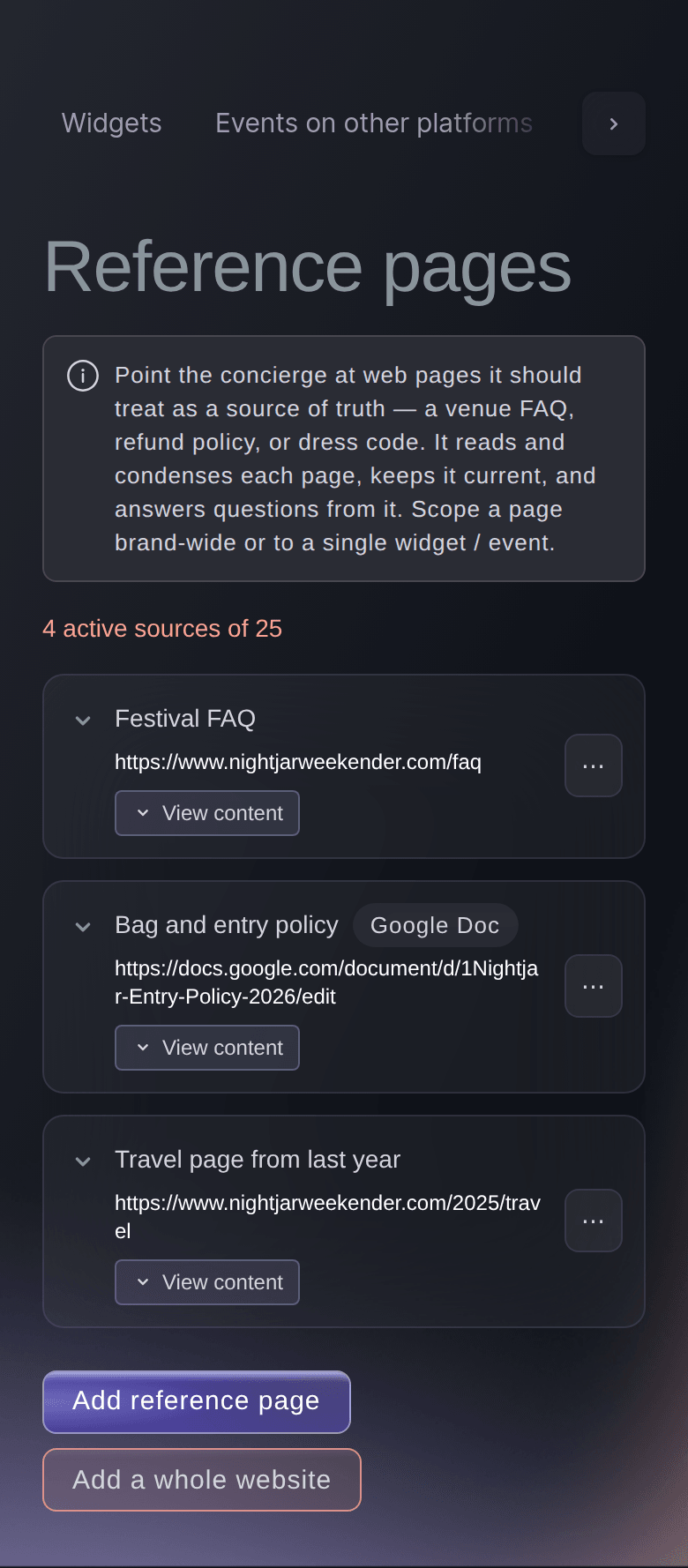
Ticket Fairy concierge Reference pages tab with a festival FAQ page, a bag and entry policy and the other pages the concierge answers from

Get a Dashboard That Arranges Itself Around Your Season

Choose Outdoor Event or Community Event as your event type, and Start with Fai asks what you want help with. Choose Staff and volunteers, Safety and Show day, and your list shows Crew, Volunteers, Shifts, Accreditation and Desks for the people who run your attraction, Incidents, Risks, Accessibility and Lost property for your visitors, and Run of show and Now and next for each day you open. Any other section is a tap away under More sections, and each person on your team can pin the sections they use most to the top of their list.

  • Start with Fai: choose what Fai helps with and your list follows
  • Shifts: your rota for every day you open
  • Pinned sections: the sections you use most at the top
Ticket Fairy More sections dialog with your role, what Fai helps with, sections to add for everyone and sections to pin to the top of your list

Follow Every Slot as Visitors Arrive

Give your staff and performers a pass on your brand that needs no slot and scans in the same app as a ticket. Your door team scans on their own phones, each with their own Door Staff login, and sells to walk-ups from the same app. On the day, the check-in report groups arrivals by date, then slot time, then ticket type, and Sales by Time Slot shows the sales and revenue of every slot. Move a visitor who cannot make their time to another slot from their order, and plan your staffing around the weather forecast for your venue.

  • Staff passes: no slot needed, scanned in the same app
  • Arrivals by slot: by date, then time, then ticket type
  • Sales by Time Slot: sales and revenue for every slot
Ticket Fairy Individual Tickets table with each ticket's status, check-in time and who scanned it
Get this page as a PDF Read it later or share it with your team. We email you a link to the PDF.
What to put in your PDF

We will email you this deck. We may also email you now and then about Ticket Fairy features that can help your events. You can unsubscribe at any time with one click.

Everything You Need to Run Your Attraction

More about ticketing for Attractions & timed entry

Questions About Ticket Fairy for Attractions & timed entry

Attractions & timed entry

Open the Time Slots dialog on the ticket type form and enter your dates, weekdays, opening hours, slot length, price and maximum sales per slot. New slots appear on your Tickets page within a minute or two.

No. Each timed ticket type has its own slots, and the maximum sales per slot counts that ticket type's sales alone. Split the room between them, such as 30 adult and 10 child places a slot, or sell one entry ticket type when the room is the only limit.

No. A season pass holder comes in without booking a slot, so their visits come on top of each slot's capacity. Set each slot's capacity below what your space holds, leaving room for the pass holders you expect at one time.

Create a timed ticket type for each room, make the slot the length of a game, set the maximum sales per slot to 1 and price the slot for the whole group. To sell places to separate players, set the maximum sales per slot to the number of players the room holds.

Not in a single run, which lays slots end to end. Generate the morning and the afternoon as two runs, or deactivate the slot you need clear.

Yes. Add your waiver as a section of the Checkout Agreement for the event, and every buyer accepts it before paying.

No. Resale is not offered on time-slot events. You can move a visitor to another slot from their order, and you can let visitors move their own ticket to another slot.

They are part of the Event Operating System, in your dashboard beside time slots, season passes, add-ons and the door. Book a demo, and we set up your first event with your team.

Sell more tickets. Build the crowd that comes back.

Start Selling Tickets Online

Sign up without a credit card and build a test event before you commit. Go on sale in minutes when you are ready.

No monthly subscription required for ticketing
Start selling tickets immediately
Ticketing tools included in the service fee
Get Started Talk to Fai Now

Ask Fai, our AI assistant, about Ticket Fairy’s features, pricing and how it could work for your event.

No credit card required

Book a demo call

See the referral model that drives 20% more ticket sales on average, learn which campaigns sell tickets, answer buyers faster and keep queues moving.

45-Minute Video Call
Pick a Time That Works for You