1. Solutions
  2. By role
  3. Box office & front of house

Get Every Guest In Fast and Balance Your Box Office Every Night

Your door team scans tickets on their own phones and sees which wristband to hand over, and walk-ups pay at the door by card, phone or cash. At the box office window, find any guest by name or email address, hand over will-call, reprint a ticket or send it again, then balance each till against its float at the end of the night. Door staff see each guest's age status on the scan, VIP hosts hear when their guests arrive and your access desk works from a link on a phone.

  • A queue that keeps moving at every door
  • A box office that balances every night
  • Every guest answered at the window
Ticket Fairy Individual Tickets table with each ticket's status, check-in time and who scanned it

Get Your Door Team Scanning on Their Own Phones

Invite each person who scans as Door Staff, on your brand for your regular team or on one event for a one-night crew. That login opens the Entry Fairy app and nothing in your dashboard, and the invitation carries the app store links, so your team installs the app the day before. Every phone sees a scan made on another, so a ticket admitted at one entrance shows as already checked in at every other, with the time and who scanned it.

One login for each person puts a name against every admission. When a guest says a friend went in on their ticket, or a manager asks which entrance let a group through, the answer is on the ticket, with the time it went in and the name of the person who scanned it. You can hand a Door Staff login to casual staff for one night without showing them sales, buyers or payouts, and remove it when the night is over.

Test a ticket on every phone before the doors open, and undo the test scan afterwards so the ticket is ready for its holder. Fai can invite your door team, send the guest list their tickets and set what each ticket may do at the door, and she shows you each invitation and change before anything is sent or saved.

  • Door Staff login: the scanning app and nothing else
  • Entry Fairy app: on your door team's own iOS or Android phones
  • Every phone in step: a ticket scanned at one door shows at every door
Ticket Fairy Check-In page with the Entry Fairy scanning app download for the door team

Hand Every Guest the Right Wristband and the Right Answer

Match each wristband to the ticket types that get it, and as a ticket scans, the app shows your door team which band to fasten on. Give a band to an add-on too, such as a campsite band for everyone who bought camping. Let a weekend ticket back in once a day or a backstage pass come and go within the hour, and give VIP and the guest list their own doors open and last entry times. The app refuses a refunded, cancelled or replaced ticket and says why in plain words.

The Refused scans report shows every refusal at the door by reason, entrance, ticket type and hour, with each refused scan listed. A ticket shown again after its holder is already inside is often a shared screenshot, and a cluster of those at one entrance tells you where to put a supervisor. A ticket resold through Ticket Fairy or replaced after a name change stops working at the door, and the new holder gets in.

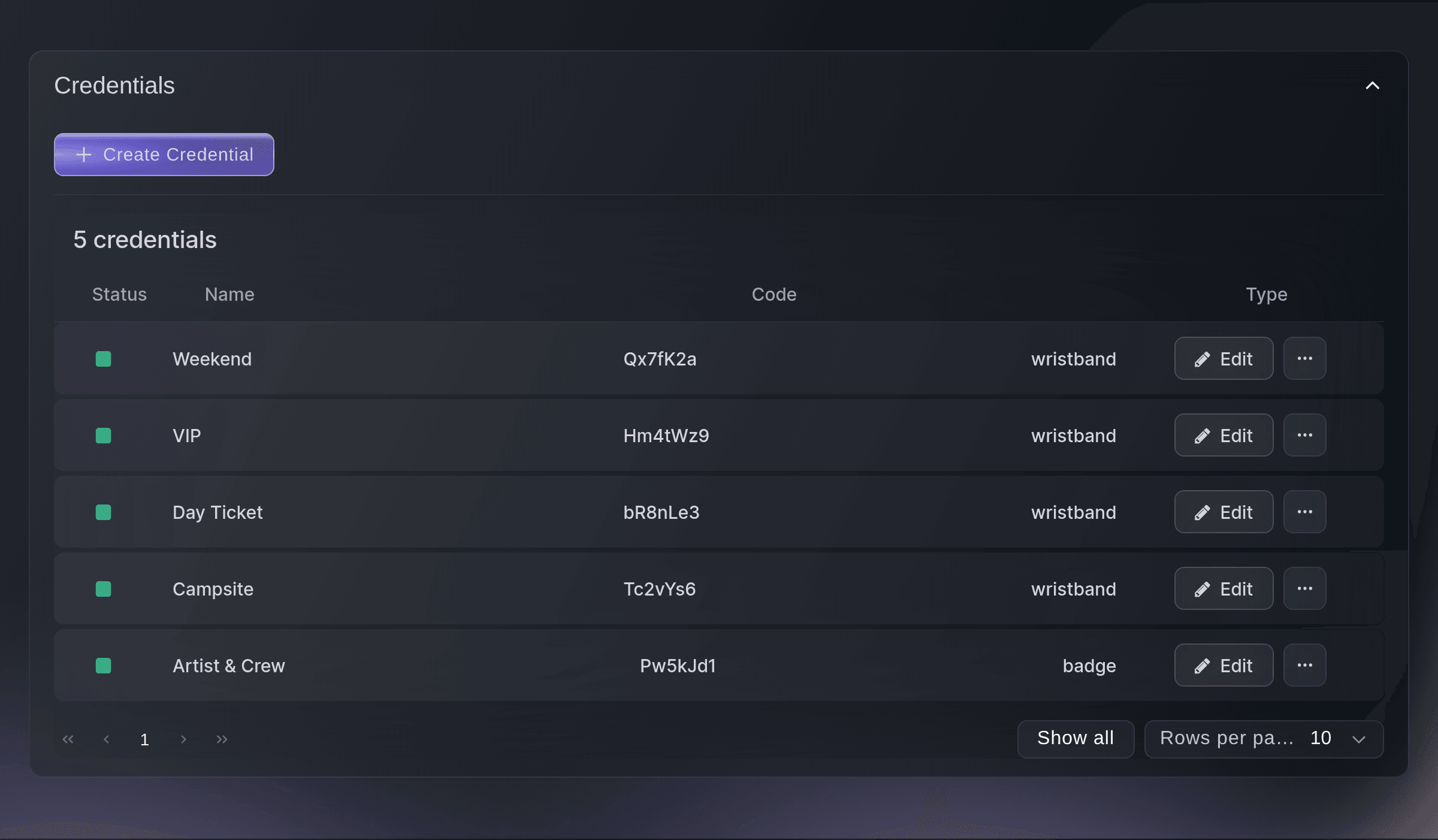
Because the band comes from the ticket type, your door team needs no printed list at the gate and spends the shift on faces and bags. A festival with weekend, day, VIP and campsite bands and a club with one band for over-18s set them up the same way, and the Credentials list shows every band and the tickets that get it.

  • Wristbands by ticket type: the right band shown as each ticket scans
  • Re-entry rules: scans allowed each day or each hour
  • Refused scans: why each ticket was turned away, in plain words
Ticket Fairy Create Credential dialog matching a day wristband to three day tickets

Sell to Walk-Ups and Balance Your Box Office

Your door team sells tickets from the same app they scan with, in cash or with the buyer tapping their card, phone or watch on the back of your team's phone. A second door, a roaming seller and the box office can all take payments at the same time. At the box office window, sell walk-up tickets, hand over will-call and reprint tickets, then start each till with its cash float and finish the night with a reconciliation that shows what each till took and whether the cash matches.

Walk-up money goes through the same payment account as your online tickets, so there is no separate card machine to hire, and box office sales have their own figure beside your online sales on the Performance page. A theatre box office that sells all week and a festival gate that sells for one afternoon close the day the same way, with each till checked against its float. With your cashless partner connected, each wristband links to its ticket, guests top up at checkout or from the event page, unspent credit is refunded, and spend by bar and trader comes into your settlement. Merch stands keep their stock by stand, with sales imported from your till system.

When a VIP table booking scans with a balance left to pay, the app shows the amount and your team marks it paid, so the host does not chase the balance at the table.

  • Walk-up sales: cash, cards, phones and watches at the door
  • Will-call and reprints: find the order and hand the tickets over
  • Float and end of night: what each till took, checked against the cash

Answer Any Guest at the Window in Seconds

Search the Orders page by the buyer's name, email address, phone number or order number, and open the order to see its tickets and contact details. When tickets never arrived, correct the name or email address and send the same tickets again, so a ticket already saved to a phone still scans. Move a buyer to another ticket type when they chose the wrong one, and they keep their barcodes. When a guest is told they are already inside, search their name to see when their ticket went in and who scanned it, and undo a scan made by mistake.

Add a note to an order so the next person at the window knows what was promised, and give a guest ticket to someone on the list who has no order. Ask Fai whether a guest has arrived and when, and she finds their ticket while you are standing at the entrance.

Lost property comes to the same window. Log each found item with a photo and where it is kept, take lost-item reports from guests, and Fai suggests which report each found item matches, so the backpack handed in at the bar finds its owner before they reach the car park. Guests can report a lost item themselves from the event page and the buyer app, beside the timetable, the map and their own agenda.

  • Find any order: by name, email, phone or order number
  • Resend and fix tickets: the same barcodes with the right name and address
  • Who scanned it and when: and undo a scan made by mistake
  • Lost property: found items matched to lost-item reports by Fai
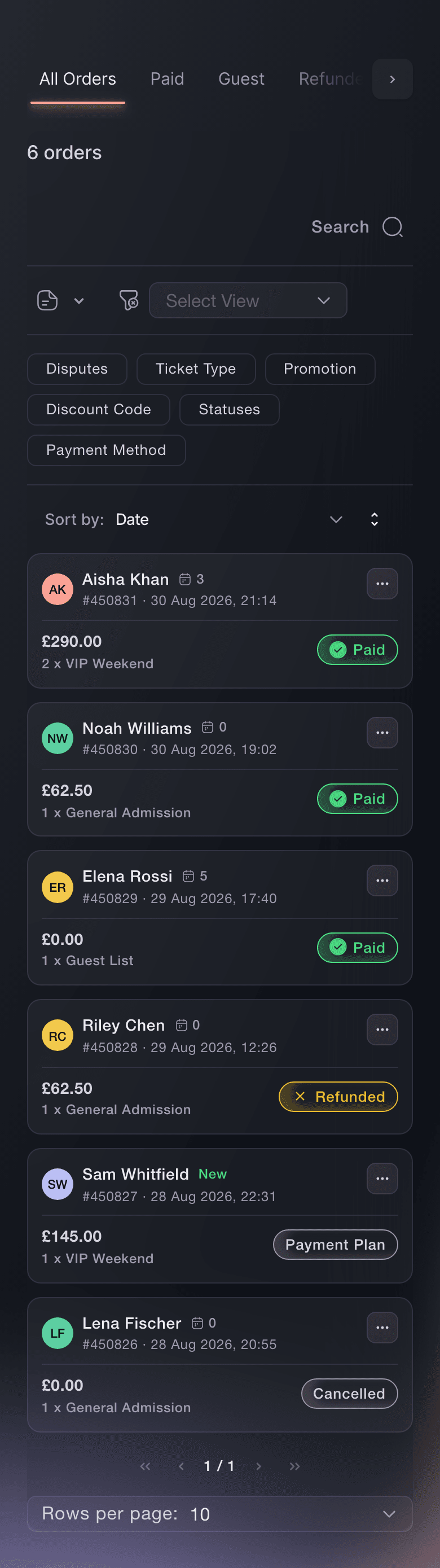
Ticket Fairy Orders page on All Orders, with Paid, Guest, Refunded, Cancelled, Payment Plan and Abandoned Carts tabs above six orders

Check Ages Once and Welcome Every VIP and Access Guest

Door staff see each guest's age status when they scan the ticket and mark the wristband or pass as ID checked, so your bar team knows the check was done, and the bar logs every refusal. Set up your VIP areas and tables, give each guest a host, and the host gets an alert when their guest arrives, with what each ticket type includes listed for them. Buyers ask for a companion ticket, a viewing platform place or an interpreted session at checkout, and your access desk works from a link on a phone with every request in its report.

An age check at the door that the bar can see means one check per guest, a shorter bar queue and a record if a licensing officer asks, because the bar logs every refusal it makes. VIP hosts stop watching the entrance and start looking after the guest who has arrived, with the table, the bottle and the inclusions in front of them.

Access requests arrive with the order, so your access team plans companion places, platform spaces and interpreters before the day and meets each guest at the door they need. Sell VIP tables and bottle service with a deposit at checkout, and the balance shows at the door when the booking scans.

  • Age status on the scan: and ID checked marked on the wristband
  • VIP arrival alerts: each host hears when their guest arrives
  • Access requests and desk: asked at checkout and met at your access desk
Ticket Fairy Credentials list with weekend, VIP, day ticket and campsite wristbands and a crew badge

Run Every Desk From a Phone and See Who Has Arrived

Give staff and volunteers without a dashboard login a desk link for their own phone, and stop it at any time. At a conference, a convention or a trade show, your registration desk scans a ticket or finds the attendee by name and prints their badge, and a kiosk lets attendees check themselves in. Open Check-In on your own phone for arrivals each hour against the tickets you sold, or ask Fai how many people are in.

The check-in report counts admissions rather than scans, so a flat hour means a quiet door rather than a queue being turned away, and you can break arrivals down by day, ticket type, add-on and the person scanning. A rising line an hour before headliners tells you to open another lane.

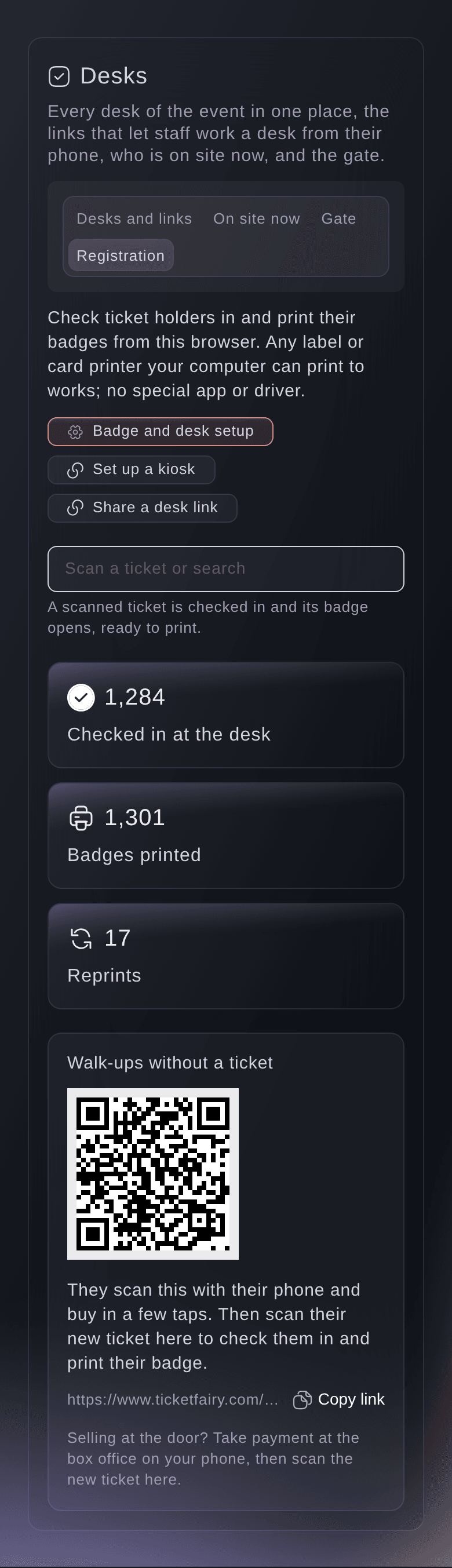
At registration, badges print with the attendee's name, company and job title from your checkout questions, and walk-ups buy a ticket from a QR code at the desk. A badge reprint at the desk keeps the reason, so you know why a second badge exists.

  • Desk links: a desk on any phone, with no dashboard login
  • Registration and badges: at your desk or a self-service kiosk
  • Arrivals by hour: by day, ticket type, add-on and scanner
Ticket Fairy registration desk for a conference, with the scan field, the count checked in at the desk, badges printed, reprints and the walk-up QR code

How Door and Box Office Teams Use Ticket Fairy

  • A Club Night

    The door manager invites a one-night crew as Door Staff, and each phone shows the age status and the right wristband as tickets scan. Walk-ups tap their phones on the back of the door team's phone, and the Refused scans report shows the shared screenshots turned away at the side door.

  • A Theatre Box Office

    The box office manager starts each till with its float, hands over will-call and reprints, and finds any patron by name when their email never arrived. At the end of each performance, every till is checked against its cash.

  • A Festival Gate

    The front of house lead matches weekend, day and campsite wristbands to ticket types and add-ons, lets weekend tickets back in once a day and gives VIP its own entrance times. Arrivals by hour show when to open another lane.

  • A Trade Show Registration Desk

    Volunteers run the registration desk from a link on their phones, scan each ticket and print the badge with the attendee's company and job title. A self-service kiosk takes the rest of the queue.

  • A Venue With VIP Tables

    The hospitality manager sells tables with a deposit, gives each booking a host and collects the balance at the door when the booking scans. Each host hears when their guest arrives.

Get this page as a PDF Read it later or share it with your team. We email you a link to the PDF.
What to put in your PDF

We will email you this deck. We may also email you now and then about Ticket Fairy features that can help your events. You can unsubscribe at any time with one click.

Everything Your Doors and Box Office Need

More about ticketing for Box office & front of house

Questions About Ticket Fairy for Box office & front of house

Box office & front of house

No. The Entry Fairy app needs an internet connection to scan tickets, so check the connection at each entrance before the doors open. The crew pass desk and the meal desk work without a connection and send what was done when it is back.

Compatible Android phones, in the country of the payment account the event uses. The option appears once the event has a venue and either your business address or the venue's address is complete. Box office staff can also take card payments with a card reader where your payment account allows it, or cash from the till's float.

No. Door Staff opens the scanning app and nothing in your dashboard, so you can hand it to casual staff for one night.

No. The app counts the scans in the 24 hours before each new scan, so the window moves with the ticket. An hourly rule works the same way over the previous hour.

They have their own card on Performance, beside your net revenue. The net revenue card names the combined figure, including cash taken at the door, when you point at it.

The event owner can refund a whole order from the Orders page, for an order paid by card through your own connected payment account while the event's funds are not yet paid out. Ticket Fairy support refunds anything else for you.

Not in your dashboard. The check-in report breaks arrivals down by hour, day, ticket type, add-on and the person scanning, and each phone shows its own running count.

No. The kiosk prints each ticket's badge once, and nobody can search for another person there. Staff print another badge at the registration desk with a reason.

Ask Fai how many people have checked in against the tickets sold, or whether one guest has arrived and when. Fai can also invite your door team as Door Staff, send the guest list their tickets and set a ticket's re-entry rules, and she shows you each change before she makes it.

No. Each desk link opens one desk on a phone or tablet, works until the date you set, and you can stop it at any time.

Sell more tickets. Build the crowd that comes back.

Start Selling Tickets Online

Sign up without a credit card and build a test event before you commit. Go on sale in minutes when you are ready.

No monthly subscription required for ticketing
Start selling tickets immediately
Ticketing tools included in the service fee
Get Started Talk to Fai Now

Ask Fai, our AI assistant, about Ticket Fairy’s features, pricing and how it could work for your event.

No credit card required

Записаться на демо

Посмотрите, как реферальная модель в среднем даёт на 20% больше продаж билетов, узнайте, какие кампании продают билеты, быстрее отвечайте покупателям и поддерживайте движение очередей.

Видеозвонок на 45 минут
Выберите удобное время