1. Solutions
  2. By event type
  3. Concerts & live music

Sell Out Every Show and Settle Each One Faster

A concert is won in two places: the minutes after the announcement, when fans and touts race for the same tickets, and the night itself, when the act, the crew and the crowd all need to be in the right place on time. Put each show on sale the minute you announce it, keep tickets with fans at face value and see which post, link and partner sold them. Behind the show, book the act at a fee the show can carry, advance their team, run the night to time and settle it from its ticket sales.

  • Every show on sale the minute you announce it
  • Tickets kept with fans at face value
  • Acts advanced, shows run to time and settled fast
Ticket Fairy Line-up section listing acts with their set times, which are shown on the public line-up and a change waiting to go public

Put Every Show on Sale the Minute You Announce It

Start from the Concert template with your general admission price and the room's capacity, and say yes to a VIP package, a seated ticket and the merchandise add-on. Give each release its own sale dates, so the second release opens the moment the first sells out, and schedule the event page to go public on the minute your announcement names. Hold tickets back for the label, a radio competition or a sponsor, and they stay out of the public on-sale. For a seated hall, fans pick their exact seat on your seat map or choose the area they want at its own price.

Reveal the line-up act by act at the date and time you choose, in your event's own time zone, so the support announcement lands a week after the headliner without anyone staying up to press a button. Group general admission, VIP and seated tickets into categories, so fans choose where they stand first and the price second.

One price suits a small room, an early bird ladder suits most shows, and phased releases suit a big room where rising prices keep fans buying early. Put the full checkout on the act's own website or yours, and every sale lands in the same dashboard and the same report.

  • Concert template: releases, VIP and merch sized to your room
  • Scheduled on-sale: the page goes public on the minute you announced
  • Held tickets: named reserves for partners, kept out of the on-sale
  • Line-up announcements: each act revealed when you choose
Ticket Fairy Concert template with its price, capacity, VIP and seating questions beside what it creates

Keep Tickets With Fans When a Show Sells Out

Set the most tickets one order and one account can buy, so a tout needs a new account and a new card for every few tickets. Ask buyers to prove who they are on the shows under most pressure, with an ID photo and a selfie, and their card is held until they pass. A fan who can no longer come passes their ticket on through your event page at the ticket's own price, and the old code stops working once the new fan has theirs. Once a release sells out, fans join your waiting list, and every ticket that comes back is offered to the next fan in line.

A waiting room in front of checkout shows each buyer their place when the public sale opens and lets them in turn, so the fans already paying finish quickly and refreshing the page gains nobody an advantage. Run a presale for your mailing list or the act's fan club with an access code or a personal invitation, so your most loyal fans buy before the public race starts.

Put a name on every ticket and check it at the door when a show is at the top of the resale sites. The Waiting List report shows how many fans you could not serve, which tells you when a second date is worth announcing, and you email the whole list the moment it goes on sale.

  • Face-value resale: on your own event page, with the old code cancelled
  • Waiting list: returned tickets offered to the next fan in line
  • Buyer ID checks: on the whole show or the busiest ticket types
  • Waiting room: each buyer let in to checkout in turn
Ticket Fairy ticket settings with the waiting list switches for tickets and add-ons

Know Which Announcement Sold Your Tickets

Make a tracking link for each post, newsletter, poster and partner site, and the table shows the clicks, orders and revenue each one brought in. Connect the ad networks you use once for your brand, and each one records the ticket sales its ads brought in. Compare this show with your last one at the same number of days out, so you know by the second week whether to add a date or spend more on ads. Give the co-promoter or the act's management a live sales link for the tickets they have a stake in, with no role on your event.

Fans who comment a word such as TICKETS under the announcement get your ticket link in a private message, straight away, and an artist team can run a followers-only presale that grows the act's following while it builds the presale list. Every buyer gets a referral link, and the fans whose friends follow them show up in your referral results.

Ask Fai how this show is selling against the last one, which link brought the most buyers and how many tickets are left in each release, and she answers from the same reports your team sees.

  • Tracking links: clicks, orders and revenue for every placement
  • Ad pixels: every network you advertise on, set up once
  • Compared with last time: this show's sales against your last one
  • Live sales links: for the co-promoter or the act's management
Ticket Fairy Tracking Links page with the clicks, orders and revenue each link earned

Book the Act at a Fee the Show Can Carry

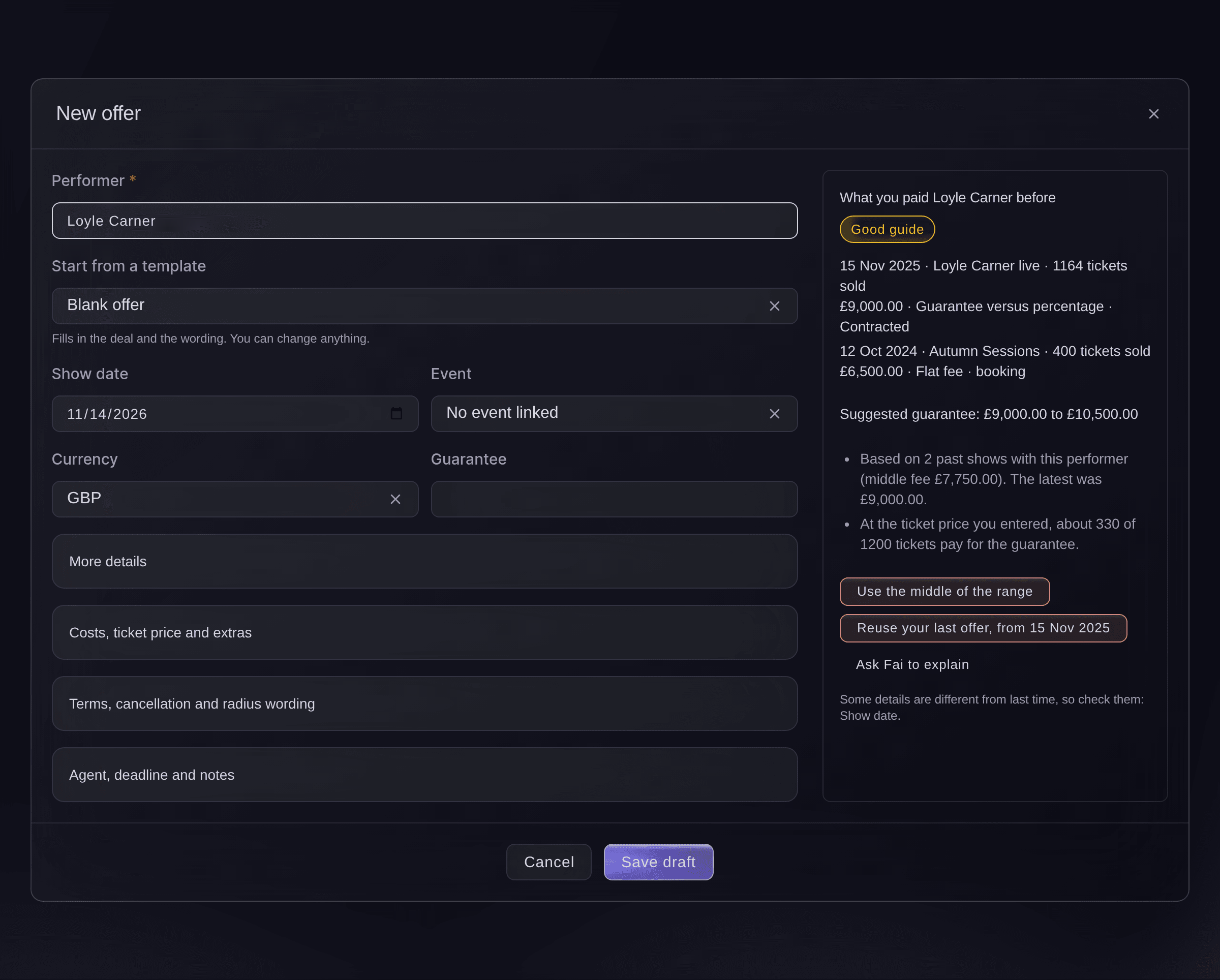
Hold the date in the room you want, then make the agent an offer with what you paid the act before and the guarantee range Fai suggests beside it. Choose a flat fee, a guarantee against a percentage of ticket sales, a guarantee plus a percentage, or a door deal, and see how many tickets pay for the guarantee at your ticket price. Each counter-offer is kept as a new version, and when the agent accepts, the act is booked onto your show with the agreed fee. After the show, Fai drafts the settlement from your ticket sales, your costs and the deal, and you share it with the act's team line by line.

Send the contract for signature by email and see every deposit and balance by the date it is due. Fai reads the contract, invoice and rider the agent sends back, and puts the dates and amounts where your team needs them. A shared settlement locks its lines, a correction is a reversing line or a new version, and the version you shared stays as it was.

Offers and settlements work for a promoter renting rooms and for a venue booking its own shows, across every event your brand runs. Model the fee against the sales you expect from past shows, and check the radius clause against your other dates before you commit.

  • Offers: past fees and a suggested range beside each one
  • Deal types: flat fee, versus, plus or a door deal
  • Settlements: drafted from ticket sales, costs and the deal
Ticket Fairy New offer form beside what you paid the act before, a suggested guarantee range and the buttons to use the middle of the range or reuse the last offer

Advance Every Act and Run the Night to Time

Every act on the bill gets an advance sheet for travel, hotel, schedule, technical needs, hospitality and their guest list. Send the tour manager a link with no sign-in that opens only the sections you choose, and every change they make is recorded. Fai fills in what she can from the contract, the rider and the tour book, and drafts the run of show with doors, soundchecks, sets, changeovers and curfew. On the night, the show caller calls each cue, and a backstage screen shows the act on now, the one on next and how late the stage is running.

Each department gets its own day sheet, which the crew open on their phones from a link and which always shows the latest times. Fai gives each act a dressing room around their set and flags any overlap, and hotel rooms you hold for the band and crew sit beside the advance. Lock a stage once its plan is final, so nobody moves a cue by mistake.

A support act with a laptop needs a set time and a guest list, and a headliner with a production needs the full advance. Choose the sections each act's team sees, and the same show runs from one advance whether there are two acts on the bill or six.

  • Advancing: travel, hotel, technical and hospitality for each act
  • Run of show: drafted by Fai from your set times
  • Day sheets: each team's part of the day on their phone
  • Now and next: backstage screens with the time left
Ticket Fairy advance for one performer, with the due date, buttons to ask their team, ask Fai, print and sign off, each section with its status, and their team's contacts

Get the Act's Guests, the Crew and the Crowd In on Time

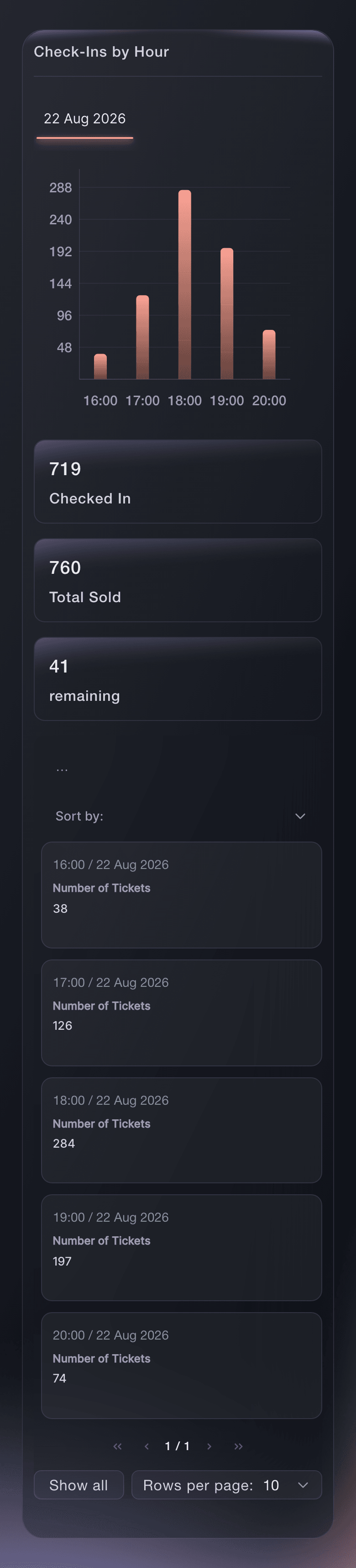
Send comps to press and the act's guests from your dashboard, each with a barcode, and give the act's management an allocation they fill themselves. Give the band and the crew a pass that scans in the same app as a ticket and takes nothing from your ticket stock. Let VIP in before the main doors with their own door times, and put the right wristband on every wrist as each ticket scans. Follow arrivals by hour while the room fills, and see every refused ticket by reason and entrance while you can still act.

Your door team scans on their own phones and sells to walk-ups from the same app, with cash or a tap of a card or phone. Merch stands keep their stock by stand, and the act's share of merch sales goes into the settlement.

Guest tickets come out of a ticket type of their own, so comps never eat into a paid release and add nothing to your takings. Ask Fai how many are in or whether a named guest has arrived, and she answers from the door figures.

  • Guest tickets and allocations: comps for press and the act's guests
  • Band and crew passes: scanned at the same door as tickets
  • Early entry for VIP: doors open and last entry for each ticket type
  • Arrivals by hour: against the tickets you sold
Ticket Fairy hourly check-in report with arrivals by hour on show day

How Concert Promoters and Music Venues Use Ticket Fairy

  • A Headline Show That Sells Out Fast

    The promoter caps tickets per order and per account, turns on the waiting list and asks for an ID check on the front standing area. Returned tickets go to the next fan at face value, and the waiting list size makes the case for a second date.

  • A Two-Room Music Venue

    The booker holds a Saturday in the big room, offers the act a guarantee against a percentage of ticket sales and books them onto the show when the agent accepts. Fai drafts the settlement once the show ends, and the act's team agrees it the next day.

  • A Promoter Bringing a Tour Through Town

    The tour manager fills in the advance from a link with no sign-in, and Fai picks up the hotel and set times from the tour book. The run of show and each crew day sheet are ready a week before load-in.

  • A Seated Concert Hall

    Fans pick their seats on the hall's seat map, and seats for the label and the act's family are held back from the on-sale. The house seats are released two days out once the act's team confirms their guests.

  • An Independent Promoter Testing Channels

    A promoter gives the newsletter, three Instagram posts and two partner blogs their own tracking links. By the second week the table shows which ones sold tickets, and the ad budget follows them.

Get this page as a PDF Read it later or share it with your team. We email you a link to the PDF.
What to put in your PDF

We will email you this deck. We may also email you now and then about Ticket Fairy features that can help your events. You can unsubscribe at any time with one click.

Everything You Need to Sell and Run Your Shows

More about ticketing for Concerts & live music

Questions About Ticket Fairy for Concerts & live music

Concerts & live music

No. Nobody sets their own price. The new buyer pays the ticket type's current price, and the seller gets back what they paid, less a resale fee of 10% of the ticket price. You can keep any ticket type out of resale or turn resale off for the event.

Thirty-six hours when the show is more than two weeks away, getting shorter as it gets closer, down to eight hours on the last day. An offer that runs out passes to the next fan in line.

From 1 to 20 for each ticket type. A buyer with no customer account yet can buy up to the per-order limit in a first order, so set a per-order limit as well.

Yes. Put the seated areas on your seat map and sell the floor as its own ticket type, or create a ticket category for each area of the room without a map. Ticket Fairy builds the seat map with you from your venue's layout.

Yes. Share the settlement with the artist's team, and every line shows how its figure was worked out. Once shared, its lines are locked; to change anything you reopen it as a new version, and the shared version is kept.

No. The advance link opens without a sign-in and shows only the sections you chose. You can stop a link or send a new one at any time.

Yes. Give them Administrator on that event's team, and they set up the tickets, guest list and publishing themselves. A promoter who sells a night your team builds gets the Promoter role with their own link.

Yes. The Entry Fairy app needs an internet connection to scan tickets, so check the connection at each door before you open.

They are part of the Event Operating System, in your dashboard beside ticketing, resale and the door. Book a demo, and we set up your first show with your team.

Sell more tickets. Build the crowd that comes back.

Start Selling Tickets Online

Sign up without a credit card and build a test event before you commit. Go on sale in minutes when you are ready.

No monthly subscription required for ticketing
Start selling tickets immediately
Ticketing tools included in the service fee
Get Started Talk to Fai Now

Ask Fai, our AI assistant, about Ticket Fairy’s features, pricing and how it could work for your event.

No credit card required

Book a demo call

See the referral model that drives 20% more ticket sales on average, learn which campaigns sell tickets, answer buyers faster and keep queues moving.

45-Minute Video Call
Pick a Time That Works for You