1. Solutions
  2. By event type
  3. Conferences

Fill Your Conference and Give Every Delegate a Smooth Day

Sell full and day passes, workshops and the dinner in one checkout, with every delegate named and their company and job title collected as they buy. Choose your speakers from their talk proposals, let delegates pick the sessions they want and badge them at your desk or a self-service kiosk. Your exhibitors scan leads on their own phones, and your sponsors see the results for themselves.

  • Passes, workshops and the dinner sold together
  • Every delegate checked in and badged fast
  • Sponsors and exhibitors who see their return
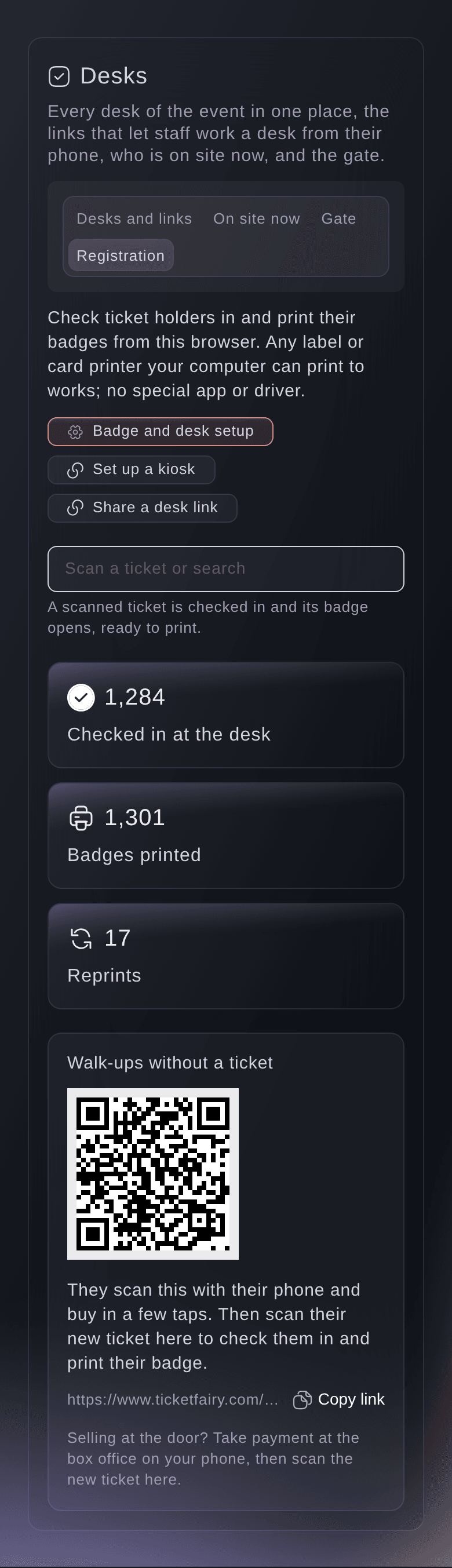
Ticket Fairy registration desk for a conference with the scan field and the number of delegates checked in

Sell Passes, Workshops and the Dinner in One Checkout

Start from the Conference template, say whether you offer a student rate and a networking dinner, and it builds a standard pass, an early bird pass and a workshop add-on with attendee names switched on. Group the passes by what they admit, such as Full conference and Day one, and close the early bird on a published date to give delegates a reason to book now. Sell each workshop and the dinner as an add-on with the number of places in the room, so it closes to buyers once it is full. For a room that fills in sittings, delegates pick an arrival time when they buy.

  • Conference template: passes, a student rate and the dinner from your answers
  • Early bird deadlines: a release that closes on the date you publish
  • Workshops as add-ons: each with the places its room holds
Ticket Fairy Conference template with its student rate and networking dinner questions

Know Who Is Coming and Who They Work For

A company buying passes for its team names each delegate, so your attendee list and your door both show who is coming. Ask each delegate for their company, job title, dietary needs or access requests at checkout, and choose whether each answer appears on their ticket and in the scanning app. For an industry day or a members' rate, approve each order before the ticket is issued, or send personal invitations with their own limits. The Professions report shows the job titles and employers your conference reaches, for your next sponsor conversation.

  • Checkout questions: for the order, each delegate or an add-on
  • Order approval: approve or decline before the ticket is issued
  • Professions report: the job titles and employers of your delegates
Ticket Fairy Professions section with a table of job titles and a table of employers side by side

Get a Dashboard That Arranges Itself Around Your Conference

With Conference or Technology Event as your event type, your event shows the sections a conference runs on and calls them what your team calls them. Programme holds Speakers, Applications, Agenda, Rooms and Public agenda. Money and partners adds Exhibitors beside Budget, Contracts and Sponsors, and Team calls your crew Event staff. Skip the questions in Start with Fai and your list shows the sections for Speakers and advancing, Show day and Sponsors and partners, the usual work of a conference, with any other section under More sections. Take talk proposals on your own form, let Fai summarise and score each one, and accept a speaker straight onto your agenda with their advance started.

  • Speakers and Agenda: named for a conference, from your event type
  • Applications: talk proposals scored by Fai and your review panel
  • Start with Fai: choose what Fai helps with and your list follows
Ticket Fairy applications for an event with new talks, the reviewers' score and Fai's score

Keep Every Session Room the Right Size

Turn the talks and workshops on your agenda into sessions delegates pick on their order page, each with its places, a waiting list when the room is full and a warning before two picks clash. Door staff scan delegates into each session from a link on their phone, so only the people who picked it go in. The attendance report shows who came, who did not and your most popular sessions. When a room moves or a speaker changes, email only the holders of that pass or that workshop.

  • Sessions to pick: places, a waiting list and clash warnings
  • Session doors: scanned from a link on a volunteer's phone
  • Session attendance: who came and your most popular sessions
Ticket Fairy Sessions view of a design conference with each day's talks and the places picked

Check In and Badge Every Delegate in Seconds

Scan a delegate's ticket at your registration desk, or find them by name, email or order number, and their name badge prints straight away with their company, job title and a QR code. Put a tablet and a badge printer by the entrance as a self-service kiosk, where delegates without their ticket to hand get a code by email. Give volunteers a registration link to work the desk with no dashboard login, and let walk-ups buy from a QR code on the desk. Speakers, chairs and press get guest tickets on the pass they should hold, and your AV crew get one pass for the whole run.

  • Name badges: printed as each delegate checks in, on a lanyard badge or card
  • Self-service kiosk: delegates check in and print their own badge
  • Registration links: for volunteers without a dashboard login
Ticket Fairy A6 name badge for a conference delegate with her company and job title

Give Sponsors and Exhibitors Results They Can See

Each exhibitor's booth staff scan delegates' badges or tickets with a lead scanner link on their own phone, rate each visitor in the exhibitor's own words and add notes. Fai drafts each follow-up email from the booth notes, and the exhibitor approves it before it goes. Each exhibitor sees their leads, follow-ups sent and the share of checked-in delegates they met on their own page, and each sponsor sees their deliverables and tracking link results. Invoice sponsors from Vault with line items and a due date.

  • Lead scanner links: one for each staff member or one for the booth
  • Follow-ups drafted by Fai: approved by the exhibitor before they go
  • Exhibitor and sponsor results: leads, follow-ups, clicks and sales
Ticket Fairy results for an exhibitor with leads by rating, contact choices and follow-ups sent
Get this page as a PDF Read it later or share it with your team. We email you a link to the PDF.
What to put in your PDF

We will email you this deck. We may also email you now and then about Ticket Fairy features that can help your events. You can unsubscribe at any time with one click.

Everything You Need to Run Your Conference

More about ticketing for Conferences

Questions About Ticket Fairy for Conferences

Conferences

Badges print as A6 lanyard badges or CR80 cards from the browser at your desk, with your event's logo and colour from your brand kit. Use a label or card printer that prints those sizes.

Yes. A delegate signs in to their account and finds Your sessions on their order page, where they drop a session and pick another while places are left. A full session lets them join its waiting list, and a session that clashes with one they picked says which, so they drop the other one first.

No. Booth staff scan from a link on their own phone, and each exhibitor manages their staff, leads and follow-ups from their own page. When a delegate says they do not want contact, their email and phone are hidden at once.

From the questions you ask at checkout. In the badge setup, choose the checkout question for the company line and the one for the job title line, or leave a line off.

They are part of the Event Operating System, in your dashboard beside your passes, workshops and checkout questions. Book a demo, and we set up your first conference with your team.

Yes. A delegate checked in at the desk shows as checked in when a door scans their ticket later, and the desk says plainly when a ticket was already used or refunded.

Yes. Keep the ticket type hidden and unlock it with an access code, a personal invitation or one invitation link for the members' group.

Sell more tickets. Build the crowd that comes back.

Start Selling Tickets Online

Sign up without a credit card and build a test event before you commit. Go on sale in minutes when you are ready.

No monthly subscription required for ticketing
Start selling tickets immediately
Ticketing tools included in the service fee
Get Started Talk to Fai Now

Ask Fai, our AI assistant, about Ticket Fairy’s features, pricing and how it could work for your event.

No credit card required

Book a demo call

See the referral model that drives 20% more ticket sales on average, learn which campaigns sell tickets, answer buyers faster and keep queues moving.

45-Minute Video Call
Pick a Time That Works for You