1. Solutions
  2. By event type
  3. Conventions & fan events

Sell Out Your Convention and Keep the Doors Moving

Sell weekend, day, VIP and child passes on one page, with photo ops, autographs and extras in the same checkout. Reward your keenest fans with first access and prizes for bringing their friends, sell your exhibitor booths online and take artist alley applications on your own form. Then look after your special guests, staff the weekend with volunteers who turn up, and get every fan through the doors each morning with a weekend pass that lets its holder in once a day.

  • Every pass, photo op and booth sold online
  • Fans who promote your convention for you
  • Guests, exhibitors and fans in on time each day
Ticket Fairy Convention template with its selling choices, the exhibitor booth and child ticket questions, and the weekend, day and VIP passes it creates

Sell Weekend, Day, VIP and Child Passes Fans Understand at a Glance

Start from the Convention template and choose how you sell: weekend and day passes for a first convention, a VIP pass on top for most, or an early bird weekend pass and a small premium VIP tier for a large one. Say yes to child tickets and an exhibitor booth, and the template adds them, with a name on every pass. Group your passes into a category for the weekend and one for each day, so fans choose their days first and their price second.

A weekend pass passed back over the barrier is a lost sale. Set it to admit its holder once a day, and the scanner refuses a second entry on the same day while letting the pass in again tomorrow. Put a name on every pass, and resold or shared passes are easy to spot at the door.

The money at a convention is in the extras. Sell a photo op or an autograph session with each guest as an add-on with its own price and stock, or as a ticket type with time slots so fans pick their time when they buy. Add a cloakroom, parking or a convention tote to the same checkout, and fans add a pass, a photo op and parking in one order.

  • Convention template: weekend, day, VIP and child passes from your answers
  • Passes by day: a category for the weekend and each day
  • Once-a-day entry: a weekend pass admits its holder once each day
  • Photo ops and autographs: sold with a price, stock or a time slot
Ticket Fairy Ticket Categories section of an event's Tickets page with four categories and the resale type each one uses

Reward Your Keenest Fans and Let Them Spread the Word

Take registrations from the day you announce your first guests, and open a presale for registered fans before the public on-sale. Fans who comment under your Instagram post and follow your account join a follower-only presale of their own. Every buyer gets a referral link and earns back part of their pass price as friends buy, and you put prizes such as a VIP upgrade or a photo with a guest on the event for the fans who bring the most friends.

Fandoms travel in groups, so let friends team up in packs and win something together, and add a boost for announcement weekend so every referral counts for more while the news is fresh. Draw winners at random or pick them yourself with a note on why they won, and every win is recorded with its status until the prize is delivered.

The presale is where a convention builds its loyalty. Fans who registered early feel rewarded, your Instagram following grows with every comment, and the people who sell your passes for you are the ones who care most about your event. The referral results show who brought the most friends and what the rewards cost you against the sales they brought in.

  • Pre-registration presale: registered fans buy before everyone else
  • Follower-only presale: fans join from a comment under your post
  • Prizes, packs and boosts: rewards for the fans who bring their friends
Ticket Fairy Prizes tab with the referral cash-back ladder above three prizes and what each one takes to win

Look After Your Special Guests From Booking to Signing

With Convention as your event type, your guests sit in Special guests, beside Schedule, Rooms and Public line-up. Send each guest's agent or manager one advance link for travel, hotel and hospitality details, and Fai fills in answers from their emails for you to accept. Hold hotel rooms in a block and plan each airport pickup with a driver and a vehicle, so every guest arrives at their panel on time.

Put each guest's panels, photo ops, signings and meet and greets on your schedule, and the checks flag a guest booked in two rooms at once or arriving after their first call, each with a fix from Fai you apply or undo. Your guest liaisons and your door team see the same day, so nobody discovers a clash in the queue.

Announce your guests in waves, each at the time you choose, with a photo, bio and links on your event page and your own website. Send guest tickets to your guests, their teams, cosplay judges and press on the pass they should hold, and give each guest's team the zones they need on an accreditation pass.

  • Special guests: each guest's schedule, travel and advance together
  • Advance links: the guest's team fills in their details, no account needed
  • Hotels and pickups: rooms held and every pickup planned
  • Guest announcements: reveal each guest when you choose
Ticket Fairy dialog announcing three acts at a chosen date and time in the event's time zone

Sell Every Exhibitor Booth and Fill Artist Alley

Sell exhibitor booths online with their price, how many you have and the smallest and largest team one booking admits. Choose whether each exhibitor pays a deposit or the whole price online, and every booking includes an identity check before the card is charged. Take artist alley, trader and cosplay competition applications on your own form, or describe the form to Fai and she drafts it, and every application arrives in one list with the same questions answered.

Accept or decline each application, and an accepted trader gets their own page with their pitch, invoice and trading terms. Place traders and artists on pitches on your site map, invoice their fees and see who has paid. Each exhibitor's booth staff get a lead scanner link for their own phone or tablet, rate each visitor and add notes, and each exhibitor approves the follow-ups Fai drafts from them.

Exhibitors and artists are customers too, and they rebook when the weekend paid. Each exhibitor sees their leads, follow-ups sent and the share of checked-in fans they met on a page of their own, with no login. That is what you show them when next year's booths go on sale.

  • Exhibitor booths: sold online with a deposit or the whole price
  • Artist alley applications: your own form, one list to accept or decline
  • Pitches on your site map: every trader placed and invoiced
  • Lead scanners: booth staff record visitors from their own phone
Ticket Fairy answers to an artist application form, with four applicants, their answers and each decision

Staff the Whole Weekend With Volunteers Who Turn Up

Take volunteer applications on your own page, with the roles you need and your own questions, and Fai reads each application and suggests where each person fits. Accept volunteers in groups, invite last year's team back with the shifts each one worked, and offer open shifts to the people who fit. Each volunteer gets their own page with their shifts, open shifts to pick, their day sheet, the induction and their documents.

A convention runs on volunteers: on the doors, in the queues, at the panels and on the info desk. Track the hours each one gives and works, approve them, and give each volunteer the rewards they have earned. Volunteers, crew and booth staff get an accreditation pass with the zones and days they need, and the pass scans at the same door as fans' tickets.

Feed your team with the meal desk: each pass carries the meals it allows, and a desk link on a phone at the crew room records who ate. The people who give up their weekend for your convention see a well-run team, which is why they come back.

  • Volunteer applications: Fai suggests where each person fits
  • Shift offers: open shifts to the people who fit
  • Volunteer page: shifts, day sheet, induction and documents on their phone
  • Passes and meals: zones, days and meals on every crew pass
Ticket Fairy volunteer page on a phone with their shifts, open shifts to pick, the day sheet, the induction and documents

Move Your Fans Through the Doors Every Morning

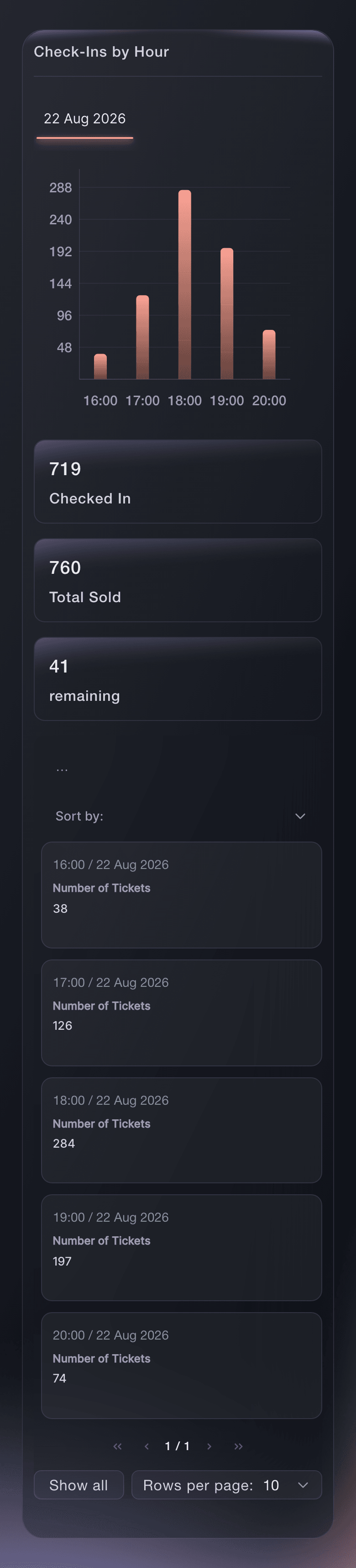
Your door team scans passes on their own phones with the Entry Fairy app, each with a Door Staff login that opens the scanning app and nothing else, so every admission carries a name. Follow arrivals by hour on each day of the convention, so you know when the queue peaks and when to move volunteers from the doors to the hall. Sell walk-up passes from the same app, for cash or a tap of a card or phone.

When a fan says their pass was already scanned, find them by name and see when and by whom. The refused scans report shows every pass turned away at the door, with the reason, the entrance and the hour, so a problem at one entrance is fixed before day two.

Fans plan their weekend before they arrive. Put your timetable on your event page and your own website, where fans star the panels they want for their own schedule and add them to their calendar, and publish your site map so they find the hall, the stages and the toilets. In the attendee companion on your event page and the buyer app, fans keep their personal agenda, get your push messages on the day and claim lost property. Email the holders of one pass type when a panel moves.

  • Entry Fairy app: scan passes on your door team's own phones
  • Arrivals by hour: for each day of the convention
  • Walk-up sales: cash or a tap of a card at the door
  • Timetable for fans: fans star panels for their own schedule
Ticket Fairy hourly check-in report with arrivals by hour on event day

How Convention Teams Use Ticket Fairy

  • A Comic Con Weekend

    Weekend, day and VIP passes sit in categories by day, and each guest's photo ops sell with a time slot. Once-a-day entry stops weekend passes going back over the barrier. The hourly arrivals report shows the Saturday peak, so volunteers move from the hall to the doors at the right time.

  • An Anime and Cosplay Convention

    Fans who comment under the guest announcement and follow the account join the follower-only presale. Cosplay competition entries arrive on the convention's own form, and the judges get guest tickets on the pass they need. Packs of friends compete for a meet and greet with the headline guest.

  • A Tabletop Games Convention

    Publishers book exhibitor booths online with a deposit, and the artist alley fills from one list of applications. Each publisher's booth staff record the players they demo to with lead scanner links. Next year's booths sell to exhibitors who saw their results.

  • A Science Fiction Fan Weekend

    A volunteer-run convention takes volunteer applications on its own page and fills every shift with offers to the people who fit. Special guests' flights and hotels are advanced from one link per agent. The convention copies its setup into next year's edition with the rooms, teams and volunteer shifts already in place.

  • A Family Fan Day

    Child tickets sit beside adult day passes, and parking sells as an add-on in the same order. Door staff scan with their own phones, and walk-up families pay by card at the door. Parents plan the day from the timetable on the event page.

  • A Convention That Tours Several Cities

    Each city's convention starts as a copy of the last one, with its passes, rooms, teams and volunteer shifts in place before the new guests are announced. Every city sells under the same brand, so the team can invite fans who bought in one city to the next. The team compares each city's arrivals and booth sales to plan the following year's tour.

Get this page as a PDF Read it later or share it with your team. We email you a link to the PDF.
What to put in your PDF

We will email you this deck. We may also email you now and then about Ticket Fairy features that can help your events. You can unsubscribe at any time with one click.

Everything You Need to Sell and Run Your Convention

More about ticketing for Conventions & fan events

Questions About Ticket Fairy for Conventions & fan events

Conventions & fan events

No. The scanner counts the scans in the 24 hours before each new scan, so the window moves with the pass.

With the online deposit set to 100, the whole booth price is held on the exhibitor's card and charged once they pass the identity check. Set a lower percentage to take a deposit online and collect the rest yourself.

The follower-only presale runs on Instagram, so connect your account first. Fans without Instagram can join through pre-registration on your event page, and both lists can buy before the public on-sale.

Yes. Sell each one as an add-on with its own price and stock, or as a ticket type with time slots so fans pick a time when they buy. Add each photo op, signing and meet and greet to your schedule beside the guest's panels, so your team sees the whole day.

No. Booth staff work from a lead scanner link on their own phone or tablet and scan with a USB or Bluetooth barcode scanner, or enter the code printed on the pass. Each exhibitor sees their leads, follow-ups and results on their own page, and each trader sees their pitch, invoice and terms on theirs.

Volunteers must be 16 or older by default. A volunteer under 18 adds a parent or guardian, who agrees too.

The Entry Fairy app needs an internet connection to scan passes, so check the connection at each entrance before the doors open.

Compatible Android phones, in the country of the payment processing account the event uses. The option appears once the event has a venue and your business address or the venue's address is complete. Cash sales work on any phone that runs the scanning app.

No. Fai can set up prizes and presales, draft your application forms, decide trader and volunteer applications with you, and draft exhibitor follow-ups, and she shows you each change and waits for your approval before anything is saved or sent.

Sell more tickets. Build the crowd that comes back.

Start Selling Tickets Online

Sign up without a credit card and build a test event before you commit. Go on sale in minutes when you are ready.

No monthly subscription required for ticketing
Start selling tickets immediately
Ticketing tools included in the service fee
Get Started Talk to Fai Now

Ask Fai, our AI assistant, about Ticket Fairy’s features, pricing and how it could work for your event.

No credit card required

Book a demo call

See the referral model that drives 20% more ticket sales on average, learn which campaigns sell tickets, answer buyers faster and keep queues moving.

45-Minute Video Call
Pick a Time That Works for You