1. Solutions
  2. By event type
  3. Esports & gaming

Fill Your Arena and Get Every Player Ready for the First Match

Sell weekend, day and finals passes to your spectators, with jerseys and merchandise in the same checkout. Take player and team sign-ups on your own form, pick your field, and send each player a ticket from a place spectators cannot buy. See how many tickets your stream sells, find the streamers who already bought a ticket, give team staff, casters and crew their passes, and count players and spectators apart as they arrive.

  • Spectator passes and merchandise sold together
  • Every player signed up, accepted and ticketed
  • Your stream and the streamers in your crowd selling tickets
Ticket Fairy Tracking Links page for an event, one row per link, with the clicks, orders and revenue each one earned

Sell Spectator Passes and Merchandise Together

Build the tournament from the Convention template and rename its weekend, day and VIP passes for your spectators, such as Weekend spectator and Finals day. The template puts a name on every ticket, so each spectator's pass carries their own name. Sell team jerseys and peripheral bundles as add-ons in the same checkout, offered only with the spectator passes they belong to. Release your passes in tiers that open as the one before sells out, so your earliest fans get the best price.

A weekend pass suits the fans who follow the whole bracket, and a finals-day pass brings in the casual fan who wants the matches that decide the tournament. A one-day tournament keeps the day pass and drops the weekend pass. Limit each merchandise add-on to the spectator passes it belongs with, so the Player ticket type is never offered merchandise meant for the crowd.

Names on every pass mean the person at the door is the person who bought. Turn on face-value resale on your own event page, and a fan who cannot come passes their seat to another fan, who gets a pass in their own name while the old code is refused at your doors.

  • Convention template: weekend, day and VIP passes to rename
  • Named passes: every spectator's own name on their pass
  • Merchandise add-ons: jerseys and bundles sold with the pass
Ticket Fairy add-on form with Limit to Certain Ticket Types Only turned on and the chosen ticket types

Sign Up Players and Pick Your Field

Open a sign-up form on your event that asks for each player's gamer tag, team name and the game they enter, and let a team captain add a section for every member of the team. Every sign-up arrives in one list with a column for each answer, and you accept or decline each one with the email you chose. Create a Player ticket type that never appears on your public event page, and send each player you accept a ticket with their own name on it.

Every form starts with an email question, which is where your decision email goes, so no player is left wondering whether they made the field. An invited or free field suits a hidden Player ticket type that you send yourself. An open bracket with an entry fee leaves the Player ticket type on sale, so each player pays for their own place at checkout and your field fills without an invoice in sight.

Each player's ticket carries their own name and a barcode for the door, and the issued list shows who you have sent. Press and guest casters get their tickets the same way on a spectator pass, so everyone who comes through the door is counted against the right ticket type.

  • Sign-up forms: gamer tags, teams and games in one list
  • Hidden player places: never shown to spectators
  • Player tickets: each with the player's own name
Ticket Fairy Create a form dialog with a box to describe the form for Fai and the ready-made forms to start from

See How Many Tickets Your Stream Sells

Create a tracking link for your channel and put it in your stream panel and chat, and the tracking links table shows the clicks, orders and ticket revenue your stream brought in. Make one for each co-streamer and partner you want to compare. Announce the on-sale on stream, with your tournament page scheduled to go public at that minute. Reward fans who bring their friends with cash back on their ticket and prizes you choose, and open a presale to the fans who follow you on Instagram.

A tracking link measures a placement and pays nobody, so it suits your own channel, a partner's banner and a newsletter. When a creator should earn from what their viewers buy, invite them to your sales team with a promoter link, and you see every ticket their viewers buy beside your own channels.

Fans who follow your Instagram account can join a followers-only presale, and fans without Instagram register on your event page, so both lists buy before the public on-sale. Each buyer then gets a personal referral link, and the friends who buy through it earn them back part of their ticket price. Set up a workflow on your Instagram account, and every fan who comments your trigger word under a clip from the stream gets a personal invitation link in a private message, day and night, so the excitement after a big match turns into ticket sales while your team sleeps.

  • Tracking links: clicks, orders and revenue for each stream
  • Scheduled on-sale: goes public at the minute you announce
  • Referral rewards: cash back and prizes for bringing friends
Ticket Fairy Tracking Links page with the Create Tracking Link dialog open above the existing links

Find the Streamers Already Coming to Your Tournament

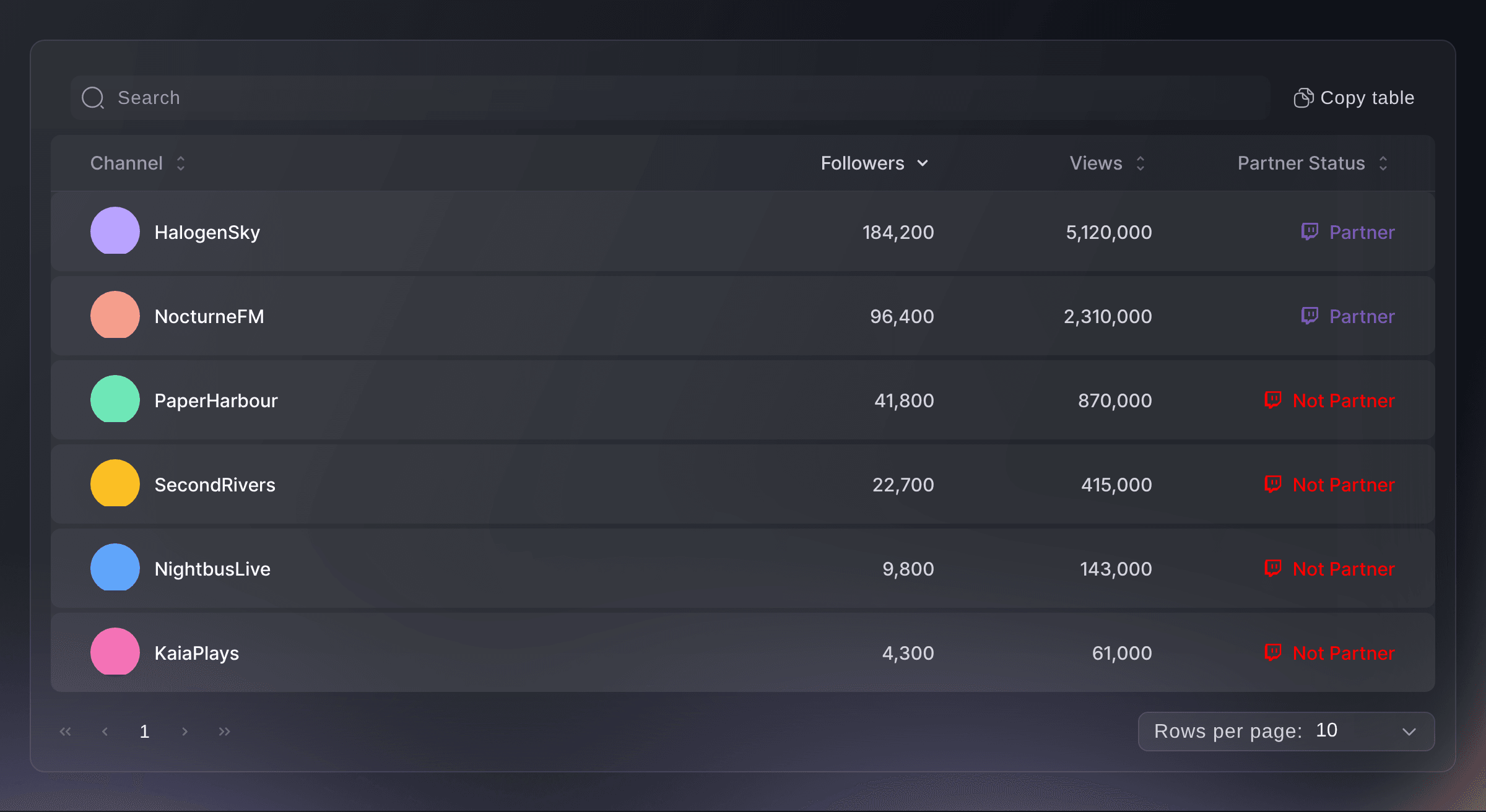
Some of your spectators stream to audiences of their own. The Gaming report lists the Twitch channel of each paying buyer who connected Twitch when they bought, with its followers, views and partner status, and the biggest channel comes first. Open a channel from its name to see the streamer's content, then offer the ones who fit your tournament a promoter link or a guest ticket in return for a shout-out on stream.

New channels join the report as more buyers complete their orders, so the list is at its best just before an announcement or a final release. Sort it, search it and copy the table into a spreadsheet, and your marketing team has an outreach list of creators who already want to be there.

Demographics show the age bands of your buyers, and your brand's Geographics report shows the cities they come from, so you can see whether a regional qualifier draws the local scene or fans from across the country. Plan your next venue and your ad spend from where your fans really live.

  • Gaming report: the Twitch channels of your paying buyers
  • Partner status: which channels are Twitch partners
  • Promoter links: see the tickets each streamer's viewers buy
Ticket Fairy Gaming report listing six Twitch channels with their followers, views and partner status

Give Teams, Casters and Crew Their Passes

Create a pass type for each group, such as Team staff, Caster and Production, and send each person a pass that scans at the same doors as a ticket without taking one from your allocation. With accreditation, each pass opens only the zones and days you choose, such as the players' area or the production desk, and your staff gate checks each pass in and out. Outside teams, such as a production company or a team organisation, name their own people for the passes you give them.

A multi-entry pass lets team staff and casters go in and out between matches up to the number of uses you set, and the same app scans passes and tickets, so your door team needs one tool. A team organisation that brings its coach, analyst and manager names them from its own link, and you see who is still missing a name before the doors open.

Your staff gate refuses a pass for the wrong zone or the wrong day and shows the reason, and the list of who is inside each zone tells you a team's coach is in the players' area before their match. Approval rules send each request for a production pass to the person who signs it off.

  • Multi-entry passes: for team staff, casters and crew
  • Zones: the players' area and production desk on the passes that need them
  • Outside teams: name their own people for passes
Ticket Fairy Zones and pass types dialog with Backstage, Production and Artist village zones and a crew wristband for two zones on two days

Check Players and Spectators In Fast

Put the Entry Fairy app on your door team's phones, and each person signs in with their own Door Staff login, so every admission carries a name. On the day, the check-in report counts players apart from spectators, so you know how many players are in before the first match. Sell walk-up spectator passes from the same app the door team scans with. Undo a scan made by mistake, or ask Fai how many are in and whether a player has arrived.

A Door Staff login opens the scanning app and nothing else in your dashboard, so a volunteer on the door never sees your sales or your players' details. When a ticket is refused, the reason shows on the phone and in your dashboard, so a player with the wrong ticket is sorted out at the desk without holding up the queue.

Walk-ups pay with cash or a tap of a card or phone on the door team's phone, and their passes count in the same check-in report. Hourly arrivals tell you when the crowd peaks, so next year you open the doors and staff the merchandise stand at the right time. Your tournament's sales, arrivals and players stay on the same event, so the debrief after the finals starts from one set of figures.

  • Door Staff logins: the scanning app and nothing else
  • Players counted apart: arrivals by ticket type
  • Door sales: walk-up passes from the same app
Ticket Fairy Add Team Member dialog with the Door Staff permission level for the scanning app

How Esports and Gaming Events Use Ticket Fairy

  • A LAN Party Weekend

    A LAN party sells weekend passes with a seat at the tables and a hidden Player ticket type for invited teams. Players are counted apart from visitors at the door, and organisers know every station is filled before the first match.

  • A University League Final

    A student league takes team sign-ups on a form with every member's gamer tag, accepts the qualified teams and sends each player a named ticket. Free spectator passes still give every guest a barcode for the door.

  • A Fighting Game Open Bracket

    A community tournament leaves the Player ticket type on sale at the entry fee, so players register by buying their place. Each streamer in the community gets a tracking link, and the table shows which stream brought in the most entrants.

  • Arena Finals for a Publisher

    A publisher's finals sell weekend, finals-day and VIP passes in release tiers with jerseys as add-ons. Team organisations name their own staff for passes, and the production company's crew get passes for the production desk only.

  • A Free Community Cup

    A community cup runs with free spectator seats and a free hidden Player ticket type, so every guest still has a barcode for the door. Volunteers on the door sign in with their own Door Staff logins, and the organiser asks Fai how many players are in before calling the first round.

  • A Gaming Convention Recruiting Streamers

    A gaming convention sorts its Gaming report by followers and offers the biggest channels promoter links. Their viewers buy through the links, and the team sees which stream sold the most tickets before planning next year's creator deals.

Get this page as a PDF Read it later or share it with your team. We email you a link to the PDF.
What to put in your PDF

We will email you this deck. We may also email you now and then about Ticket Fairy features that can help your events. You can unsubscribe at any time with one click.

Everything You Need to Run Your Tournament

More about ticketing for Esports & gaming

Questions About Ticket Fairy for Esports & gaming

Esports & gaming

Yes. Price the Player ticket type at your entry fee and leave it visible, so each player buys their own place at checkout. A hidden Player ticket type suits a free or invited field, where you send each place yourself.

Ask for the team name and every member's gamer tag on the sign-up form, then send the team's tickets on the Player ticket type once you accept them. One email address receives every ticket in a batch, so send each player their own when they arrive separately.

No. A multi-entry pass scans at the same door as a ticket, lets its holder in and out up to its most uses, and does not take a ticket out of your allocation.

Buyers with a paid order who connected Twitch when they bought. The followers, views and partner status are the figures Twitch gave at that moment, so open the channel to check its current following. The report shows ten channels a page.

No. A tracking link counts clicks, orders and revenue and pays nobody. To reward a streamer for the tickets their viewers buy, add them to your sales team with a promoter link.

Yes. The follower-only presale runs on Instagram, so connect your account first. Fans without Instagram can join through pre-registration on your event page, and both lists can buy before the public on-sale.

Every sign-up form asks for an email address, and the question cannot be removed. When you accept or decline a sign-up, the email you chose goes to that address, and an accepted player then receives their named ticket.

Yes, when you turn on face-value resale. The new holder gets a pass in their own name and the old code stops working. Outside India, each resale carries a 10% resale fee, charged separately to the seller's original card, and the seller gets the ticket price back in full.

No. Fai answers questions such as how many players are in, and she drafts emails and changes for a member of your team to approve, change or turn down before anything is saved or sent.

No. The Entry Fairy app needs an internet connection to scan tickets, so check the connection at each entrance before the doors open.

Sell more tickets. Build the crowd that comes back.

Start Selling Tickets Online

Sign up without a credit card and build a test event before you commit. Go on sale in minutes when you are ready.

No monthly subscription required for ticketing
Start selling tickets immediately
Ticketing tools included in the service fee
Get Started Talk to Fai Now

Ask Fai, our AI assistant, about Ticket Fairy’s features, pricing and how it could work for your event.

No credit card required

Book a demo call

See the referral model that drives 20% more ticket sales on average, learn which campaigns sell tickets, answer buyers faster and keep queues moving.

45-Minute Video Call
Pick a Time That Works for You