1. Solutions
  2. By event type
  3. Fairs & shows

Welcome Every Family Through the Gate on Every Day of Your Fair

Price the gate for adults, children and families, sell a season pass that lets its holder in once a day, and add ride wristbands, parking and grandstand seats to the same order. Clubs and schools hand out their own exhibitor tickets, vendors apply and pay for their pitch on their own page, and your crew get one pass for every day. Your entrance team scans on their phones, sells to walk-ups at the gate and hands every visitor the right wristband, while you follow arrivals and the weather from your own phone.

  • Families priced and through the gate fast
  • Rides, parking and grandstand seats sold with admission
  • Exhibitors, vendors and crew in every morning
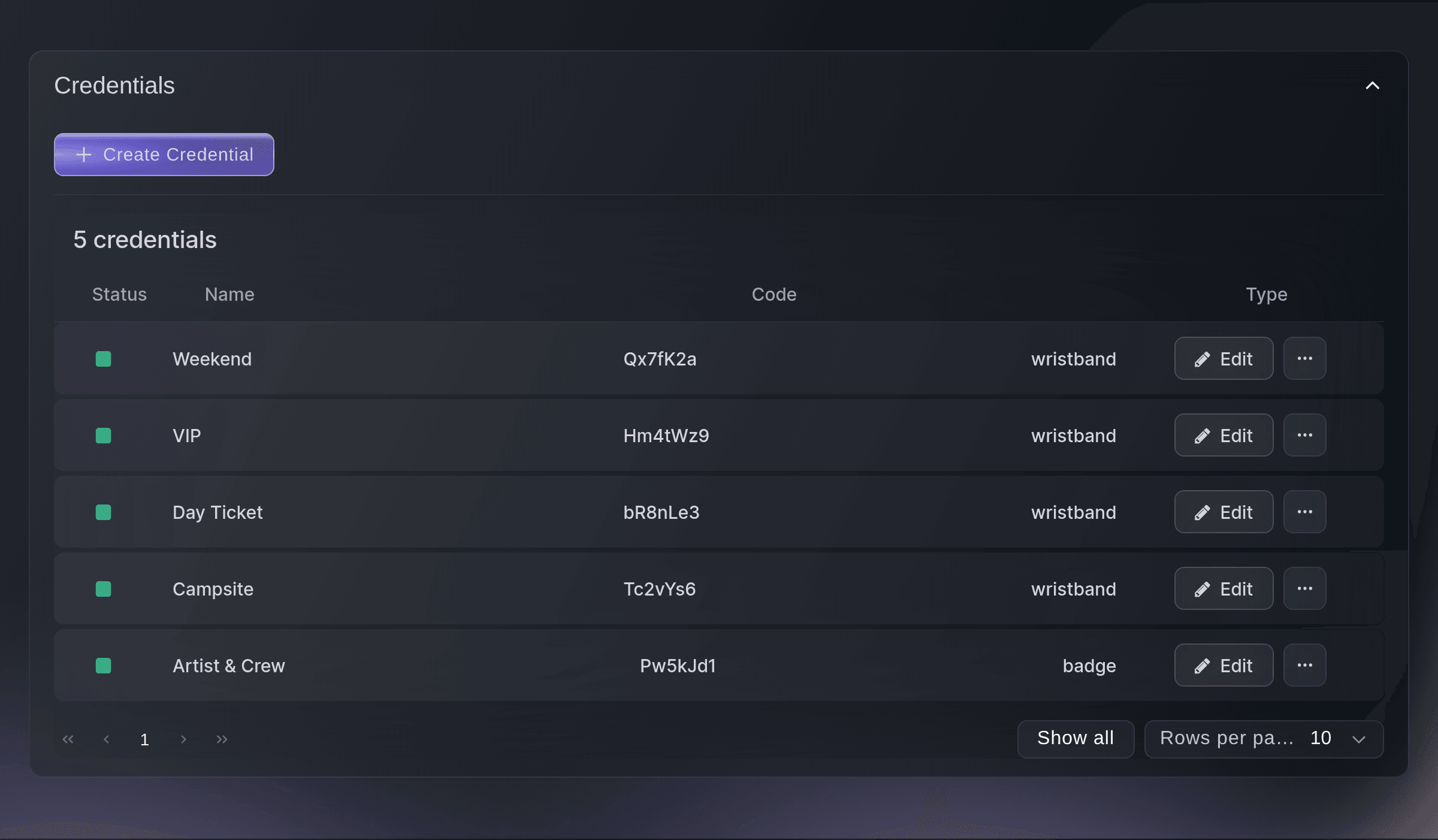
Ticket Fairy Credentials list with weekend, VIP, day ticket and campsite wristbands and a crew badge

Price the Gate for Every Family

Start from the Exhibition template and say yes to a family ticket, and it builds Adult, Concession and Family admission with no ID or date of birth asked. Rename Concession to the rate you offer, such as Child or Senior, and say in the family ticket's description who it admits. Choose a season pass on top for visitors who come back, and give it a once-a-day scan rule so it lets its holder in once a day for as long as the fair is open. Schedule your fair page to go public at the minute your announcement promised, in the fair's own timezone.

A family ticket is one ticket priced for a group, so it carries one barcode and scans once, which keeps the entrance moving on the busiest morning. Add a second concession rate when you price children and seniors differently. Nobody is asked for ID or a date of birth at checkout, so a parent buys for the whole family on a phone in the car park.

A season pass suits the visitors who come back on several days, and the once-a-day rule stops one pass from letting a whole group in on the same morning. A day ticket keeps the standard rule of one entry, and you can allow more scans in a day when visitors leave the grounds and come back. Duplicate last year's fair, and the copy moves the sale windows and door times to the new dates.

  • Exhibition template: adult, concession and family admission
  • Family ticket: one barcode for the whole group
  • Season pass: lets its holder in once a day
  • Scheduled on-sale: goes public at the minute you announced
Ticket Fairy Exhibition template with the season pass choice and the ticket list

Sell Rides, Parking and Grandstand Seats With Admission

Create an add-on for each extra, such as an unlimited ride wristband, a parking pass or a seat at the grandstand show, with its own price and stock. Visitors add them in the same checkout as their admission, and a grandstand seat closes to buyers when the show is full while admission stays on sale. Match each wristband to the tickets and add-ons that get it, and as each ticket scans, the app shows your entrance team which band to fasten on.

An add-on works when the extra belongs to a day at the fair, such as a ride wristband, a parking pass or a seat at the evening show. A grandstand concert that people travel to on its own suits an event of its own, with its own page and its own on-sale. Limit an add-on to the tickets it belongs with, so each buyer sees only the extras that fit their ticket.

Wristbands follow what each visitor bought, so your ride operators only need to check the colour on a wrist. When you cap how many visitors arrive in each part of the day, give admission arrival times: visitors pick a date and a time, and a full slot closes while the others stay on sale, which spreads the queue across the morning.

  • Add-ons: rides, parking and grandstand seats
  • Wristbands by ticket: the right band shown as each ticket scans
  • Timed entry: arrival times with their own capacity
Ticket Fairy Create Add-On form with the name, price, stock, a description and four switches

Bring In Exhibitors, Clubs and Schools Every Morning

Take exhibitor applications on your own form and accept or decline each one. Give each club, school or association that shows at the fair an allocation of exhibitor tickets that never appear on your public page, and the person you name adds their own exhibitors through one link with no login to your event. Upload your crew and long-standing exhibitors from a spreadsheet as passes that carry them through every day of the fair without taking a ticket from your allocation. Everyone scans in at the same entrances as your visitors.

A hidden Exhibitor ticket type with a daily scan rule lets one exhibitor ticket in on every day of the fair. The youth club leader, the poultry club secretary or the head of a school choir hands out their own share of those tickets and cannot go past the number you set, so your office stops typing names from emailed lists in the week before opening.

Every application arrives in one list with the same questions answered, and once you accept an applicant, their row offers you a guest ticket or an invitation to buy. A cattle breeder, a craft guild and a marching band can each get the entry that fits them, and the people you upload as passes go in and out as often as the work needs.

  • Application forms: your own questions for exhibitors
  • Club and school allocations: each names their own exhibitors
  • Passes for every day: uploaded from a spreadsheet
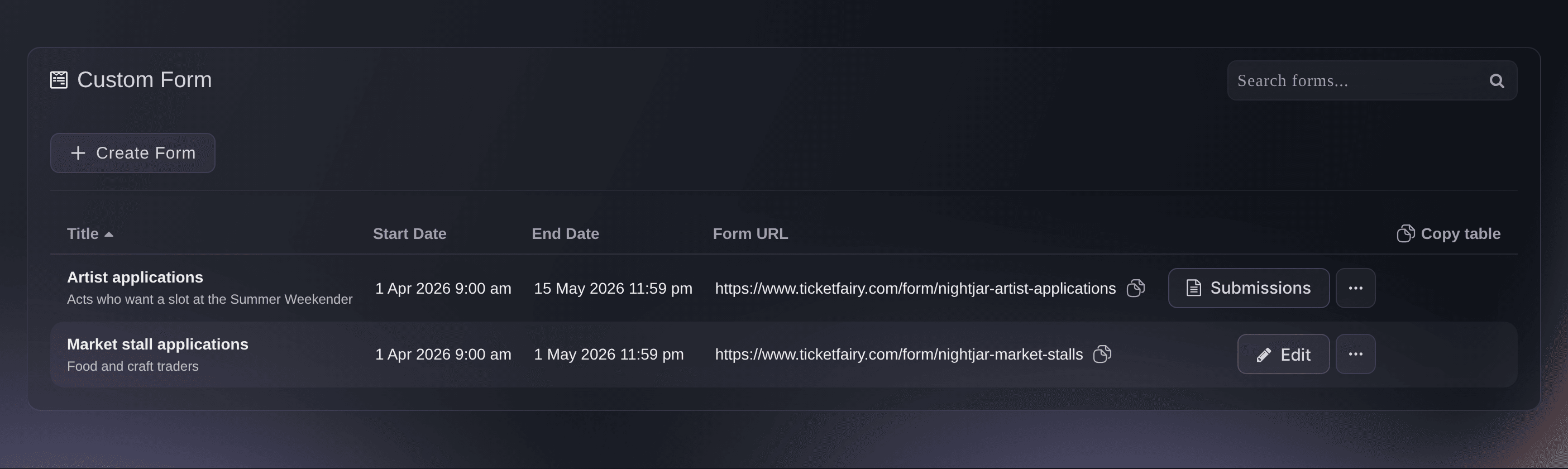
Ticket Fairy Forms page with two application forms, their dates and their public addresses

Give Every Concession Stand a Pitch and a Page of Their Own

Concession stands and craft sellers apply from their phone on your public application page, which shows your pitch fees, and you approve, waitlist or decline each one. Each vendor you approve gets their own page to accept your terms, pay their invoice, book a load-in time before the gates open and name their staff. Drag each vendor onto a pitch on your site map, give your electrician a power sheet for every zone, and invoice your share of each vendor's takings after the fair from the reports they send.

The funnel cake stand that needs power and water and the woodcarver who needs neither each show what they need on the Pitches view, so your electrician plans the cable runs from one sheet. A pitch fee can include staff passes, and the vendor names their own staff, who scan in at the same entrances as your visitors.

A fair that comes back to the same field each year does not start from a blank map. Copy your site map, pass types and forms into next year's fair with the dates moved, so the work of the first year carries into the next.

  • Vendor applications: your fees and questions on your own page
  • Pitches on your map: with a power sheet for each zone
  • Share of takings: invoiced from the reports vendors send
Ticket Fairy Pitches view with each trader's pitch, the amps of power they need, whether they need water and the power sheet links

Follow Every Day of the Fair as It Happens

Your entrance team scans tickets on their own phones and sells to walk-ups from the same app, with cash or a tap of a card or phone. Open Check-In from your phone to see arrivals by hour on each day, so you know when the morning rush comes and when it has passed. Weather for your fairground sits under your sales, with the forecast for each day and what your dates are usually like.

Each person at the entrance signs in to the scanning app with their own Door Staff login, so every admission carries a name and the login opens nothing else in your dashboard. The hourly report covers the whole fair, so read it for when to add staff at the gates, such as the morning rush, the quiet after lunch and the second wave before the grandstand show.

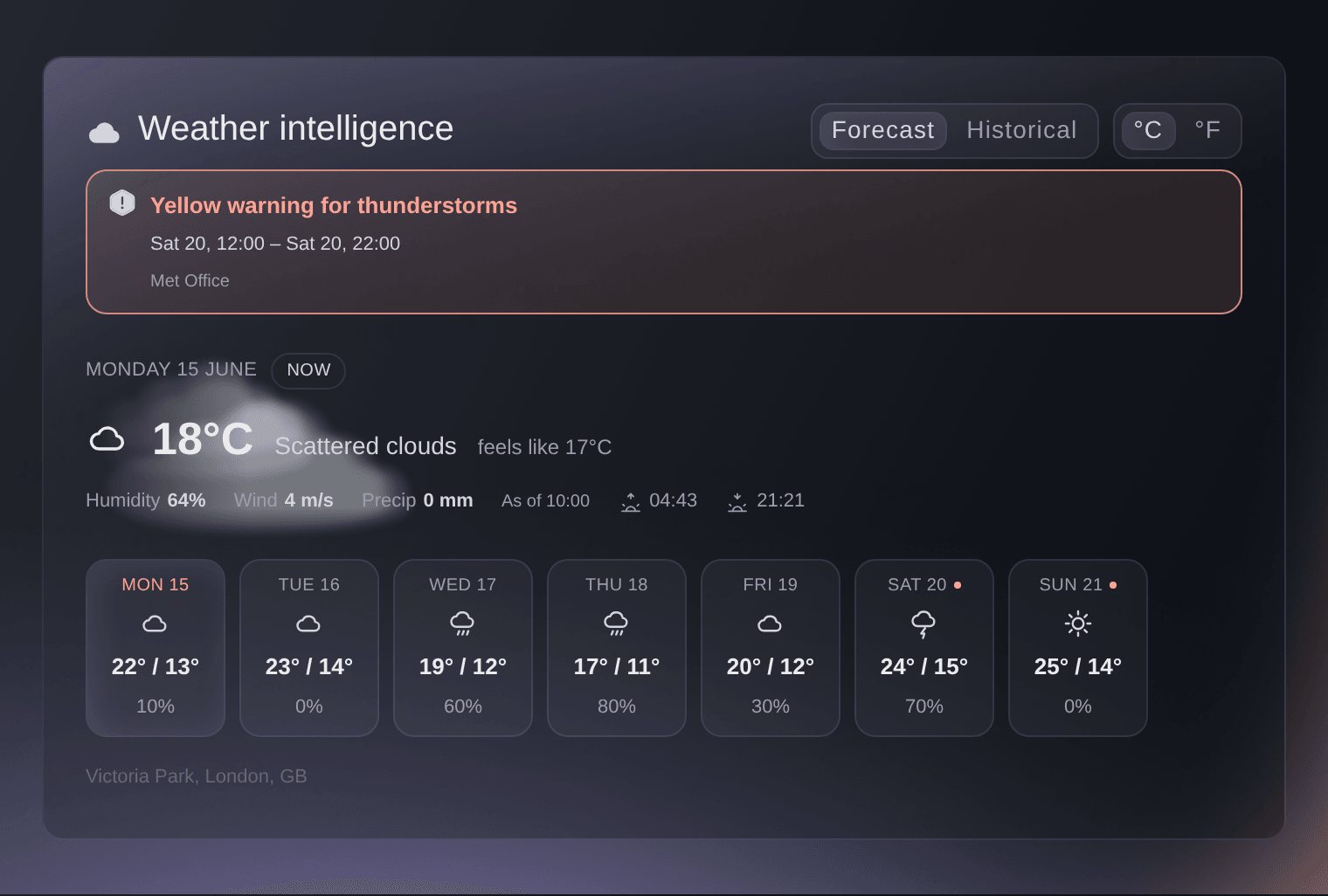
The weather card warns you when the forecast turns, shows the conditions at your fairground now, and switches to the usual highs, lows and rain for your dates. Ask Fai whether rain is coming on Saturday, and move the petting zoo under cover or open the overflow car park before the first car arrives.

  • Gate sales: cash or tap to pay from the scanning app
  • Hourly arrivals: for each day of the fair
  • Weather: the forecast and the usual weather for your dates
Ticket Fairy Weather intelligence card on the Performance page, with a thunderstorm warning, the conditions at the venue now and the week ahead

Keep Your Fairground Safe and Your Team on Shift

Plan shifts for your gates, car parks and information booths by team and hour, and Fai suggests who fits each open place from the people who work your fair. Draw your fairground on the site map, and Check my map tells you what is still missing for the crowd you expect, such as first aid, water, ways out and toilets. Anyone on your team can report an incident from their phone, and Fai drafts a risk register for an outdoor event with a score for each risk.

Your control room runs the fair from one live log, and live counts for each zone from the scans at your gates warn you before an area such as the grandstand reaches its safe capacity. Give the fire service a private link to the map with the fire lane and the exits marked, so the first conversation on site starts from the same plan.

Lost property is logged as it is handed in, with lost reports taken at the information booth and Fai spotting likely matches, so the parent who calls about a lost coat on Sunday gets an answer. Volunteers see their shifts and the day sheet on their own page, and the hours they worked come to you for approval at the end of the fair.

  • Shifts and offers: gates, car parks and booths covered by hour
  • Check my map: first aid, water, ways out and toilets
  • Incidents and risks: reported from a phone, with a risk register
  • Lost property: handed-in items matched to lost reports
Ticket Fairy Check my map dialog with first aid, water, ways out and toilets still to add

How Fairs and Shows Use Ticket Fairy

  • A County Fair Over a Long Weekend

    A county fair sells adult, child and family admission with a season pass on top. Families add ride wristbands and parking in the same order, and each wristband is shown on the entrance team's phone as the ticket scans.

  • A Renaissance Faire Running Every Weekend

    A renaissance faire opens on weekends across a whole season. Regulars buy a season pass that lets them in once a day, day visitors pick an arrival time, and the costumed cast and crew scan in on passes uploaded from a spreadsheet.

  • A State Fair With Grandstand Concerts

    A state fair sells grandstand seats as add-ons with admission, so each show closes to buyers when its seats are gone while the gate stays on sale. The hourly report shows when to add staff before the evening show.

  • An Agricultural Show With Clubs and Schools

    An agricultural show gives each young farmers' club and school an allocation of hidden exhibitor tickets. Each club leader names their own exhibitors from one link, and the show office no longer types names from emailed spreadsheets.

  • A Christmas Fair With Timed Entry

    A Christmas fair caps how many visitors arrive each hour, so families pick an arrival time and the busiest slots close while later ones stay on sale. Craft sellers apply for pitches and pay their invoice from their own page.

Get this page as a PDF Read it later or share it with your team. We email you a link to the PDF.
What to put in your PDF

We will email you this deck. We may also email you now and then about Ticket Fairy features that can help your events. You can unsubscribe at any time with one click.

Everything You Need to Run Your Fair

More about ticketing for Fairs & shows

Questions About Ticket Fairy for Fairs & shows

Fairs & shows

A family ticket is one ticket priced for a group, so it carries one barcode and is scanned once. Say in its description how many adults and children it admits, so buyers and your entrance team read the same rule.

No. The app counts the scans in the 24 hours before each new scan, so the window moves with the pass.

Yes, if you allow it. Enter a higher number of scans for each day on the ticket type, and a visitor can go out to their car and back in up to that number.

An add-on works when the show is part of a day at the fair: visitors buy their seat in the same checkout as admission, and the stock closes when the seats are gone. A show you sell to people who do not visit the fair suits an event of its own.

Upload them as a CSV of first name, last name and email address under Upload Recipients, and each one receives a multi-entry pass. The most uses on a pass cover the whole fair, so set it high enough for every trip in and out.

Yes. Give the admission ticket type time slots, and it offers a calendar of dates and arrival times, each with its own capacity.

Compatible Android phones, in the country of the payment account the event uses. The option appears once the event has a venue and your business address or the venue's address is complete. Cash sales work on any phone that runs the scanning app.

No. Their link does one job: handing out the exhibitor tickets you gave them, up to the number you set. You can raise or lower that number at any time.

Yes. Give them their own allocation, and they hand out tickets from one link with no login to your event. A partner hands out only the ticket types you already sell, up to the number you set for each.

No. The Entry Fairy app needs an internet connection to scan tickets, so check the connection at each entrance before the gates open.

Sell more tickets. Build the crowd that comes back.

Start Selling Tickets Online

Sign up without a credit card and build a test event before you commit. Go on sale in minutes when you are ready.

No monthly subscription required for ticketing
Start selling tickets immediately
Ticketing tools included in the service fee
Get Started Talk to Fai Now

Ask Fai, our AI assistant, about Ticket Fairy’s features, pricing and how it could work for your event.

No credit card required

Book a demo call

See the referral model that drives 20% more ticket sales on average, learn which campaigns sell tickets, answer buyers faster and keep queues moving.

45-Minute Video Call
Pick a Time That Works for You