1. Solutions
  2. By event type
  3. Festivals

Sell Out Your Festival and Run Every Stage on Time

Sell day tickets, weekend tickets, camping and payment plans on one event page, and let your buyers bring their friends for a share of their ticket back. The same event then carries your line-up, advances, shifts, passes, traders and run of show, so your ticketing team and your production team work from the same facts. Fai drafts the admin across all of it, and you approve each change.

  • Every day, weekend and camping pitch sold from one page
  • An on-sale your fans help you fill
  • Acts, crew, traders and stages ready for the gates
Ticket Fairy Compared with last time for a summer festival, with tickets sold ahead of last year and the sales and arrivals charts

Sell Every Day, Weekend and Camping Pitch From One Page

Start from the multi-day festival template, which asks for your dates and stages and lays out day and weekend tickets for you to price. Group them into a category for each day and one for the weekend, and put every price release inside, so fans compare the days first and the price second. Camping, parking and the shuttle sell as add-ons in the same checkout, offered only with the tickets they belong to. A fan who cannot pay for a weekend ticket today pays a deposit and the rest in instalments from the same card.

  • Day and weekend categories: each release opens by itself as the one before sells out
  • Camping and parking add-ons: offered with the ticket types they belong to
  • Payment plans: a deposit at checkout and the rest weekly or monthly
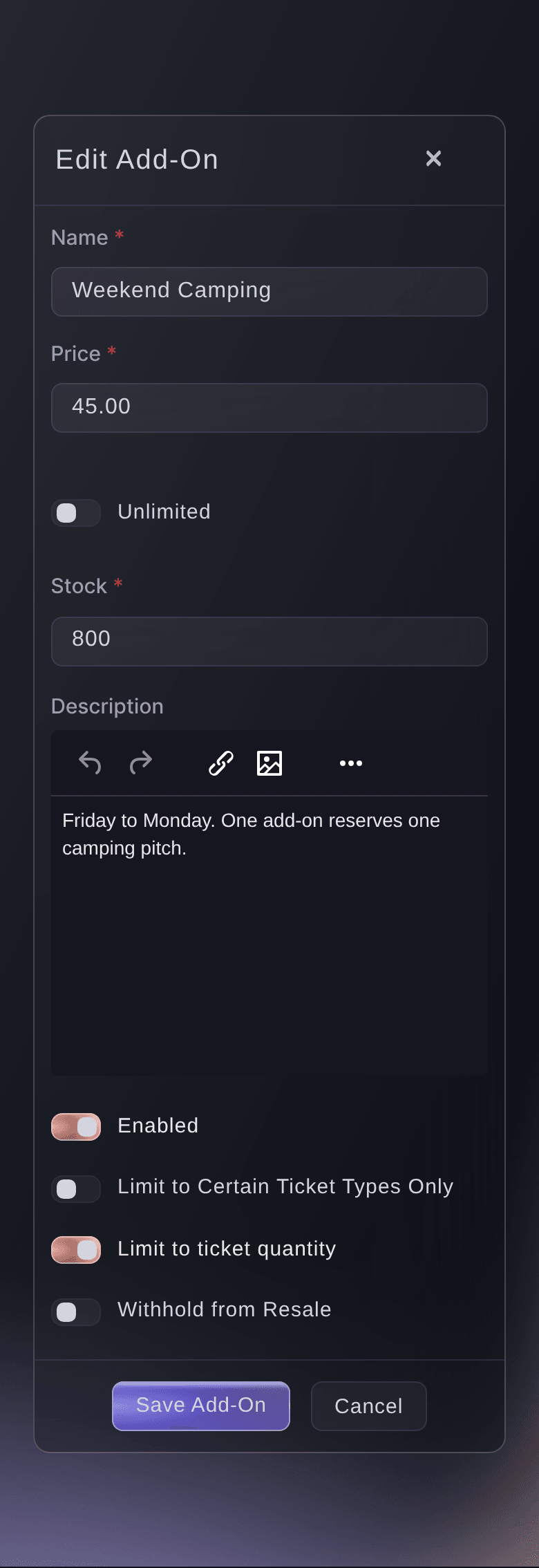
Ticket Fairy add-on form filled in for a weekend camping pitch

Fill Your On-Sale With Your Own Fans

Every buyer gets a personal referral link and earns back part of their ticket price, or all of it, as their friends buy through it. Events sell 20% more tickets on average with Ticket Fairy referrals. Take registrations from the day you announce, open a presale for registered fans before the public on-sale, and put prizes such as a VIP upgrade on the event for the fans who bring the most friends. Connect Meta and every other network you advertise on once for your brand, and give each post, partner and poster its own tracking link to see what each one sold.

  • Referral rewards: buyers earn back their ticket price when friends buy
  • Prizes and leaderboards: upgrades, merch and experiences for your biggest fans
  • Pre-registration presale: registered fans buy before the public on-sale
  • Tracking links and pixels: the tickets every ad, post and partner sold
Ticket Fairy Reward Targets with three tiers, the sales needed and the share of the ticket price each one returns

Open a High-Demand On-Sale and Keep Tickets With Real Fans

Schedule the event page to go public on the minute your announcement promised, and let each release open on its own date. Limit how many tickets one order and one customer account can hold, so the weekend tickets spread across more of your fans. Put a name on every ticket and keep resale on your own event page at face value, where the next fan on your waiting list gets the first chance to buy. Your door team then scans the new holder's ticket and the old code no longer gets in.

  • Scheduled on-sale: your page goes public on the minute you announced
  • Purchase limits and names: per order, per account and on every ticket
  • Face-value resale and waiting list: returned tickets offered to the next fan in line
Ticket Fairy Anti-Scalping/Fraud Settings card with names required and ticket resale turned on

Get a Dashboard That Arranges Itself Around Your Festival

Tick Festival as your event type, and your event shows the sections a festival runs on, grouped in the order a festival runs. Programme holds Artists, Applications, Schedule, Stages and Public line-up. Money and partners holds Budget, Contracts, Sponsors, Traders, Outside teams and Licences and certificates. Advance holds Advancing, Travel, Accommodation, Hire and shopping, Production, Kit and equipment, Site map and Accessibility, and Team holds Crew, Volunteers, Shifts, Accreditation, Press and Meals. Show day brings Run of show, Day sheets, Now and next, Desks, Arrivals and parking, Incidents, Risks and Lost property, and After the show brings Feedback. Tell Fai what you want help with, such as Line-up and advancing, Staff and volunteers or Food, drink and market traders, and your list shows the sections each one needs, with the group for where your festival is now open first.

  • Event type: ticking Festival decides which sections show and their names
  • Start with Fai: choose what Fai helps with and your list follows
  • Today page: the countdown to gates, your tasks and what changed
Ticket Fairy event type dialog with a tick box for each kind of event and Festival ticked

Book, Advance and Run Every Stage on Time

Send each act's agent or tour manager one advance link for travel, hotel, technical and guest list details, and Fai fills in answers from their emails and tour books for you to accept. Running-order checks catch the same act on two stages, a flight that lands after soundcheck and a set that runs past curfew, each with a fix you apply in one tap. Announce your line-up in waves, then call each stage from Now and next on the day, with every team working from its own day sheet. Anyone on your team can report an incident from their phone, and your control room runs the site from one live log, with live counts for each zone from the scans at your gates.

  • Advance links: the act's team fills in their own details, no account needed
  • Running-order checks: clashes, changeovers and curfew caught early
  • Now and next: how late each stage is running, live
Ticket Fairy Now and next for a festival with the Main Stage running late and the next acts on each stage

Have Your Crew, Volunteers and Traders Ready Before the Gates Open

Plan shifts by team and hour, and Fai lists who fits each open place from the crew and volunteers who work your events. Issue every pass with its zones, days and meals from your shifts, advances, traders and press list, and hand them out at your desk. Traders apply on your own page, pay their invoice and book a load-in time, and you drag each one onto a pitch on your site map. Place every camping and campervan plot on your site plan and check campers in at the campsite from a desk link. At the public gates, your door team scans tickets on their own phones and sees which wristband to hand over, including the campsite band for everyone who bought camping.

  • Shifts and offers: the first person to accept takes the place
  • Accreditation: zones, days and meals on every pass
  • Traders and pitches: applications, invoices and a place on your site map
  • Wristbands by ticket type: the right band shown as each ticket scans
Ticket Fairy rota for a festival Saturday with places filled and cover by team and hour
Get this page as a PDF Read it later or share it with your team. We email you a link to the PDF.
What to put in your PDF

We will email you this deck. We may also email you now and then about Ticket Fairy features that can help your events. You can unsubscribe at any time with one click.

Everything You Need to Sell and Run Your Festival

More about ticketing for Festivals

Questions About Ticket Fairy for Festivals

Festivals

Yes. Run the festival as one event with a ticket category for each day and one for the full weekend. Each day ticket can have its own doors-open and last-entry times, and a weekend ticket can let its holder in once a day.

Payment plans run on card payments in the currencies that support them. You choose the deposit, the number of payments and when the last one is due. If a buyer stops paying, the order is cancelled after the grace period you set and its tickets go back on sale.

The sections for artists, shifts, passes, traders and show day are part of the Event Operating System, and they appear when you tick Festival as your event type. Book a demo, and we set up your first festival with your team. Owners and admins set the event type, and you can change it at any time.

Until your team finishes or skips Start with Fai, every section shows. After that, your list shows the sections for what you asked Fai to help with, and any section that already has something in it. Add or pin any other section under More sections.

No. Budget and Contracts show only to people whose role can see your event's finances. Door staff get the scanning app and nothing in your dashboard.

The Entry Fairy app needs an internet connection to scan tickets, so check the connection at each gate before you open. The accreditation desk and the crew meal desk work without a connection and send what was done when it is back.

No. Fai drafts tasks, emails, advances and fixes, and a member of your team approves, changes or turns down each one before anything is saved or sent.

Sell more tickets. Build the crowd that comes back.

Start Selling Tickets Online

Sign up without a credit card and build a test event before you commit. Go on sale in minutes when you are ready.

No monthly subscription required for ticketing
Start selling tickets immediately
Ticketing tools included in the service fee
Get Started Talk to Fai Now

Ask Fai, our AI assistant, about Ticket Fairy’s features, pricing and how it could work for your event.

No credit card required

Book a demo call

See the referral model that drives 20% more ticket sales on average, learn which campaigns sell tickets, answer buyers faster and keep queues moving.

45-Minute Video Call
Pick a Time That Works for You