1. Platform
  2. Solutions
  3. By event type
  4. Food festivals

Food vendors chosen, placed and paying your share

Food vendors apply with their menus, and Fai, your AI teammate, ranks each against the food you want. You invoice your share of their takings.

You describe your menu in plain words: two pizza vans at most, plenty of vegan dishes and a dessert stall. Fai ranks each application against it with her reasons, and you approve Green Bowl and Sugar Shack and put Dough Bros, a 3rd pizza van, on the waiting list.

  • Your guests buy day tickets, token cards and parking in one checkout.
  • Fai ranks every vendor application against the menu you describe.
  • Your share of each vendor's takings is invoiced from their own reports.

Sell day tickets, tasting tokens and wristbands in one checkout

You start from the One-day festival template, or Multi-day festival for a weekend, and price day tickets in release tiers that step up as each one sells out.

Read more

A token card, a tasting wristband or parking sells as an add-on in the same checkout. Each add-on has its own price and stock, and you choose the ticket types it goes with.

A tasting wristband suits a festival where one price covers a sample from every stall. A token card suits one where guests spend tokens at the stalls they choose. Both are add-ons, offered only with the ticket types they belong to. Drink tokens can be an add-on too, so guests buy their food and beverage tokens in the same checkout as the day ticket. When an add-on sells out, it goes off sale and your day tickets stay on sale.

Chef demonstrations, a long-table lunch or a children's cookery class can each be a ticket type with its own price and allocation. When your site can only hold so many guests at once, the day ticket can have time slots, and each slot sells out on its own count. On the day, the check-in report groups arrivals by date, slot and ticket type.

  • Release tiers: day tickets that step up as each tier sells out
  • Tokens and wristbands: add-ons with their own price and stock
  • Time slots: when the site holds only so many at once
  • Festival website: vendors, menus and the day's schedule, with tickets on sale on the page
Ticket Fairy Time Slots dialog with a date range, weekdays, opening hours, slot length, price and maximum sales per slot

Choose the food vendors who make your menu

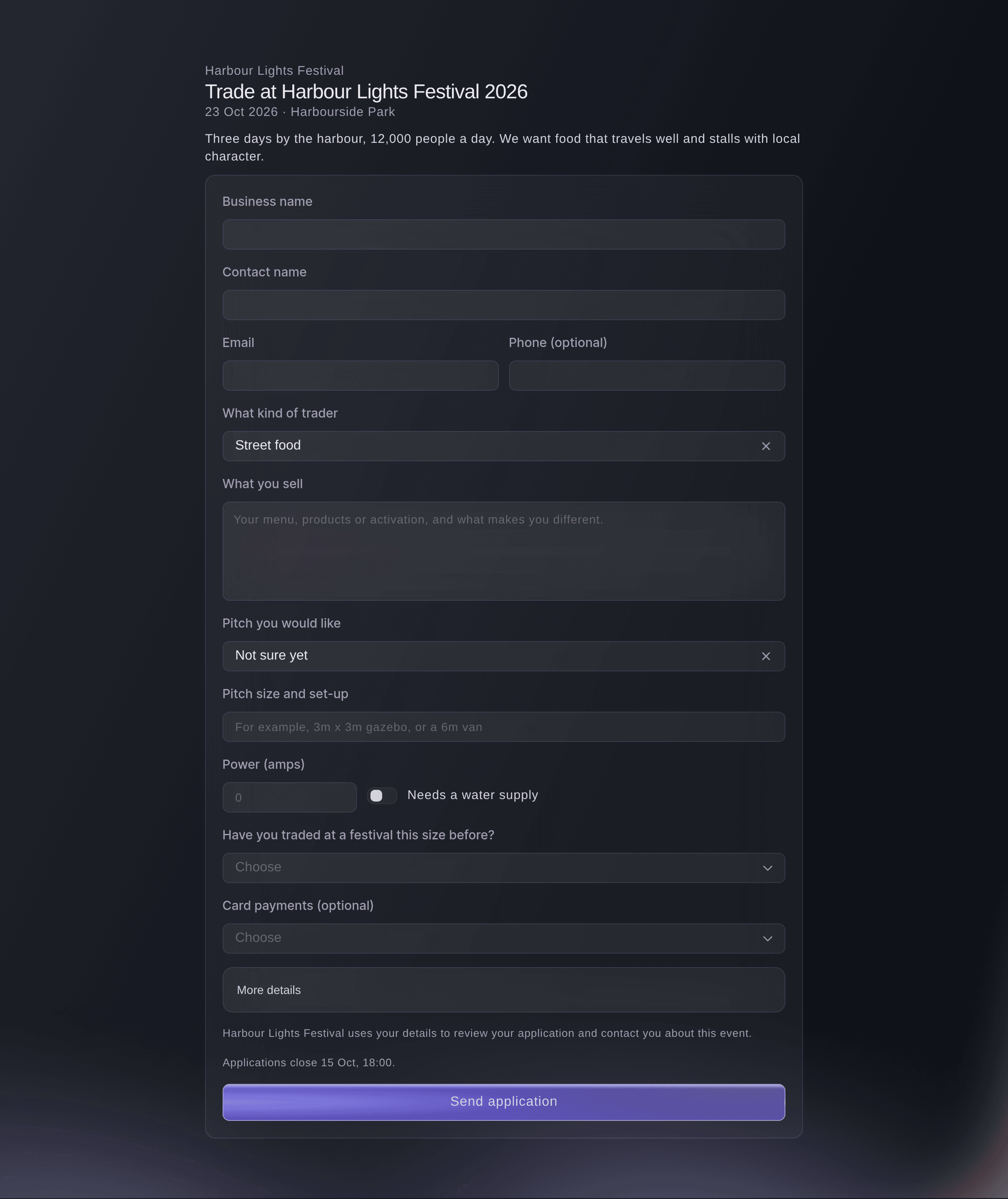
Food trucks, street food stalls and local producers apply from their phone on your public application page. It shows your pitch fees and extras such as power, water and an extra staff pass.

Read more

Fai ranks each application against the menu you want, with her reasons, and you approve, waitlist or decline each vendor. Ticket Fairy then sends each approved vendor an invoice and a page of their own to accept your terms and pay.

You describe your menu in plain words, such as no more than two pizza vans, plenty of vegan dishes and a dessert stall near the stage. Fai checks every application against it and explains each ranking. You still decide each vendor. The approval, waiting list and decline emails go out in your own wording. When a vendor drops out, the next one on the waiting list is one decision away.

Every vendor can send their food hygiene rating, public liability insurance and gas safety certificate. Fai reads the expiry date from each file for you to check before you accept it. Vendors who have not sent theirs yet get a reminder. Each vendor names the staff they bring, and their pitch fee can include staff passes, with extras on sale for more.

  • Vendor applications: your fees, extras and the certificates you ask for
  • Ranked by Fai: against the menu you describe, with her reasons
  • Certificates: hygiene, insurance and gas, with expiry dates
  • Staff passes: included in the pitch fee, with extras for more
Ticket Fairy public trader application page for a festival, with the business, what they sell, pitch, power and photos

Plan every pitch, from the food trucks to the fire lane

Run your food festival like a company many times your size. You enter your pitch rules the way you would say them, such as keeping the burger vans apart and the fire lane clear.

Read more

Fai plans a pitch for each vendor still without one, and you accept it or drag the vendor somewhere else on your site map. Each vendor's page then shows their pitch, a small map around it and their load-in time, and your electrician gets a power sheet for each zone.

When a vendor asks to move, you see their reason. You can offer them a free pitch that meets your rules, or decline with an email that says why. Your run of show lists each load-in time with the vendors booked on it, so the gate team knows which food truck to expect and when. Food truck festivals sell their day tickets from the same event that gives every truck its load-in time.

A private map link can go to the fire service, environmental health or your power supplier for as long as you choose. Vendors enter their own listing for a vendor directory on your website, and you check and publish each one. Guests then plan what to eat before they arrive. The directory never shows a vendor's contact name, email or phone number.

  • Pitch rules: checked on your map, with a pitch plan from Fai
  • Power sheets: each pitch's power and water by zone
  • Private map links: for the fire service and environmental health
  • Vendor directory: listings your vendors enter and you publish

You enter your pitch rules in your own words, such as keeping the fire lane clear and the burgers 20 m apart. Fai's plan puts Smokehouse BBQ on pitch B4 in the food court, with a 07:30 load-in and 16 A of power on the zone's power sheet.

Split revenue with your vendors, fairly and on record

After the festival, each vendor enters their takings on their own page with their till or card machine reports.

Read more

Fai says whether the reports match the figure entered, and you accept it or ask about it. Your share comes from the pitch fee's percentage, raised to its minimum or lowered to its maximum. The vendor gets an invoice with a link to pay, and the Invoices view shows which vendors have paid.

A share of sales rewards you both when the queues are long, and suits a new vendor who cannot guess their takings. A minimum protects you from a quiet stall, and a maximum keeps the deal fair for your busiest food truck. Either limit can stay empty when you do not want one. A flat pitch fee with no share keeps the deal simple, paid before the festival opens.

When a report does not add up, you can ask the vendor about it, and they answer on their own page. You keep every figure on the vendor's record with the reports they sent, so when a vendor asks about it weeks later, you both start from the same numbers. Pitch fees, shares of takings and sponsor money go into your festival budget beside your own costs.

  • Takings checked by Fai: each report checked against the figure entered
  • Share of sales: with the pitch fee's minimum and maximum
  • Invoices view: paid and still to pay, vendor by vendor

A share of 15% with a $150 minimum and a $900 maximum: the quiet stall took $600, so its $90 is raised to $150. The taco truck took $2,800 and pays $420, and the busiest truck took $8,000, so its $1,200 is held at $900.

Run your food fairs and street food markets all season

If you run a street food market or a food truck festival every month, you use the same food fair software as a once-a-year festival.

Read more

One vendor application covers every date of your season, and you approve or decline each date on its own. A vendor who cannot make a date releases their pitch from their own page, and a vendor on the waiting list takes it. Each month's share of takings is invoiced from that month's reports.

Each market date sells as its own event, with free or paid entry. The market's regulars can get an email when the next date goes on sale. Each vendor's own page shows their pitch and load-in time, so nobody has to ask the night before.

You tick Food Festival or Culinary Event as your event type. The Traders tab then lists every food truck and producer you book, from application to on site. The Licenses and certificates tab lists each health permit and license with its expiry date, so nothing lapses in the week before you open.

  • Market seasons: one application covers every date
  • Released pitches: a waiting-list vendor takes the free date
  • Traders: each food truck from application to on site

Green Bowl is approved for 7 June, 5 July and 2 August on one application. When it says it cannot make 5 July, you approve Pho Real from the waiting list for pitch B4.

Staff gates, bins and the info tent on show day

You plan shifts for the gates, the waste and recycling team and the information tent by team and hour.

Read more

Fai suggests who fits each open place, and each person gets a pass with the zones and days they work. Door staff scan tickets at every gate with the Entry Fairy app.

A sponsor, a local radio station or a food magazine can have their own allocation and hand out tickets to their guests themselves. It suits the cookware brand that wants to bring its best customers, or the magazine running a competition. The partner hands out only the ticket types you already sell, up to the number you set for each. They use one link with no login to your event and never see your sales.

If your festival also runs a bar, you set the youngest age you admit and each buyer enters their date of birth at checkout. A buyer who is too young is told why before they pay. Door staff see each guest's age status as they scan, so the bar team serves with confidence.

  • Crew and volunteers: shifts by team and hour, with Fai's suggestions
  • Partner allocations: sponsors and media hand out their own tickets
  • Entry Fairy: tickets scanned at every gate
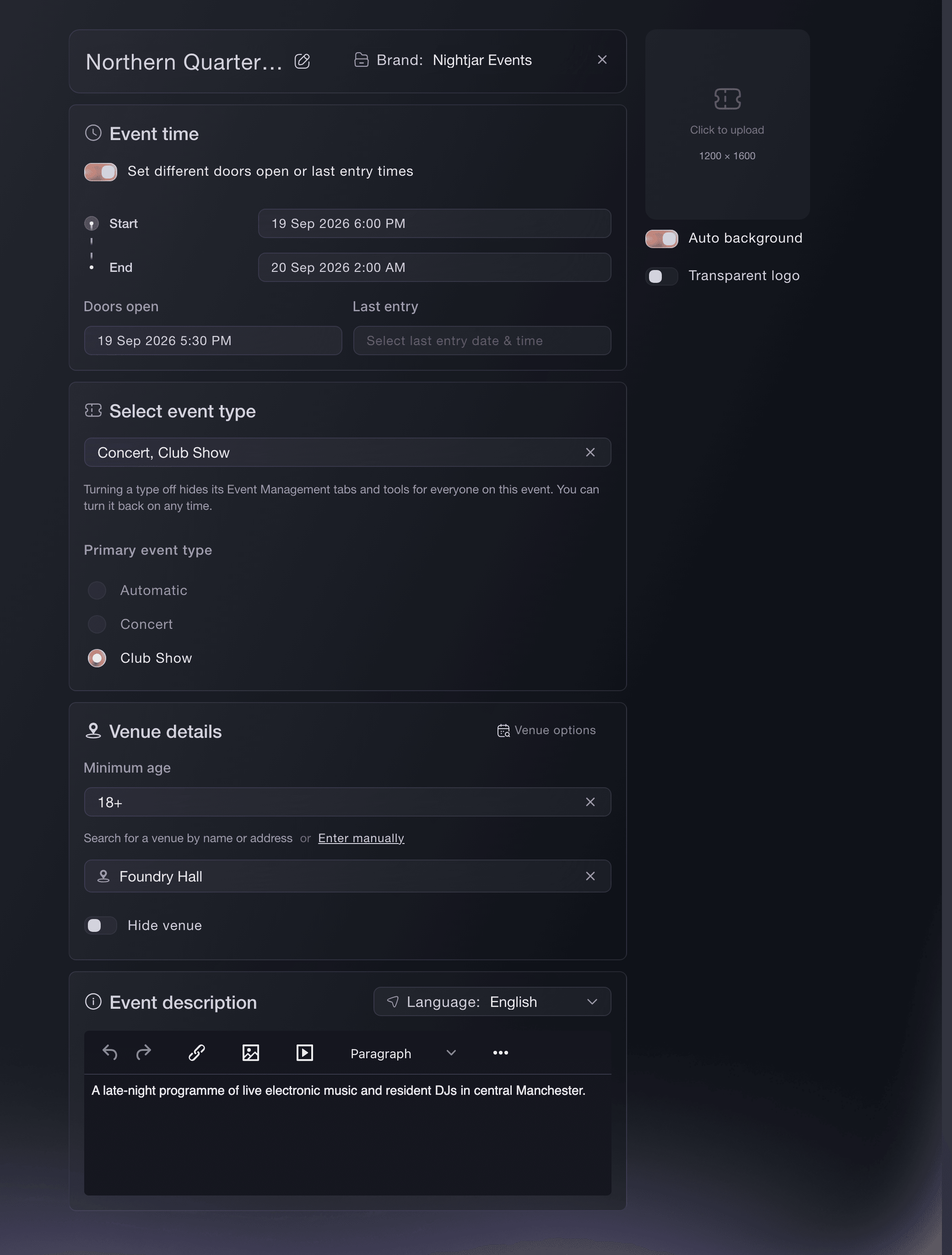
Ticket Fairy event details step with the dates, event types, venue, minimum age and description

How you can use Ticket Fairy for your food festival

  • A monthly street food market

    A street food market takes one application for its whole season, decides each date on its own and gives a waiting-list vendor the pitch when a vendor cannot make a date.

    Each month, the market invoices its share of takings from the vendors' reports.

  • A chilli festival with tasting tokens

    A chilli festival sells day tickets in release tiers, with a token card as an add-on. Guests spend tokens at the stalls they choose, and the token card goes off sale when the stock runs out while day tickets stay on sale.

  • A vegan food fair

    A vegan food fair tells Fai it wants every dish plant-based and a balance of sweet and savoury.

    Fai ranks the applications against that menu, and the food fair organizer approves the best mix. Approved vendors pay, upload their hygiene rating and book a load-in slot.

  • A food and music weekend

    A weekend festival sells day tickets with a stage line-up and a street food village, and Fai plans the pitches to keep the barbecues away from the seating.

    The electrician works from the power sheet, and guests plan their meals from the vendor directory.

  • A festival with chef demonstrations

    A three-day food festival sells chef demonstrations and a long-table lunch as ticket types with their own allocations.

    A cookware brand hands out its own guest tickets, and the check-in report shows each demonstration's arrivals.

Get this page as a PDF Read it later or share it with your team. We email you a link to the PDF.
What to put in your PDF

We will email you this deck. We may also email you now and then about Ticket Fairy features that can help your events. You can unsubscribe at any time with one click.

Everything you need to run your food festival

  • Traders & markets

    You get the right mix of traders, with their paperwork and payments in before load-in. Each pitch sits on your map, and you can invoice your share of sales.

  • Add-ons & upsells

    You earn more from each buyer. Parking, camping, merchandise and upgrades sell with the ticket, VIP tables book with a deposit, and passes can cover several of your events.

  • Ticket types & pricing

    You earn more per ticket with releases that open by themselves, you can hold tickets back for guests, and day and weekend tickets sit together so buyers choose fast.

  • Seating & timed entry

    You can sell timed entry with a capacity and price for each slot, follow sales and arrivals slot by slot, and sell numbered seats or seated areas for shows.

  • Checkout

    You win back buyers who left checkout, collect the answers your door team needs, and can approve orders and check ID before tickets go out.

  • Check-in & box office

    Your door team scans tickets on their own phones and fastens the right wristband on each guest. Walk-ups buy at the door, and you see who has arrived as the night goes on.

  • Guest lists & comps

    You can send guests free tickets your door team scans, upload a whole list at once, and let partners hand out their own allocation.

  • Site & logistics

    Your site is ready before the gates open. You map your site, hire lists come from riders, deliveries book into arrival times and kit goes out and back by scan.

  • Budget & costs

    You see the all-in cost of each act, your whole team works from one shared budget, and you can compare costs and sales pace across your events.

  • Crew & volunteers

    Your shifts fill with offers to the people who fit, your crew keep one record across events, and you can recruit, look after and reward your volunteers.

  • Referral rewards

    Events sell 20% more tickets on average with referral rewards. Buyers earn back part or all of their ticket price as friends buy, fans chase prizes you choose, and you see what each referral brought in.

  • Front of house

    Your box office team can sell to walk-ups and see what each seller took, and ages are checked once. VIP guests get a host, merch stays stocked, fans have a guide through their day and pay cashless on wristbands.

  • Control & safety

    One live control log covers your site, you see the pass holders in each zone and official weather warnings for your venue, and medical care, barriers and permits stay on track.

  • Website builder

    Fai drafts a website for your festival, venue or brand. You choose the look, and you can list your events with live prices, take enquiries, translate the site and publish it on your own domain.

Food festivals: your questions about Ticket Fairy

Food festivals

Yes. Each is an add-on with its own price and stock, sold in the same checkout. You choose which ticket types it goes with, so buyers see only the extras that belong with their ticket.

Yes. You set a percentage on the pitch fee, with a minimum and a maximum if you want them. After the festival, vendors enter their takings with their till reports, Fai checks the reports against the figure, and each vendor gets an invoice for your share.

No. Fai ranks applications against the menu you describe, with plain reasons, and your team approves, waitlists or declines each vendor.

Any file you need, such as a food hygiene rating, public liability insurance or a gas safety certificate. Fai reads each expiry date for you to check, and vendors who have not sent theirs yet get a reminder.

No. A pitch fee can include staff passes, and each vendor names the staff they bring. An extra on the pitch fee adds more passes.

Yes. One application covers every date of a market season, and you approve or decline each date on its own. A vendor who cannot make a date releases the pitch for a waiting-list vendor.

Up to 5 till or card reports, each a PDF, photo or spreadsheet of up to 25 MB. The takings must be in the pitch fee's currency, and the vendor can split the total into card and cash.

No. A listing shows only the name, what they sell, the kind of vendor, the words guests filter by, a website and an Instagram name.

No. The Entry Fairy app needs an internet connection to scan tickets, so a quick check of the connection at each gate before you open saves a queue.

Yes. You set the youngest age you admit, and buyers enter their date of birth at checkout. Your gate team sees each guest's age status as they scan and marks ID checked on the wristband, so your bar serves without asking again.

Sell more tickets. Build the crowd that comes back.

Start Selling Tickets Online

Create a free account and build a test event before you commit. Set up your tickets, explore referral rewards and go on sale when you are ready.

Unlimited events with no monthly fee

Start selling tickets immediately

Tickets, door and website tools on every plan, Free included

Get Started Talk to Fai Now

Ask Fai, our AI teammate, about Ticket Fairy’s features, pricing and how it could work for your event.

No credit card required

Book a demo call

You can explore referrals, guest lists and ticket scanning with our team. If you are moving platforms, we help with event setup, branding and team training around your on-sale date.

45-Minute Video Call
Pick a Time That Works for You