1. Solutions
  2. By event type
  3. Nightclubs & club nights

Pack Every Club Night and Bring Your Regulars Back

Set up your night once and repeat it for every date, with early bird, advance and door releases, a guest list and VIP booths. Your promoters each sell from their own link, tables sell online with a deposit, and your door team scans everyone in on their own phones. After the night, you see who sold what and which of your crowd keep coming back.

  • Every weekly night set up in minutes
  • Promoters, tables and guest list in order
  • Regulars who come back night after night
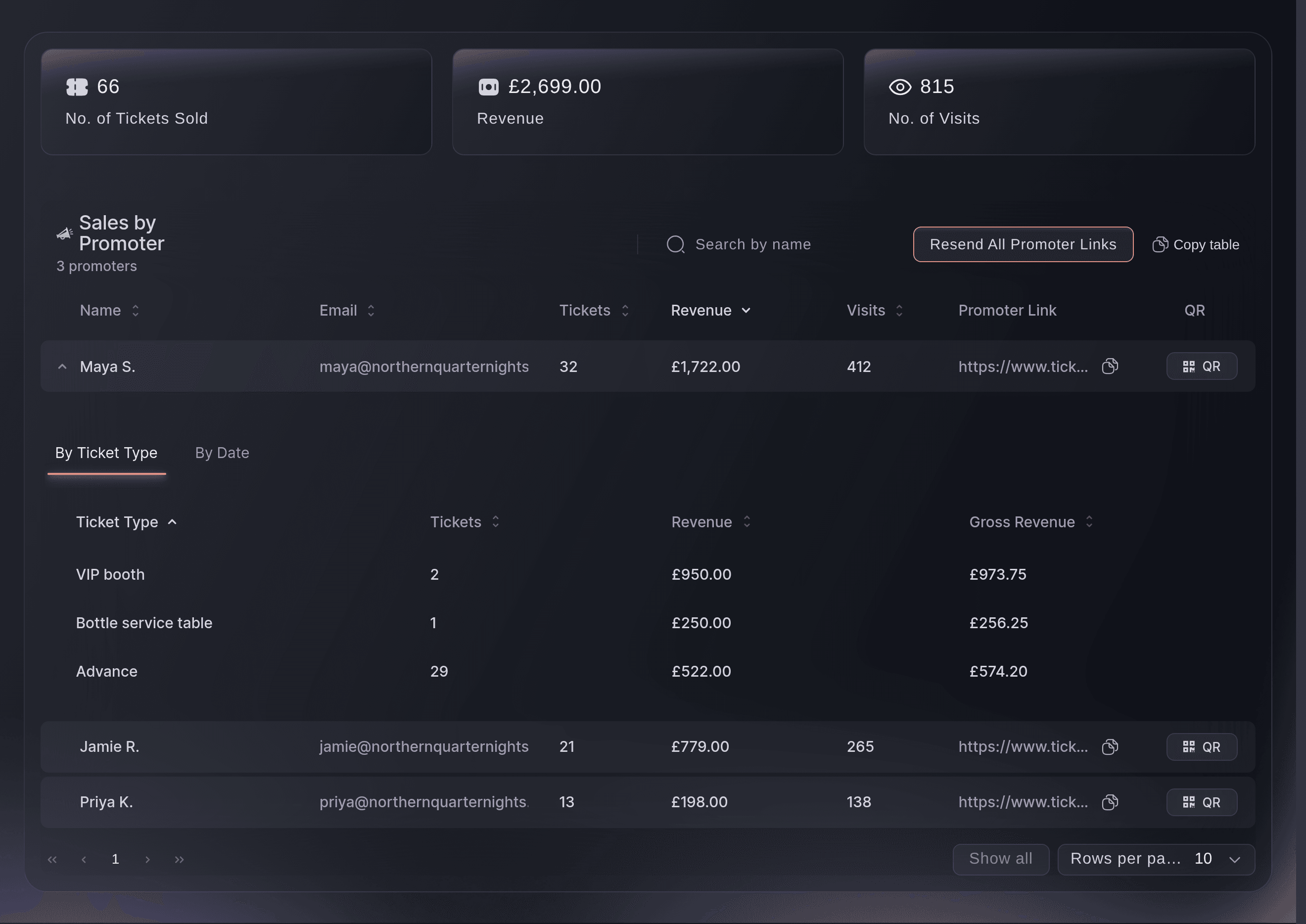
Ticket Fairy Sales by Promoter table with each promoter's tickets, revenue and visits to the event page

Set Up Your Night Once and Repeat It Every Week

Start your first night from the Club show template with your advance price and room capacity, and say yes to a guest list ticket and a VIP booth. It lays out your releases up to an on the door price, with an age limit and door times already set, and it marks the event as a Club Show. Duplicate that night for every date, and the sale windows and door times move with the new dates. Group your nights into an event series with its own public page, and sell a pass that covers several nights, such as four for the price of three.

  • Club show template: releases, guest list ticket and VIP booth from your answers
  • Duplicate a night: choose what to copy and enter the new dates
  • Event series page: every date of your weekly night together
  • Multi-night passes: buyers pay once and book the nights they want
Ticket Fairy duplicate event dialog with the new night's name, dates and the choice of what to copy

Fill the Room Through Your Promoters

Invite a promoter to your brand and they get their own link and QR code for every night you run, including the ones you create later. Share one invitation link in your promoters' group chat and everyone who opens it joins. Sales by Promoter shows the tickets, revenue and visits each promoter brought in, and table bookings count for the promoter whose link the buyer came through. Run your promoters as a collective across every brand and venue you work with, with the commission each venue pays worked out for you.

  • Promoter links and QR codes: one for every night, sent when you publish
  • Sales by Promoter: tickets, revenue and visits for each seller
  • Collectives: one promoter team across your brands and venues
  • Promoter artwork: flyers and story artwork beside each promoter's link
Ticket Fairy collective page with its promoters, a venue's request, the invite code and its deployments

Sell Every Table and Booth Before the Night

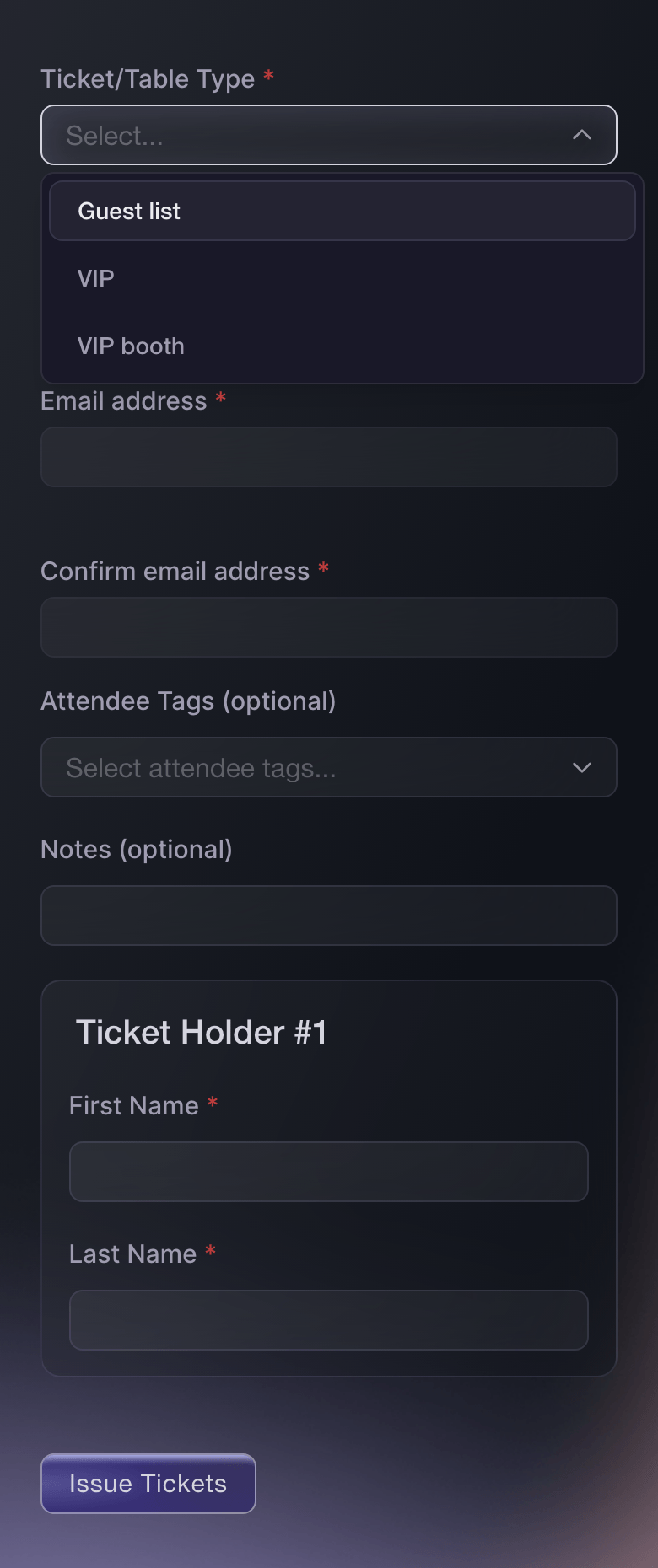
Create a table type for each booth or bottle-service package, with its price, how many you have and the smallest and largest party one booking holds. Buyers choose a table and their party size on your event page and pay a deposit or the whole price online. When the host arrives, your door team scans one code for the whole party and the app shows the balance still to pay. Open a pricier booth once the first one sells out, and close online bookings before doors so your floor team has the final list. Give each table a host who gets an alert when the guests arrive.

  • VIP tables and booths: party size, price per extra guest and sale dates
  • Deposits online: the rest collected at the venue
  • One code for the party: the balance shows as the host scans in
Ticket Fairy Create Table Type form with the VIP booth name, price, stock and guest limits

Run the Guest List and the Door Without a Clipboard

Send guest list tickets by name from your dashboard, or upload the whole list at once, and each guest gets a barcode your door team scans like any other ticket. Give each promoter or the DJ's manager an allocation of their own, and they add their guests themselves without going past the number you set. Set the youngest age you admit, and checkout works out each buyer's age on the night. Give the guest list or VIP their own door and last entry times, and sell to walk-ups from the scanning app, with buyers tapping their card or phone on your door team's phone.

  • Guest list tickets: named tickets that scan at the door
  • Partner allocations: promoters and managers add their own guests
  • Door and last entry times: for each ticket type
  • Door sales: cash or tap to pay from the scanning app
Ticket Fairy Send Guest Tickets form with the guest list ticket type and the names on each ticket

Get a Dashboard That Arranges Itself Around Your Club Night

With Club Show as your event type, your event shows the sections a night of DJs and live acts runs on. Programme includes Artists, Schedule, Stages and Public line-up, so you keep each act's set time, fee and rider together and announce your line-up when you are ready. Advance includes Advancing, Travel and Accommodation for the headliner flying in, and Show day includes Run of show, Day sheets and Now and next. Ask Fai to help with Line-up and advancing and Show day, and your list shows the sections they need, with any other section a tap away under More sections. If you run the venue, its calendar shows every hold and show across your rooms, with offers and settlements beside them.

  • Artists and set times: fees, riders and the advance for every act
  • Public line-up: reveal each act when you choose
  • Venue calendar: holds, offers and settlements for every room
Ticket Fairy More sections dialog with your role, what Fai helps with and the sections to add or pin

Bring Your Regulars Back Night After Night

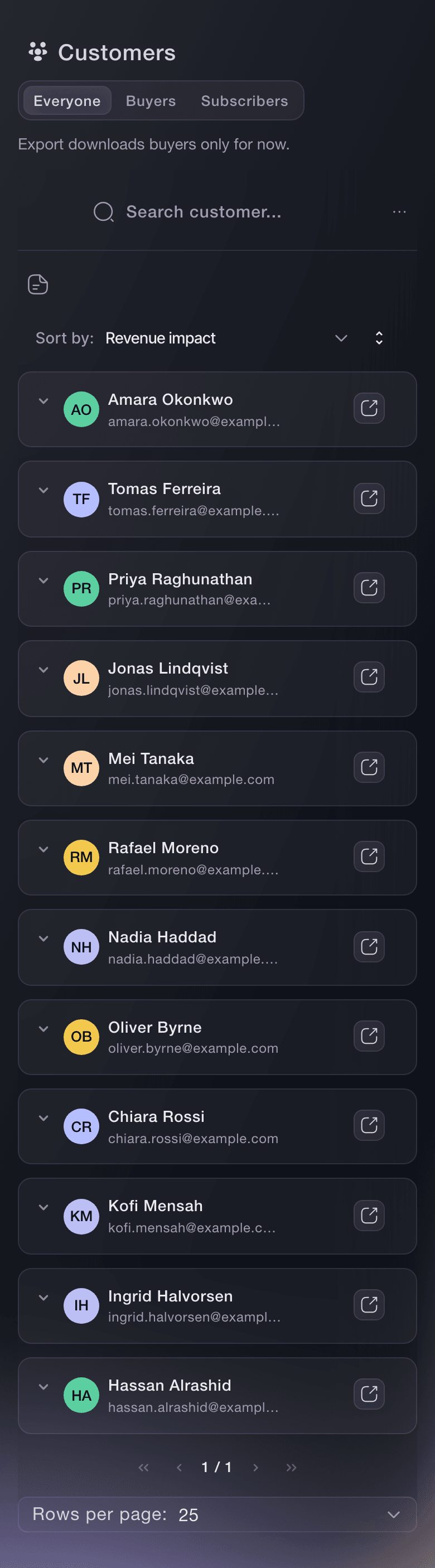
Customers lists everyone who has bought from your brand, one row per person, with the nights they bought for and what they spent, so you can find the people who come back. Every buyer gets a referral link and earns money back when their friends buy, and every fan who comments a word such as TICKETS under your event posts gets your ticket link in a private message. Email the holders of one ticket type when you add a special guest to the line-up, and see which posts, promoters and links sold each night.

  • Customers: your repeat buyers, one row per person
  • Referral rewards: money back for buyers who bring friends
  • Ticket link auto-replies: fans who ask under your posts get the link
Ticket Fairy Customers list with one row per person, the nights they ordered for and what they spent
Get this page as a PDF Read it later or share it with your team. We email you a link to the PDF.
What to put in your PDF

We will email you this deck. We may also email you now and then about Ticket Fairy features that can help your events. You can unsubscribe at any time with one click.

Everything You Need to Run Your Club Nights

More about ticketing for Nightclubs & club nights

Questions About Ticket Fairy for Nightclubs & club nights

Nightclubs & club nights

You choose what comes across. The copy always takes the event details, venue, settings and ticket types, and you choose whether the team, promotions, email templates and other parts come too. Guest tickets and orders stay with the night they were issued for.

You choose, from a deposit to the whole price. Every table booking goes through an identity check before the card is charged and the ticket goes out, and your door team marks the balance paid once they collect it.

No. Each promoter sees the event's sales beside their own link, and their figures stay private from the rest of your promoters. A partner with an allocation never sees your sales or your buyers.

Compatible Android phones, in the country of the payment account the event uses. The option appears once the event has a venue and your business address or the venue's address is complete. Cash sales work on any phone that runs the scanning app.

Yes. Ask every buyer for their date of birth and set the youngest age you admit. Checkout works out each buyer's age on the day your event starts and tells an under-age buyer in plain words why they cannot buy. At the door, your team sees each guest's age status as they scan and marks the wristband as ID checked.

They are part of the Event Operating System, in your dashboard beside ticketing, promoters, tables and the door. Book a demo, and we set up your first night with your team.

Yes. Connect your Instagram account to your brand first, directly or through the Facebook Page it is linked to, then turn on an auto-reply for the event.

Sell more tickets. Build the crowd that comes back.

Start Selling Tickets Online

Sign up without a credit card and build a test event before you commit. Go on sale in minutes when you are ready.

No monthly subscription required for ticketing
Start selling tickets immediately
Ticketing tools included in the service fee
Get Started Talk to Fai Now

Ask Fai, our AI assistant, about Ticket Fairy’s features, pricing and how it could work for your event.

No credit card required

Book a demo call

See the referral model that drives 20% more ticket sales on average, learn which campaigns sell tickets, answer buyers faster and keep queues moving.

45-Minute Video Call
Pick a Time That Works for You