1. Solutions
  2. By role
  3. Operations managers

Get Every Shift Covered, Every Gate Ready and Every Crowd Safe

Plan shifts by team and hour, and Fai lists who fits each open place. Book every delivery into an arrival time, issue every pass with its zones and days, and hand them out at desks your staff run from their own phones. On show day, your control room, your safety lead and every team share one live log, with zone counts from the scans at your gates and your emergency plan ready for every warning.

  • Every shift covered by the right people
  • Every pass, delivery and desk ready on time
  • A safe site and a fast response
Ticket Fairy Show day for a festival, with now and next on each stage, buttons to call each cue, arrivals and open incidents

Get a Dashboard That Fits Every Kind of Event You Run

Tick one or more event types on each event, with your main one first, and the sections and their names follow. A festival, concert or club show gets Artists, Stages and a schedule, a conference gets Speakers, Rooms, an Agenda and Event staff, a convention gets Special guests, Rooms and an Exhibitor hall, a food or drink festival gets Vendors, Booths and Tastings, and a sports or esports event gets Athletes, Venues and a Match schedule. Every event groups its sections in the order it runs, from Programme, Money and partners, Advance and Team to Show day and After the show. Invite your security lead or box office manager by the name of their role, and they start with the menu, Today page and help from Fai that their role needs.

  • Event types: one or more, with your main one first
  • Role kits: the menu, Today page and Fai help for each role
  • Today page: each person's tasks, approvals and the countdown to doors
Ticket Fairy event type dialog with a tick box for each kind of event and Festival ticked

Fill Every Shift With People Who Are Ready to Work

Plan shifts by team and hour, and see how many places are filled for each team and hour while there is still time to fix it. For each open shift, Fai lists who fits: free, rested, old enough and with the right skill, and the first person to accept your offer takes the place. Ask for the certificates each shift needs, run a safety induction with a short test Fai drafts from your briefing, and tell the kitchen how many people to feed from your shifts. After the event, approve hours from check-in and check-out times, with each agency's hours and cost beside them.

  • Shifts and offers: the first person to accept takes the place
  • Certificates and inductions: checked before anyone works a shift
  • Hours by outside team: what each agency's people worked and cost
Ticket Fairy hours by outside team, with each agency's people, hours and cost beside your own team

Get Your Site, Deliveries and Kit Ready Before the Gates Open

Upload your site plan, mark areas, points and routes to scale, and Fai checks you have enough first aid, exits, water and toilets for your crowd. Open arrival times by gate, and outside teams book each vehicle into one on their own page, so your gate team checks them in by code or number plate. Ask every supplier for insurance and risk assessments with a due date, hand out radios and kit by scan and see who still has what. Share a private link to your live site map with the fire service, with the fire lanes, exits and first aid they need.

  • Site map: checked by Fai for first aid, exits, water and toilets
  • Arrivals and deliveries: every vehicle booked in and checked at the gate
  • Kit desk and radio plan: radios and kit handed out and back by scan
Ticket Fairy gate for a festival build day, with the vehicles expected, here and gone and the lookup by reference or number plate

Give Everyone Who Works Your Event the Right Access

Issue passes from your shifts, advances, traders, volunteers and press list, and let each outside team name their own people against the passes you allow. Give each pass type its zones, days, hours and meals, and your staff gates refuse a pass that is not for that zone or day, saying why. Your hand-out desk shows the photo, zones and today's meals as each badge scans, and desk staff without a dashboard login work the desk from a link on their own phone. On site now shows how many people are in each zone, by group or outside team.

  • Accreditation: zones, days and meals on every pass
  • Staff gates: the wrong zone or day refused, with the reason
  • Desk links: any desk run from a phone, with no dashboard login
Ticket Fairy Desks section with every desk of a festival and its desk links, where each one works and when it was last used

Run Show Day From One Live Control Log

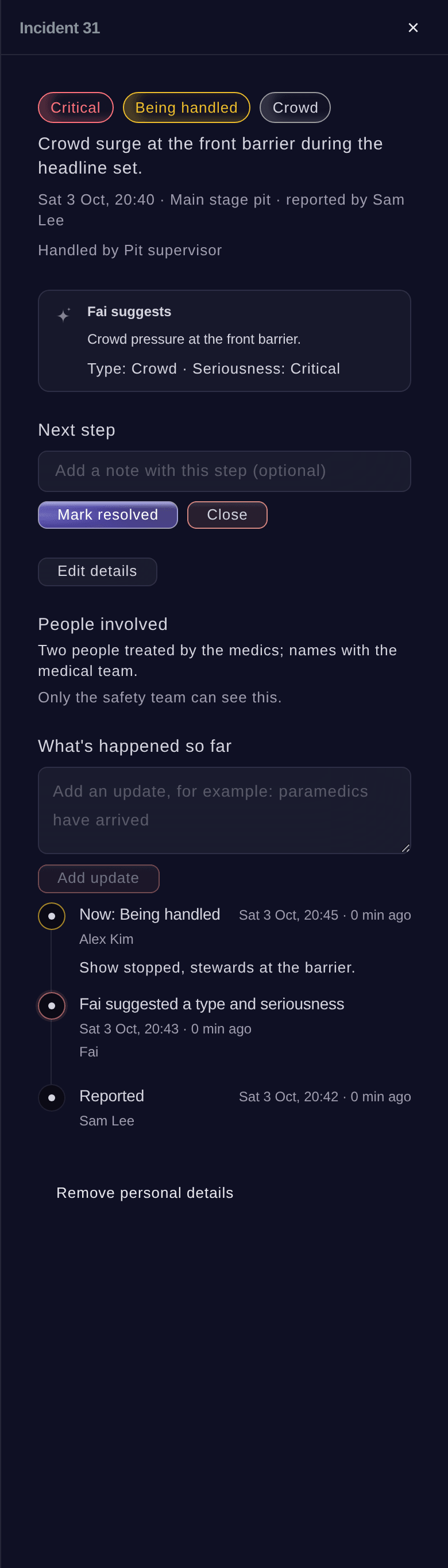
Your teams report everything into one live log, each entry with its zone, a pin on your site plan, how serious it is and everything that has happened since. Assign and escalate each entry, send it to the team for that zone on its radio channel and put the log on a TV in your control cabin. Live counts for each zone come from the scans at your gates, and Fai warns you before a zone reaches the safe capacity you set. When wind, lightning, heat or a crowd passes the level you set, your emergency plan shows the steps your team takes, and you can message any team or day's shifts at once.

  • Control log: report, assign, escalate and close
  • Zone counts: live, against each zone's safe capacity
  • Emergency plan: the steps for every weather and crowd warning
Ticket Fairy incident panel for a crowd surge, with its seriousness, the next step, Fai's suggestion and the people involved

Look After Every Guest From the Gate to the Bar

Your door team scans tickets on their own phones and sees which wristband to hand over, and the Refused scans report shows every ticket turned away, with the reason and the entrance. Buyers ask for access support at checkout, such as a companion ticket or a place on the viewing platform, and your access team works their desk from a link. Your cleaning, waste and water teams scan a code at each spot to mark a round done, and you hear when one is missed. Found items are logged with a photo, and Fai suggests which lost-item report each one matches.

  • Ticket scanning and wristbands: the right band shown as each ticket scans
  • Access requests: taken at checkout, with a desk for your access team
  • Service rounds: toilets, bins and water points checked all day
  • Lost property: found items matched to lost-item reports by Fai
Ticket Fairy possible match between a backpack handed in and a lost-item report, with what the two have in common
Get this page as a PDF Read it later or share it with your team. We email you a link to the PDF.
What to put in your PDF

We will email you this deck. We may also email you now and then about Ticket Fairy features that can help your events. You can unsubscribe at any time with one click.

Everything You Need to Run Your Event Operations

Questions About Ticket Fairy for Operations managers

Operations managers

It is in your dashboard: choose your event types, and each event shows the sections they need. Book a demo, and we help your team set up the first event.

The event's owners and admins, from the Set up menu. It is the same event type as in Event Details, and your sections change as soon as you save. Choose more than one type and you get the sections of each, named the way your main type names them.

The hand-out desk and the meal desk work without a connection and send what was done when it is back. Staff gates and the Entry Fairy ticket scanning app need a connection, so check it at each gate before you open.

From the scans in and out at your gates and zone entrances. Enter a safe capacity for each zone, and Fai warns you before the count reaches it.

No. Fai warns you and suggests a step, such as holding an entrance or opening the overflow, and a person on your team decides.

No. Open the private link on a TV or computer in your control cabin.

People with the Medical role on your event, and the event's owners and admins. Everyone else sees counts with no names. Ticket Fairy records every time someone opens a record.

The first to accept takes the place. If the shift is then full, the other person's page thanks them and says the place was filled.

Sell more tickets. Build the crowd that comes back.

Start Selling Tickets Online

Sign up without a credit card and build a test event before you commit. Go on sale in minutes when you are ready.

No monthly subscription required for ticketing
Start selling tickets immediately
Ticketing tools included in the service fee
Get Started Talk to Fai Now

Ask Fai, our AI assistant, about Ticket Fairy’s features, pricing and how it could work for your event.

No credit card required

Book a demo call

See the referral model that drives 20% more ticket sales on average, learn which campaigns sell tickets, answer buyers faster and keep queues moving.

45-Minute Video Call
Pick a Time That Works for You