1. Solutions
  2. By role
  3. Safety & security leads

Keep Every Crowd Safe and Every Team Responding Fast

Your control room, your stewards and your medics report into one live log, and you see how full each zone is as people scan in. When the wind picks up or a zone fills, your emergency plan shows the steps your team agreed. Every pass is checked at your staff gates, every steward is qualified and briefed before their shift, and every permit and inspection is signed off before the gates open.

  • One live log for your whole site
  • A warning before any zone fills
  • Every steward, pass and permit checked
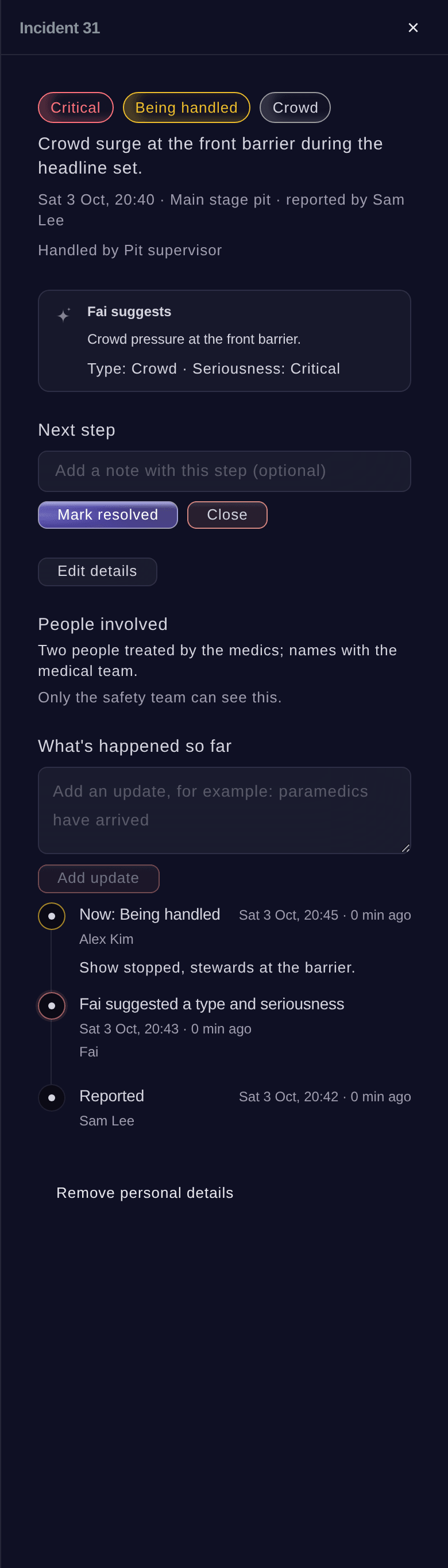
Ticket Fairy incident panel for a crowd surge, with its seriousness, the next step, Fai's suggestion, the people involved and what has happened so far

Run Your Control Room From One Live Log

Anyone on your team reports an incident from their phone with what happened, where and how serious it is, and drops a pin on your site map. Your control room assigns it, escalates it and sends it to the team for that zone on its radio channel, from the radio plan you already keep. Put the live log on a TV in your control cabin from a private link with no sign-in. Your medics record each patient's triage, treatment and outcome beside the incident they came from, and everyone outside the medical team sees counts with no names.

  • Control log: report, assign, escalate and close
  • Dispatch by zone: to the right team on its radio channel
  • Medical and welfare log: linked to each incident, with counts and no names for everyone else
Ticket Fairy radio plan with a Control channel for emergencies and a Security channel, each with its call signs and who answers

See How Full Every Zone Is Before It Becomes a Problem

Enter a safe capacity for each zone, and the scans at your gates and zone entrances keep a live count against it. Fai warns you before a zone reaches its capacity and suggests the next step, such as holding an entrance or opening the overflow, and a person on your team decides. See how fast people are arriving and leaving, with a heat map of every zone on your site plan. At the public gates, the check-in report shows arrivals hour by hour against the tickets sold, so you see the rush coming.

  • Zone counts: live, against the safe capacity you enter
  • Early warnings from Fai: with the next step suggested for your team to take
  • Heat map: how busy each zone is on your site plan
Ticket Fairy On site now for a festival, with the people on site, the count inside each zone and the counts by group or organisation

Act on Weather and Crowd Warnings With Your Plan Ready

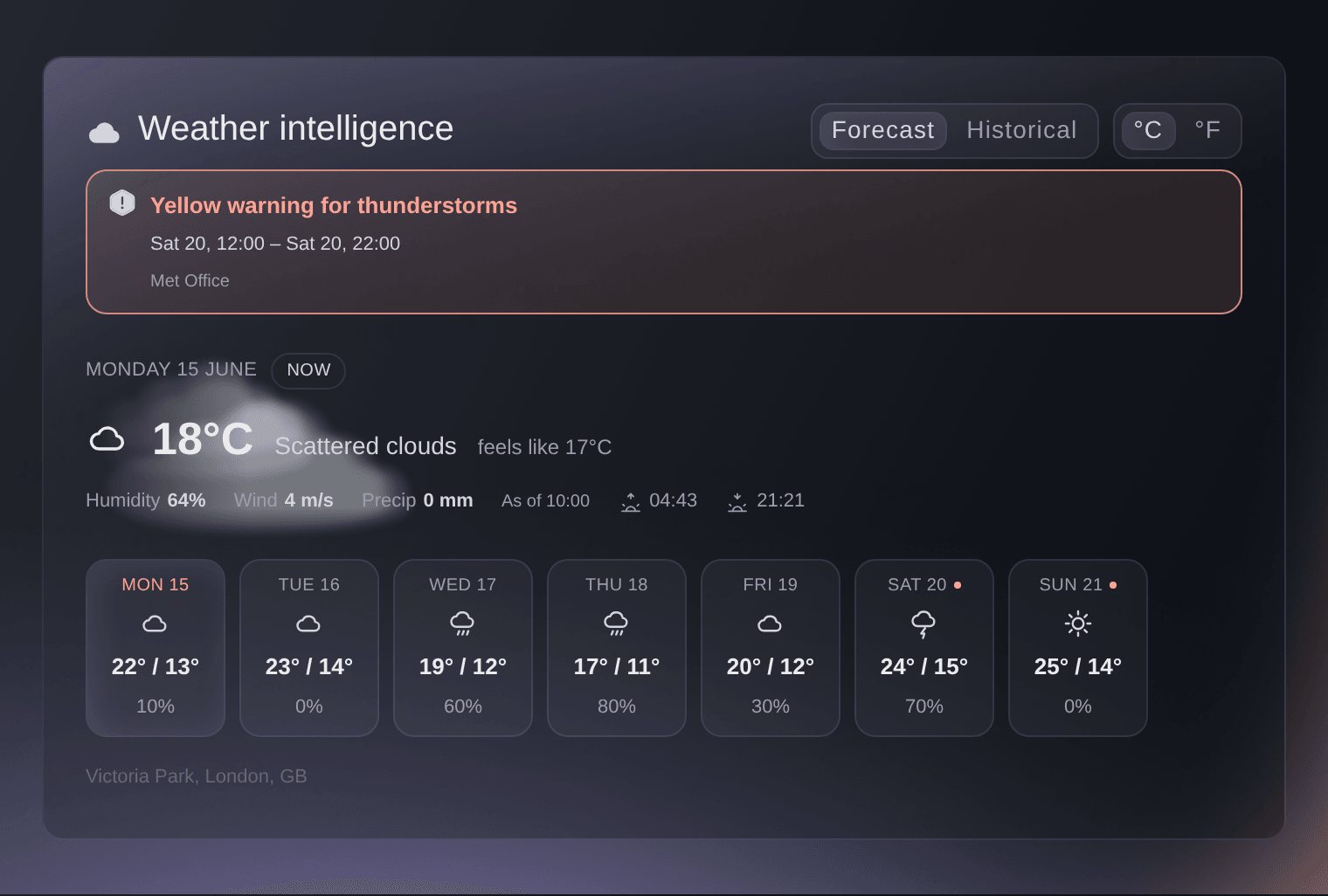
Link each warning in your emergency plan to the steps your team takes. When wind, lightning, heat or a crowd passes the level you set, your plan shows those steps, such as pausing a stage, opening shelters, adding water or messaging your ticket holders. Months ahead, the weather card shows what your event dates are usually like, and on show days the forecast for your venue updates hour by hour with official weather alerts. Message a team, one day's shifts, your volunteers or your traders, see exactly who will get it before you send, and see who opened it.

  • Emergency plan: wind, lightning, heat and crowd levels linked to your steps
  • Hourly forecast: with official weather alerts for your venue
  • Messages to your teams: see who gets it before you send and who opened it
Ticket Fairy Weather intelligence card with a thunderstorm warning, the conditions at the venue now and a strip of the week ahead

Let Only the Right People Into Each Area

Give each pass type its zones, days and hours, and your stewards scan passes in and out at each staff gate. A pass for the wrong zone, day or hour is refused with the reason in plain words, and a supervisor can let the holder through with a reason that stays on the pass's record. On site now lists everyone inside each zone for a roll call. At the public doors, a refunded, cancelled or replaced ticket is refused, door staff see each guest's age status as they scan and mark the wristband as ID checked, and the Refused scans report shows every refusal by reason, entrance and hour, including shared screenshots.

  • Staff gates: passes checked in and out of each zone
  • Age checks: age status on the scan and ID checked on the wristband
  • Refused scans: every refusal by reason, entrance and hour
Ticket Fairy backstage gate refusing a stage hand whose pass is for another day and for the production village only, with the button to let them through

Know Every Steward Is Qualified and Briefed Before Their Shift

Ask for the certificates each shift needs in your own words, such as a door supervisor licence or a first aid certificate. Each person adds a document once from their My shifts page, it counts at every one of your events until it expires, and Fai reads the expiry date from the file. Nobody goes on a shift without it unless your team gives a reason. Run a safety induction with a short test Fai drafts from your briefing, and the hand-out desk checks it is done before anyone collects their pass. Your security contractor names its stewards on its own page, sends its insurance and risk assessment, and you check its invoice against the hours its people worked.

  • Certificates for shifts: added once, with expiry dates read by Fai
  • Safety induction: checked at the desk before a pass is handed over
  • Security contractors: stewards, documents and hours for each outside team
Ticket Fairy hand-out desk with a runner whose pass waits for the safety induction, and the button to record it done at the desk

Get Your Risks, Permits and Inspections Signed Off on Time

Start your risk register from Fai's draft for your kind of event, and give each risk an owner, a review date and a status. Follow each permit with its authority, such as licensing, fire, police, highways or health, with its conditions, due dates, the documents you sent and the inspections booked and passed. Draw your fence and barrier lines on your site plan and sign off timed inspections, with every sign-off kept in its history. Share a private link to your live site map with the fire service, showing the fire lanes, exits and first aid points. Choose Safety in Start with Fai, and your event list shows Incidents, Risks, Licences and certificates, Accessibility, Site map and Lost property, ready for your team.

  • Risk register: drafted by Fai, with an owner and a review date for each risk
  • Permit tracker: conditions, due dates and inspections for each authority
  • Barriers and inspections: barrier lines on your site plan, signed off on time
Ticket Fairy site map link page for the fire service, with the live map, the fire lane to keep clear, exits, first aid and routes
Get this page as a PDF Read it later or share it with your team. We email you a link to the PDF.
What to put in your PDF

We will email you this deck. We may also email you now and then about Ticket Fairy features that can help your events. You can unsubscribe at any time with one click.

Everything You Need to Keep Your Event Safe

Questions About Ticket Fairy for Safety & security leads

Safety & security leads

Only your safety team can read sensitive incident details, and only people with the Medical role on your event and the event's owners and admins can see medical records. Everyone else sees counts with no names. Ticket Fairy records every time someone opens a full incident report or a medical record.

You choose for each event, and you can keep them permanently. When a patient asks for their details to be removed, their personal details are removed and the counts stay.

No. Fai warns you and suggests a step, such as holding an entrance or opening the overflow, and a person on your team decides.

No. The gate checks every pass with Ticket Fairy, so without a connection it asks your stewards to check passes by eye and scan them when the connection is back. The hand-out and meal desks work without one.

Zone, day and hour checks run at your staff gates and on gate links. The check-in app your door team uses scans passes as tickets and shows what each pass allows.

No. Fai drafts them from your briefing and your kind of event so your team starts faster. Your safety lead checks every risk, question and answer before you use them.

Yes. Invite them by the name of their role, and they start with the menu, permissions, Today page and Fai help a security lead needs. Each person also opens one link for every shift, desk and document their roles give them.

They are part of the Event Operating System, in your dashboard beside ticket scanning, refused scans and repeat scan rules. Book a demo, and we help your team set up the first event.

Sell more tickets. Build the crowd that comes back.

Start Selling Tickets Online

Sign up without a credit card and build a test event before you commit. Go on sale in minutes when you are ready.

No monthly subscription required for ticketing
Start selling tickets immediately
Ticketing tools included in the service fee
Get Started Talk to Fai Now

Ask Fai, our AI assistant, about Ticket Fairy’s features, pricing and how it could work for your event.

No credit card required

Book a demo call

See the referral model that drives 20% more ticket sales on average, learn which campaigns sell tickets, answer buyers faster and keep queues moving.

45-Minute Video Call
Pick a Time That Works for You