1. Solutions
  2. By role
  3. Sponsorship & partnerships

Sign More Sponsors and Show Each One the Return They Paid For

A partnership team sells something harder to prove than a ticket: an audience, a moment on stage and a promise kept. Ticket Fairy tracks every sponsor from the first call to the last deliverable, with the cash and in-kind value of each deal and every promise turned into a task with an owner. Pitch with the ages, jobs and home towns of your real ticket buyers, give each sponsor a page with their deliverables and their sales, get their guests and activations ready for show day, and collect the money into your Vault balance.

  • Every deal tracked from first call to fulfilled
  • Sponsors who see the results they paid for
  • Sponsorship money in on time
Ticket Fairy page for the sponsor Brightline Energy, with four of six deliverables done and the clicks and sales through its tracking link

Keep Every Sponsor Deal Moving From First Call to Delivered

Add each sponsor to your event with their tier, from Presenting and Platinum to Media, In-Kind and Community, and move them from Prospecting to Committed, Contracted, Paid and Fulfilled as the deal progresses. Record the cash amount and the in-kind value of each deal, and list every deliverable you promised, such as a logo on the stage screens or a branded bar. The whole pipeline sits on the event it pays for.

Turn a sponsor's deliverables into tasks on your task board in one step, give each one an owner and follow them from pending to fulfilled. Deliverables already fulfilled are skipped, so running the step again never adds duplicates. Each person sees their sponsor work beside the rest of their event jobs, so the logo on the stage displays is not forgotten in the rush of show week.

Every change to a sponsor keeps a version history, and you see when a colleague has the same sponsor open, so two people never overwrite each other's notes. Your event budget takes its sponsorship income from the sponsors you record, so production plans with the money you have signed and finance sees the same figure.

  • Tiers and stages: from Prospecting to Fulfilled for every sponsor
  • Cash and in-kind values: recorded on each deal and carried to the budget
  • Deliverables as tasks: each promise on your task board with an owner
  • Version history: who changed a deal and when
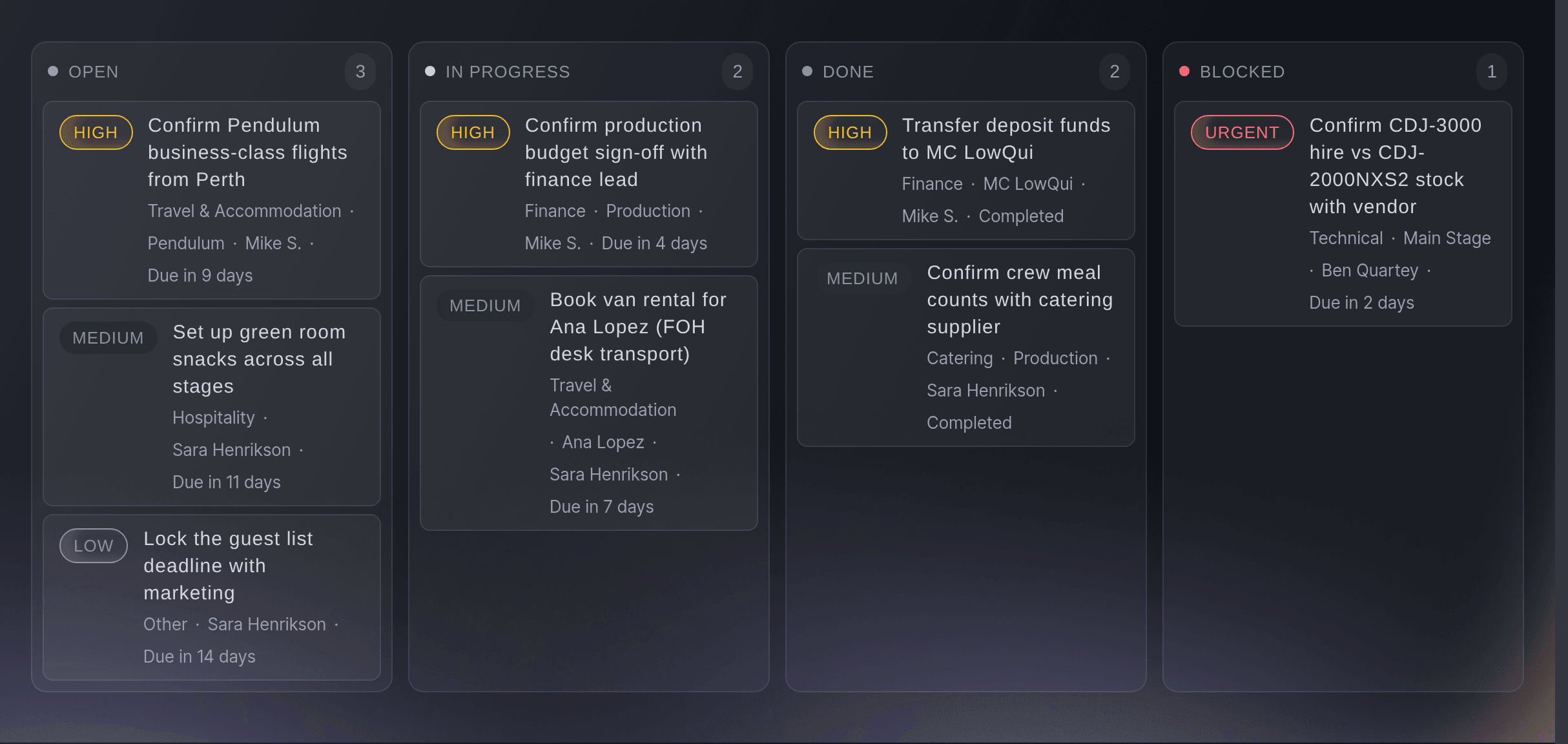
Ticket Fairy event task board with cards spread across the open, in progress, done and blocked columns

Pitch Sponsors With the Audience Your Events Bring

Show a prospective sponsor who buys your tickets: their ages, their gender, the job titles and employers they work for, and the countries, regions and cities they live in, for one event or across all your events. Every figure comes from people who bought tickets, so a brand sees the audience it will meet on the day.

The Professions section of Demographics lists your buyers' job titles and employers side by side, which is what a business-to-business sponsor of a conference or trade show wants to see before signing. Geographics narrows to one series, one venue or one city, so a regional brand sees how many of your buyers live in its area. Copy table puts any of it straight into your sponsorship deck or a spreadsheet for the brand's own team.

Customers shows how many of your buyers come back event after event and what they spend, which turns a one-off activation into a multi-year deal. Ask Fai which age band bought the most or where a series' buyers come from, and she answers with the figures and a chart you can take into the meeting.

  • Professions: the job titles and employers of your buyers
  • Where your buyers live: countries, regions and cities across your events
  • Repeat buyers: the loyal audience a long deal reaches
  • Answers from Fai: audience figures and charts for your next pitch
Ticket Fairy Professions section with a table of job titles and a table of employers side by side

Show Each Sponsor the Results They Paid For

Give each sponsor their own page, where they see the deliverables you promised, how many are done, and the clicks and sales through their tracking link. Make the sponsor a tracking link and QR code for their posters and channels, and build them a landing page for your event with their own wording and images for their customers.

A sponsor who can open their results whenever they like stops asking for a report and starts planning next year. The tracking link counts the visits, orders and revenue their audience brought in, and a promo code with a price you agreed gives their customers a reason to buy through it. Every sponsor promise, from the logo to the activation and the posts, is tracked to proof, and a proof of performance report brings the deliverables and the results together for the renewal meeting.

Send a live sales report link for the tickets a sponsor has a stake in, such as a hospitality package they co-branded, and they see the number sold, the stock left and the revenue as it changes. They need no role on your event, and you choose whether they see day-by-day sales or totals only.

  • Sponsor page: deliverables done and tracking link results
  • Tracking links: clicks, orders and revenue for each sponsor
  • Sponsor landing pages: your event page in words made for their customers
  • Live sales report links: the tickets a sponsor has a stake in
Ticket Fairy Tracking Links page for an event, one row per link, with the clicks, orders and revenue each one earned

Get Sponsor Guests, Staff and Activations Ready for Show Day

Hold back the tickets a sponsor's contract names, so they never reach the public on-sale, and give the sponsor an allocation they hand out to their own guests from their own link. The sponsor's team names its own people for passes on its own page, sends you its insurance and books its activation build into an arrival time at your gate.

The sponsor's page needs no sign-in, so their agency or events manager adds the names, badge photos and email addresses of their staff without a seat on your team. Each pass still goes through your usual accreditation checks, and you see at a glance which sponsors still owe names. Ask every sponsor for public liability insurance at once, and Fai reads each file and the date it expires before you accept it.

A sponsor with a stand can be an exhibitor too. Their booth staff scan every visitor from a lead scanner link, and Fai drafts a follow-up email to each visitor for the sponsor to approve, so the leads they paid to meet become conversations the next morning. The sponsor's results show how many visitors they met and followed up.

  • Sponsor allocations: guest tickets the sponsor hands out from their own link
  • Passes for their team: named by the sponsor within your allowance
  • Activation build: vehicles booked into an arrival time at your gate
  • Lead scanner: every booth visitor captured and followed up
Ticket Fairy Delegations page of a festival, with a partner's delegation and the controls to manage its access or remove it

Collect Sponsorship Money on Time

Raise an invoice from Vault with line items and a due date, or share a payment link for a sponsorship package, and the money lands in your Vault balance. Open local bank details in another country, so an overseas sponsor pays you in their own currency. See which invoices are still unpaid, and Fai prepares invoice reminders for you to approve.

A sponsorship package often arrives in stages: a deposit on signing and a balance before the event. Raise each one as its own invoice with its own due date, and move the sponsor to Paid when the money lands. Payment links suit a smaller package sold to many local businesses, each of whom pays from the link without an invoice to chase.

Each sponsor is saved as a billing customer in Vault, so next year's invoice starts with their details already in. Your finance team sees the same invoices and payments in Vault, so nobody keeps a separate spreadsheet of who has paid.

  • Sponsor invoices: line items, a due date and what is still unpaid
  • Payment links: for a sponsorship package, paid into Vault
  • Receiving accounts: sponsors pay you in their own currency
Ticket Fairy Vault Get paid page with a paid VIP table deposit link, merchandise pre-orders taking payments, a sponsorship link turned off and a group deposit that ended

Keep Every Sponsor Conversation and Commitment on Record

Fai files the email about each event into its Inbox, marked by subject such as sponsorship, and by priority, so the sponsor thread is beside the event it concerns. Send Fai's notetaker to your Zoom, Google Meet or Microsoft Teams calls with sponsors for a summary, the follow-ups agreed and notes you can share.

Each follow-up from a call shows who took it on and by when, where the call made that clear, so a promise made on a call becomes a job someone owns. Notes to share are ready to send to everyone on the call, so the sponsor and your team leave with the same record.

When a colleague takes over an account, the event's Inbox, Meetings and the sponsor's version history tell them what was agreed, by whom and when. Nobody has to search a former colleague's mailbox before the renewal call. Fai can also add a sponsor or move a deal to its next stage from what was agreed, once you approve the change.

  • Event Inbox: sponsor email filed under the event it concerns
  • Call notes from Fai: the summary and follow-ups from each sponsor call
  • Notes to share: the same record for the sponsor and your team
Ticket Fairy event Meetings with three calls and one open, showing the summary, the follow-ups agreed on the call and the notes to share

How Partnership Teams Use Ticket Fairy

  • A Festival With a Presenting Partner

    The presenting partner's branded bar, stage screens and guest list become tasks with owners. On the day, the partner's page shows every deliverable done and the tickets sold through their link, and the renewal is signed before the site is cleared.

  • A Conference Selling to Technology Brands

    The Professions section shows last year's delegates by job title and employer, which becomes the first slide of every pitch. Exhibiting sponsors scan visitors at their booths and approve the follow-ups Fai drafted the next morning.

  • A Sports Event With Local Partners

    Small local businesses buy a community package from a payment link, while the headline partner pays a deposit and a balance by invoice. Fai prepares the reminder when the balance is overdue.

  • A Concert Series With a Media Partner

    The radio station records as an in-kind deal and gets a tracking link and a landing page for its listeners. Its live sales report shows the hospitality package it co-branded, so the on-air reads follow what is selling.

  • A Venue With a Drinks Sponsor

    The drinks brand names its promotional staff for passes on its own page and books its delivery into an arrival time. The partnership manager reads the call notes from the quarterly review before agreeing next season's activations.

  • An Esports Tournament With Hardware Sponsors

    Each hardware brand gets its own landing page and tracking link for its community, and a sponsor page that shows its deliverables ticking off during the weekend. The partnership lead sends the shared call notes after the debrief, and the renewal conversation starts from the sales each brand drove.

Get this page as a PDF Read it later or share it with your team. We email you a link to the PDF.
What to put in your PDF

We will email you this deck. We may also email you now and then about Ticket Fairy features that can help your events. You can unsubscribe at any time with one click.

Everything Your Partnership Team Needs

Questions About Ticket Fairy for Sponsorship & partnerships

Sponsorship & partnerships

Link the sponsor to an outside team on your event. The sponsor then opens their page from a link, with no account to make, and sees their deliverables and their tracking link results. A new page link stops the one before, and each link works for 120 days.

Yes, for a sales report link. Your sponsor signs in with a Ticket Fairy organiser login of their own when they open the link. They do not need a role on your event, and they see only the report. Anyone signed in to Ticket Fairy who has the link can open it, so send it only to the person it is for.

Revenue on a tracking link is your share after Ticket Fairy's fees, not what the buyer paid. A sale counts when the buyer opens that link and buys in the same browser. Tracking links belong to one event, so create one for each event a sponsor supports.

Ages, devices, locations and repeat buyers come from your own completed orders. Gender and professions come from an audience match that runs after your first sales and usually appear within about 24 hours. None of it is a modelled panel or a bought-in lookalike audience.

Up to 200 people at a time, typed in, pasted as a list or uploaded as a CSV or Excel file, within the allowance of passes you gave them. Each pass waits in Accreditation for your usual checks before it is issued.

US dollars, pounds sterling, euros, Canadian dollars and Australian dollars, for both the cash amount and the in-kind value.

Connect your brand's Gmail or Outlook mailbox, and Fai files each conversation about the event into its Inbox a few minutes after it arrives. The notetaker joins calls from a link you paste, or from your connected calendar.

Yes. Fai can create a sponsor with its tier, cash amount, in-kind value, contact and deliverables, update its details and move it from one stage to the next. She shows you each change and asks you to approve it before she makes it, and a change a colleague made in the meantime is caught so neither of you loses work.

Yes. The sponsor downloads its leads from its own page, and every time the list is opened or downloaded it is recorded. Email addresses and phone numbers show only for visitors who can be contacted, and each visitor gets one follow-up email at most.

An owner or admin opens the Vault account for your brand and finishes a verification check. Owners and admins on the brand use Vault. The Ticket Fairy, Inc. is a technology platform and is not a bank. Vault banking services are provided through regulated banking partners.

Sell more tickets. Build the crowd that comes back.

Start Selling Tickets Online

Sign up without a credit card and build a test event before you commit. Go on sale in minutes when you are ready.

No monthly subscription required for ticketing
Start selling tickets immediately
Ticketing tools included in the service fee
Get Started Talk to Fai Now

Ask Fai, our AI assistant, about Ticket Fairy’s features, pricing and how it could work for your event.

No credit card required

Book a demo call

See the referral model that drives 20% more ticket sales on average, learn which campaigns sell tickets, answer buyers faster and keep queues moving.

45-Minute Video Call
Pick a Time That Works for You