1. Solutions
  2. By role
  3. Ticketing managers

Run Every On-Sale Smoothly and Answer Every Buyer Fast

Set up your ticket types, releases and limits once, and each release opens as the one before sells out. On a busy on-sale, a waiting room keeps checkout quick and face-value resale keeps returned tickets with fans. Find any order in seconds to fix, move or refund it, and on the night your door team scans and sells on their own phones while you follow arrivals hour by hour.

  • Every release on sale at the right moment
  • Any order found and fixed in seconds
  • A door that moves and a box office that balances
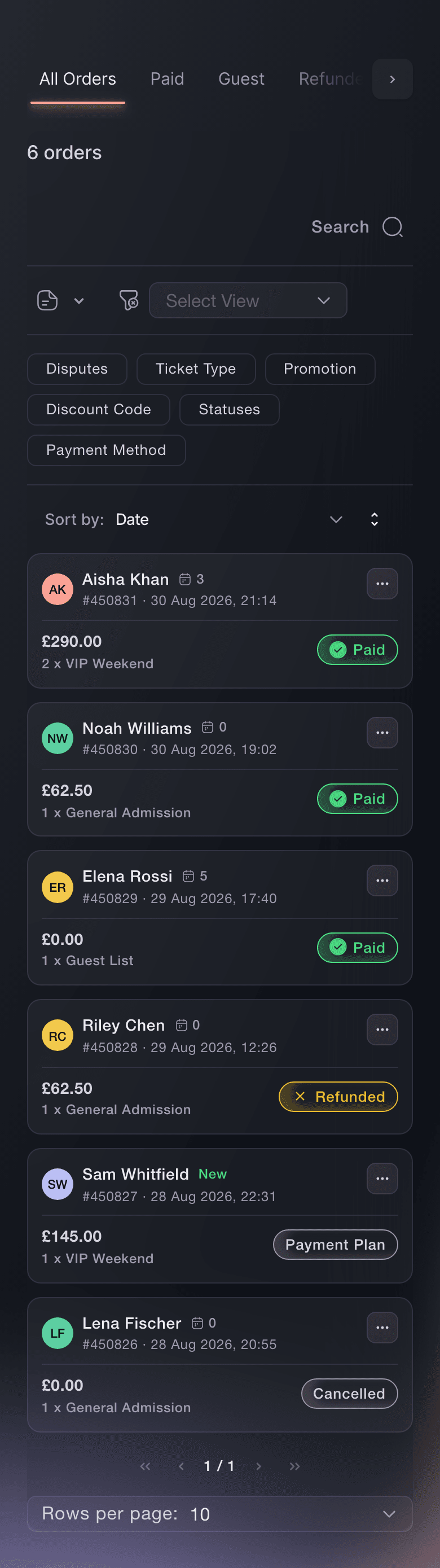
Ticket Fairy Orders page with Paid, Guest, Refunded, Cancelled, Payment Plan and Abandoned Carts tabs above six orders

Set Up Every Ticket, Release and Limit Once

Start from a template for your kind of event, or copy last year's event and enter the new dates, and the sale windows and door times move with them. Make each price release its own ticket type and choose when it opens: at a date, when the one before sells out, or whichever comes first. Group day, weekend and VIP tickets into categories, hold back named reserves for guest lists and partners, and limit how many tickets one order and one customer account can buy. Schedule the minute your event page goes public, in your event's time zone.

  • Release tiers: each price opens at a date or when the one before sells out
  • Hold tickets: named reserves kept out of the public on-sale
  • Purchase limits: for each order and each customer account
  • Scheduled go-live: your event page goes public on the minute you choose
Ticket Fairy Hold tickets setting with two named holds on a general admission release

Open a Busy On-Sale and Keep Tickets With Real Fans

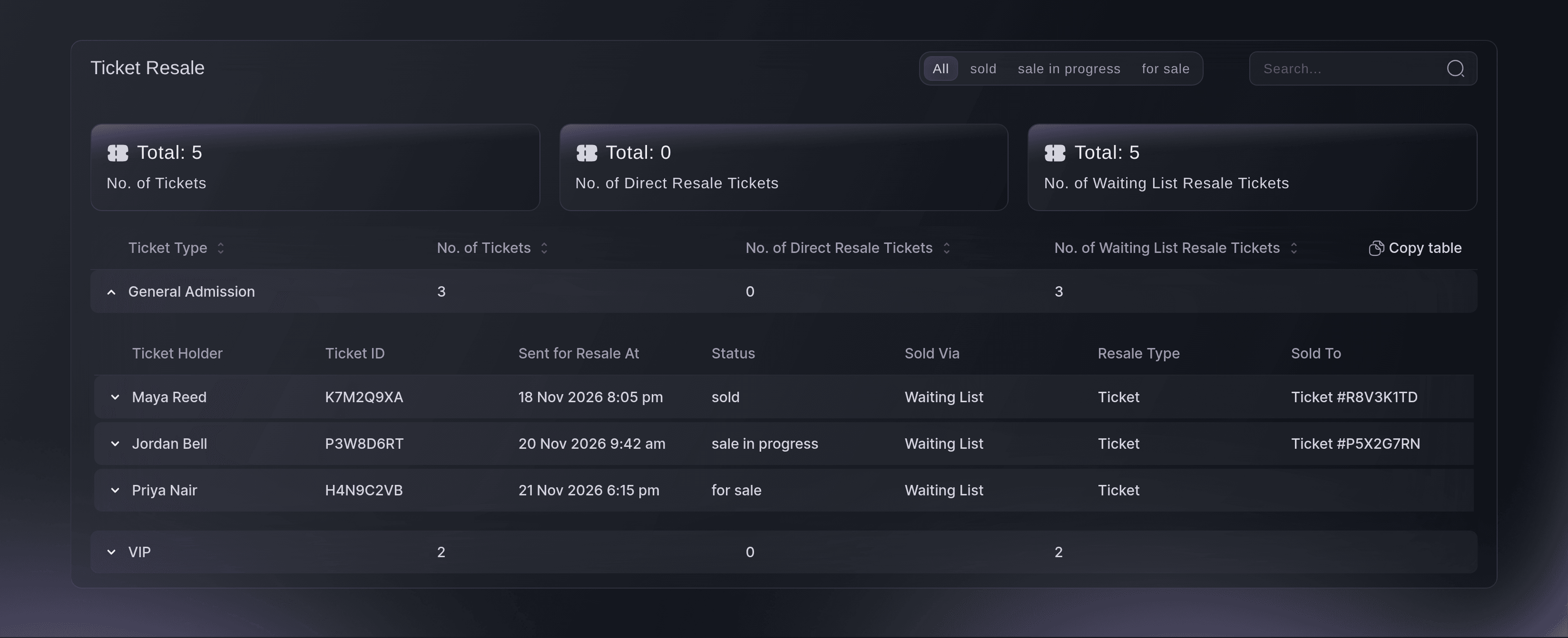
A waiting room sits in front of every on-sale and turns itself on when arrivals climb, so buyers already in checkout pay quickly while the rest see their place in line. Ask for an ID check on the ticket types under most pressure, and put a name on every ticket. A fan who cannot come sells their ticket at face value to the next person on your waiting list, the new holder gets their ticket and the old code stops working. The Ticket Resale report shows what has sold, what is in progress and what is waiting for a buyer.

  • Waiting room: turns itself on when arrivals climb
  • ID checks: the card held until the buyer proves who they are
  • Face-value resale and waiting list: returned tickets offered to the next fan in line
Ticket Fairy Ticket Resale report with General Admission opened to show tickets sold, in progress and for sale through the waiting list

Find Any Order in Seconds and Fix It While the Buyer Waits

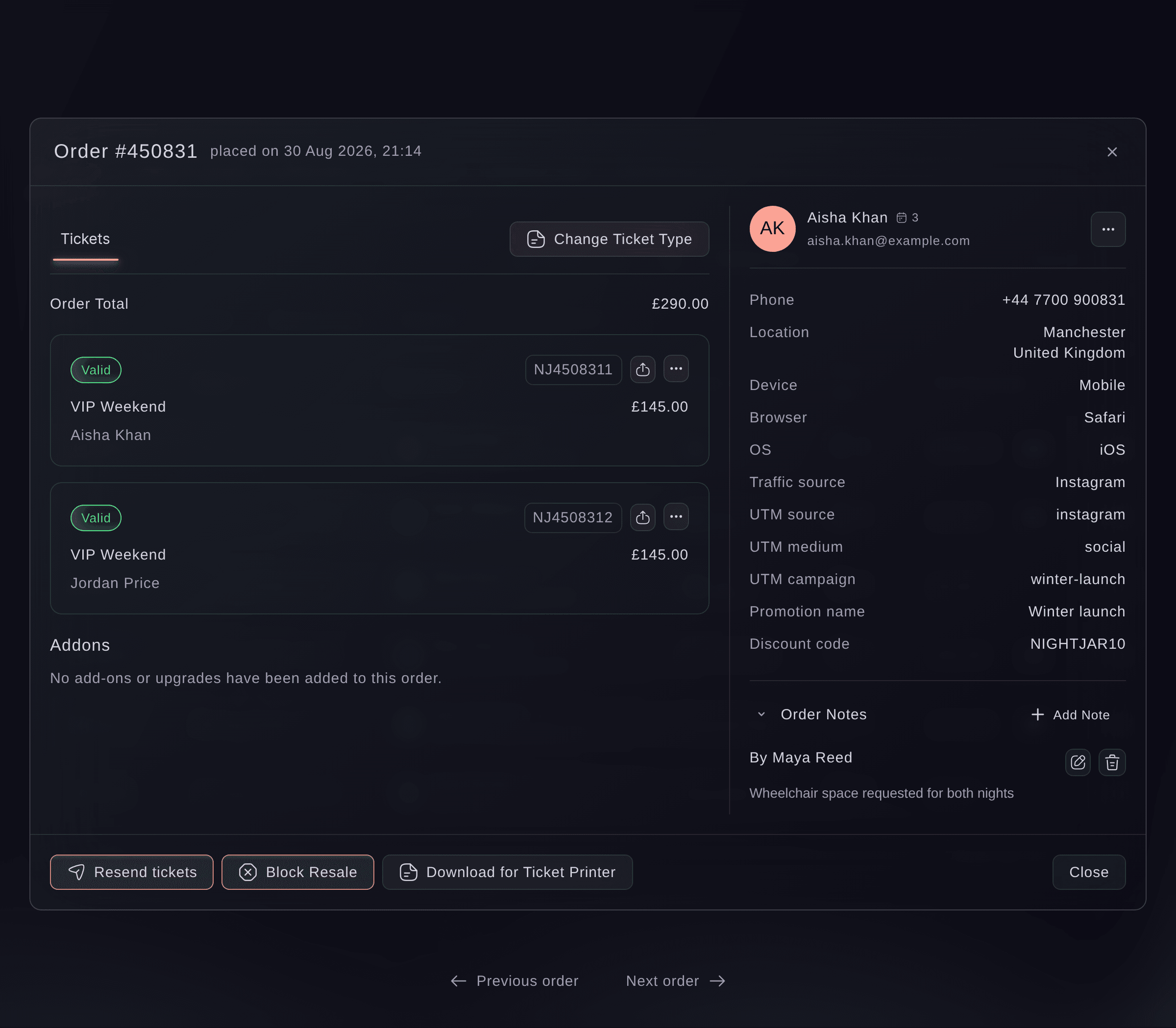
Search orders by the buyer's name, email address, phone number or order number, and open one to see its tickets, the device the buyer used and where the sale came from. Correct a name or email address and send the same tickets again, so a ticket already saved to a phone still scans. Move a buyer to another ticket type or seat without a new order, and leave a note your team can see. Refund an order to the buyer's card, or let buyers refund their own tickets from their order page, and when plans change, postpone or cancel the event and every ticket holder gets the right email.

  • Order search: by name, email, phone, order number or note
  • Resend and fix details: the same tickets, so a saved ticket still scans
  • Refunds and self-refunds: from the Orders page or the buyer's order page
Ticket Fairy order window with two VIP Weekend tickets, the buyer's phone, location, device and traffic source, and a team note

Get Every Guest, Partner and Private Buyer the Right Ticket

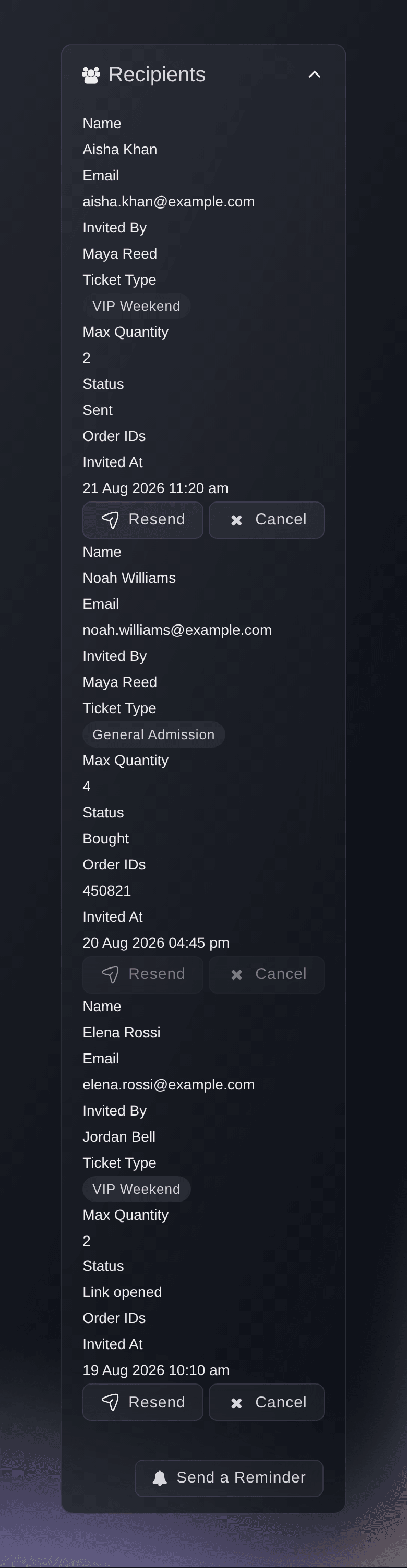
Send guests a free ticket with its own barcode, one at a time or from a spreadsheet, and give an act's management, a radio station or a sponsor a counted allocation they hand out from their own link. Give your guest list a ticket type of its own, so comps never eat into a paid release and add nothing to your takings. Sell to chosen people with personal invitations that carry their own limits, one invitation link for a group, an access code that reveals hidden tickets or a password on the whole event page.

  • Guest tickets: a barcode for every guest, scanned like any ticket
  • Partner allocations: a counted share partners hand out themselves
  • Invitations and access codes: private tickets for the people you choose
Ticket Fairy Invitations table with each recipient's status and the actions for each one

Get Your Crowd Through the Door and Your Box Office Balanced

Your door team scans tickets with the Entry Fairy app on their own phones, each with a login that opens the app and nothing else. Set what each ticket type allows at the door, from once-a-day re-entry to its own doors-open time, and the app shows which wristband to hand over as each ticket scans. Your box office sells walk-up tickets, hands over will-call and reprints tickets, takes card payments with Tap to Pay on a phone and balances each till against its float at the end of the night. The Refused scans report shows every ticket turned away, with the reason and the entrance.

  • Entry Fairy: scanning on your team's own iPhone and Android phones
  • Re-entry rules and wristbands: the right band shown as each ticket scans
  • Box office: walk-ups, will-call and reprints, balanced every night
  • Refused scans: every ticket turned away, with the reason
Ticket Fairy Refused scans report with totals at the door and staff gates and the scans refused by reason and entrance

Know How Every Ticket Type Is Selling and Share It

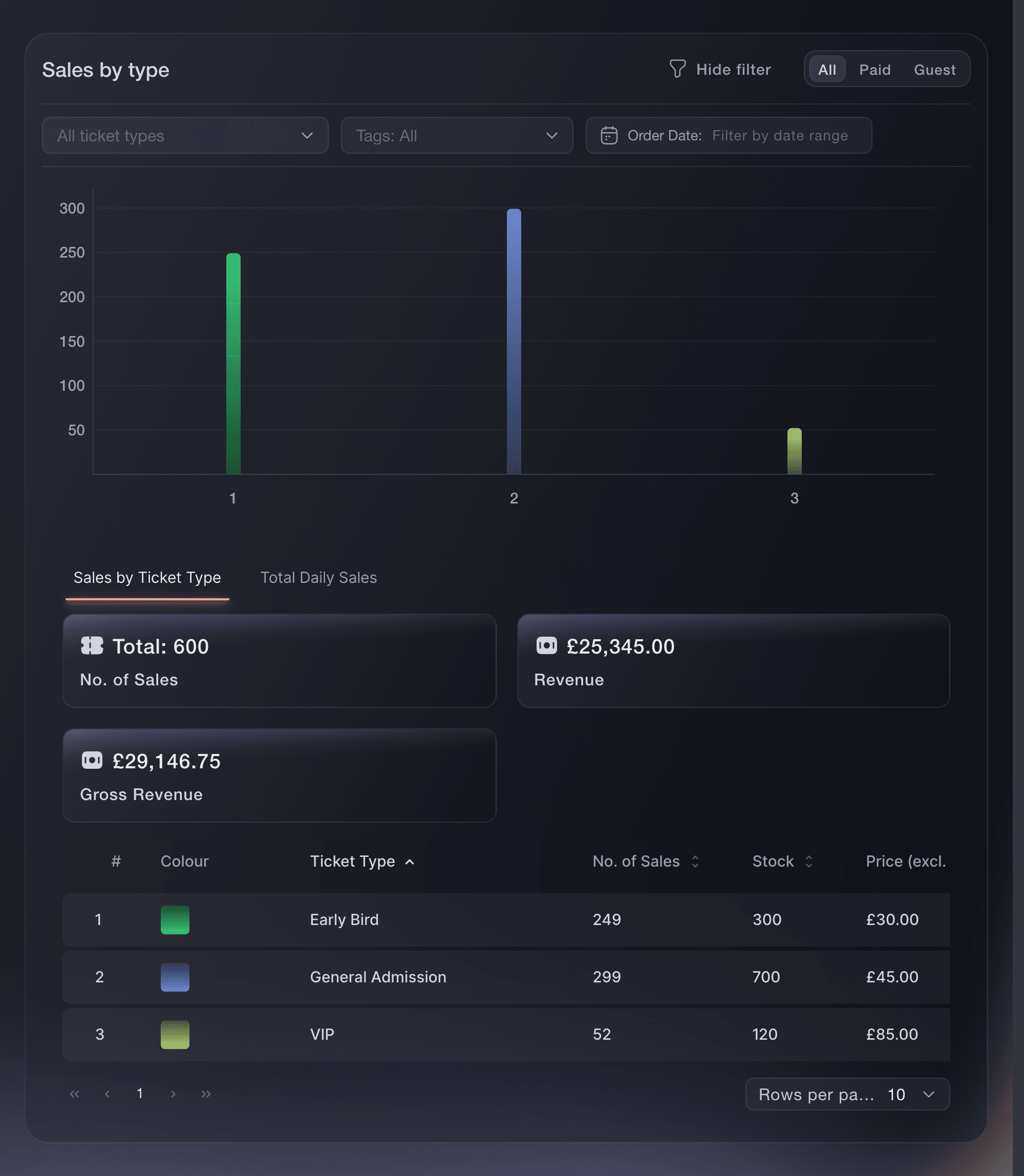
Your Performance page shows tickets sold and net revenue as they change, with the tickets sitting in buyers' carts underneath. Sales by Type shows what each ticket type has sold and earned, so you know which release to open next, and separate tabs cover add-ons, payment plans, box office sales, resale and your waiting list. Give a venue or co-promoter a live sales link for the ticket types they share in, and export any filtered set of orders as a spreadsheet. Ask Fai how two events compare and get the answer as a chart.

  • Sales by Type: what each ticket type has sold and earned
  • Sales report links: live sales for partners, without a role on your event
  • Order exports: one row per order or one row per ticket
Ticket Fairy Sales by Type showing how each ticket type performed for an event
Get this page as a PDF Read it later or share it with your team. We email you a link to the PDF.
What to put in your PDF

We will email you this deck. We may also email you now and then about Ticket Fairy features that can help your events. You can unsubscribe at any time with one click.

Everything You Need to Sell and Admit Every Ticket

Questions About Ticket Fairy for Ticketing managers

Ticketing managers

You choose a number from 1 to 20 for each ticket type. The limit counts active tickets of that type across the account's orders. A buyer whose email has no customer account yet is not held to it on a first purchase, so set a limit per order as well when the first order matters.

No. It sits in front of every on-sale and turns itself on when arrivals climb. Buyers see their place, and refreshing the page does not move them up or down.

Turn on the ID check for your event or for chosen ticket types. Ticket Fairy emails a reminder to the buyer every twelve hours, and starts clearing an untouched order after seven days.

The event owner. The order must be paid by card through your own connected payment account, with every ticket still valid, and the event's funds not yet paid out. Ticket Fairy support refunds anything else for you.

The seller pays a resale fee of 10% of what they paid for the ticket, not counting the booking fee. For currencies other than US, Australian or New Zealand dollars, pounds sterling and euros, it is capped at the equivalent of US$20. Events in India carry no resale fee, and Ticket Fairy can set a different fee for your event.

No. The Entry Fairy app needs an internet connection to scan tickets, so check the connection at each entrance before the doors open.

In cash from the till's float, or by card with a card reader or with Tap to Pay on a compatible Android phone in the country of the payment account your event uses.

Ticket Sales leaves complimentary orders out and Sales by Type counts them, so where you issue guest, artist or crew tickets, Sales by Type is the larger of the two. Ticket Sales also counts tickets held but not yet paid for. Refunded tickets drop out of both.

Sell more tickets. Build the crowd that comes back.

Start Selling Tickets Online

Sign up without a credit card and build a test event before you commit. Go on sale in minutes when you are ready.

No monthly subscription required for ticketing
Start selling tickets immediately
Ticketing tools included in the service fee
Get Started Talk to Fai Now

Ask Fai, our AI assistant, about Ticket Fairy’s features, pricing and how it could work for your event.

No credit card required

Book a demo call

See the referral model that drives 20% more ticket sales on average, learn which campaigns sell tickets, answer buyers faster and keep queues moving.

45-Minute Video Call
Pick a Time That Works for You